Shopify Cart Upsell vs Checkout Upsell: Differences, Benefits & How to Maximize Conversions
Summary
Cart upsell and checkout upsell are two powerful Shopify strategies to increase average order value by targeting customers at different stages of the buying journey. Cart upsells appear before checkout and work best for product upgrades, bundles, and complementary items, while checkout upsells appear during or after checkout and drive quick add-ons with minimal friction. Using both together helps maximize conversions, improve customer experience, and boost revenue. With the right tools and targeting, Shopify merchants can create seamless upsell flows across the entire funnel.

Ravish (RV)
Senior Content Writer
Ravish is an ecommerce and SaaS marketing expert with 6+ years of experience in Shopify and ecommerce and 10+ years of experience in marketing, and growth strategy. He has worked closely with Shopify merchants to solve real ecommerce challenges and shares practical, research-backed insights, industry best practices, and emerging trends.
Key Takeaways
Cart upsell and checkout upsell are two powerful Shopify strategies to increase average order value by targeting customers at different stages of the buying journey. Cart upsells appear before checkout and work best for product upgrades, bundles, and complementary items, while checkout upsells appear during or after checkout and drive quick add-ons with minimal friction. Using both together helps maximize conversions, improve customer experience, and boost revenue. With the right tools and targeting, Shopify merchants can create seamless upsell flows across the entire funnel.
Nothing is sweeter than selling more to a customer who is already on your website. It means a higher Average Order Value, more revenue, and all of this without spending an extra dollar on ads.
Upselling in Shopify is a proven strategy that helps you sell more to customers already browsing your store by presenting them with compelling offers, nudging them toward better products at a slightly higher price point.
While most Shopify store owners agree that upselling is a no-brainer, the real debate is about where to upsell: at the cart or at checkout? In this article, we break down the benefits of each, how they differ from one another, and when to use which, so you can make the right call for your store.
What is a Shopify Cart Upsell?
A cart upsell is an offer that appears to your customer when they are on the cart page; that is, the page where they land after adding a product and are reviewing their items before hitting the checkout button.
Imagine your customer has just added a skincare serum to their cart and is about to head to checkout. Right there on the cart page, they see a message that says, "Customers who bought this serum also loved our Hydrating Face Moisturizer. Add it to complete your routine for just $15 more.” That is a cart upsell doing its job.
Where Does it Appear?
A cart upsell shows up specifically on the cart page of your Shopify store. This is the page that sits right between your product page and your checkout page, that small but important middle ground where your customer pauses, looks at what they have picked, and decides whether they are ready to pay.
That pause is everything. At this exact moment, your customer is still very much in the buying mindset. They have not completed their purchase yet, which means they are still open to adding more. The cart page catches them at the perfect time: engaged, interested, and ready to spend.
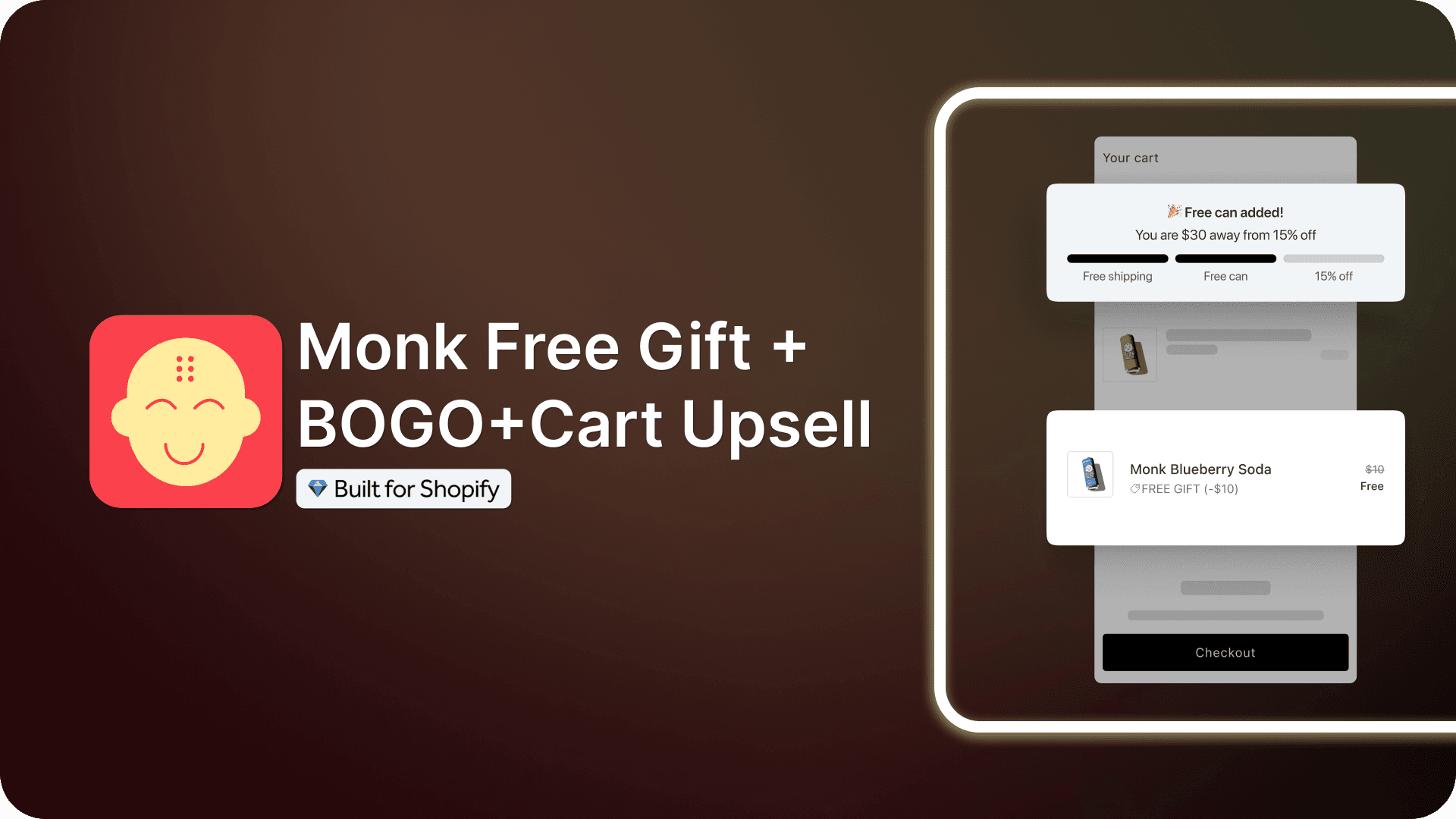
A detailed guide to creating an upsell in the cart on Shopify using Monk.
What Are the Benefits of a Cart Upsell?
The biggest advantage of a cart upsell is timing. Your customer has already decided to buy something. They are no longer just browsing or comparing options. This means they are far more receptive to adding something extra compared to someone who has just landed on your homepage for the first time.
Here is what that translates to for your store:
Higher Average Order Value: Instead of one item going through checkout, you are now potentially sending two or three. Every additional item bumps up the total order value without you spending a single extra dollar on acquiring that customer.
Better Customer Experience: When done right, a cart upsell does not feel pushy at all. It actually feels helpful. If someone is buying a camera, showing them a memory card or a camera bag on the cart page makes their life genuinely easier; they did not even know they needed it until you reminded them.
No Extra Ad Spend: You already paid to bring this customer to your store. A cart upsell simply helps you make the absolute most out of that investment.
Low Friction: Since the customer has not completed their purchase yet, adding something extra to the cart feels like a completely natural step. There is no resistance, no second-guessing; it is just a smooth, easy addition.
For example, Pela provides an upsell option of adding a phone strap when a customer purchases a phone cover from them. It is a 30$ purchase that complements what the customer is buying and makes their life easier. Before they head to make the final payment, customers can add the upsell product with a single click.
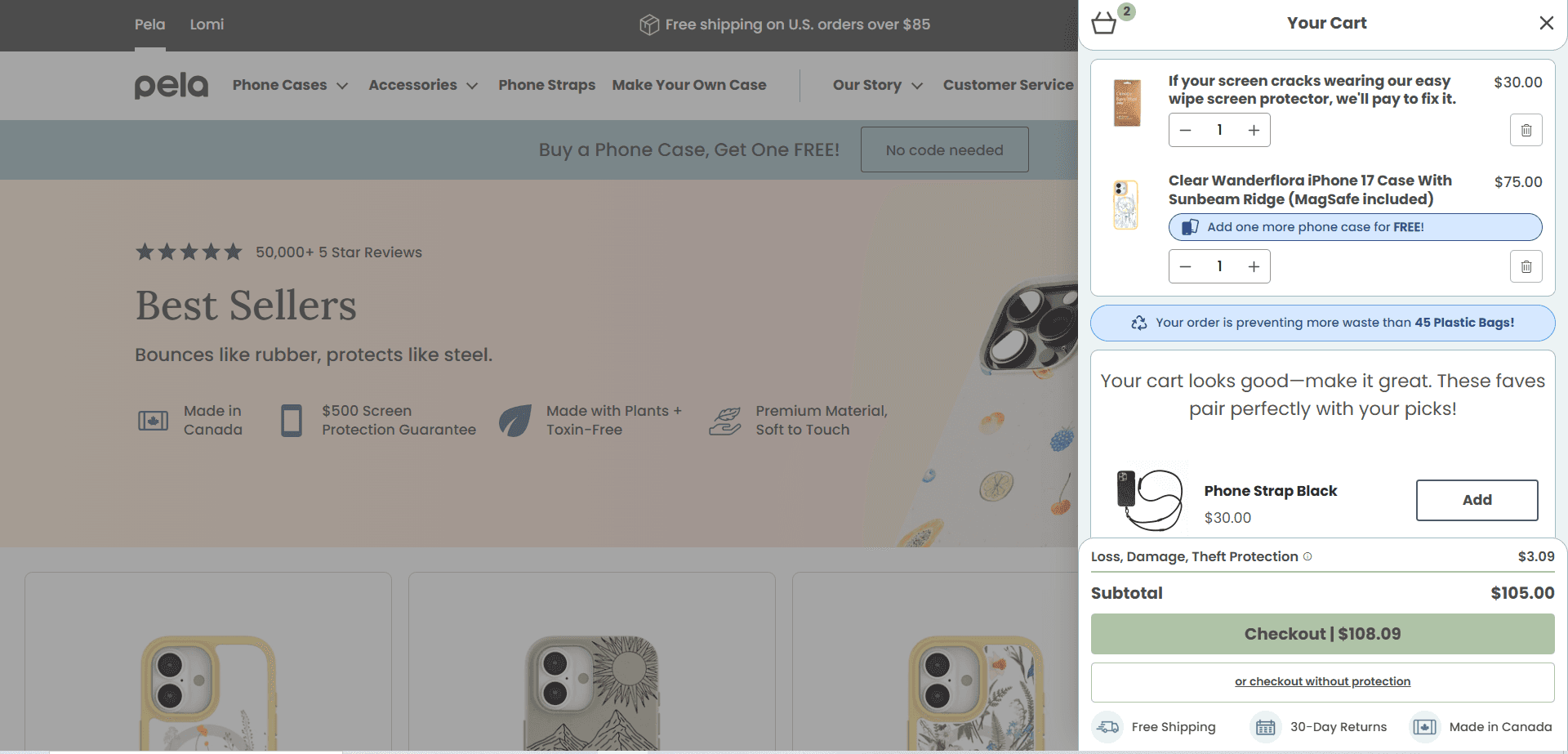
Notice the pattern across all of these? Every single offer is relevant, makes complete sense alongside what the customer is already buying, and adds genuine value to their purchase. That is the sweet spot of a great cart upsell, it never feels like a hard sell. It feels like a helpful nudge from a store that actually understands what its customers need.
Also read: How is an upsell different from a cross-sell?
What is a Shopify Checkout Upsell?
A checkout upsell is an offer that appears to your customer during the checkout process; that is, after they have clicked the "Proceed to Checkout" button and are in the middle of entering their shipping details or payment information.
Your customer has already made up their mind. They are typing in their address, their card details are ready, and they are seconds away from placing the order. Right at that moment, they see, "Wait, before you finish, customers who ordered this also picked up our Premium Warranty Plan for just $10. Want to add it?" That is a checkout upsell.
Where Does it Appear?
A checkout upsell shows up inside the Shopify checkout page, which is the page where your customer fills in their name, address, and payment details before completing their purchase.
On Shopify, this is a very specific and controlled environment. Only Shopify Plus merchants have the ability to fully customize this page and add upsell offers directly within it. For non-Plus stores, checkout upsells typically appear as a post-purchase offer, meaning the offer pops up right after the customer has clicked "Place Order" but before they land on the thank you page.
A detailed guide to creating an upsell at checkout on Shopify using Monk.
What Are the Benefits of a Checkout Upsell?
The checkout upsell works for a very specific reason: the buyer's momentum. When someone is mid-checkout, they are in a completely different headspace compared to when they were just browsing. They have already mentally spent the money. Adding one more small thing to the order at this stage feels like a much smaller decision to them.
Here is what that means for your store:
Higher Conversion on Upsell Offers: The customer is already committed to buying, so they are more likely to say yes to an additional offer. Usually, the hard part is convincing customers to spend money, which is already done at this stage.
Feels Low Pressure: A checkout upsell does not interrupt the shopping experience. It comes in at the very end, so it never risks making the customer abandon their cart out of frustration or distraction.
Perfect for Small Add-ons: Checkout upsells work brilliantly for smaller, low-cost additions, things like warranties, gift wrapping, travel-size versions of a product, or a complementary accessory. These are easy yes decisions for a customer who has already committed to a bigger purchase.
Great for Impulse Buys: Since the customer is already in spending mode, a well-placed checkout upsell can trigger quick, impulse-driven decisions without much deliberation.
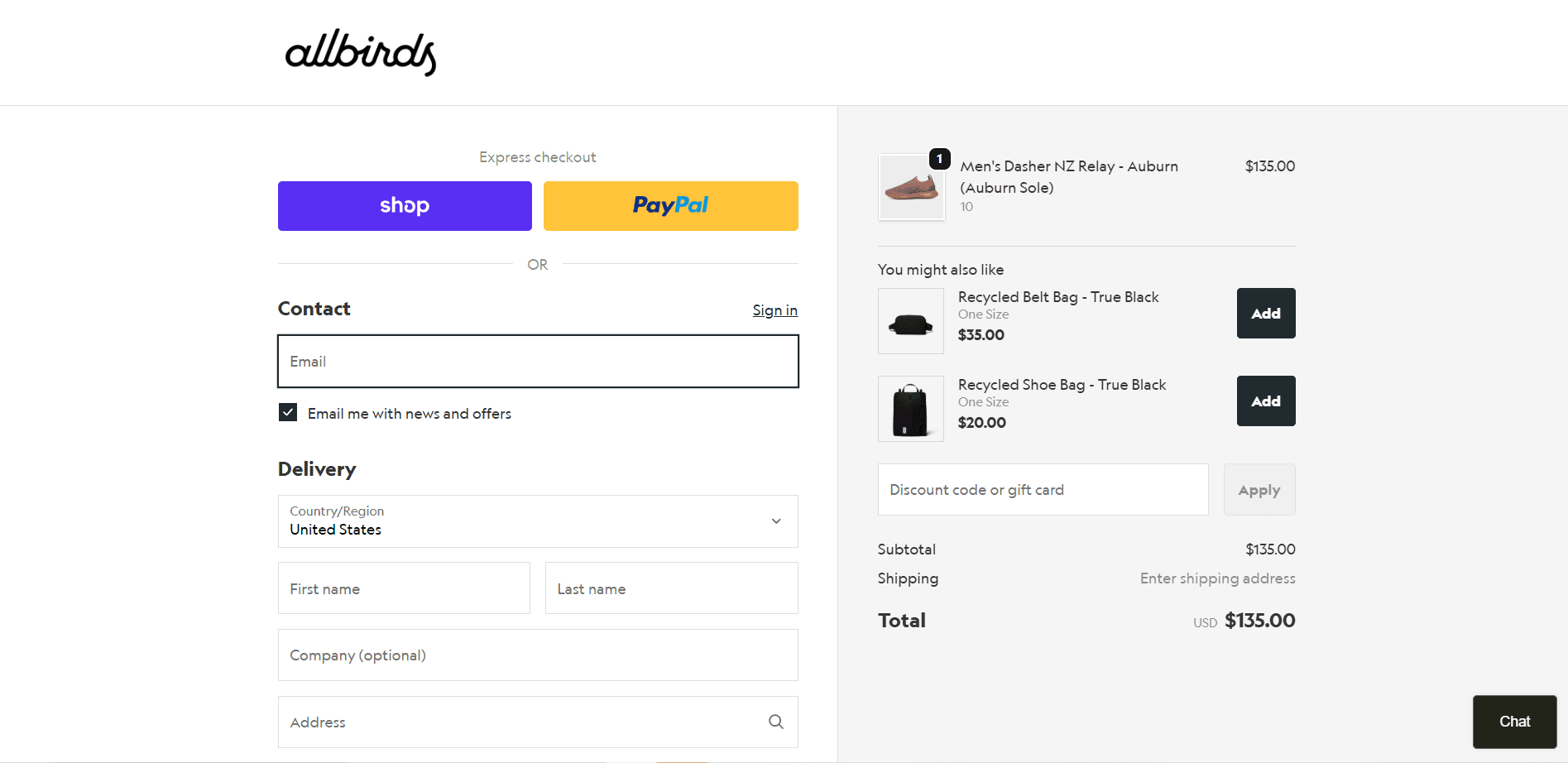
Allbirds, a shoe brand, displays an upsell offer of adding a shoe bag when purchasing a shoe at the checkout stage. It presents the shoe bag as a complete solution when someone buys a pair of shoes from the website. Also, since it is only a 20$ purchase, the customer sees value in adding it to their purchase.
Shopify Cart Upsell vs Checkout Upsell: Key Differences
Now that you understand what each of these strategies is on its own, let's put them side by side. While both cart upsells and checkout upsells are working toward getting your customer to spend a little more, the way they go about it is quite different. Knowing these differences is what helps you pick the right one for the right situation.
Here is a clean, side-by-side breakdown of everything that sets them apart:
Features | Cart Upsell | Checkout Upsell |
Where in the Customer Journey | Appears on the cart page, after the customer has added a product but before they move to checkout | Appears during checkout or right after the order is placed, just before the thank-you page |
Customer Intent | The customer is still in review mode, so they are open to exploring, adding, or even swapping products | The customer has fully committed, their mind is made up, and they are ready to complete the purchase |
Impact | Can significantly increase Average Order Value, but carries a moderate risk of cart abandonment if the offer feels too pushy or irrelevant | Boosts order value with almost zero risk of abandonment since the customer has already decided to buy |
Shopify Plan Requirements | Available to all Shopify plans, with no restrictions on customizing the cart page | Full checkout customization is only available on Shopify Plus. Non-Plus stores can only run post-purchase upsells after the order is placed |
Customization | High level of flexibility: you can design the upsell to look completely on-brand, native, and visually appealing | Limited customization unless you are on Shopify Plus. For everyone else, the checkout page follows Shopify's standard layout |
Useful For | Product upgrades, higher-tier alternatives, bundles, and complementary products that add real value to the main purchase | Small, low-cost add-ons like warranties, gift wrapping, travel-size products, or accessories that are easy and quick to say yes to |
Note: Neither cart upsell nor checkout upsell is better than the other in absolute terms. They simply serve different purposes at different points in your customer's journey. The smartest Shopify stores do not choose one over the other; they use both, each doing its own job at exactly the right moment.
Cart Upsell vs. Checkout Upsell: Which One Should You Use?
The best choice depends entirely on your store, your products, and where your customers are in their buying journey. Let's walk through the factors that should guide your decision:
1. Your Industry and Niche
The nature of your products plays a huge role in deciding which upsell works better for you.
If you run a store that sells products people consider before making a purchase, such as electronics, fitness equipment, skincare, or home décor, a cart upsell tends to be more effective. These are considered purchases where the customer is still in an exploratory headspace on the cart page and is open to discovering something that complements or upgrades what they are already buying. The cart page gives them the space to consider the offer without feeling rushed.
On the other hand, if you sell products that people buy quickly and impulsively, like fashion, accessories, gifts, or everyday consumables, a checkout upsell can be incredibly effective. By the time they hit checkout, they are already in full spending mode, and a small, relevant add-on is very easy to say yes to without overthinking it.
Some industries benefit equally from both. A beauty brand, for example, could use a cart upsell to suggest a full skincare routine and a checkout upsell to offer travel-size versions or gift wrapping. It all comes down to understanding your customer's purchase behavior and what they are likely to respond to at each stage.
2. Your Shopify Plan
Your Shopify plan directly affects what you can and cannot do, especially at checkout.
If you are on a standard Shopify plan, you can't customize the checkout page itself. This means true in-checkout upsells are off the table for you. What you can do instead is run post-purchase upsells, which appear right after the order is placed but before the thank-you page. These still work well, but they are not the same as being able to embed an offer directly inside the checkout flow.
If you are on Shopify Plus, you have full control over the checkout page and can place upsell offers directly within it. This is a significant advantage and one of the reasons many high-volume stores eventually upgrade to Plus.
So if checkout upsells are something you want to explore deeply, and you are not on Plus yet, it is worth factoring that into your roadmap. In the meantime, cart upsells are fully available to every Shopify plan with no restrictions, making them the more accessible starting point for most stores.
3. A/B Test and Optimize
Consumer behavior varies by audience, by product category, by price point, and even by the season. This is why A/B testing is essential.
Run a cart upsell for a few weeks, track your numbers, and then test a checkout upsell for the same period. Look at the data: which one drove more add-ons? Which one had a better conversion rate on the upsell offer itself? Did one of them negatively impact your cart abandonment rate? These are the questions your test results will answer.
When you A/B test, ensure you change only one variable at a time. Test the placement first between the cart and checkout. Then, once you have a winner, test the offer type, the wording, the design, and the timing. Every small optimization compounds over time and can make a meaningful difference to your revenue.
Quick Note: The most successful Shopify stores do not treat upsell placement as an either-or decision. They use both cart upsells and checkout upsells together, each playing its role at the right moment in the customer journey. When both are working together with the right offers at the right stages, the impact on your average order value is compounded. You are not relying on a single opportunity to upsell; you are building two well-timed touchpoints that together create a much stronger revenue engine for your store. |
Best Upsell Strategies for Shopify
Knowing what an upsell is and actually making it work for your store are two completely unique things. Many Shopify stores put up an upsell offer and wonder why nobody is clicking on it. That’s because upselling is not just about showing an offer; it is about showing the right offer to the right customer at the right time. Here are some strategies to make the most of upselling:
1. Product Recommendations
Product recommendations are the backbone of any solid upsell strategy. When a customer is looking at or has added a product, you show them something else they are likely to want based on what you already know about their behavior or purchase intent. Done well, it does not feel like selling at all. It feels like your store genuinely understands what the customer needs.
There are a few ways to go about this:
Best Selling Products: Best sellers carry social proof by default; people are already buying them in large numbers, which makes it easier for a new customer to say yes.
Complementary Products: These are items that work well with what the customer is already buying, so they enhance, complete, or protect the main product.
2. Offer a Product Upgrade
Sometimes the best upsell is not a different product but a better version of the same product. If a customer has added the standard version of something to their cart, offer them the premium version at a slightly higher price and tell them exactly what they get extra for that difference.
For example, if someone is buying a basic meal plan subscription, offer them the premium plan with more variety and faster delivery. If someone is buying a regular water bottle, show them the insulated version that keeps water cold for 24 hours. The key here is to make the upgrade feel worth it and spell out the added value clearly so the customer can justify the extra spend in their head.
3. Bundle and Save
People love feeling like they are getting a deal. A bundle upsell takes two or three products that naturally go together and offers them as a package at a slightly discounted price compared to buying each item individually.
For example, a haircare brand could bundle a shampoo, conditioner, and hair mask together and offer the set at 10% off. The customer gets more value, and you get a higher order value. It is a win on both sides. Bundles also work brilliantly because they reduce the decision fatigue of choosing individual products, as everything the customer needs is already packaged together.
How Monk Free Gift + BOGO Helps You Maximize Upsells
You can have the best upsell strategy in the world, but if the tool you are using to execute it is clunky, limited, or hard to set up, none of it matters. That is exactly the gap that Monk Free Gift + BOGO fills.
Monk Free Gift is a Shopify upsell and cross-sell app built specifically to help store owners increase their average order value without disrupting the shopping experience. It is designed to be simple enough for someone who has never run an upsell campaign in Shopify before, yet powerful enough for high-volume Shopify stores that need advanced customization and control.
What sets Monk Free Gift apart from generic upsell tools is that it works across the entire customer journey, from the product page all the way to the post-purchase screen, giving you multiple touchpoints to present the right offer at the right moment.
Key Advantages of Using Monk Free Gift + BOGO
Cart and Checkout Upsells in One Place: Instead of juggling multiple apps for cart upsells and checkout upsells separately, Monk Free Gift brings everything under one roof. You can manage, edit, and optimize all your upsell flows from a single dashboard.
Highly Customizable Designs: Monk Free Gift lets you fully customize how your upsell offers look so they feel native to your store rather than bolted on. Matching fonts, colors, and layouts means your upsell widgets blend seamlessly into your store's design.
Targets the Right Customer with the Right Offer: Monk Free Gift + BOGO allows you to set specific conditions for when and to whom an upsell offer appears. You can trigger offers based on what is in the cart, the cart value, the product category, or even whether the customer is a first-time buyer. This level of targeting means your offers always feel relevant rather than random.
No Code Required: Setting up upsell flows on Monk Free Gift does not require a developer or any technical knowledge. The interface is built for store owners, not engineers.
Post-purchase or Thank You page upsell: Show an upsell to your customer after they checkout and before they leave your store, to maximize revenue and promote products for one last time in the customer journey.
Conclusion
Upselling is one of the simplest and most effective levers you can pull to grow your Shopify store's revenue. Cart upsells and checkout upsells are not competing strategies. They are complementary ones, each designed to catch your customer at a different moment in their journey and present them with an offer that feels relevant and worthwhile.
The stores that win at upselling are not the ones that show the most offers; they are the ones that show the right offers at the right time. Use your cart page to present meaningful upgrades and complementary products while your customer is still in an open mindset. Use checkout to slip in a small, easy add-on when they are already committed. Test, refine, and let the data guide you.
Frequently Asked Questions
What is the difference between cart upsell and checkout upsell?
A cart upsell appears on the cart page before the customer moves to checkout and works best for product upgrades, bundles, and complementary add-ons. A checkout upsell appears during or right after the checkout process and works best for small, low-cost additions like warranties or gift wrapping.
Do checkout upsells increase conversions?
Yes, checkout upsells increase conversions because the customer has already committed to buying by the time the offer appears. There is virtually no risk of cart abandonment, and since the decision to spend money has already been made, saying yes to a small add-on requires very little convincing.
Can I use both cart and checkout upsells together?
Yes, you can absolutely use both cart and checkout upsells together, and in most cases, you should. Using both creates two well-timed touchpoints across the customer journey, which compounds the impact on your average order value. The cart upsell handles the heavier lifting with more meaningful offers, while the checkout upsell closes things out with a quick, easy addition. Together, they cover the full journey without overwhelming the customer.
How to offer upsells in Shopify?
The easiest way is to use a dedicated upsell app like Monk Free Gift + BOGO, which lets you set up cart upsells, checkout upsells, and post-purchase offers without any coding. You simply choose where the offer appears, set the conditions for when it triggers, pick the product you want to upsell, and customize how it looks. The entire setup takes minutes, and from there it runs automatically for every customer who visits your store.
Shopify Cart Upsell vs Checkout Upsell: Differences, Benefits & How to Maximize Conversions
Summary
Cart upsell and checkout upsell are two powerful Shopify strategies to increase average order value by targeting customers at different stages of the buying journey. Cart upsells appear before checkout and work best for product upgrades, bundles, and complementary items, while checkout upsells appear during or after checkout and drive quick add-ons with minimal friction. Using both together helps maximize conversions, improve customer experience, and boost revenue. With the right tools and targeting, Shopify merchants can create seamless upsell flows across the entire funnel.
Nothing is sweeter than selling more to a customer who is already on your website. It means a higher Average Order Value, more revenue, and all of this without spending an extra dollar on ads.
Upselling in Shopify is a proven strategy that helps you sell more to customers already browsing your store by presenting them with compelling offers, nudging them toward better products at a slightly higher price point.
While most Shopify store owners agree that upselling is a no-brainer, the real debate is about where to upsell: at the cart or at checkout? In this article, we break down the benefits of each, how they differ from one another, and when to use which, so you can make the right call for your store.
What is a Shopify Cart Upsell?
A cart upsell is an offer that appears to your customer when they are on the cart page; that is, the page where they land after adding a product and are reviewing their items before hitting the checkout button.
Imagine your customer has just added a skincare serum to their cart and is about to head to checkout. Right there on the cart page, they see a message that says, "Customers who bought this serum also loved our Hydrating Face Moisturizer. Add it to complete your routine for just $15 more.” That is a cart upsell doing its job.
Where Does it Appear?
A cart upsell shows up specifically on the cart page of your Shopify store. This is the page that sits right between your product page and your checkout page, that small but important middle ground where your customer pauses, looks at what they have picked, and decides whether they are ready to pay.
That pause is everything. At this exact moment, your customer is still very much in the buying mindset. They have not completed their purchase yet, which means they are still open to adding more. The cart page catches them at the perfect time: engaged, interested, and ready to spend.
A detailed guide to creating an upsell in the cart on Shopify using Monk.
What Are the Benefits of a Cart Upsell?
The biggest advantage of a cart upsell is timing. Your customer has already decided to buy something. They are no longer just browsing or comparing options. This means they are far more receptive to adding something extra compared to someone who has just landed on your homepage for the first time.
Here is what that translates to for your store:
Higher Average Order Value: Instead of one item going through checkout, you are now potentially sending two or three. Every additional item bumps up the total order value without you spending a single extra dollar on acquiring that customer.
Better Customer Experience: When done right, a cart upsell does not feel pushy at all. It actually feels helpful. If someone is buying a camera, showing them a memory card or a camera bag on the cart page makes their life genuinely easier; they did not even know they needed it until you reminded them.
No Extra Ad Spend: You already paid to bring this customer to your store. A cart upsell simply helps you make the absolute most out of that investment.
Low Friction: Since the customer has not completed their purchase yet, adding something extra to the cart feels like a completely natural step. There is no resistance, no second-guessing; it is just a smooth, easy addition.
For example, Pela provides an upsell option of adding a phone strap when a customer purchases a phone cover from them. It is a 30$ purchase that complements what the customer is buying and makes their life easier. Before they head to make the final payment, customers can add the upsell product with a single click.
Notice the pattern across all of these? Every single offer is relevant, makes complete sense alongside what the customer is already buying, and adds genuine value to their purchase. That is the sweet spot of a great cart upsell, it never feels like a hard sell. It feels like a helpful nudge from a store that actually understands what its customers need.
Also read: How is an upsell different from a cross-sell?
What is a Shopify Checkout Upsell?
A checkout upsell is an offer that appears to your customer during the checkout process; that is, after they have clicked the "Proceed to Checkout" button and are in the middle of entering their shipping details or payment information.
Your customer has already made up their mind. They are typing in their address, their card details are ready, and they are seconds away from placing the order. Right at that moment, they see, "Wait, before you finish, customers who ordered this also picked up our Premium Warranty Plan for just $10. Want to add it?" That is a checkout upsell.
Where Does it Appear?
A checkout upsell shows up inside the Shopify checkout page, which is the page where your customer fills in their name, address, and payment details before completing their purchase.
On Shopify, this is a very specific and controlled environment. Only Shopify Plus merchants have the ability to fully customize this page and add upsell offers directly within it. For non-Plus stores, checkout upsells typically appear as a post-purchase offer, meaning the offer pops up right after the customer has clicked "Place Order" but before they land on the thank you page.
A detailed guide to creating an upsell at checkout on Shopify using Monk.
What Are the Benefits of a Checkout Upsell?
The checkout upsell works for a very specific reason: the buyer's momentum. When someone is mid-checkout, they are in a completely different headspace compared to when they were just browsing. They have already mentally spent the money. Adding one more small thing to the order at this stage feels like a much smaller decision to them.
Here is what that means for your store:
Higher Conversion on Upsell Offers: The customer is already committed to buying, so they are more likely to say yes to an additional offer. Usually, the hard part is convincing customers to spend money, which is already done at this stage.
Feels Low Pressure: A checkout upsell does not interrupt the shopping experience. It comes in at the very end, so it never risks making the customer abandon their cart out of frustration or distraction.
Perfect for Small Add-ons: Checkout upsells work brilliantly for smaller, low-cost additions, things like warranties, gift wrapping, travel-size versions of a product, or a complementary accessory. These are easy yes decisions for a customer who has already committed to a bigger purchase.
Great for Impulse Buys: Since the customer is already in spending mode, a well-placed checkout upsell can trigger quick, impulse-driven decisions without much deliberation.
Allbirds, a shoe brand, displays an upsell offer of adding a shoe bag when purchasing a shoe at the checkout stage. It presents the shoe bag as a complete solution when someone buys a pair of shoes from the website. Also, since it is only a 20$ purchase, the customer sees value in adding it to their purchase.
Shopify Cart Upsell vs Checkout Upsell: Key Differences
Now that you understand what each of these strategies is on its own, let's put them side by side. While both cart upsells and checkout upsells are working toward getting your customer to spend a little more, the way they go about it is quite different. Knowing these differences is what helps you pick the right one for the right situation.
Here is a clean, side-by-side breakdown of everything that sets them apart:
Features | Cart Upsell | Checkout Upsell |
Where in the Customer Journey | Appears on the cart page, after the customer has added a product but before they move to checkout | Appears during checkout or right after the order is placed, just before the thank-you page |
Customer Intent | The customer is still in review mode, so they are open to exploring, adding, or even swapping products | The customer has fully committed, their mind is made up, and they are ready to complete the purchase |
Impact | Can significantly increase Average Order Value, but carries a moderate risk of cart abandonment if the offer feels too pushy or irrelevant | Boosts order value with almost zero risk of abandonment since the customer has already decided to buy |
Shopify Plan Requirements | Available to all Shopify plans, with no restrictions on customizing the cart page | Full checkout customization is only available on Shopify Plus. Non-Plus stores can only run post-purchase upsells after the order is placed |
Customization | High level of flexibility: you can design the upsell to look completely on-brand, native, and visually appealing | Limited customization unless you are on Shopify Plus. For everyone else, the checkout page follows Shopify's standard layout |
Useful For | Product upgrades, higher-tier alternatives, bundles, and complementary products that add real value to the main purchase | Small, low-cost add-ons like warranties, gift wrapping, travel-size products, or accessories that are easy and quick to say yes to |
Note: Neither cart upsell nor checkout upsell is better than the other in absolute terms. They simply serve different purposes at different points in your customer's journey. The smartest Shopify stores do not choose one over the other; they use both, each doing its own job at exactly the right moment.
Cart Upsell vs. Checkout Upsell: Which One Should You Use?
The best choice depends entirely on your store, your products, and where your customers are in their buying journey. Let's walk through the factors that should guide your decision:
1. Your Industry and Niche
The nature of your products plays a huge role in deciding which upsell works better for you.
If you run a store that sells products people consider before making a purchase, such as electronics, fitness equipment, skincare, or home décor, a cart upsell tends to be more effective. These are considered purchases where the customer is still in an exploratory headspace on the cart page and is open to discovering something that complements or upgrades what they are already buying. The cart page gives them the space to consider the offer without feeling rushed.
On the other hand, if you sell products that people buy quickly and impulsively, like fashion, accessories, gifts, or everyday consumables, a checkout upsell can be incredibly effective. By the time they hit checkout, they are already in full spending mode, and a small, relevant add-on is very easy to say yes to without overthinking it.
Some industries benefit equally from both. A beauty brand, for example, could use a cart upsell to suggest a full skincare routine and a checkout upsell to offer travel-size versions or gift wrapping. It all comes down to understanding your customer's purchase behavior and what they are likely to respond to at each stage.
2. Your Shopify Plan
Your Shopify plan directly affects what you can and cannot do, especially at checkout.
If you are on a standard Shopify plan, you can't customize the checkout page itself. This means true in-checkout upsells are off the table for you. What you can do instead is run post-purchase upsells, which appear right after the order is placed but before the thank-you page. These still work well, but they are not the same as being able to embed an offer directly inside the checkout flow.
If you are on Shopify Plus, you have full control over the checkout page and can place upsell offers directly within it. This is a significant advantage and one of the reasons many high-volume stores eventually upgrade to Plus.
So if checkout upsells are something you want to explore deeply, and you are not on Plus yet, it is worth factoring that into your roadmap. In the meantime, cart upsells are fully available to every Shopify plan with no restrictions, making them the more accessible starting point for most stores.
3. A/B Test and Optimize
Consumer behavior varies by audience, by product category, by price point, and even by the season. This is why A/B testing is essential.
Run a cart upsell for a few weeks, track your numbers, and then test a checkout upsell for the same period. Look at the data: which one drove more add-ons? Which one had a better conversion rate on the upsell offer itself? Did one of them negatively impact your cart abandonment rate? These are the questions your test results will answer.
When you A/B test, ensure you change only one variable at a time. Test the placement first between the cart and checkout. Then, once you have a winner, test the offer type, the wording, the design, and the timing. Every small optimization compounds over time and can make a meaningful difference to your revenue.
Quick Note: The most successful Shopify stores do not treat upsell placement as an either-or decision. They use both cart upsells and checkout upsells together, each playing its role at the right moment in the customer journey. When both are working together with the right offers at the right stages, the impact on your average order value is compounded. You are not relying on a single opportunity to upsell; you are building two well-timed touchpoints that together create a much stronger revenue engine for your store. |
Best Upsell Strategies for Shopify
Knowing what an upsell is and actually making it work for your store are two completely unique things. Many Shopify stores put up an upsell offer and wonder why nobody is clicking on it. That’s because upselling is not just about showing an offer; it is about showing the right offer to the right customer at the right time. Here are some strategies to make the most of upselling:
1. Product Recommendations
Product recommendations are the backbone of any solid upsell strategy. When a customer is looking at or has added a product, you show them something else they are likely to want based on what you already know about their behavior or purchase intent. Done well, it does not feel like selling at all. It feels like your store genuinely understands what the customer needs.
There are a few ways to go about this:
Best Selling Products: Best sellers carry social proof by default; people are already buying them in large numbers, which makes it easier for a new customer to say yes.
Complementary Products: These are items that work well with what the customer is already buying, so they enhance, complete, or protect the main product.
2. Offer a Product Upgrade
Sometimes the best upsell is not a different product but a better version of the same product. If a customer has added the standard version of something to their cart, offer them the premium version at a slightly higher price and tell them exactly what they get extra for that difference.
For example, if someone is buying a basic meal plan subscription, offer them the premium plan with more variety and faster delivery. If someone is buying a regular water bottle, show them the insulated version that keeps water cold for 24 hours. The key here is to make the upgrade feel worth it and spell out the added value clearly so the customer can justify the extra spend in their head.
3. Bundle and Save
People love feeling like they are getting a deal. A bundle upsell takes two or three products that naturally go together and offers them as a package at a slightly discounted price compared to buying each item individually.
For example, a haircare brand could bundle a shampoo, conditioner, and hair mask together and offer the set at 10% off. The customer gets more value, and you get a higher order value. It is a win on both sides. Bundles also work brilliantly because they reduce the decision fatigue of choosing individual products, as everything the customer needs is already packaged together.
How Monk Free Gift + BOGO Helps You Maximize Upsells
You can have the best upsell strategy in the world, but if the tool you are using to execute it is clunky, limited, or hard to set up, none of it matters. That is exactly the gap that Monk Free Gift + BOGO fills.
Monk Free Gift is a Shopify upsell and cross-sell app built specifically to help store owners increase their average order value without disrupting the shopping experience. It is designed to be simple enough for someone who has never run an upsell campaign in Shopify before, yet powerful enough for high-volume Shopify stores that need advanced customization and control.
What sets Monk Free Gift apart from generic upsell tools is that it works across the entire customer journey, from the product page all the way to the post-purchase screen, giving you multiple touchpoints to present the right offer at the right moment.
Key Advantages of Using Monk Free Gift + BOGO
Cart and Checkout Upsells in One Place: Instead of juggling multiple apps for cart upsells and checkout upsells separately, Monk Free Gift brings everything under one roof. You can manage, edit, and optimize all your upsell flows from a single dashboard.
Highly Customizable Designs: Monk Free Gift lets you fully customize how your upsell offers look so they feel native to your store rather than bolted on. Matching fonts, colors, and layouts means your upsell widgets blend seamlessly into your store's design.
Targets the Right Customer with the Right Offer: Monk Free Gift + BOGO allows you to set specific conditions for when and to whom an upsell offer appears. You can trigger offers based on what is in the cart, the cart value, the product category, or even whether the customer is a first-time buyer. This level of targeting means your offers always feel relevant rather than random.
No Code Required: Setting up upsell flows on Monk Free Gift does not require a developer or any technical knowledge. The interface is built for store owners, not engineers.
Post-purchase or Thank You page upsell: Show an upsell to your customer after they checkout and before they leave your store, to maximize revenue and promote products for one last time in the customer journey.
Conclusion
Upselling is one of the simplest and most effective levers you can pull to grow your Shopify store's revenue. Cart upsells and checkout upsells are not competing strategies. They are complementary ones, each designed to catch your customer at a different moment in their journey and present them with an offer that feels relevant and worthwhile.
The stores that win at upselling are not the ones that show the most offers; they are the ones that show the right offers at the right time. Use your cart page to present meaningful upgrades and complementary products while your customer is still in an open mindset. Use checkout to slip in a small, easy add-on when they are already committed. Test, refine, and let the data guide you.
Frequently Asked Questions
What is the difference between cart upsell and checkout upsell?
A cart upsell appears on the cart page before the customer moves to checkout and works best for product upgrades, bundles, and complementary add-ons. A checkout upsell appears during or right after the checkout process and works best for small, low-cost additions like warranties or gift wrapping.
Do checkout upsells increase conversions?
Yes, checkout upsells increase conversions because the customer has already committed to buying by the time the offer appears. There is virtually no risk of cart abandonment, and since the decision to spend money has already been made, saying yes to a small add-on requires very little convincing.
Can I use both cart and checkout upsells together?
Yes, you can absolutely use both cart and checkout upsells together, and in most cases, you should. Using both creates two well-timed touchpoints across the customer journey, which compounds the impact on your average order value. The cart upsell handles the heavier lifting with more meaningful offers, while the checkout upsell closes things out with a quick, easy addition. Together, they cover the full journey without overwhelming the customer.
How to offer upsells in Shopify?
The easiest way is to use a dedicated upsell app like Monk Free Gift + BOGO, which lets you set up cart upsells, checkout upsells, and post-purchase offers without any coding. You simply choose where the offer appears, set the conditions for when it triggers, pick the product you want to upsell, and customize how it looks. The entire setup takes minutes, and from there it runs automatically for every customer who visits your store.
Ravish (RV)
Co-Founder, Monk Commerce
Ravish is an ecommerce and SaaS marketing expert with 6+ years of experience in Shopify and ecommerce and 10+ years of experience in marketing, and growth strategy. He has worked closely with Shopify merchants to solve real ecommerce challenges and shares practical, research-backed insights, industry best practices, and emerging trends.
Contents
Related Articles
Upsell vs Cross-Sell in Shopify: Key Differences, Examples & Strategies
10 Best Shopify Upsell Apps to Increase AOV in 2026 (Free & Paid)
Shopify Upselling Guide for Beginners
Get Monk Free Gift app for just $1/month this Black Friday
First month: $1 after your 7-day free trial. All features included. Offer live!
Claim offer now

Get Monk Free Gift app for just $1/month this Black Friday
First month: $1 after your 7-day free trial. All features included. Offer live!
Claim offer now
Get Monk Free Gift app for just $1/month this Black Friday
First month: $1 after your 7-day free trial. All features included. Offer live!
Claim offer now