
How to Add Checkout Upsells in Shopify: Step-by-Step Guide to Boost AOV
Summary
Checkout upsells are offers shown at or immediately after checkout to increase order value by encouraging customers to add complementary or upgraded products. They work best because purchase intent is highest, with studies showing 20 to 40 percent higher customer lifetime value. Formats include in checkout upsells on Shopify Plus, post purchase one click offers, and thank you page upsells; non Plus stores rely on apps and cart or post purchase flows. Best practices include relevance, limited choices, one click add ons, pricing optimization, testing, and social proof. Poor relevance, too many offers, and friction reduce performance.

Ravish (RV)
Senior Content Writer
Ravish is an ecommerce and SaaS marketing expert with 6+ years of experience in Shopify and ecommerce and 10+ years of experience in marketing, and growth strategy. He has worked closely with Shopify merchants to solve real ecommerce challenges and shares practical, research-backed insights, industry best practices, and emerging trends.
Key Takeaways
Checkout upsells are offers shown at or immediately after checkout to increase order value by encouraging customers to add complementary or upgraded products. They work best because purchase intent is highest, with studies showing 20 to 40 percent higher customer lifetime value. Formats include in checkout upsells on Shopify Plus, post purchase one click offers, and thank you page upsells; non Plus stores rely on apps and cart or post purchase flows. Best practices include relevance, limited choices, one click add ons, pricing optimization, testing, and social proof. Poor relevance, too many offers, and friction reduce performance.
Checkout is a goldmine most Shopify stores leave untapped.
By the time a customer hits that page, the hard work is done, they trust you, they want what you sell, and their wallet is already open. That's the perfect moment to say: "While you're here, have you considered this?"
Upselling can increase average Customer Lifetime Value by 20-40%. And unlike upsells placed earlier in the buying journey, checkout upsells convert better because the customer is already in buying mode.
Ready to explore the full potential of this option? We'll walk you through how to add checkout upsells in Shopify, the strategies that actually work, and the best practices to get going.
What Are Checkout Upsells in Shopify?
When a customer is about to complete their purchase, they've added items to their cart, filled in their details, and are one click away from paying, that's the checkout moment. A checkout upsell is simply an offer you show them at this exact point, nudging them to add something more to their order before they're done.
A customer buys a face moisturizer, and right before they pay, you show them a travel-size version of the same product. Or they're buying a water bottle, and you offer a cleaning kit to go with it. These small, helpful suggestions feel like you are providing a complete solution or improving their product, rather than pushing them to increase their cart value.
Why Checkout Upsell Work?
The reason upsell works so well at checkout, specifically, is due to timing. The customer has already decided to buy from you, so the hesitation is gone. Now, when you show them something that complements what they're already getting, the barrier to saying yes is much lower than it would be anywhere else in your store.
For Shopify businesses, this is one of the simplest ways to increase the average order value without spending more on ads or driving more traffic to the store. Also by combining upsells with cart progress bar, free gifts and bogo offers in Shopify, stores can increase revenue.
Why Checkout Upsells Matter for Shopify Stores?
Here's why upselling at checkout can transform your store's performance:
Your customer is already in buy mode: Shoppers at checkout have their wallets open and their guard down. There's no better time to introduce a complementary offer than when purchase intent is at its absolute peak.
Conversion rates are higher than on-site popups: Checkout upsells feel contextual, not intrusive. Because they're tied to what the customer is already buying, they're more relevant, and relevant offers get clicked.
It levels the playing field with big retail: Large retailers have long used bundling and last-minute add-ons to boost revenue. Checkout upsells give Shopify store owners the same power without a dedicated sales team.
Data improves your entire product strategy: Tracking which upsells perform best reveals exactly what your customers want alongside their primary purchase. You can use these insights across your store, ads, and email flows.
How to Add Checkout Upsells in Shopify (Step-by-Step)
Adding upsells to your Shopify checkout is straightforward, but only when you find the right fit for your requirements. There are different ways to execute it, and the right method depends on your plan, budget, and where in the buying journey you want to show your offer.
Note:
Before we go ahead, it is crucial to note that running upsells at checkout is a feature of Shopify Plus only. Non-members can move these upsells to thank you pages, post-checkout flows, or the cart page.
Here are the three main approaches, broken down so you can find the one that fits your store:
Method 1: Using Shopify Apps (Best for Most Stores)
For most Shopify merchants, dedicated upsell apps like Monk Free Gift + BOGO are the fastest and most flexible option. These apps plug into your store and handle everything for you. This means no coding, no custom development, just install, configure, and go.
The best apps let you trigger offers based on cart contents, set display rules, and customize the look to match your brand. They also come with built-in analytics so you can see exactly what's converting.
Depending on your Shopify plan, apps will display offers either on the cart page (before checkout) or in the post-purchase flow (right after payment). Non-Plus merchants can't place widgets natively inside the checkout page, so most apps route their offers to the cart or the thank-you page instead, both of which still convert well.
Best for: Stores on standard Shopify plans that want a quick, effective setup without touching code.
Method 2: Shopify Plus (Checkout Extensions)
If you're on Shopify Plus, you get access to something no other plan offers: the ability to place upsells directly on the checkout page, natively and seamlessly.
Shopify's Checkout Extensibility framework is the modern system for customizing the checkout experience, replacing the older checkout.liquid setup. It uses app blocks that render natively in checkout, so your upsells load quickly, look native, and work perfectly on mobile.
Here’s what you can do with Shopify Plus:
Product upsell blocks: Add product recommendations directly inside the checkout flow, displayed to the customer as they're about to pay.
Dynamic, personalized offers: Show offers based on what's in the cart and the customer's behavior, making every recommendation feel relevant rather than generic.
Trust elements and messaging: Add shipping estimates, security badges, and promotional messaging to reduce checkout anxiety and keep customers moving forward.
A/B testing: Test different upsell configurations to find what drives the most conversions.
While these are the features of using Shopify Plus, it also has several limitations you must keep in mind:
The price barrier is steep: Shopify Plus starts at $2,300/month. For most growing stores, paying that much just to unlock native checkout upsells isn't a realistic or efficient use of budget.
Customization has a ceiling: Checkout Extensibility gives you app blocks, but you're still operating within Shopify's rigid structure. You can't freely design the layout, control the exact placement of offers, or build the kind of nuanced upsell logic that a dedicated app allows.
No cross-sell logic built in: Shopify's native tools don't offer smart product pairing or rule-based triggers out of the box. Only Shopify upsell and cross-sell apps can help you do this seamlessly.
Best for: High-volume Shopify Plus stores that want native, in-checkout upsell placement with full customization control.
Method 3: Post-Purchase Upsells (No Plus Required)
Post-purchase upsells are another effective way to overcome Shopify Plus limitation and they're available on every Shopify plan.
When choosing this option, once the customer completes checkout and payment, a new page appears with an upsell offer. The customer can accept it with a single click, without having to re-enter payment details. The thank-you page then appears as normal. The original sale is already locked in, so there's zero risk to your conversion.
Best for: Any store not on Shopify Plus that wants high-converting upsells without needing access to the native checkout page.
Different Types of Shopify Checkout Upsells
Where you place your offer matters just as much as what the offer actually is. Each type appears at a different point in the buying journey, targets a different customer mindset, and offers its own advantages.
Here's a breakdown of every type so you can choose what fits your store best:
In-Checkout Upsells (Shopify Plus)
An in-checkout upsell is an offer that appears directly on the checkout page while the customer is entering their payment and shipping details. It's embedded natively into the flow, no popups, no redirects, no friction. The customer sees the offer as part of the checkout experience itself.
This works because the customer is already committed to buying. Their card is out, their decision is made, and the mental resistance to spending a little more is at its lowest.
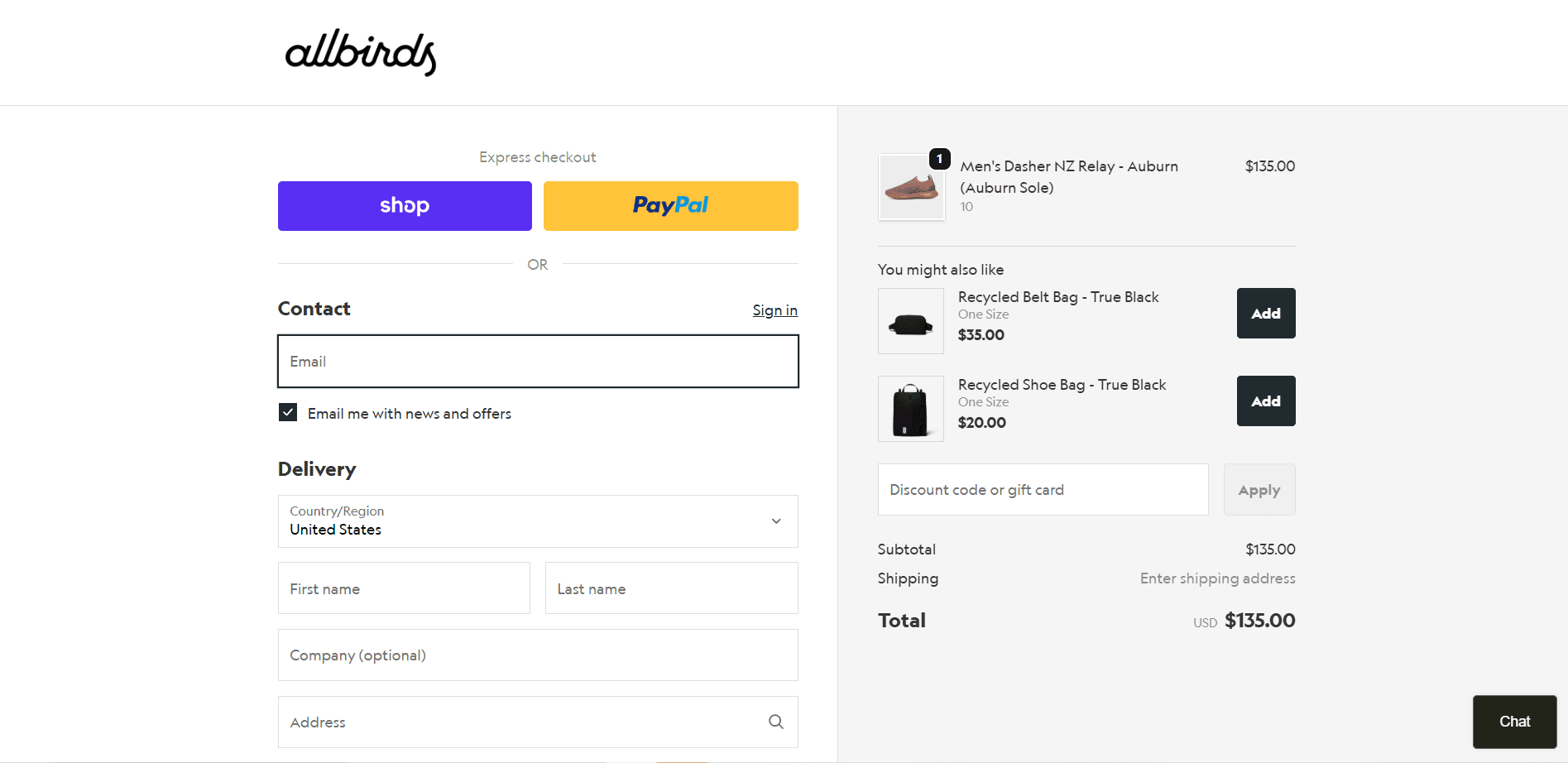
For example, Allbirds, a shoe brand, offers customers who buy a pair of shoes an upsell option to add a belt bag or a shoe bag, which is highly relevant and costs little.
Post-Purchase Upsells
A post-purchase upsell appears immediately after the customer clicks "Complete Order" but before they reach the thank-you page. The payment has gone through, the sale is confirmed, and a full-screen offer loads, giving them the chance to add one more item to their order with a single click.
The reason this type converts so well is that the original sale is completely protected. There's no risk of losing the order, since it's already been completed.
For example, a customer just bought a yoga mat. A page appears: "Complete your kit — add a yoga block and strap for $14." They tap accept, their order is updated instantly, and your AOV just increased without you touching a single ad.
Thank You Page Upsells
A thank-you page upsell lives on the order confirmation page: the page every single customer lands on after completing a purchase. Most stores treat this page as a dead end, but some treat it as another opportunity, using widgets, banners, or embedded offers to present products, referral prompts, or subscription upgrades while the customer is still warm.
It works because the customer is no longer in a rush to check out, so they'll actually read what's on the page. That openness makes it ideal not just for product upsells but also for loyalty sign-ups, review requests, and referral incentives.
For example, a customer orders a coffee subscription. Below their confirmation details, they see: "Upgrade your mornings, add a reusable travel cup at a one-time special price." No urgency, but just a well-placed offer to a customer who's already in a yes mindset.
Best Practices for High-Converting Checkout Upsells
While an upsell is most likely successful, here are some best practices to keep in mind to maximize the revenue from them:
Keep Offers Relevant
The fastest way to kill a sale is to show your customer something completely unrelated to what they just bought. If someone's checking out with a yoga mat, offering them a protein shaker makes sense, not a laptop stand.
When your upsell feels like a natural extension of what they're already buying, customers don't feel helped. Use purchase data and browsing behavior to match upsell offers to each customer's actual needs.
Use One-Click Upsells
Nobody wants to re-enter their card details or go through a second checkout flow just to add an item. One-click upsells remove that friction entirely, as customers can say yes with a single tap and the item is added automatically.
This is especially powerful post-purchase. Once someone has already committed to buying, they're in a "yes" mindset. A one-click offer right after the order confirmation page catches them at exactly the right moment, without interrupting the original checkout experience.
Optimize Pricing Strategy
Price your upsells so they feel like a no-brainer. A common approach is to offer a meaningful discount on the upsell item. "Add this for just $9 today (regular price $15)" works because it creates real perceived value.
The upsell price should almost always be lower than the original order value. If someone just spent $30, a $50 upsell feels like a stretch. But a $12 add-on is easy to say yes to. Also, avoid stacking too many upsells; one or two strong offers beat five mediocre ones every time.
Test Placement and Timing
There's no universal rule for where or when to show an upsell. For some stores, in-cart offers work best. For others, post-purchase is where the money is. The only way to really know is to test.
Start by identifying the two or three placements you want to try, run A/B tests, and let the data guide you. Even small tweaks, like showing the upsell after the customer enters their shipping details rather than before, can make a noticeable difference in conversion rates.
Add Social Proof
People trust other people more than they trust brands. When your upsell includes a short review, a star rating, or even a simple "2,000+ customers also added this," it becomes more credible right away.
If a customer is on the fence about adding an item, knowing that others bought it and loved it is often the nudge they need.
Learn Shopify Product Recommendation Strategies to Increase AOV & Conversions
Why Use Monk Free Gift + BOGO for Checkout Upsells
If you're on Shopify and looking for a tool that handles checkout upsells without the technical headache, Monk Free Gift + BOGO is built exactly for that. It brings together upsells, cross-sells, rewards, and post-purchase offers into one system. Monk Free Gift is trusted by 3,000+ Shopify and Shopify Plus brands, and holds a 4.9/5 rating with 400+ reviews on the Shopify App Store.
Here's what makes it stand out for checkout upsells specifically:
Checkout Upsells: Show targeted upsell and cross-sell offers on product and cart pages so customers have a natural opportunity to add more before they complete their order.
Smart Cross-Sell Logic: Offers are triggered by cart value, product selection, or eligibility, so customers see recommendations that actually make sense for what they're buying.
One-Click Post-Purchase Offers: Right after checkout, before the thank-you page, customers get an additional offer they can accept in a single click. No re-entering payment details, no extra steps.
Personalization: Go beyond generic upsells with targeted incentives, such as auto-added gifts or selectable rewards based on customer criteria.
And beyond the features, what merchants actually appreciate is how fast it is to get going. You can launch offers quickly, run experiments without a developer, and enjoy predictable monthly pricing.
Here's what real Monk customers have to say:
"We've increased our conversion by 25% in just one day... Highly recommend." — David Dundas, COO, You Go Natural
"Monk has been vital for allowing us to grow our monthly sales, we have tried several apps but none perform as well as this." — Marc Byrne, MD & Founder, JSML Global
Ready to get started? Here is a guide on how to create offers at checkout.
Conclusion
Checkout upsells are one of the simplest ways to grow your revenue without increasing your ad spend. Whether you place them on the cart page, during checkout, or right after the purchase, there's an option that works for every Shopify plan. The key is to start with relevant offers, keep the experience frictionless, and optimize as you go.
If you're ready to set up checkout upsells on your Shopify store without the technical complexity, Monk Free Gift + BOGO makes it easy to launch, test, and scale.
Frequently Asked Questions
Can you add upsells directly in Shopify checkout?
Yes, you can add upsells directly in Shopify checkout depending on your plan. Shopify Plus merchants can add upsells directly inside the checkout using checkout extensibility. On standard Shopify plans, upsells can be placed on the cart page or as post-purchase offers instead.
Do I need Shopify Plus for checkout upsells?
Yes, you need Shopify Plus for checkout upsell. Shopify Plus gives you access to native checkout customization, but standard Shopify stores can still run effective upsells on cart pages and post-purchase pages using third-party apps.
What is the best app for Shopify checkout upsells?
There are various upselling apps available in the Shopify App Store, and Monk Free Gift + BOGO is one of the top-rated options that offers a 7-day trial. It supports checkout upsells, cart upsells, post-purchase offers, cross-sells, and rewards.
What is the difference between upsell and cross-sell?
An upsell encourages the customer to buy a higher-value version of what they're already considering, like upgrading from a standard plan to a premium one. Cross-selling involves offering a complementary product alongside a purchase, such as a case with a phone. Learn more about the difference between Upsell and Cross-sell
How do post-purchase upsells work in Shopify?
Post-purchase upsells appear after the customer completes their order but before they reach the thank-you page. Since payment details are already saved, customers can accept the offer with a single click, making it a low-friction way to increase order value.
Do checkout upsells affect conversion rates?
Done right, relevant and well-timed upsells have little to no negative impact on conversions and can meaningfully boost average order value. Done poorly with too many offers or irrelevant recommendations, they can create friction and cause drop-offs.
Which product types work best for upselling?
Products that are naturally complementary, consumable, or offer a clear upgrade tend to perform best for upselling. Think accessories, bundles, extended warranties, travel-size versions, or higher-tier variants of what the customer is already buying. The closer the connection to the original item, the better.
How many upsells should I show at checkout?
One to two offers are ideal for upsell at checkout. Showing too many choices creates decision fatigue and can reduce the likelihood that any upsell will be accepted. Pick your strongest, most relevant offer and lead with that.
How to Add Checkout Upsells in Shopify: Step-by-Step Guide to Boost AOV
Summary
Checkout upsells are offers shown at or immediately after checkout to increase order value by encouraging customers to add complementary or upgraded products. They work best because purchase intent is highest, with studies showing 20 to 40 percent higher customer lifetime value. Formats include in checkout upsells on Shopify Plus, post purchase one click offers, and thank you page upsells; non Plus stores rely on apps and cart or post purchase flows. Best practices include relevance, limited choices, one click add ons, pricing optimization, testing, and social proof. Poor relevance, too many offers, and friction reduce performance.
Checkout is a goldmine most Shopify stores leave untapped.
By the time a customer hits that page, the hard work is done, they trust you, they want what you sell, and their wallet is already open. That's the perfect moment to say: "While you're here, have you considered this?"
Upselling can increase average Customer Lifetime Value by 20-40%. And unlike upsells placed earlier in the buying journey, checkout upsells convert better because the customer is already in buying mode.
Ready to explore the full potential of this option? We'll walk you through how to add checkout upsells in Shopify, the strategies that actually work, and the best practices to get going.
What Are Checkout Upsells in Shopify?
When a customer is about to complete their purchase, they've added items to their cart, filled in their details, and are one click away from paying, that's the checkout moment. A checkout upsell is simply an offer you show them at this exact point, nudging them to add something more to their order before they're done.
A customer buys a face moisturizer, and right before they pay, you show them a travel-size version of the same product. Or they're buying a water bottle, and you offer a cleaning kit to go with it. These small, helpful suggestions feel like you are providing a complete solution or improving their product, rather than pushing them to increase their cart value.
Why Checkout Upsell Work?
The reason upsell works so well at checkout, specifically, is due to timing. The customer has already decided to buy from you, so the hesitation is gone. Now, when you show them something that complements what they're already getting, the barrier to saying yes is much lower than it would be anywhere else in your store.
For Shopify businesses, this is one of the simplest ways to increase the average order value without spending more on ads or driving more traffic to the store. Also by combining upsells with cart progress bar, free gifts and bogo offers in Shopify, stores can increase revenue.
Why Checkout Upsells Matter for Shopify Stores?
Here's why upselling at checkout can transform your store's performance:
Your customer is already in buy mode: Shoppers at checkout have their wallets open and their guard down. There's no better time to introduce a complementary offer than when purchase intent is at its absolute peak.
Conversion rates are higher than on-site popups: Checkout upsells feel contextual, not intrusive. Because they're tied to what the customer is already buying, they're more relevant, and relevant offers get clicked.
It levels the playing field with big retail: Large retailers have long used bundling and last-minute add-ons to boost revenue. Checkout upsells give Shopify store owners the same power without a dedicated sales team.
Data improves your entire product strategy: Tracking which upsells perform best reveals exactly what your customers want alongside their primary purchase. You can use these insights across your store, ads, and email flows.
How to Add Checkout Upsells in Shopify (Step-by-Step)
Adding upsells to your Shopify checkout is straightforward, but only when you find the right fit for your requirements. There are different ways to execute it, and the right method depends on your plan, budget, and where in the buying journey you want to show your offer.
Note:
Before we go ahead, it is crucial to note that running upsells at checkout is a feature of Shopify Plus only. Non-members can move these upsells to thank you pages, post-checkout flows, or the cart page.
Here are the three main approaches, broken down so you can find the one that fits your store:
Method 1: Using Shopify Apps (Best for Most Stores)
For most Shopify merchants, dedicated upsell apps like Monk Free Gift + BOGO are the fastest and most flexible option. These apps plug into your store and handle everything for you. This means no coding, no custom development, just install, configure, and go.
The best apps let you trigger offers based on cart contents, set display rules, and customize the look to match your brand. They also come with built-in analytics so you can see exactly what's converting.
Depending on your Shopify plan, apps will display offers either on the cart page (before checkout) or in the post-purchase flow (right after payment). Non-Plus merchants can't place widgets natively inside the checkout page, so most apps route their offers to the cart or the thank-you page instead, both of which still convert well.
Best for: Stores on standard Shopify plans that want a quick, effective setup without touching code.
Method 2: Shopify Plus (Checkout Extensions)
If you're on Shopify Plus, you get access to something no other plan offers: the ability to place upsells directly on the checkout page, natively and seamlessly.
Shopify's Checkout Extensibility framework is the modern system for customizing the checkout experience, replacing the older checkout.liquid setup. It uses app blocks that render natively in checkout, so your upsells load quickly, look native, and work perfectly on mobile.
Here’s what you can do with Shopify Plus:
Product upsell blocks: Add product recommendations directly inside the checkout flow, displayed to the customer as they're about to pay.
Dynamic, personalized offers: Show offers based on what's in the cart and the customer's behavior, making every recommendation feel relevant rather than generic.
Trust elements and messaging: Add shipping estimates, security badges, and promotional messaging to reduce checkout anxiety and keep customers moving forward.
A/B testing: Test different upsell configurations to find what drives the most conversions.
While these are the features of using Shopify Plus, it also has several limitations you must keep in mind:
The price barrier is steep: Shopify Plus starts at $2,300/month. For most growing stores, paying that much just to unlock native checkout upsells isn't a realistic or efficient use of budget.
Customization has a ceiling: Checkout Extensibility gives you app blocks, but you're still operating within Shopify's rigid structure. You can't freely design the layout, control the exact placement of offers, or build the kind of nuanced upsell logic that a dedicated app allows.
No cross-sell logic built in: Shopify's native tools don't offer smart product pairing or rule-based triggers out of the box. Only Shopify upsell and cross-sell apps can help you do this seamlessly.
Best for: High-volume Shopify Plus stores that want native, in-checkout upsell placement with full customization control.
Method 3: Post-Purchase Upsells (No Plus Required)
Post-purchase upsells are another effective way to overcome Shopify Plus limitation and they're available on every Shopify plan.
When choosing this option, once the customer completes checkout and payment, a new page appears with an upsell offer. The customer can accept it with a single click, without having to re-enter payment details. The thank-you page then appears as normal. The original sale is already locked in, so there's zero risk to your conversion.
Best for: Any store not on Shopify Plus that wants high-converting upsells without needing access to the native checkout page.
Different Types of Shopify Checkout Upsells
Where you place your offer matters just as much as what the offer actually is. Each type appears at a different point in the buying journey, targets a different customer mindset, and offers its own advantages.
Here's a breakdown of every type so you can choose what fits your store best:
In-Checkout Upsells (Shopify Plus)
An in-checkout upsell is an offer that appears directly on the checkout page while the customer is entering their payment and shipping details. It's embedded natively into the flow, no popups, no redirects, no friction. The customer sees the offer as part of the checkout experience itself.
This works because the customer is already committed to buying. Their card is out, their decision is made, and the mental resistance to spending a little more is at its lowest.
For example, Allbirds, a shoe brand, offers customers who buy a pair of shoes an upsell option to add a belt bag or a shoe bag, which is highly relevant and costs little.
Post-Purchase Upsells
A post-purchase upsell appears immediately after the customer clicks "Complete Order" but before they reach the thank-you page. The payment has gone through, the sale is confirmed, and a full-screen offer loads, giving them the chance to add one more item to their order with a single click.
The reason this type converts so well is that the original sale is completely protected. There's no risk of losing the order, since it's already been completed.
For example, a customer just bought a yoga mat. A page appears: "Complete your kit — add a yoga block and strap for $14." They tap accept, their order is updated instantly, and your AOV just increased without you touching a single ad.
Thank You Page Upsells
A thank-you page upsell lives on the order confirmation page: the page every single customer lands on after completing a purchase. Most stores treat this page as a dead end, but some treat it as another opportunity, using widgets, banners, or embedded offers to present products, referral prompts, or subscription upgrades while the customer is still warm.
It works because the customer is no longer in a rush to check out, so they'll actually read what's on the page. That openness makes it ideal not just for product upsells but also for loyalty sign-ups, review requests, and referral incentives.
For example, a customer orders a coffee subscription. Below their confirmation details, they see: "Upgrade your mornings, add a reusable travel cup at a one-time special price." No urgency, but just a well-placed offer to a customer who's already in a yes mindset.
Best Practices for High-Converting Checkout Upsells
While an upsell is most likely successful, here are some best practices to keep in mind to maximize the revenue from them:
Keep Offers Relevant
The fastest way to kill a sale is to show your customer something completely unrelated to what they just bought. If someone's checking out with a yoga mat, offering them a protein shaker makes sense, not a laptop stand.
When your upsell feels like a natural extension of what they're already buying, customers don't feel helped. Use purchase data and browsing behavior to match upsell offers to each customer's actual needs.
Use One-Click Upsells
Nobody wants to re-enter their card details or go through a second checkout flow just to add an item. One-click upsells remove that friction entirely, as customers can say yes with a single tap and the item is added automatically.
This is especially powerful post-purchase. Once someone has already committed to buying, they're in a "yes" mindset. A one-click offer right after the order confirmation page catches them at exactly the right moment, without interrupting the original checkout experience.
Optimize Pricing Strategy
Price your upsells so they feel like a no-brainer. A common approach is to offer a meaningful discount on the upsell item. "Add this for just $9 today (regular price $15)" works because it creates real perceived value.
The upsell price should almost always be lower than the original order value. If someone just spent $30, a $50 upsell feels like a stretch. But a $12 add-on is easy to say yes to. Also, avoid stacking too many upsells; one or two strong offers beat five mediocre ones every time.
Test Placement and Timing
There's no universal rule for where or when to show an upsell. For some stores, in-cart offers work best. For others, post-purchase is where the money is. The only way to really know is to test.
Start by identifying the two or three placements you want to try, run A/B tests, and let the data guide you. Even small tweaks, like showing the upsell after the customer enters their shipping details rather than before, can make a noticeable difference in conversion rates.
Add Social Proof
People trust other people more than they trust brands. When your upsell includes a short review, a star rating, or even a simple "2,000+ customers also added this," it becomes more credible right away.
If a customer is on the fence about adding an item, knowing that others bought it and loved it is often the nudge they need.
Learn Shopify Product Recommendation Strategies to Increase AOV & Conversions
Why Use Monk Free Gift + BOGO for Checkout Upsells
If you're on Shopify and looking for a tool that handles checkout upsells without the technical headache, Monk Free Gift + BOGO is built exactly for that. It brings together upsells, cross-sells, rewards, and post-purchase offers into one system. Monk Free Gift is trusted by 3,000+ Shopify and Shopify Plus brands, and holds a 4.9/5 rating with 400+ reviews on the Shopify App Store.
Here's what makes it stand out for checkout upsells specifically:
Checkout Upsells: Show targeted upsell and cross-sell offers on product and cart pages so customers have a natural opportunity to add more before they complete their order.
Smart Cross-Sell Logic: Offers are triggered by cart value, product selection, or eligibility, so customers see recommendations that actually make sense for what they're buying.
One-Click Post-Purchase Offers: Right after checkout, before the thank-you page, customers get an additional offer they can accept in a single click. No re-entering payment details, no extra steps.
Personalization: Go beyond generic upsells with targeted incentives, such as auto-added gifts or selectable rewards based on customer criteria.
And beyond the features, what merchants actually appreciate is how fast it is to get going. You can launch offers quickly, run experiments without a developer, and enjoy predictable monthly pricing.
Here's what real Monk customers have to say:
"We've increased our conversion by 25% in just one day... Highly recommend." — David Dundas, COO, You Go Natural
"Monk has been vital for allowing us to grow our monthly sales, we have tried several apps but none perform as well as this." — Marc Byrne, MD & Founder, JSML Global
Ready to get started? Here is a guide on how to create offers at checkout.
Conclusion
Checkout upsells are one of the simplest ways to grow your revenue without increasing your ad spend. Whether you place them on the cart page, during checkout, or right after the purchase, there's an option that works for every Shopify plan. The key is to start with relevant offers, keep the experience frictionless, and optimize as you go.
If you're ready to set up checkout upsells on your Shopify store without the technical complexity, Monk Free Gift + BOGO makes it easy to launch, test, and scale.
Frequently Asked Questions
Can you add upsells directly in Shopify checkout?
Yes, you can add upsells directly in Shopify checkout depending on your plan. Shopify Plus merchants can add upsells directly inside the checkout using checkout extensibility. On standard Shopify plans, upsells can be placed on the cart page or as post-purchase offers instead.
Do I need Shopify Plus for checkout upsells?
Yes, you need Shopify Plus for checkout upsell. Shopify Plus gives you access to native checkout customization, but standard Shopify stores can still run effective upsells on cart pages and post-purchase pages using third-party apps.
What is the best app for Shopify checkout upsells?
There are various upselling apps available in the Shopify App Store, and Monk Free Gift + BOGO is one of the top-rated options that offers a 7-day trial. It supports checkout upsells, cart upsells, post-purchase offers, cross-sells, and rewards.
What is the difference between upsell and cross-sell?
An upsell encourages the customer to buy a higher-value version of what they're already considering, like upgrading from a standard plan to a premium one. Cross-selling involves offering a complementary product alongside a purchase, such as a case with a phone. Learn more about the difference between Upsell and Cross-sell
How do post-purchase upsells work in Shopify?
Post-purchase upsells appear after the customer completes their order but before they reach the thank-you page. Since payment details are already saved, customers can accept the offer with a single click, making it a low-friction way to increase order value.
Do checkout upsells affect conversion rates?
Done right, relevant and well-timed upsells have little to no negative impact on conversions and can meaningfully boost average order value. Done poorly with too many offers or irrelevant recommendations, they can create friction and cause drop-offs.
Which product types work best for upselling?
Products that are naturally complementary, consumable, or offer a clear upgrade tend to perform best for upselling. Think accessories, bundles, extended warranties, travel-size versions, or higher-tier variants of what the customer is already buying. The closer the connection to the original item, the better.
How many upsells should I show at checkout?
One to two offers are ideal for upsell at checkout. Showing too many choices creates decision fatigue and can reduce the likelihood that any upsell will be accepted. Pick your strongest, most relevant offer and lead with that.
Ravish (RV)
Co-Founder, Monk Commerce
Ravish is an ecommerce and SaaS marketing expert with 6+ years of experience in Shopify and ecommerce and 10+ years of experience in marketing, and growth strategy. He has worked closely with Shopify merchants to solve real ecommerce challenges and shares practical, research-backed insights, industry best practices, and emerging trends.
Contents
Related Articles
How to Add Upsell Offers on Shopify to Increase AOV (Step-by-Step Guide)
Upsell vs Cross-Sell in Shopify: Key Differences, Examples & Strategies
10 Best Upsell Apps for Shopify to Boost Sales & AOV in 2026
Get Monk Free Gift app for just $1/month this Black Friday
First month: $1 after your 7-day free trial. All features included. Offer live!
Claim offer now

Get Monk Free Gift app for just $1/month this Black Friday
First month: $1 after your 7-day free trial. All features included. Offer live!
Claim offer now
Get Monk Free Gift app for just $1/month this Black Friday
First month: $1 after your 7-day free trial. All features included. Offer live!
Claim offer now