
Shopify Upselling Guide for Beginners
Summary
Upselling in Shopify is the practice of encouraging customers to spend more by upgrading products or adding complementary items during or after purchase. It increases average order value without acquiring new customers and works across product pages, cart, checkout, and post purchase stages. Effective upsells are relevant, timely, and low friction. Common tools include apps like Monk Free Gift + BOGO, Bold Upsell, and In Cart Upsell. Best practices include limiting offers, keeping price increases reasonable, and targeting accurately. Mistakes include irrelevant suggestions, too many offers, poor timing, and lack of testing. Success is measured by AOV, upsell conv rate and revenue contribution.

Ravish (RV)
Senior Content Writer
Ravish is an ecommerce and SaaS marketing expert with 6+ years of experience in Shopify and ecommerce and 10+ years of experience in marketing, and growth strategy. He has worked closely with Shopify merchants to solve real ecommerce challenges and shares practical, research-backed insights, industry best practices, and emerging trends.
Key Takeaways
Upselling in Shopify is the practice of encouraging customers to spend more by upgrading products or adding complementary items during or after purchase. It increases average order value without acquiring new customers and works across product pages, cart, checkout, and post purchase stages. Effective upsells are relevant, timely, and low friction. Common tools include apps like Monk Free Gift + BOGO, Bold Upsell, and In Cart Upsell. Best practices include limiting offers, keeping price increases reasonable, and targeting accurately. Mistakes include irrelevant suggestions, too many offers, poor timing, and lack of testing. Success is measured by AOV, upsell conv rate and revenue contribution.
Watching a customer finally add something to their cart feels like a sigh of relief. Every campaign, every touchpoint, every ounce of effort your brand poured into getting them here, it's all starting to pay off.
Now imagine making that bag even bigger without lifting a finger to acquire another customer.
That's upselling in Shopify. And it's one of the most effortless ways to grow your revenue, not by chasing new customers, but by doing more for the ones already shopping with you.
Done right, it doesn't just boost your average order value; it shows customers that your brand actually gets them, offering personalized options and complete solutions right when they need it most.
Most successful Shopify brands already have upselling baked into their strategy. In fact, businesses with automated upselling see up to a 3x revenue lift. Ready to get your store up to speed? This guide breaks down the best practices for upselling, the highest-converting placements for your upsell offers, and the top apps to make the whole experience seamless.
What is Upselling in Shopify?
Upselling is encouraging a customer who is already buying something to spend a little more, either by upgrading what they're getting or by adding something that enhances their purchase.
For example, a customer lands on your Shopify store and adds a basic face moisturizer to their cart. Before they check out, your store shows them an option to upgrade to the premium version of the same moisturizer, one with SPF, better ingredients, and a slightly higher price. The customer already wants the product. You're simply showing them a better version of it at the right moment.
The key is to understand that upselling is not about pushing unnecessary products onto people but recognizing what a customer already wants and offering them something that better serves that want. When done well, the customer feels like your store is helping them make a smarter choice instead of just selling to them.
For Shopify store owners, upselling is built into the shopping journey itself. It can show up on the product page, in the cart, or even at checkout. The goal is always to increase the value of that single order without the customer feeling pressured or overwhelmed.
Learn how Upselling is different from Cross-selling in Shopify
Best Places to Add Upsells in Shopify
There are different areas in the customer journey where one can place an upsell offer. Depending on the place you choose, there are pros and cons and varying probabilities that the customer will take the offer. Let's explore the different possibilities and understand how each of them is significant:
Product Page Upsells
The product page is where a customer is actively evaluating what they want to buy. They're already interested; they clicked; they're reading; they're considering. This makes it one of the most valuable moments to introduce an upgrade or a better version of what they're looking at before they've even made their initial decision.
A well-placed upsell here doesn't disrupt the buying process; rather adds to it. Instead of letting the customer settle for the base option by default, you're giving them the full picture of what they might be missing.
Cart Page Upsells
By the time a customer reaches the cart page, they've already made a decision. They want to buy. That buying intent is exactly what makes this placement so effective. A cart page upsell typically shows up as a suggested upgrade or an add-on that complements what's already in the cart.
This is also a good moment to upsell around thresholds. If your store offers free shipping above a certain order value, the cart page is where a customer realizes they're close to hitting it. A well-timed upsell here feels like a logical reason to add one more thing.
The checkout page is the closest a customer gets to completing their purchase. A checkout upsell works best when it's small, fast, and frictionless. Think of a one-click add-on that doesn't ask the customer to re-enter any information or navigate away from the page. The offer should feel like a quick, easy yes, and not another decision that slows them down.
This is a good place for lower-priced upgrades or protection add-ons, such as gift wrapping, extended warranties, or a travel-sized version of a product they're already buying. The ask is small enough that it doesn't feel like a disruption, but it still adds meaningful value to the order total.
Post-Purchase Upsells
A post-purchase upsell appears after the customer completes their order, typically on the confirmation page or in a follow-up email. Because the transaction is done, there's zero risk of it interfering with the checkout or causing the customer to abandon their cart. This makes it one of the lowest-pressure upsell placements available.
The customer just had a positive experience: they found what they wanted, they bought it, and they're feeling good about it. That's a receptive moment.
Post-purchase offers work well for products that naturally follow what was just bought. If someone ordered a coffee machine, showing them a bag of premium coffee beans right after makes complete sense. If someone bought a skincare serum, a follow-up offer on a matching moisturizer fits naturally into the story.
Best Shopify Upsell Apps for Beginners
When implementing Shopify upsells, the native Shopify features offer limited customization options. That’s where Shopify upsell apps come into the picture. Here are some of the best apps to get started:
Best for: Managing upsells across the entire customer journey from a single app
Shopify rating: 4.9/5 from 529+ reviews
Monk Free Gift + BOGO offers a single, unified setup that works across every stage of the buying journey: product page, cart, checkout, and post-purchase.
On the product page, you can display cross-sell offers using multiple layout options such as carousels, checkboxes, and list views that fit naturally into your theme without touching a single line of code.
On the cart side, it works seamlessly across cart drawers, cart popups, and cart pages, with full control over how products are displayed, discounted, and recommended.
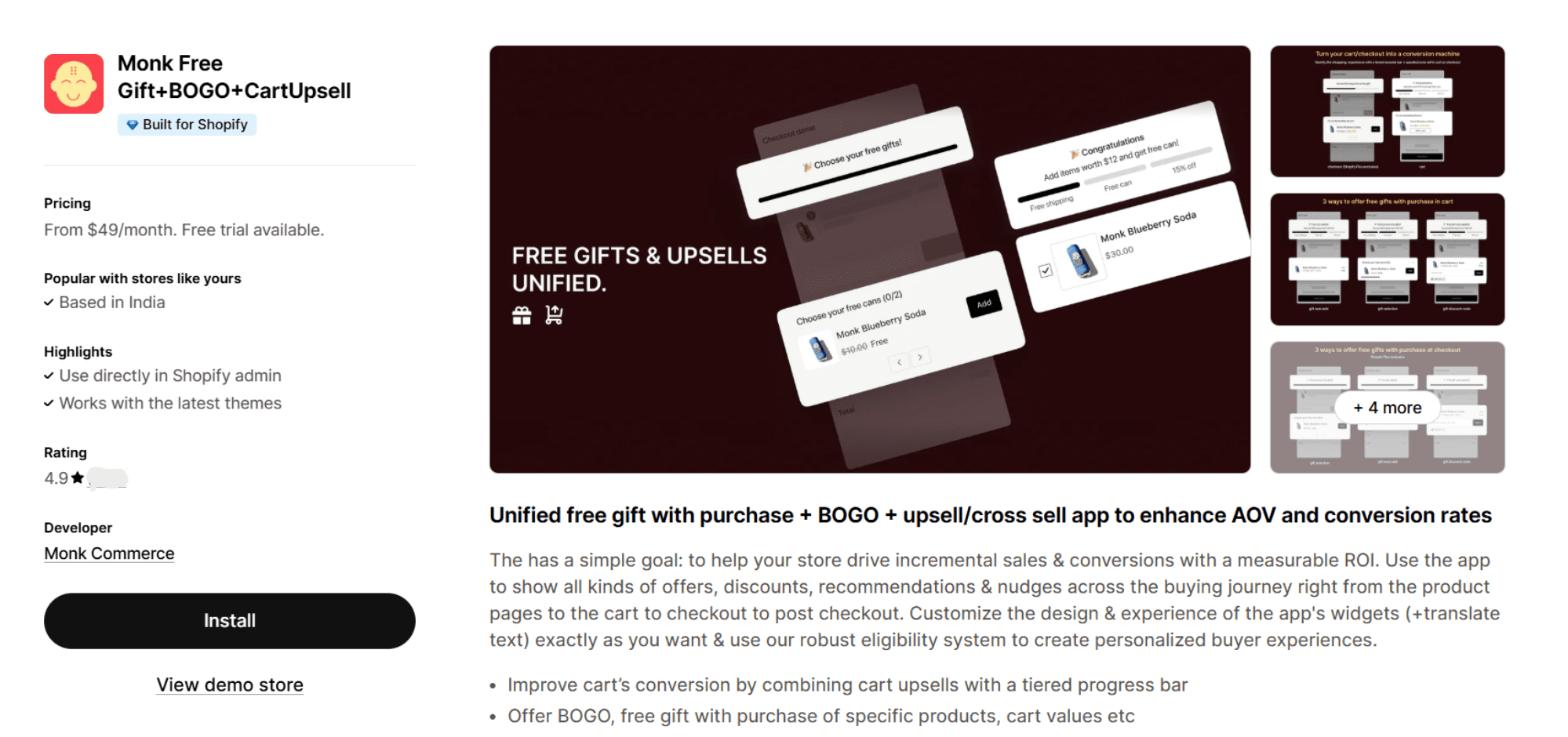
Here are some key features:
Full-journey upsell coverage: Set up upsell and cross-sell offers on Shopify product page, cart, checkout, and post-purchase confirmation page, all from one dashboard, without needing separate apps for each placement.
Smart rule-based targeting: Trigger offers based on specific conditions, such as cart value, products added, or customer behavior. This means your offers show up when they're actually relevant, not just whenever a customer lands on a page.
AI-powered auto product recommendations: For stores processing high volumes of orders, Monk Free Gift uses Shopify's AI algorithm to suggest products based on bestsellers and past purchase data, so you don't have to manually curate every offer.
Cart progress bar: Show customers how close they are to unlocking a reward or hitting a free shipping threshold, giving them a concrete reason to add one more item to their cart.
Post-purchase one-click offers: Display additional products on the confirmation page after checkout, without requiring the customer to re-enter payment details. It's the lowest-friction upsell placement available.
Flexible discount controls: Apply discounts to offers in Shopify as a percentage or a flat amount, limit the number of discounted items a customer can add, and control how prices are displayed.
Full design customization: Edit fonts, colors, spacing, and layouts directly from the app. You can also set different layouts for mobile and desktop, so the experience holds up across all devices.
Analytics dashboard: Track the revenue each upsell funnel generates from one place, so you can see what's working and adjust accordingly.
Learn how to create an upsell offer to raise the average order value using Monk.
Using Monk Free Gift + BOGO, Maverick & Co., a global travel and luggage brand, generated an additional $40K in revenue in a single month.
Pricing:
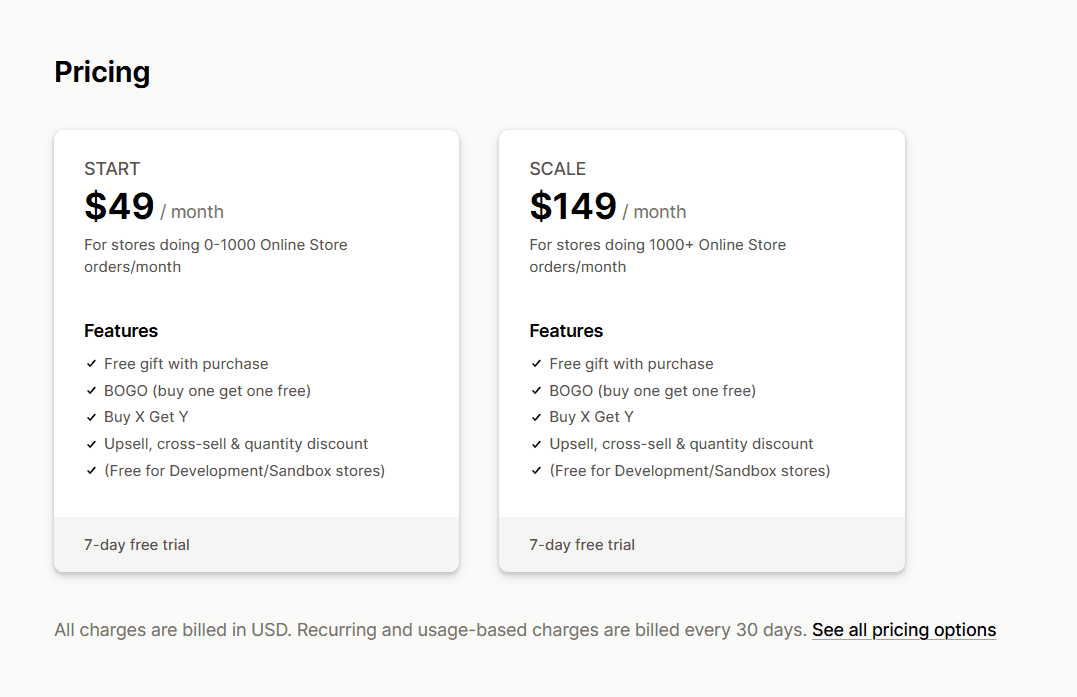
START: $49/month - suited for stores with fewer than 1,000 orders per month
SCALE: $149/month - built for stores doing more than 1,000 orders per month
Both plans come with a 7-day free trial. You can sign up here or book a demo to see it in action.
Bold AI Upsell & Cross-Sell
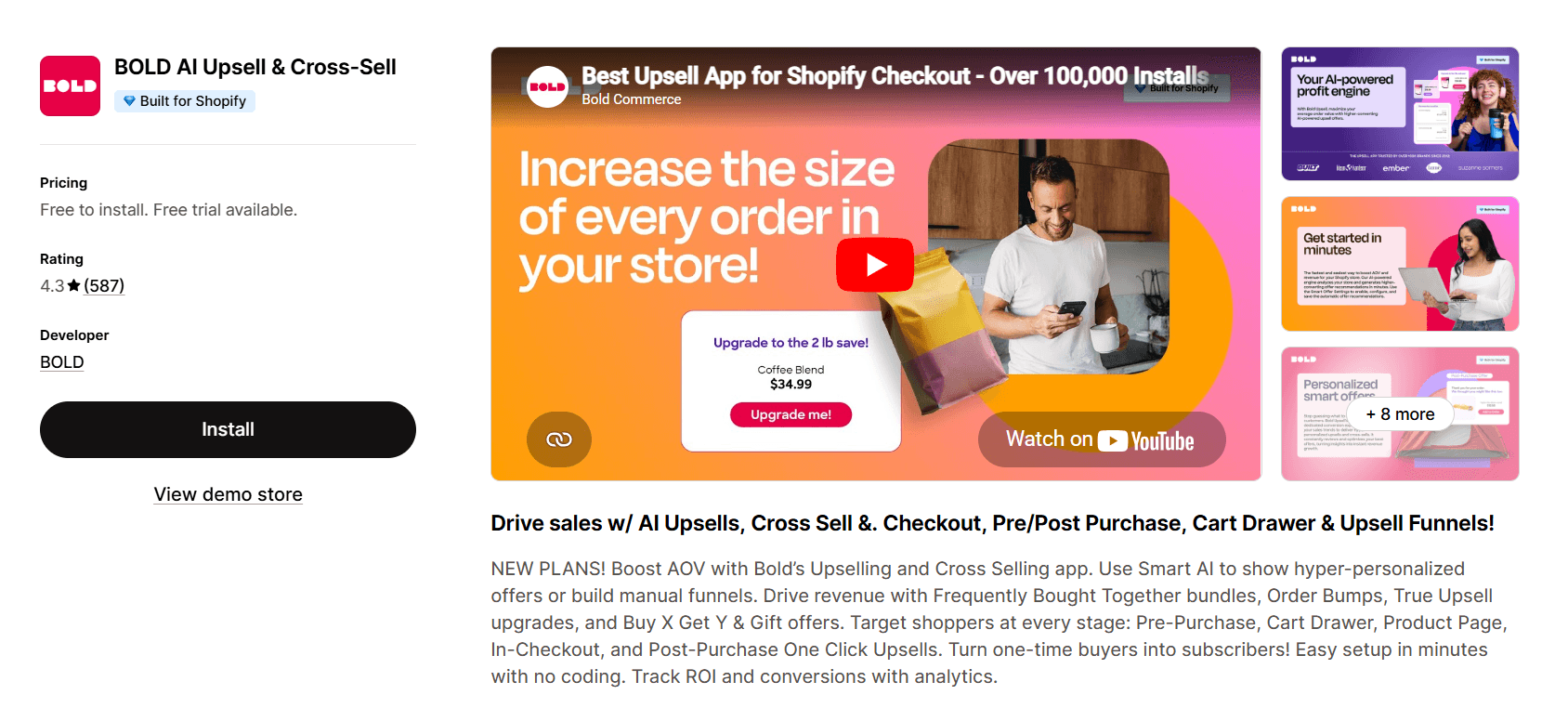
Bold AI Upsell & Cross-Sell leans heavily on AI to decide which products to show and when, analyzing customer behavior and preferences to serve offers that are more likely to convert. You can place upsells on product pages, in the cart, at checkout, after purchase, and even via email.
It's a solid option if you want AI to handle most of the targeting for you, though some of its more advanced features are available only in higher-tier plans, and the view-based pricing model can get expensive quickly as your store scales.
Pricing:
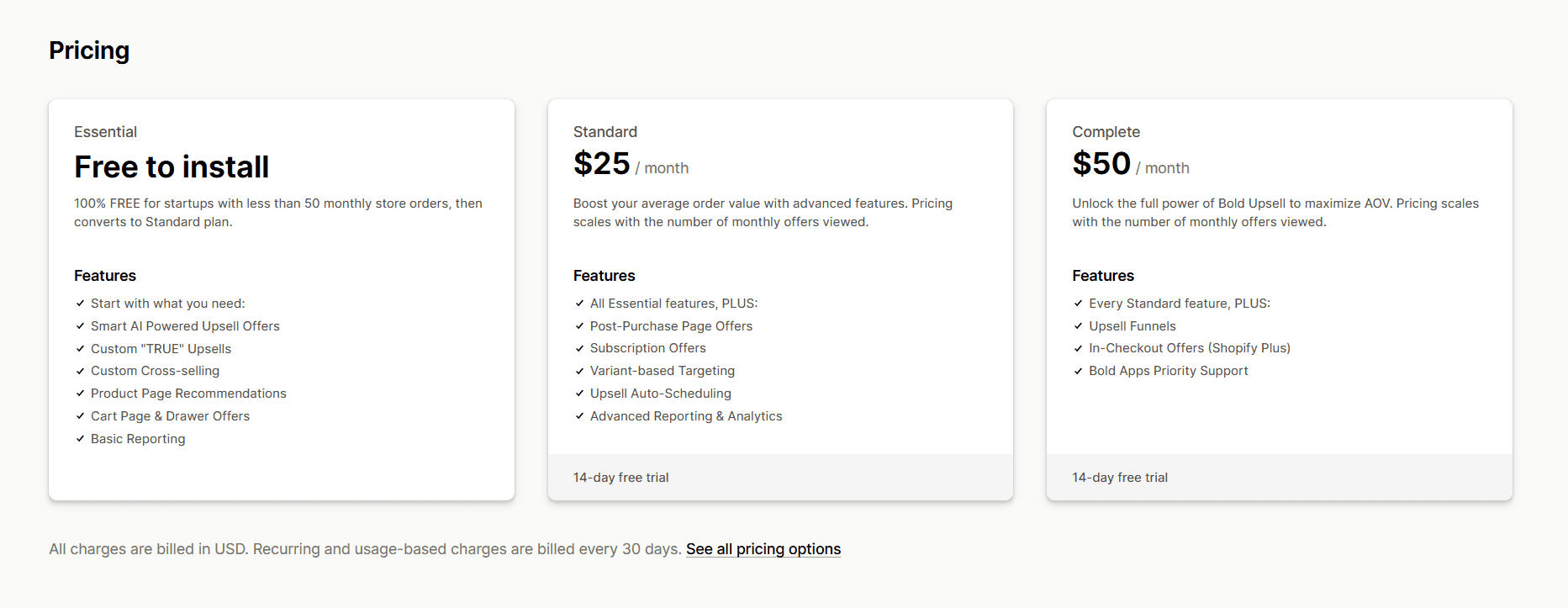
Free plan available (up to 50 orders/month). Paid plans start at $25/month for Standard, $50/month for Complete, and $500/month for Enterprise. 14-day free trial available on all plans.
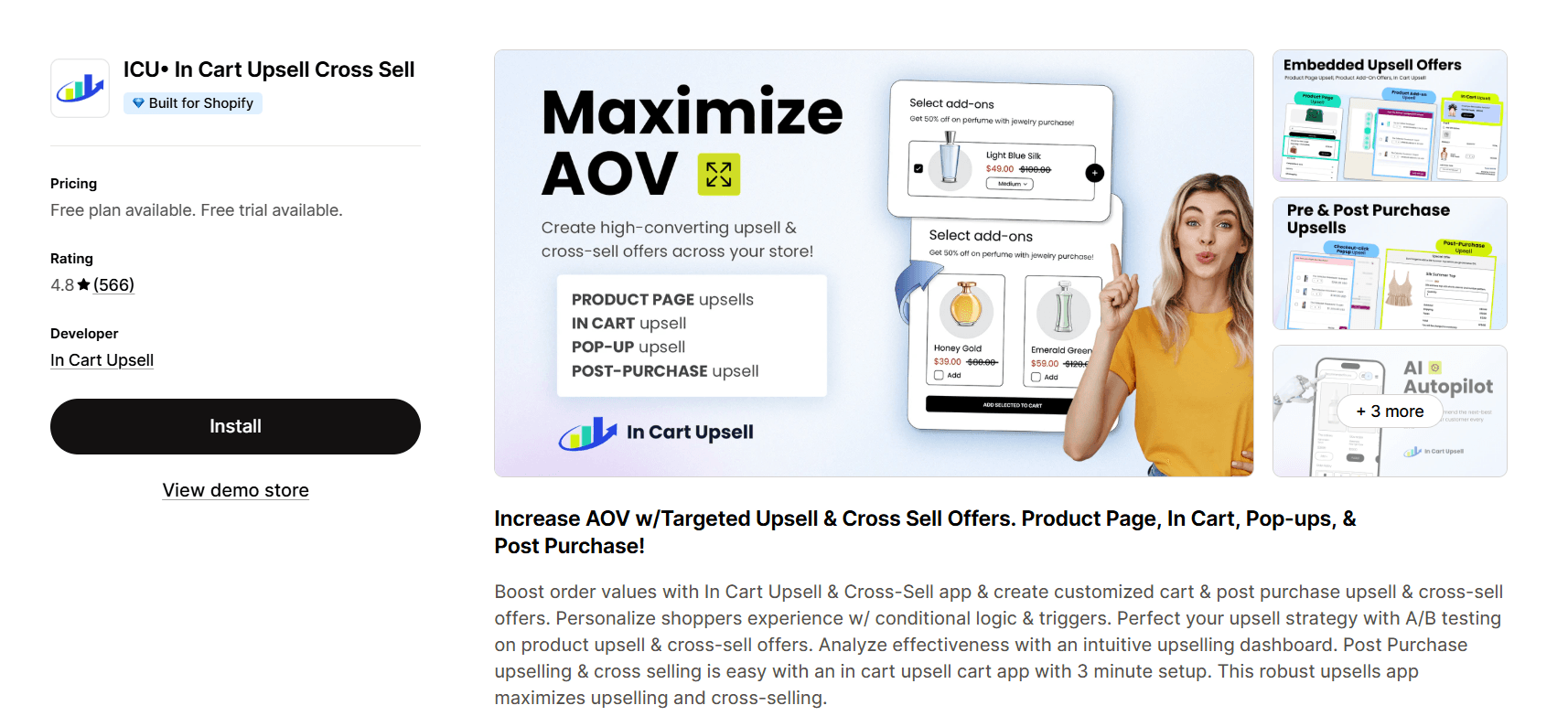
ICU• In Cart Upsell Cross Sell
In Cart Upsell does exactly what the name suggests: it shows targeted offers while the customer is still in their cart, before they reach checkout. It's a straightforward tool with smart cart-based targeting, bundle and volume discount options, and mobile-optimized widgets. If all you need is a clean cart upsell without a full funnel builder, it gets the job done.
However, this app doesn't support post-purchase upsells, subscription-based offers, or advanced AI targeting, so it has a narrower use case.
Pricing:
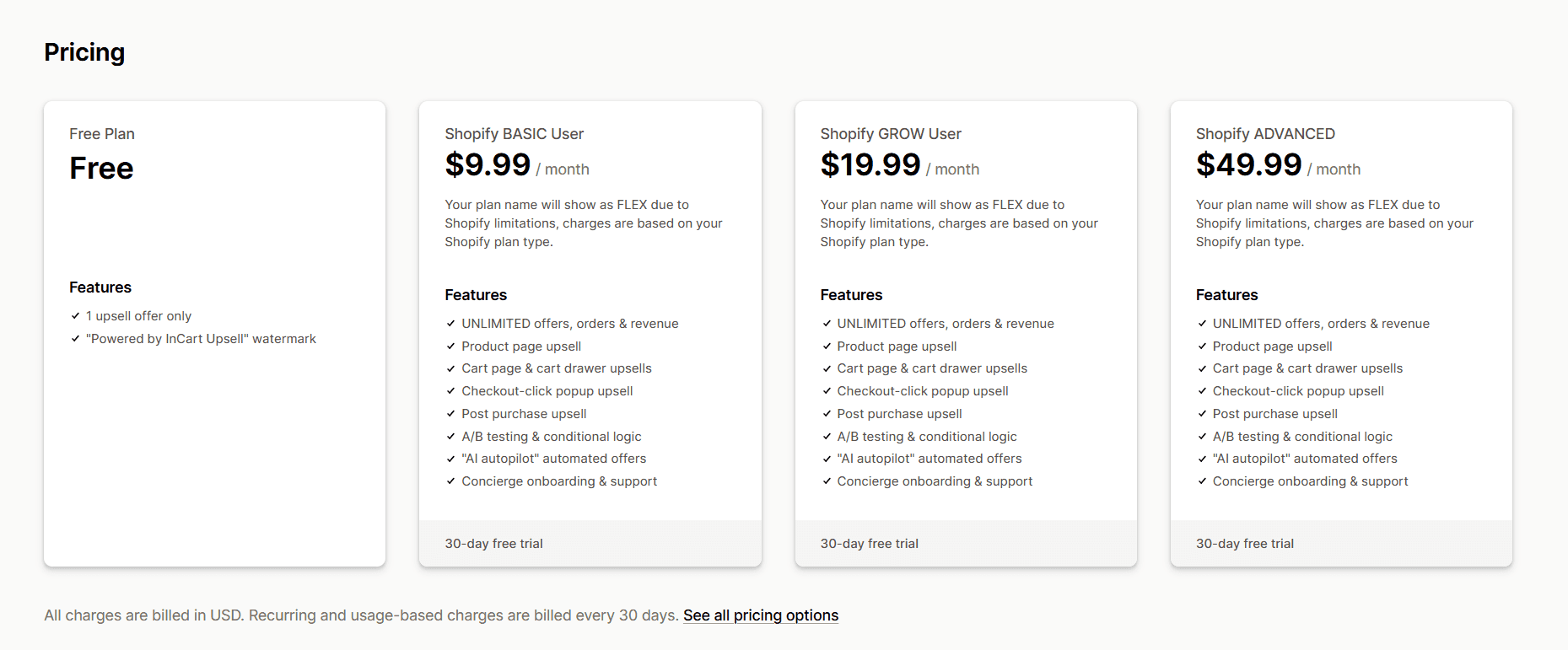
Free plan available (1 upsell per month). Paid plans range from $9.99/month to $99.99/month, depending on your Shopify plan, with a 30-day free trial.
Common Upselling Mistakes to Avoid
To make upselling successful, there are a few things you must keep in mind or you will not see the results you expect. Here are the most common mistakes Shopify store owners make and ways to fix them:
Showing irrelevant offers: A customer buying a yoga mat doesn't need to see a phone case. Keep your upsell offers closely tied to what's already in the cart, or they'll be ignored entirely.
Fix: Set specific targeting rules so that offers appear only for relevant products.
Overloading customers with too many offers: Showing three upsells at once doesn't triple your chances; it overwhelms the customer and often leads to them dismissing all of them.
Fix: Stick to one to two clear, well-timed offers per placement.
Upselling at the wrong moment: A high-value upsell on the checkout page can create hesitation right when the customer is about to complete their purchase.
Fix: Match the size and complexity of your offer to the placement where it appears.
Making the price jump too steeply: If the upgrade costs significantly more than what's in the cart, most customers won't take it up.
Fix: Keep upsell offers within a reasonable price range, ideally no more than 25–30% above the original product price.
Using generic copy: "You might also like" doesn't tell a customer anything useful. Vague messaging makes upsells easy to ignore.
Fix: Write the offer text to clearly explain the upgrade's value in plain language.
Never testing or reviewing performance: Setting up an upsell and leaving it running without checking results could mean you're missing revenue or losing customers without realizing it.
Fix: Review your upsell analytics regularly and adjust offers based on what's actually converting.
Conclusion
Upselling isn't about squeezing more money out of your customers but about making the most of the trust they've already placed in your store. When done right, it improves the shopping experience, increases your revenue per order, and builds the kind of relationship that brings customers back.
The brands that see the best results from upselling aren't the ones with the most offers; they're the ones with the most relevant ones, placed at the right moments, with a clear and honest value proposition. Start simple, test as you go, and let the data guide your next move.
Frequently Asked Questions
How many upsell offers should a Shopify store show?
One to two upsell offers per placement are more than enough. Showing multiple upsells at once splits the customer's attention and makes it harder for them to say yes to any of them. Focus on one or two well-chosen, relevant offers at each stage of the journey, rather than stacking several in the same spot.
Do upsell offers work for low-priced products?
Yes, upsell offers work for low-priced products, but the approach matters. For low-priced products, quantity-based discounts and bundles tend to work better than premium upgrades, since the price difference between tiers is often too small to feel meaningful. Encouraging a customer to buy two or three of something they were already going to buy once is a straightforward win, even at a lower price point.
Is upselling suitable for new Shopify stores?
Yes, upselling can be suitable for a new Shopify store, but it's worth getting the basics right first. If your product pages, checkout flow, and customer experience aren't solid yet, layering in upsell offers too early can distract from fixing those fundamentals. Once you're seeing consistent orders and have a clear sense of what your customers buy, upselling becomes a natural next step rather than a guessing game.
What industries benefit most from upselling?
Upselling works across most product categories, but it tends to perform especially well in skincare and beauty, supplements and nutrition, electronics and accessories, fashion, home goods, and food and beverage. Essentially, any category with products that have natural tiers, complementary items, or repeat-purchase potential is a strong fit for upselling.
How do upsell offers affect conversion rates?
A well-placed, relevant upsell offer generally improves conversion rates. It adds value to the order without disrupting the buying process. A poorly placed or irrelevant one, however, can introduce hesitation and actually hurt your overall conversion rate. The key is relevance and timing.
How often should upsell strategies be updated?
Revisiting your upsell offer strategy every four to six weeks is a reasonable starting point. Seasonal changes, new product launches, shifts in what's selling, and changes in customer behavior are all good reasons to review and refresh your offers. Beyond scheduled reviews, it's worth consistently keeping an eye on your analytics.
Can upselling work for digital products?
Yes, digital products such as online courses, templates, presets, software tools, and ebooks are well-suited for upselling. Common approaches include offering a premium version with more features or content, bundling related digital products together, or upselling a one-time buyer into a subscription or membership. Since there are no inventory or shipping constraints, the margin on a digital product upsell is often better than on a physical one.
What metrics measure upselling success?
The most important metrics to track for upselling success are average order value (AOV), upsell conversion rate (the percentage of customers who take the offer), revenue attributed to upsell funnels, and overall return on investment from your upsell setup. Over time, it's also worth watching customer lifetime value that shows up in the long-term numbers more than in any single transaction.
Shopify Upselling Guide for Beginners
Summary
Upselling in Shopify is the practice of encouraging customers to spend more by upgrading products or adding complementary items during or after purchase. It increases average order value without acquiring new customers and works across product pages, cart, checkout, and post purchase stages. Effective upsells are relevant, timely, and low friction. Common tools include apps like Monk Free Gift + BOGO, Bold Upsell, and In Cart Upsell. Best practices include limiting offers, keeping price increases reasonable, and targeting accurately. Mistakes include irrelevant suggestions, too many offers, poor timing, and lack of testing. Success is measured by AOV, upsell conv rate and revenue contribution.
Watching a customer finally add something to their cart feels like a sigh of relief. Every campaign, every touchpoint, every ounce of effort your brand poured into getting them here, it's all starting to pay off.
Now imagine making that bag even bigger without lifting a finger to acquire another customer.
That's upselling in Shopify. And it's one of the most effortless ways to grow your revenue, not by chasing new customers, but by doing more for the ones already shopping with you.
Done right, it doesn't just boost your average order value; it shows customers that your brand actually gets them, offering personalized options and complete solutions right when they need it most.
Most successful Shopify brands already have upselling baked into their strategy. In fact, businesses with automated upselling see up to a 3x revenue lift. Ready to get your store up to speed? This guide breaks down the best practices for upselling, the highest-converting placements for your upsell offers, and the top apps to make the whole experience seamless.
What is Upselling in Shopify?
Upselling is encouraging a customer who is already buying something to spend a little more, either by upgrading what they're getting or by adding something that enhances their purchase.
For example, a customer lands on your Shopify store and adds a basic face moisturizer to their cart. Before they check out, your store shows them an option to upgrade to the premium version of the same moisturizer, one with SPF, better ingredients, and a slightly higher price. The customer already wants the product. You're simply showing them a better version of it at the right moment.
The key is to understand that upselling is not about pushing unnecessary products onto people but recognizing what a customer already wants and offering them something that better serves that want. When done well, the customer feels like your store is helping them make a smarter choice instead of just selling to them.
For Shopify store owners, upselling is built into the shopping journey itself. It can show up on the product page, in the cart, or even at checkout. The goal is always to increase the value of that single order without the customer feeling pressured or overwhelmed.
Learn how Upselling is different from Cross-selling in Shopify
Best Places to Add Upsells in Shopify
There are different areas in the customer journey where one can place an upsell offer. Depending on the place you choose, there are pros and cons and varying probabilities that the customer will take the offer. Let's explore the different possibilities and understand how each of them is significant:
Product Page Upsells
The product page is where a customer is actively evaluating what they want to buy. They're already interested; they clicked; they're reading; they're considering. This makes it one of the most valuable moments to introduce an upgrade or a better version of what they're looking at before they've even made their initial decision.
A well-placed upsell here doesn't disrupt the buying process; rather adds to it. Instead of letting the customer settle for the base option by default, you're giving them the full picture of what they might be missing.
Cart Page Upsells
By the time a customer reaches the cart page, they've already made a decision. They want to buy. That buying intent is exactly what makes this placement so effective. A cart page upsell typically shows up as a suggested upgrade or an add-on that complements what's already in the cart.
This is also a good moment to upsell around thresholds. If your store offers free shipping above a certain order value, the cart page is where a customer realizes they're close to hitting it. A well-timed upsell here feels like a logical reason to add one more thing.
The checkout page is the closest a customer gets to completing their purchase. A checkout upsell works best when it's small, fast, and frictionless. Think of a one-click add-on that doesn't ask the customer to re-enter any information or navigate away from the page. The offer should feel like a quick, easy yes, and not another decision that slows them down.
This is a good place for lower-priced upgrades or protection add-ons, such as gift wrapping, extended warranties, or a travel-sized version of a product they're already buying. The ask is small enough that it doesn't feel like a disruption, but it still adds meaningful value to the order total.
Post-Purchase Upsells
A post-purchase upsell appears after the customer completes their order, typically on the confirmation page or in a follow-up email. Because the transaction is done, there's zero risk of it interfering with the checkout or causing the customer to abandon their cart. This makes it one of the lowest-pressure upsell placements available.
The customer just had a positive experience: they found what they wanted, they bought it, and they're feeling good about it. That's a receptive moment.
Post-purchase offers work well for products that naturally follow what was just bought. If someone ordered a coffee machine, showing them a bag of premium coffee beans right after makes complete sense. If someone bought a skincare serum, a follow-up offer on a matching moisturizer fits naturally into the story.
Best Shopify Upsell Apps for Beginners
When implementing Shopify upsells, the native Shopify features offer limited customization options. That’s where Shopify upsell apps come into the picture. Here are some of the best apps to get started:
Best for: Managing upsells across the entire customer journey from a single app
Shopify rating: 4.9/5 from 529+ reviews
Monk Free Gift + BOGO offers a single, unified setup that works across every stage of the buying journey: product page, cart, checkout, and post-purchase.
On the product page, you can display cross-sell offers using multiple layout options such as carousels, checkboxes, and list views that fit naturally into your theme without touching a single line of code.
On the cart side, it works seamlessly across cart drawers, cart popups, and cart pages, with full control over how products are displayed, discounted, and recommended.
Here are some key features:
Full-journey upsell coverage: Set up upsell and cross-sell offers on Shopify product page, cart, checkout, and post-purchase confirmation page, all from one dashboard, without needing separate apps for each placement.
Smart rule-based targeting: Trigger offers based on specific conditions, such as cart value, products added, or customer behavior. This means your offers show up when they're actually relevant, not just whenever a customer lands on a page.
AI-powered auto product recommendations: For stores processing high volumes of orders, Monk Free Gift uses Shopify's AI algorithm to suggest products based on bestsellers and past purchase data, so you don't have to manually curate every offer.
Cart progress bar: Show customers how close they are to unlocking a reward or hitting a free shipping threshold, giving them a concrete reason to add one more item to their cart.
Post-purchase one-click offers: Display additional products on the confirmation page after checkout, without requiring the customer to re-enter payment details. It's the lowest-friction upsell placement available.
Flexible discount controls: Apply discounts to offers in Shopify as a percentage or a flat amount, limit the number of discounted items a customer can add, and control how prices are displayed.
Full design customization: Edit fonts, colors, spacing, and layouts directly from the app. You can also set different layouts for mobile and desktop, so the experience holds up across all devices.
Analytics dashboard: Track the revenue each upsell funnel generates from one place, so you can see what's working and adjust accordingly.
Learn how to create an upsell offer to raise the average order value using Monk.
Using Monk Free Gift + BOGO, Maverick & Co., a global travel and luggage brand, generated an additional $40K in revenue in a single month.
Pricing:
START: $49/month - suited for stores with fewer than 1,000 orders per month
SCALE: $149/month - built for stores doing more than 1,000 orders per month
Both plans come with a 7-day free trial. You can sign up here or book a demo to see it in action.
Bold AI Upsell & Cross-Sell
Bold AI Upsell & Cross-Sell leans heavily on AI to decide which products to show and when, analyzing customer behavior and preferences to serve offers that are more likely to convert. You can place upsells on product pages, in the cart, at checkout, after purchase, and even via email.
It's a solid option if you want AI to handle most of the targeting for you, though some of its more advanced features are available only in higher-tier plans, and the view-based pricing model can get expensive quickly as your store scales.
Pricing:
Free plan available (up to 50 orders/month). Paid plans start at $25/month for Standard, $50/month for Complete, and $500/month for Enterprise. 14-day free trial available on all plans.
ICU• In Cart Upsell Cross Sell
In Cart Upsell does exactly what the name suggests: it shows targeted offers while the customer is still in their cart, before they reach checkout. It's a straightforward tool with smart cart-based targeting, bundle and volume discount options, and mobile-optimized widgets. If all you need is a clean cart upsell without a full funnel builder, it gets the job done.
However, this app doesn't support post-purchase upsells, subscription-based offers, or advanced AI targeting, so it has a narrower use case.
Pricing:
Free plan available (1 upsell per month). Paid plans range from $9.99/month to $99.99/month, depending on your Shopify plan, with a 30-day free trial.
Common Upselling Mistakes to Avoid
To make upselling successful, there are a few things you must keep in mind or you will not see the results you expect. Here are the most common mistakes Shopify store owners make and ways to fix them:
Showing irrelevant offers: A customer buying a yoga mat doesn't need to see a phone case. Keep your upsell offers closely tied to what's already in the cart, or they'll be ignored entirely.
Fix: Set specific targeting rules so that offers appear only for relevant products.
Overloading customers with too many offers: Showing three upsells at once doesn't triple your chances; it overwhelms the customer and often leads to them dismissing all of them.
Fix: Stick to one to two clear, well-timed offers per placement.
Upselling at the wrong moment: A high-value upsell on the checkout page can create hesitation right when the customer is about to complete their purchase.
Fix: Match the size and complexity of your offer to the placement where it appears.
Making the price jump too steeply: If the upgrade costs significantly more than what's in the cart, most customers won't take it up.
Fix: Keep upsell offers within a reasonable price range, ideally no more than 25–30% above the original product price.
Using generic copy: "You might also like" doesn't tell a customer anything useful. Vague messaging makes upsells easy to ignore.
Fix: Write the offer text to clearly explain the upgrade's value in plain language.
Never testing or reviewing performance: Setting up an upsell and leaving it running without checking results could mean you're missing revenue or losing customers without realizing it.
Fix: Review your upsell analytics regularly and adjust offers based on what's actually converting.
Conclusion
Upselling isn't about squeezing more money out of your customers but about making the most of the trust they've already placed in your store. When done right, it improves the shopping experience, increases your revenue per order, and builds the kind of relationship that brings customers back.
The brands that see the best results from upselling aren't the ones with the most offers; they're the ones with the most relevant ones, placed at the right moments, with a clear and honest value proposition. Start simple, test as you go, and let the data guide your next move.
Frequently Asked Questions
How many upsell offers should a Shopify store show?
One to two upsell offers per placement are more than enough. Showing multiple upsells at once splits the customer's attention and makes it harder for them to say yes to any of them. Focus on one or two well-chosen, relevant offers at each stage of the journey, rather than stacking several in the same spot.
Do upsell offers work for low-priced products?
Yes, upsell offers work for low-priced products, but the approach matters. For low-priced products, quantity-based discounts and bundles tend to work better than premium upgrades, since the price difference between tiers is often too small to feel meaningful. Encouraging a customer to buy two or three of something they were already going to buy once is a straightforward win, even at a lower price point.
Is upselling suitable for new Shopify stores?
Yes, upselling can be suitable for a new Shopify store, but it's worth getting the basics right first. If your product pages, checkout flow, and customer experience aren't solid yet, layering in upsell offers too early can distract from fixing those fundamentals. Once you're seeing consistent orders and have a clear sense of what your customers buy, upselling becomes a natural next step rather than a guessing game.
What industries benefit most from upselling?
Upselling works across most product categories, but it tends to perform especially well in skincare and beauty, supplements and nutrition, electronics and accessories, fashion, home goods, and food and beverage. Essentially, any category with products that have natural tiers, complementary items, or repeat-purchase potential is a strong fit for upselling.
How do upsell offers affect conversion rates?
A well-placed, relevant upsell offer generally improves conversion rates. It adds value to the order without disrupting the buying process. A poorly placed or irrelevant one, however, can introduce hesitation and actually hurt your overall conversion rate. The key is relevance and timing.
How often should upsell strategies be updated?
Revisiting your upsell offer strategy every four to six weeks is a reasonable starting point. Seasonal changes, new product launches, shifts in what's selling, and changes in customer behavior are all good reasons to review and refresh your offers. Beyond scheduled reviews, it's worth consistently keeping an eye on your analytics.
Can upselling work for digital products?
Yes, digital products such as online courses, templates, presets, software tools, and ebooks are well-suited for upselling. Common approaches include offering a premium version with more features or content, bundling related digital products together, or upselling a one-time buyer into a subscription or membership. Since there are no inventory or shipping constraints, the margin on a digital product upsell is often better than on a physical one.
What metrics measure upselling success?
The most important metrics to track for upselling success are average order value (AOV), upsell conversion rate (the percentage of customers who take the offer), revenue attributed to upsell funnels, and overall return on investment from your upsell setup. Over time, it's also worth watching customer lifetime value that shows up in the long-term numbers more than in any single transaction.
Ravish (RV)
Co-Founder, Monk Commerce
Ravish is an ecommerce and SaaS marketing expert with 6+ years of experience in Shopify and ecommerce and 10+ years of experience in marketing, and growth strategy. He has worked closely with Shopify merchants to solve real ecommerce challenges and shares practical, research-backed insights, industry best practices, and emerging trends.
Contents
Related Articles
Upsell vs Cross-Sell in Shopify: Key Differences, Examples & Strategies
10 Best Upsell Apps for Shopify to Boost Sales & AOV in 2026
How to Add Checkout Upsells in Shopify: Step-by-Step Guide to Boost AOV
Get Monk Free Gift app for just $1/month this Black Friday
First month: $1 after your 7-day free trial. All features included. Offer live!
Claim offer now

Get Monk Free Gift app for just $1/month this Black Friday
First month: $1 after your 7-day free trial. All features included. Offer live!
Claim offer now
Get Monk Free Gift app for just $1/month this Black Friday
First month: $1 after your 7-day free trial. All features included. Offer live!
Claim offer now