
How to Add Upsell Offers on Shopify to Increase AOV (Step-by-Step Guide)
Summary
Upselling in Shopify increases average order value by encouraging customers in a buying mindset to upgrade products, add bundles, or include complementary items. Even small AOV gains can significantly boost revenue without extra ad spend.
Effective upsell strategies include product upgrades, cross-sells, bundles, post-purchase offers, and threshold-based incentives like free shipping progress bars. Implementation involves identifying relevant opportunities, selecting suitable strategies, and using Shopify apps for in-cart, checkout, and post-purchase placements.
Key success factors are relevance, timing, simplicity, mobile optimization, and continuous testing. Post-purchase and cart-based upsells typically perform best, with well-optimized stores achieving 10 to 30 percent AOV growth.

Ravish (RV)
Senior Content Writer
Ravish is an ecommerce and SaaS marketing expert with 6+ years of experience in Shopify and ecommerce and 10+ years of experience in marketing, and growth strategy. He has worked closely with Shopify merchants to solve real ecommerce challenges and shares practical, research-backed insights, industry best practices, and emerging trends.
Key Takeaways
Upselling in Shopify increases average order value by encouraging customers in a buying mindset to upgrade products, add bundles, or include complementary items. Even small AOV gains can significantly boost revenue without extra ad spend.
Effective upsell strategies include product upgrades, cross-sells, bundles, post-purchase offers, and threshold-based incentives like free shipping progress bars. Implementation involves identifying relevant opportunities, selecting suitable strategies, and using Shopify apps for in-cart, checkout, and post-purchase placements.
Key success factors are relevance, timing, simplicity, mobile optimization, and continuous testing. Post-purchase and cart-based upsells typically perform best, with well-optimized stores achieving 10 to 30 percent AOV growth.
In today’s competitive e-commerce space, if you're not upselling, you're leaving money on the table with every single order.
Average Order Value (AOV) is one of the most powerful metrics in e-commerce. Even a modest 15–20% increase in AOV can dramatically boost your revenue without spending a single extra dollar on ads. Upselling in Shopify is one of the most direct, proven way to move that number.
In this guide, you'll learn how to add upsell offers on Shopify to increase AOV. Whether you're just getting started or looking to optimize an existing upsell flow, this is your complete playbook.
Why Upsell Offers are Critical for Increasing AOV
Upselling works because the customer is already in a buying mindset.
The hardest part of any sale is earning trust and intent. When a shopper adds a product to their cart or completes a purchase, they've already cleared that hurdle. Presenting a relevant upgrade or add-on at that moment requires far less persuasion than converting a cold visitor.
In fact, upselling done right creates a better shopping experience. When you recommend a genuinely relevant product, such as a premium version, a complementary accessory, or a larger size at a discount, you're helping the customer get more value. That builds loyalty and increases Average Order Value (AOV) and lifetime value (LTV), not just the immediate order.
Step-by-Step Guide to Add Upsell Offers on Shopify
This section breaks the entire process down into six actionable steps, making it easy for you to set up an upsell in Monk.
Step 1: Identify Upsell Opportunities
The foundation of a successful upsell strategy is relevance. Irrelevant offers annoy customers and hurt conversions. Relevant ones delight them and drive revenue.
Start by auditing your product catalog with these questions in mind:
Which products have natural premium versions?
If you sell a basic face moisturizer for $59, do you also offer an advanced moisturizer with SPF for $129? That price gap is a natural upsell opportunity.
Which products are frequently bought together?
Dig into your Shopify Analytics to find products with high affinity. If 40% of customers who buy a yoga mat also buy a yoga block, that's a cross-sell (or bundle) opportunity waiting to be activated.
Where are customers dropping off?
Use your customer purchase history data to identify the moments where customers hesitate or abandon. Occasionally a well-timed upsell, like a free shipping threshold nudge, is what converts a fence-sitter.
What is your average order value today?
Establish your baseline before you begin. Shopify's analytics dashboard gives you this number directly. Set a realistic target; don't hesitate to test and iterate your tiers.
Once you've mapped your opportunities, categorize them:
Pre-cart upsells: Upgrades shown on the product page before the customer adds to the cart.
In-cart upsells: Add-ons or bundles shown in the cart drawer or cart page.
Checkout upsells: Offers shown during the checkout flow (available on Shopify Plus via checkout extensions).
Post-purchase upsells: Offers displayed immediately after the order is placed, before the thank-you page fully loads.
Step 2: Choose the Right Upsell Strategy
Not every upsell tactic works for every store. The right strategy depends on your product type, price point, and customer behavior. Here are the main approaches:
True Upselling: Recommending a higher-tier version of the product a customer is already viewing or purchasing.
For example, ‘Upgrade to the Pro plan for just $50 more.’ This works best for products with clear good, better, and best tiers.
Cross-Selling: Recommending complementary products.
For example, ‘Customers who bought this water bottle also love our insulated bag.’ This is especially suitable for accessory-heavy categories like electronics, fitness, and fashion.
Bundle Upselling: Offering a curated bundle at a discount.
For example, ‘Get the full skincare kit with cleanser, toner, and moisturizer for $199 instead of $259.’ Bundles increase perceived value and significantly raise AOV.
Post-Purchase Upselling: One of the most underused tactics. After a customer completes their order, they're in a highly trusting and intentional state.
A one-click post-purchase offer that lets them avoid re-entering their payment details can convert at 5–15%, which is exceptional for any offer.
Threshold-Based Upselling: Showing a progress bar that says ‘Spend $30 more to get free shipping.’
This nudges customers to add more items to their cart organically, without feeling like a hard sell.
Choose the strategy (or combination of strategies) that aligns best with your catalog and customer journey. You can layer multiple tactics across the funnel.
Step 3: Install a Shopify Upsell App
Shopify's native functionality has improved significantly, but to run sophisticated upsell offers, especially post-purchase upsells and one-click checkout upsells, you'll need a dedicated app.
Here's how to choose the right upsell app:
Define your requirements first: Do you need post-purchase upsells only, or do you want in-cart and product-page upsells as well?
Also, consider whether you need AI-powered recommendations or if manual curation works for your catalog size.
Check for checkout extensibility: If you're on Shopify Plus, look for apps that use Shopify's native checkout extensions rather than injecting custom scripts.
This ensures your checkout remains fast, secure, and compliant with Shopify's standards.
Look for one-click upsell functionality: The best apps let customers accept post-purchase offers with a single tap without re-entering payment details.
This dramatically increases conversion rates since it's extremely convenient for your customers to make multiple transactions.
Evaluate analytics and A/B testing: Ensure the upsell app provides granular data on offer views, acceptance rates, and revenue attributed to each offer.
Consistently staying in touch with analytics helps you improve customer experience significantly. Without this, you're flying blind.
Monk Free Gift Bogo Upsell is one of the leading options in this space. It offers a comprehensive suite of upsell and AOV optimization tools, including cart upsells, free gift offers, volume discounts, post-purchase flows, and a highly customizable cart drawer. All this is designed specifically for Shopify merchants who want to increase AOV without compromising the shopping experience.
You can install Monk from the Shopify App Store.

Step 4: Create Convertible Offers using Monk
Installing the app is just the beginning. Next, you have to craft offers that customers want to accept. Here's how you can do it using Monk:
Offer Creation
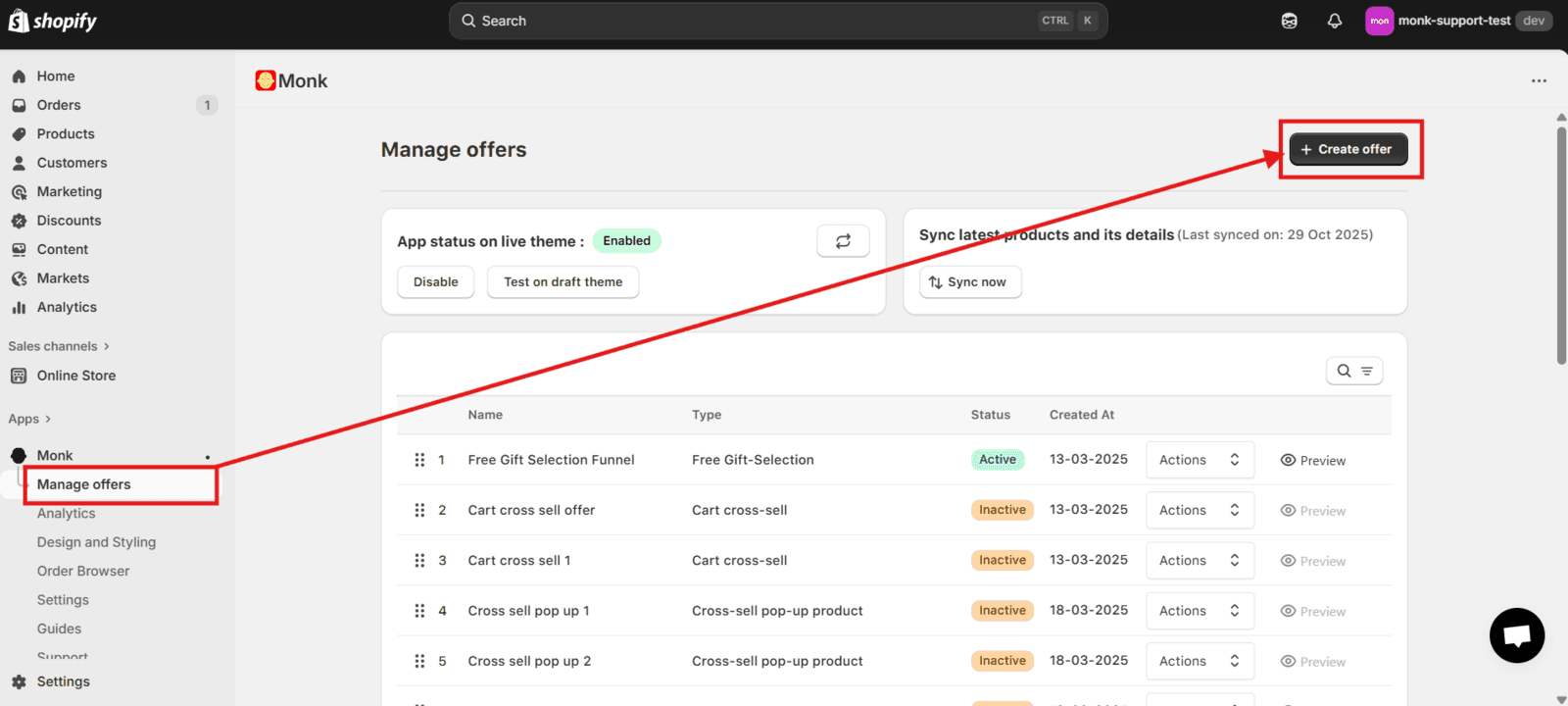
Go to Manage Offers in your Monk dashboard > click Create Offer (top right) > Custom Offer > Cross-sell & Product Groups > Cross-sell
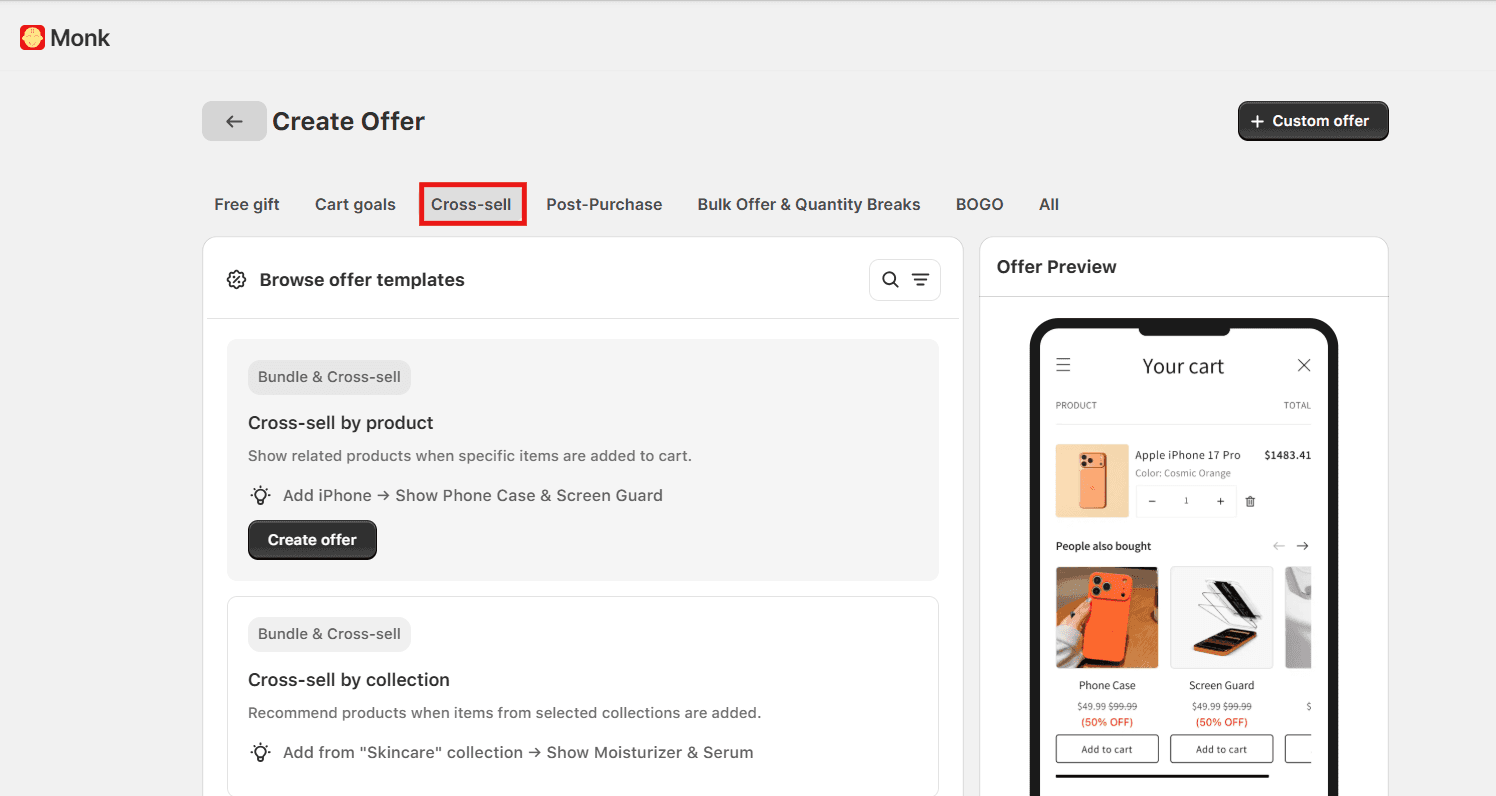
You'll find a variety of pre-built templates to choose from. If your upsell structure matches one of them, select it and proceed. If not, you can custom-build your offer from scratch as well.
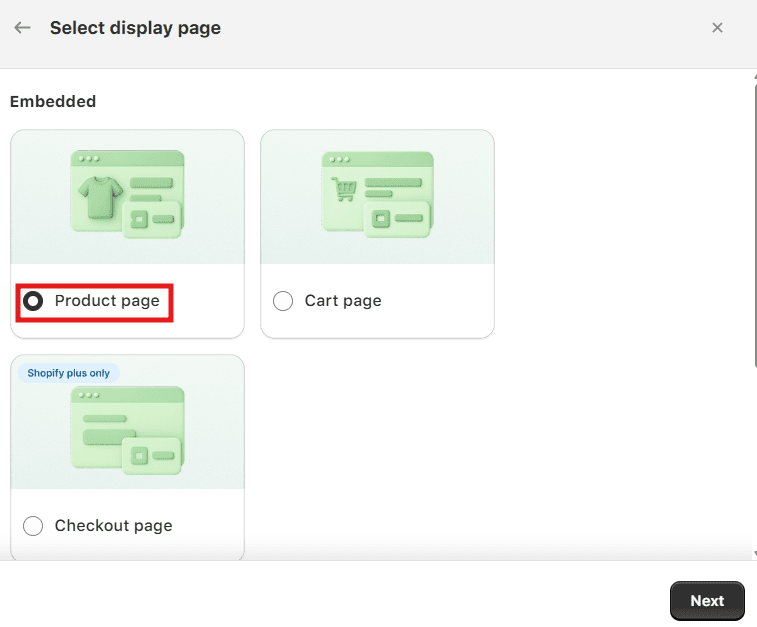
Select how you desire to display the offer, then click Next to name your offer. Naming your offer correctly is crucial, as the name is displayed as the discount in the cart and checkout. Ensure not to use generic names to avoid misuse.
Eligibility and Display
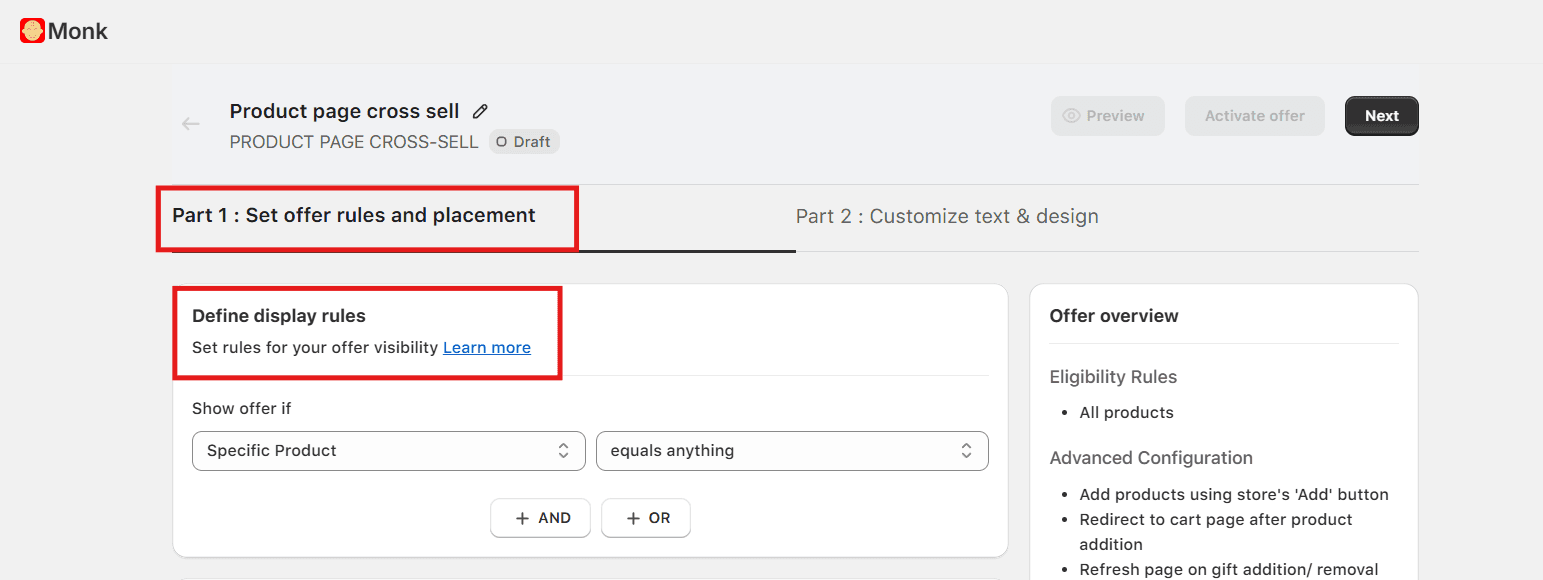
In Step 1 of the offer setup inside Monk, configure your eligibility rule to determine which products or cart conditions trigger the upsell.
Monk's eligibility rules give you granular control over who sees which offer and when.
For example, you can set the upsell to appear on the specific product pages or when the cart meets a minimum value.
Product Selection and Discount
Select the upsell product(s) you want to display inside the widget. You can apply a discount to the upsell product, either as a percentage off or a flat discount, giving customers a clear financial incentive to accept the offer.
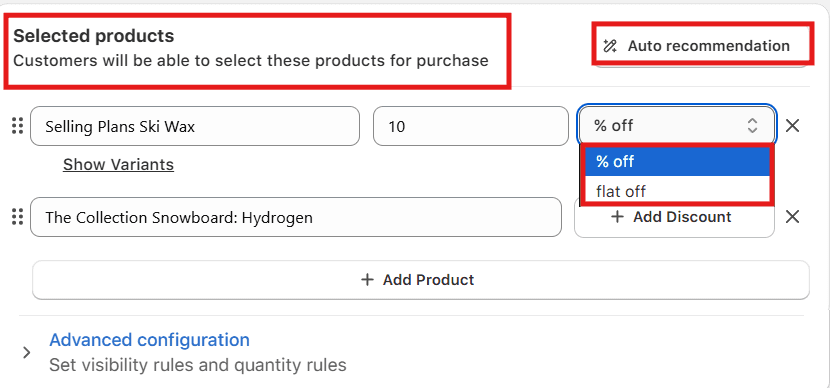
If you'd prefer not to manually curate upsell products, enable auto-recommendation and set the number of products you want the widget to display.
Note: Monk uses Shopify's AI algorithm to surface products based on your store's best-sellers and past purchase behavior.
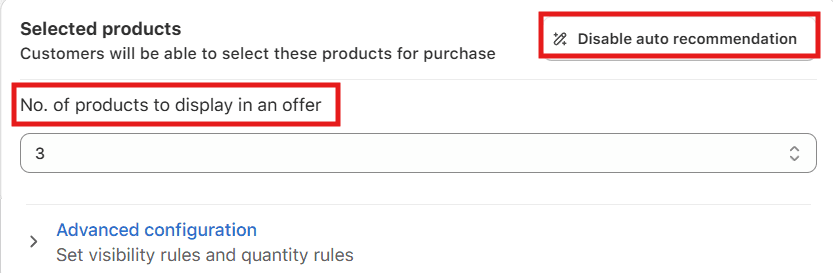
Note: Auto Recommendation works best for stores processing 10,000+ orders per month, as the algorithm needs sufficient data to generate accurate suggestions. This feature is not available for sandbox, testing, or development stores. |
Step 6: Test and Optimize
Consistent testing and optimization of your upsell offers separates stores that see a 5% AOV increase from those that see 25%+.
Run A/B tests
Change the headline copy, swap the product image, adjust the discount amount, or shift the placement.
Avoid testing multiple variables simultaneously, as it makes it impossible to know what’s working.
Give each test at least 100–200 offer impressions before drawing conclusions.
Track metrics
Metric | What to measure | Benchmark |
Offer Acceptance Rate | % of customers who see the offer and take it | 5–10% is solid; 15%+ is excellent (post-purchase) |
AOV Lift | AOV before vs. after upsells, or upsell vs. non-upsell sessions | Target 15–20% improvement |
Revenue Per Session | Whether upsells are meaningfully increasing per-visit revenue | Should trend upward after implementation |
Conversion Rate Impact | Whether upsell offers are causing primary purchase abandonment | Any drop signals or offers are too aggressive or poorly placed |
Refresh offers seasonally
A bundle that converts well in January around leftover holiday stock won't resonate in April. Align your upsell calendar with your promotional schedule and proactively rotate offers. Don't wait for performance to drop before making a change.
Take customer feedback
If support tickets or reviews mention that upsell pop-ups feel pushy or confusing, that's a signal worth acting on. The best upsell offers feel like helpful recommendations. When customers feel respected, they convert and come back.
Best Practices for High-Converting Upsell Offers
Across thousands of Shopify stores, the upsell offers that consistently perform best share these characteristics:
Keep it singular: Present one clear, compelling offer because decision fatigue is real, so the more choices you give, the lower the acceptance rate on any individual offer.
Make the value obvious: Ensure the customer immediately understands what they're getting and why it's a good deal, since ambiguous offers get ignored.
Use the language of enhancement: Include phrases like ‘complete your order,’ ‘customers love this with,’ and ‘take your results further with’ in your vocabulary.
Implement a mobile-first design: Create a responsive, fast-loading, and easy-to-interact-with upsell widget for the small screen.
Limit frequency. Set frequency caps in your app settings to ensure offers appear contextually, not repeatedly like an annoying pop-up cycle.
Make it easy to decline: Have the option to say ‘no thanks’ easily visible, as it increases the acceptance rate of upselling.
Combined offer strategy: For an effective and profitable strategy, combine upsell with free gifts with purchase offers in Shopify
Proven Upsell Strategies to Increase AOV
The strategies below are consistently the highest-performing across Shopify stores. Each one works by tapping into a different customer motivation, which is why the best stores use them in combination rather than relying on any single approach.
Strategy | How it works | Best for | Key tips |
Product bundling | Group related products at a combined price lower than the cost of buying them separately. Triggers the ‘I'd buy these anyway’ mindset. | Stores with complementary products or multi-step routines (skincare, fitness, food) | Use your top-selling product as the bundle anchor. Offer fixed, build-your-own, or ‘frequently bought together’ bundle types. |
Free shipping thresholds | Set a minimum order value for free shipping and show a cart progress bar to close the gap. | Almost every Shopify store's shipping cost anxiety is the #1 cart abandonment trigger | Set the threshold just above your current AOV. Pair the progress bar with product suggestions in the gap price range. |
Volume discounts | Offer tiered pricing for buying more units of the same product (e.g., buy 1 for ₹499, buy 2 for ₹449 each). | Consumables, supplements, apparel, anything customers naturally repurchase | Label the middle tier ‘Most Popular.’ Show savings in absolute rupee amounts, not just percentages. |
Personalized recommendations | Use purchase history, browsing behavior, and product tags to surface relevant upsells. | Stores with large catalogs or repeat customers | Build a strong product tagging taxonomy. Layer manual rules on top of AI suggestions for the best results. |
Common Mistakes to Avoid
Even well-intentioned upsell strategies can hurt conversions if executed poorly. Watch out for these:
Too many offers at once: Upsells on the product page, in the cart, and at checkout simultaneously feel like a gauntlet. Pick one or two placements and do them well.
Irrelevant recommendations: Suggesting unrelated products signals you don't know your customer. Make sure your recommendation logic is properly configured.
Pricing the upsell too high: If the upsell costs more than what's already in the cart, it creates friction. Keep upsell products priced at roughly 25–40% of the original item's value.
Poor mobile experience: A widget that breaks on mobile is worse than no widget at all. Always QA your upsell flows across devices before going live.
Setting it and forgetting it: Launching an offer and never revisiting it leaves money on the table. Treat your upsell stack as a system that improves with continuous testing.
Making it hard to decline: A tiny close button or guilt-tripping copy frustrates customers and can cause cart abandonment. Make saying no easy because it increases overall acceptance rates.
Ignoring post-purchase upsells: The order confirmation page is one of the highest-converting upsell moments in the entire funnel. If you're not using it, you're missing straightforward revenue.
How Monk Helps You Increase AOV
Upselling improves the customer experience by helping shoppers discover products they genuinely need and get more value from their purchase.
For a high-performing upsell strategy: identify the right opportunities in your catalog, choose the strategies that fit your store's context, implement them with the right tools, and optimize relentlessly based on data.
You don't need to do everything at once. Start with a single high-intent placement, for example, the cart drawer or the post-purchase page. Then, nail that before layering in more complexity. Even a single well-executed upsell offer can move your AOV by 10–15% within weeks.
Monk’s upsell features make this process accessible for merchants at every stage. Whether you're a DTC brand just starting or a scaling store looking to optimize an existing funnel, Monk gives you the tools to increase AOV without compromising the shopping experience.
FAQs
What is the best upsell strategy for Shopify stores?
The best upsell strategy depends on your product type and customer behavior. Still, post-purchase upsells consistently deliver the highest acceptance rates because they appear after the customer has already committed to buying.
In-cart upsell progress bars with a free shipping threshold are also highly effective and work well for most store types. Ideally, layer multiple strategies across your funnel for maximum impact.
How do I add upsell offers without affecting conversions?
Upsell offers should never interrupt or compete with the primary purchase decision. Post-purchase upsells are the safest because they appear after the transaction is complete. In-cart and checkout upsells should be lightweight and easy to dismiss.
Always ensure your upsell widgets are mobile-optimized, visually consistent with your store, and priced appropriately relative to the original product. Monitor your main conversion rate closely after adding any upsell; if it drops, audit your placements.
What is the difference between upsell and cross-sell?
An upsell encourages the customer to purchase a higher-tier or premium version of the product they're considering. A cross-sell recommends a related or complementary product alongside the original.
Refer to this article to know the difference between upsell vs. cross-sell in detail.
Do upsell apps slow down Shopify stores?
Shopify store speed depends on the app and its architecture. Apps that inject custom JavaScript directly into your storefront can negatively impact page load speed and Core Web Vitals.
Well-built apps, particularly those that use Shopify's native app blocks and checkout extensions, have minimal performance impact. Monk is lightweight and performance-conscious.
How much can upselling increase AOV?
Shopify stores can see an AOV increase of 10–30% with upselling. Some stores in high-affinity categories (supplements, skincare, electronics accessories) report even higher lifts when bundles and volume discounts are combined with post-purchase offers. The exact improvement depends on your product catalog, price points, and how well your offers are targeted and designed.
Where should I place upsell offers in Shopify?
The highest-converting placements for upsells in Shopify, in order of typical performance, are: (1) post-purchase / order confirmation page: highest acceptance rate, zero risk of disrupting checkout; (2) cart drawer or cart page: high purchase intent, natural moment to add items; (3) checkout page (Shopify Plus only): order bumps in native checkout convert well; (4) product page: pre-cart bundles and upgrade offers work for considered purchases.
How to Add Upsell Offers on Shopify to Increase AOV (Step-by-Step Guide)
Summary
Upselling in Shopify increases average order value by encouraging customers in a buying mindset to upgrade products, add bundles, or include complementary items. Even small AOV gains can significantly boost revenue without extra ad spend.
Effective upsell strategies include product upgrades, cross-sells, bundles, post-purchase offers, and threshold-based incentives like free shipping progress bars. Implementation involves identifying relevant opportunities, selecting suitable strategies, and using Shopify apps for in-cart, checkout, and post-purchase placements.
Key success factors are relevance, timing, simplicity, mobile optimization, and continuous testing. Post-purchase and cart-based upsells typically perform best, with well-optimized stores achieving 10 to 30 percent AOV growth.
In today’s competitive e-commerce space, if you're not upselling, you're leaving money on the table with every single order.
Average Order Value (AOV) is one of the most powerful metrics in e-commerce. Even a modest 15–20% increase in AOV can dramatically boost your revenue without spending a single extra dollar on ads. Upselling in Shopify is one of the most direct, proven way to move that number.
In this guide, you'll learn how to add upsell offers on Shopify to increase AOV. Whether you're just getting started or looking to optimize an existing upsell flow, this is your complete playbook.
Why Upsell Offers are Critical for Increasing AOV
Upselling works because the customer is already in a buying mindset.
The hardest part of any sale is earning trust and intent. When a shopper adds a product to their cart or completes a purchase, they've already cleared that hurdle. Presenting a relevant upgrade or add-on at that moment requires far less persuasion than converting a cold visitor.
In fact, upselling done right creates a better shopping experience. When you recommend a genuinely relevant product, such as a premium version, a complementary accessory, or a larger size at a discount, you're helping the customer get more value. That builds loyalty and increases Average Order Value (AOV) and lifetime value (LTV), not just the immediate order.
Step-by-Step Guide to Add Upsell Offers on Shopify
This section breaks the entire process down into six actionable steps, making it easy for you to set up an upsell in Monk.
Step 1: Identify Upsell Opportunities
The foundation of a successful upsell strategy is relevance. Irrelevant offers annoy customers and hurt conversions. Relevant ones delight them and drive revenue.
Start by auditing your product catalog with these questions in mind:
Which products have natural premium versions?
If you sell a basic face moisturizer for $59, do you also offer an advanced moisturizer with SPF for $129? That price gap is a natural upsell opportunity.
Which products are frequently bought together?
Dig into your Shopify Analytics to find products with high affinity. If 40% of customers who buy a yoga mat also buy a yoga block, that's a cross-sell (or bundle) opportunity waiting to be activated.
Where are customers dropping off?
Use your customer purchase history data to identify the moments where customers hesitate or abandon. Occasionally a well-timed upsell, like a free shipping threshold nudge, is what converts a fence-sitter.
What is your average order value today?
Establish your baseline before you begin. Shopify's analytics dashboard gives you this number directly. Set a realistic target; don't hesitate to test and iterate your tiers.
Once you've mapped your opportunities, categorize them:
Pre-cart upsells: Upgrades shown on the product page before the customer adds to the cart.
In-cart upsells: Add-ons or bundles shown in the cart drawer or cart page.
Checkout upsells: Offers shown during the checkout flow (available on Shopify Plus via checkout extensions).
Post-purchase upsells: Offers displayed immediately after the order is placed, before the thank-you page fully loads.
Step 2: Choose the Right Upsell Strategy
Not every upsell tactic works for every store. The right strategy depends on your product type, price point, and customer behavior. Here are the main approaches:
True Upselling: Recommending a higher-tier version of the product a customer is already viewing or purchasing.
For example, ‘Upgrade to the Pro plan for just $50 more.’ This works best for products with clear good, better, and best tiers.
Cross-Selling: Recommending complementary products.
For example, ‘Customers who bought this water bottle also love our insulated bag.’ This is especially suitable for accessory-heavy categories like electronics, fitness, and fashion.
Bundle Upselling: Offering a curated bundle at a discount.
For example, ‘Get the full skincare kit with cleanser, toner, and moisturizer for $199 instead of $259.’ Bundles increase perceived value and significantly raise AOV.
Post-Purchase Upselling: One of the most underused tactics. After a customer completes their order, they're in a highly trusting and intentional state.
A one-click post-purchase offer that lets them avoid re-entering their payment details can convert at 5–15%, which is exceptional for any offer.
Threshold-Based Upselling: Showing a progress bar that says ‘Spend $30 more to get free shipping.’
This nudges customers to add more items to their cart organically, without feeling like a hard sell.
Choose the strategy (or combination of strategies) that aligns best with your catalog and customer journey. You can layer multiple tactics across the funnel.
Step 3: Install a Shopify Upsell App
Shopify's native functionality has improved significantly, but to run sophisticated upsell offers, especially post-purchase upsells and one-click checkout upsells, you'll need a dedicated app.
Here's how to choose the right upsell app:
Define your requirements first: Do you need post-purchase upsells only, or do you want in-cart and product-page upsells as well?
Also, consider whether you need AI-powered recommendations or if manual curation works for your catalog size.
Check for checkout extensibility: If you're on Shopify Plus, look for apps that use Shopify's native checkout extensions rather than injecting custom scripts.
This ensures your checkout remains fast, secure, and compliant with Shopify's standards.
Look for one-click upsell functionality: The best apps let customers accept post-purchase offers with a single tap without re-entering payment details.
This dramatically increases conversion rates since it's extremely convenient for your customers to make multiple transactions.
Evaluate analytics and A/B testing: Ensure the upsell app provides granular data on offer views, acceptance rates, and revenue attributed to each offer.
Consistently staying in touch with analytics helps you improve customer experience significantly. Without this, you're flying blind.
Monk Free Gift Bogo Upsell is one of the leading options in this space. It offers a comprehensive suite of upsell and AOV optimization tools, including cart upsells, free gift offers, volume discounts, post-purchase flows, and a highly customizable cart drawer. All this is designed specifically for Shopify merchants who want to increase AOV without compromising the shopping experience.
You can install Monk from the Shopify App Store.
Step 4: Create Convertible Offers using Monk
Installing the app is just the beginning. Next, you have to craft offers that customers want to accept. Here's how you can do it using Monk:
Offer Creation
Go to Manage Offers in your Monk dashboard > click Create Offer (top right) > Custom Offer > Cross-sell & Product Groups > Cross-sell
You'll find a variety of pre-built templates to choose from. If your upsell structure matches one of them, select it and proceed. If not, you can custom-build your offer from scratch as well.
Select how you desire to display the offer, then click Next to name your offer. Naming your offer correctly is crucial, as the name is displayed as the discount in the cart and checkout. Ensure not to use generic names to avoid misuse.
Eligibility and Display
In Step 1 of the offer setup inside Monk, configure your eligibility rule to determine which products or cart conditions trigger the upsell.
Monk's eligibility rules give you granular control over who sees which offer and when.
For example, you can set the upsell to appear on the specific product pages or when the cart meets a minimum value.
Product Selection and Discount
Select the upsell product(s) you want to display inside the widget. You can apply a discount to the upsell product, either as a percentage off or a flat discount, giving customers a clear financial incentive to accept the offer.
If you'd prefer not to manually curate upsell products, enable auto-recommendation and set the number of products you want the widget to display.
Note: Monk uses Shopify's AI algorithm to surface products based on your store's best-sellers and past purchase behavior.
Note: Auto Recommendation works best for stores processing 10,000+ orders per month, as the algorithm needs sufficient data to generate accurate suggestions. This feature is not available for sandbox, testing, or development stores. |
Step 6: Test and Optimize
Consistent testing and optimization of your upsell offers separates stores that see a 5% AOV increase from those that see 25%+.
Run A/B tests
Change the headline copy, swap the product image, adjust the discount amount, or shift the placement.
Avoid testing multiple variables simultaneously, as it makes it impossible to know what’s working.
Give each test at least 100–200 offer impressions before drawing conclusions.
Track metrics
Metric | What to measure | Benchmark |
Offer Acceptance Rate | % of customers who see the offer and take it | 5–10% is solid; 15%+ is excellent (post-purchase) |
AOV Lift | AOV before vs. after upsells, or upsell vs. non-upsell sessions | Target 15–20% improvement |
Revenue Per Session | Whether upsells are meaningfully increasing per-visit revenue | Should trend upward after implementation |
Conversion Rate Impact | Whether upsell offers are causing primary purchase abandonment | Any drop signals or offers are too aggressive or poorly placed |
Refresh offers seasonally
A bundle that converts well in January around leftover holiday stock won't resonate in April. Align your upsell calendar with your promotional schedule and proactively rotate offers. Don't wait for performance to drop before making a change.
Take customer feedback
If support tickets or reviews mention that upsell pop-ups feel pushy or confusing, that's a signal worth acting on. The best upsell offers feel like helpful recommendations. When customers feel respected, they convert and come back.
Best Practices for High-Converting Upsell Offers
Across thousands of Shopify stores, the upsell offers that consistently perform best share these characteristics:
Keep it singular: Present one clear, compelling offer because decision fatigue is real, so the more choices you give, the lower the acceptance rate on any individual offer.
Make the value obvious: Ensure the customer immediately understands what they're getting and why it's a good deal, since ambiguous offers get ignored.
Use the language of enhancement: Include phrases like ‘complete your order,’ ‘customers love this with,’ and ‘take your results further with’ in your vocabulary.
Implement a mobile-first design: Create a responsive, fast-loading, and easy-to-interact-with upsell widget for the small screen.
Limit frequency. Set frequency caps in your app settings to ensure offers appear contextually, not repeatedly like an annoying pop-up cycle.
Make it easy to decline: Have the option to say ‘no thanks’ easily visible, as it increases the acceptance rate of upselling.
Combined offer strategy: For an effective and profitable strategy, combine upsell with free gifts with purchase offers in Shopify
Proven Upsell Strategies to Increase AOV
The strategies below are consistently the highest-performing across Shopify stores. Each one works by tapping into a different customer motivation, which is why the best stores use them in combination rather than relying on any single approach.
Strategy | How it works | Best for | Key tips |
Product bundling | Group related products at a combined price lower than the cost of buying them separately. Triggers the ‘I'd buy these anyway’ mindset. | Stores with complementary products or multi-step routines (skincare, fitness, food) | Use your top-selling product as the bundle anchor. Offer fixed, build-your-own, or ‘frequently bought together’ bundle types. |
Free shipping thresholds | Set a minimum order value for free shipping and show a cart progress bar to close the gap. | Almost every Shopify store's shipping cost anxiety is the #1 cart abandonment trigger | Set the threshold just above your current AOV. Pair the progress bar with product suggestions in the gap price range. |
Volume discounts | Offer tiered pricing for buying more units of the same product (e.g., buy 1 for ₹499, buy 2 for ₹449 each). | Consumables, supplements, apparel, anything customers naturally repurchase | Label the middle tier ‘Most Popular.’ Show savings in absolute rupee amounts, not just percentages. |
Personalized recommendations | Use purchase history, browsing behavior, and product tags to surface relevant upsells. | Stores with large catalogs or repeat customers | Build a strong product tagging taxonomy. Layer manual rules on top of AI suggestions for the best results. |
Common Mistakes to Avoid
Even well-intentioned upsell strategies can hurt conversions if executed poorly. Watch out for these:
Too many offers at once: Upsells on the product page, in the cart, and at checkout simultaneously feel like a gauntlet. Pick one or two placements and do them well.
Irrelevant recommendations: Suggesting unrelated products signals you don't know your customer. Make sure your recommendation logic is properly configured.
Pricing the upsell too high: If the upsell costs more than what's already in the cart, it creates friction. Keep upsell products priced at roughly 25–40% of the original item's value.
Poor mobile experience: A widget that breaks on mobile is worse than no widget at all. Always QA your upsell flows across devices before going live.
Setting it and forgetting it: Launching an offer and never revisiting it leaves money on the table. Treat your upsell stack as a system that improves with continuous testing.
Making it hard to decline: A tiny close button or guilt-tripping copy frustrates customers and can cause cart abandonment. Make saying no easy because it increases overall acceptance rates.
Ignoring post-purchase upsells: The order confirmation page is one of the highest-converting upsell moments in the entire funnel. If you're not using it, you're missing straightforward revenue.
How Monk Helps You Increase AOV
Upselling improves the customer experience by helping shoppers discover products they genuinely need and get more value from their purchase.
For a high-performing upsell strategy: identify the right opportunities in your catalog, choose the strategies that fit your store's context, implement them with the right tools, and optimize relentlessly based on data.
You don't need to do everything at once. Start with a single high-intent placement, for example, the cart drawer or the post-purchase page. Then, nail that before layering in more complexity. Even a single well-executed upsell offer can move your AOV by 10–15% within weeks.
Monk’s upsell features make this process accessible for merchants at every stage. Whether you're a DTC brand just starting or a scaling store looking to optimize an existing funnel, Monk gives you the tools to increase AOV without compromising the shopping experience.
FAQs
What is the best upsell strategy for Shopify stores?
The best upsell strategy depends on your product type and customer behavior. Still, post-purchase upsells consistently deliver the highest acceptance rates because they appear after the customer has already committed to buying.
In-cart upsell progress bars with a free shipping threshold are also highly effective and work well for most store types. Ideally, layer multiple strategies across your funnel for maximum impact.
How do I add upsell offers without affecting conversions?
Upsell offers should never interrupt or compete with the primary purchase decision. Post-purchase upsells are the safest because they appear after the transaction is complete. In-cart and checkout upsells should be lightweight and easy to dismiss.
Always ensure your upsell widgets are mobile-optimized, visually consistent with your store, and priced appropriately relative to the original product. Monitor your main conversion rate closely after adding any upsell; if it drops, audit your placements.
What is the difference between upsell and cross-sell?
An upsell encourages the customer to purchase a higher-tier or premium version of the product they're considering. A cross-sell recommends a related or complementary product alongside the original.
Refer to this article to know the difference between upsell vs. cross-sell in detail.
Do upsell apps slow down Shopify stores?
Shopify store speed depends on the app and its architecture. Apps that inject custom JavaScript directly into your storefront can negatively impact page load speed and Core Web Vitals.
Well-built apps, particularly those that use Shopify's native app blocks and checkout extensions, have minimal performance impact. Monk is lightweight and performance-conscious.
How much can upselling increase AOV?
Shopify stores can see an AOV increase of 10–30% with upselling. Some stores in high-affinity categories (supplements, skincare, electronics accessories) report even higher lifts when bundles and volume discounts are combined with post-purchase offers. The exact improvement depends on your product catalog, price points, and how well your offers are targeted and designed.
Where should I place upsell offers in Shopify?
The highest-converting placements for upsells in Shopify, in order of typical performance, are: (1) post-purchase / order confirmation page: highest acceptance rate, zero risk of disrupting checkout; (2) cart drawer or cart page: high purchase intent, natural moment to add items; (3) checkout page (Shopify Plus only): order bumps in native checkout convert well; (4) product page: pre-cart bundles and upgrade offers work for considered purchases.
Ravish (RV)
Co-Founder, Monk Commerce
Ravish is an ecommerce and SaaS marketing expert with 6+ years of experience in Shopify and ecommerce and 10+ years of experience in marketing, and growth strategy. He has worked closely with Shopify merchants to solve real ecommerce challenges and shares practical, research-backed insights, industry best practices, and emerging trends.
Contents
Related Articles
Upsell vs Cross-Sell in Shopify: Key Differences, Examples & Strategies
Cross-Selling Examples That Drive More Revenue in Ecommerce
10 Best Upsell Apps for Shopify to Boost Sales & AOV in 2026
Get Monk Free Gift app for just $1/month this Black Friday
First month: $1 after your 7-day free trial. All features included. Offer live!
Claim offer now

Get Monk Free Gift app for just $1/month this Black Friday
First month: $1 after your 7-day free trial. All features included. Offer live!
Claim offer now
Get Monk Free Gift app for just $1/month this Black Friday
First month: $1 after your 7-day free trial. All features included. Offer live!
Claim offer now