
7 Post Purchase Upsell Strategies Shopify Stores Use to Increase AOV
Summary
Post-purchase upsells on Shopify help increase revenue by targeting customers right after checkout, when trust and buying intent are highest. These offers, such as add-ons, bundles, or discounts, require no extra acquisition cost and can significantly boost average order value. With one-click acceptance and no need to re-enter payment details, they create a frictionless experience. Effective strategies include complementary products, limited-time offers, personalization, and subscriptions. When optimized with relevant offers and proper timing, post-purchase upsells become a scalable and high ROI growth strategy for Shopify stores.

Key Takeaways
Post-purchase upsells on Shopify help increase revenue by targeting customers right after checkout, when trust and buying intent are highest. These offers, such as add-ons, bundles, or discounts, require no extra acquisition cost and can significantly boost average order value. With one-click acceptance and no need to re-enter payment details, they create a frictionless experience. Effective strategies include complementary products, limited-time offers, personalization, and subscriptions. When optimized with relevant offers and proper timing, post-purchase upsells become a scalable and high ROI growth strategy for Shopify stores.
Most stores treat a completed checkout as the finish line. It isn't. The moment a customer places an order is actually the best time to show them something else they'll want, because they already trust you, their card is already out, and they're still in a buying mindset. That window is short. Used well, it quietly compounds into one of the highest-returning strategies in your store. This strategy is called "post-purchase upsell" in Shopify.
Post-purchase is a powerful revenue driver that requires zero additional customer acquisition costs. More than that, it signals to your customer that you genuinely understand their needs and are invested in delivering value beyond the transaction.
Ready to hook your customers with post-purchase offers they can't refuse? This guide breaks down the full potential of the post-purchase strategy along with proven tactics and best practices to help you execute it. Ensure you combine it with proven easy strategies like discounts, BOGO, and free gifts with purchase on Shopify store to maximize revenue and benefits.
What Is a Post-Purchase Upsell?
A post-purchase upsell is an offer shown to a customer immediately after they complete checkout, before they leave your store. It could be a related product, an upgrade, or a small add-on that pairs with what they just bought. Because the customer has already made a purchase decision, their intent is still high, which makes this the best moment to present something else worth buying.
Let's take an example to better understand this.
Say you run a Shopify skincare store, and someone just bought a face wash. The moment they complete checkout, your store automatically shows them, "Before you go, complete your skincare routine with this moisturizer. Enjoy 20% off today."
This way, the customer doesn't have to search, and there’s no need to re-enter card details. Just one click, and it's added to their order.
Quick Note: |
Why Post-Purchase Upsells Matter for Shopify Stores
Getting a customer to your Shopify store takes a lot of funds, marketing strategies, and consistent effort. Now that the customer is already on your store and the acquisition cost has been recouped, it's easier for businesses to sell more to customers who are already there.
Here's why post-purchase upsell deserves a place in your store's strategy:
No extra acquisition cost: Getting a new customer to your store costs money: ads, campaigns, and promotions. But a post-purchase upsell targets someone who has already bought from you, which means you're generating additional revenue without spending a single extra dollar on marketing.
Timing works in your favor: Right after checkout, your customer is in their happiest buying state. They've just made a decision they feel good about, and their trust in your store is at its peak. An offer presented at this moment feels natural, not pushy.
Increases your average order value: Instead of relying solely on getting more customers through the door, post-purchase upsells help you earn more from each transaction that's already happening. Over time, even small increases in order value compound into significant revenue growth.
Personalizes the shopping experience: When your upsell offer is relevant, it doesn't feel like a random promotion. It feels like your store actually paid attention to what the customer needed.
Works in the background: Once you set it up on your Shopify store, the process runs on its own. The right offer gets shown to the right customer at the right time, without you having to manually intervene every single time.
Builds the foundation for repeat purchases: A customer who buys twice is far more likely to come back a third time. Post-purchase upsells gently nudge first-time buyers toward becoming regulars, which is where the real long-term value for your store lies.
Also read: Learn how to add upsell offers to Shopify to increase AOV
7 Effective Post-Purchase Upsell Strategies
While a post-purchase upsell can be effective, how and where you do it are equally crucial to make the most of it. Here are seven strategies that get real results:
1. Offer Complementary Products
When a customer completes a purchase, show them a product that naturally complements what they just bought, making their original purchase more useful, more complete, or a better experience overall.
This way, you're not pushing a random product on them. You're showing them something that genuinely makes sense given what they already chose. This works so well because the offer doesn't feel forced.
For example, Say a customer just purchased a camera from your Shopify store. Right after checkout, your store shows them an offer for a camera bag and a memory card, two things they're almost certainly going to need anyway, on the thank you page. Instead of searching for these separately, they can add them to their order in one click. They get convenience, and you get a higher order value. |
2. Use One-Click Upsells
A one-click upsell is exactly what it sounds like; after a customer completes their purchase, they're shown an additional offer they can accept with a single click. No re-entering card details, no going back to the cart, no sitting through another checkout process. Their payment information is already saved, so adding the upsell product to their order is completely seamless.
This simplicity is what makes it so effective. The moment you add extra steps between a customer and an impulse decision, you risk losing them entirely. One-click upsells keep that buying momentum alive right where it matters most.
3. Limited-Time Post-Checkout Offers
A limited-time post-checkout offer is a deal you present to a customer right after they complete their purchase, with a countdown attached. The offer is only available for a short window, sometimes a few minutes, sometimes a few hours, and once that timer hits zero, it's gone.
What makes this work is urgency. When a customer sees a ticking clock next to an offer, the decision suddenly feels much more urgent. There's no "I'll come back to this later" because there is no later. That psychological nudge is often all it takes to push someone from considering to buying.
For example, Right after checkout, on the Thank You page, a customer is shown an offer for a complimentary product at 25% off, available for the next 10 minutes. That timer on the screen makes the decision feel urgent without coming across as aggressive. |
4. Bundle Discounts After Checkout
A post-checkout bundle discount is when you group a set of related products and offer them to the customer at a better price than they'd get if they bought each item individually. The customer has already spent money, and now they're being shown a way to get more value for less.
This works because it reframes the offer around savings rather than spending. The customer isn't just buying more; they're getting a deal that actually makes sense for them, which makes the decision feel smart rather than impulsive.
For example, Right after checkout, on the Thank You page, offer a bundle: a second bag of beans, a coffee grinder, and a reusable filter at a 30% combined discount. The customer gets a complete coffee setup at a better price, and your store sees a significantly higher order value from that single transaction. |
5. Personalized Product Recommendations
A personalized product recommendation is when your store shows a customer an upsell offer tailored to what they just bought. It's not a generic bestseller or a random promotion but a product that directly relates to their previous purchases and likely needs as a buyer.
When the recommendation feels tailored, customers feel your store actually paid attention to what they wanted. That shift in perception makes them far more open to considering the offer.
For example, Say you run a Shopify fitness store and a customer just bought a yoga mat. Instead of showing them a generic "top sellers" upsell, your store recommends a yoga block and a stretch strap. Because the suggestion feels relevant and thoughtful, the customer is far more likely to engage with it than they would with an offer that has nothing to do with their order. |
6. Subscription Upsells
A subscription upsell is when you offer a customer the option to turn their one-time purchase into a recurring order (usually at a slightly discounted rate) right after they complete checkout. Instead of buying the product once, they sign up to receive it automatically every month, every two weeks, or at whatever interval makes sense for that product.
For your store, this is one of the most valuable upsells you can offer because it locks in predictable, recurring revenue from a customer you've already acquired.
For example, Say you run a Shopify pet store and a customer just bought a bag of dog food. Right after checkout, they're shown an offer: "Subscribe and save 15%. Get this delivered to your door every month." For the customer, it's convenient and cheaper. For your store, it means that the customer is a returning source of revenue without you having to win them over again. |
7. Loyalty or Reward Upsells
A loyalty or reward upsell is when you encourage a customer to make an additional purchase by tying it to a tangible benefit, such as points, store credit, a reward, or a perk they can unlock by spending just a little more.
What makes this different from a standard upsell is that it gives the customer a reason to buy beyond the product itself. They're not just adding something to their order; they're working toward something, which makes the act of spending feel more rewarding than it otherwise would.
How Post-Purchase Upsells Work in Shopify
Post-purchase upsells on Shopify are relatively straightforward to set up. Here's a simple breakdown of how the whole thing actually works from your end as a store owner.
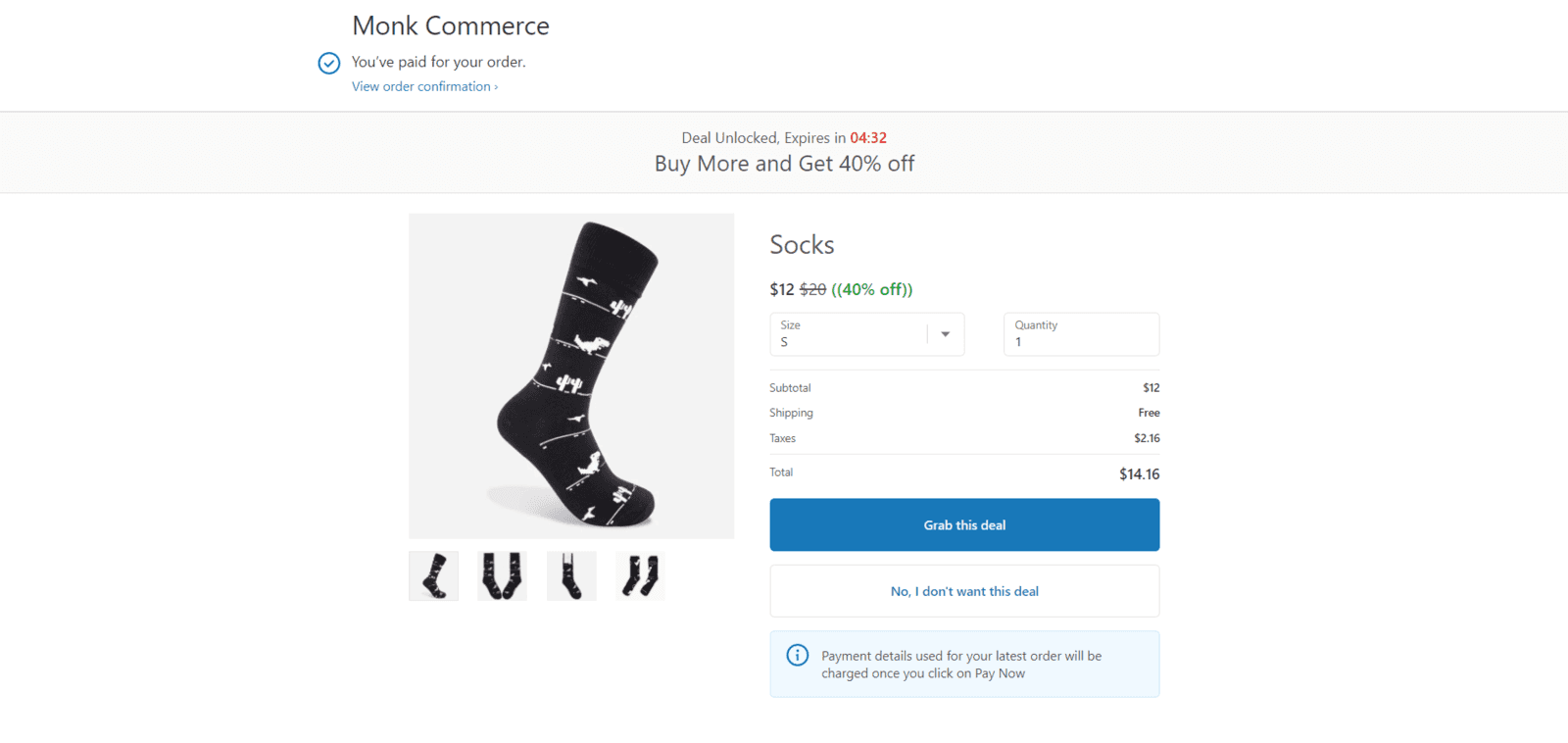
When a customer completes their purchase and clicks "Place Order," Shopify's checkout process moves them to a confirmation page. This is the exact moment where a post-purchase upsell steps in.
Before the customer reaches the standard order confirmation screen, they're shown an offer that they can accept or decline without going through the checkout process again.
What makes this possible on Shopify is the platform's native post-purchase extensibility, which allows apps and built-in features to inject offers between the payment confirmation and the thank-you page.
This means the customer's payment details are already captured and verified, so accepting an upsell is as simple as tapping one button.
From your side as a store owner, here's roughly how it comes together:
You choose the trigger product and set up the offer: You set up a rule that says when a customer buys product X, show them offer Y. Now, you set the offer, if it's a complementary product, a discounted bundle, a subscription option, or any other upsell type. You decide the price, the discount, and how the offer is presented.
The app or feature handles the timing: Once everything is configured, the upsell appears automatically at the right moment, right after payment is confirmed, before the thank-you page loads. You don't have to manually trigger anything.
The customer makes their choice: They either accept the offer with one click or decline it and move on to the confirmation page. Either way, their original order is completely unaffected.
The upsell gets added to the same order: If they accept, the new product is added directly to their existing order. No new transaction, no separate fulfillment headache.
Shopify also has a growing ecosystem of apps like Monk Free Gift + BOGO that give you more control over how these upsells look, how they're targeted, and how they perform over time. Let's look at how post-purchase upsell works through the app.
How Monk Free Gift + BOGO Helps Optimize Post-Purchase Upsells
Shopify's native post-purchase features give you a starting point, but they leave a lot of the heavy lifting to you. Monk Free Gift is built specifically to close that gap, giving Shopify store owners a cleaner, smarter, and more conversion-focused way to run post-purchase upsells without the complexity.
Here's what sets Monk Free Gift + BOGO apart and how it actually works in your store:
It shows up at exactly the right moment: Monk Free Gift post-purchase offer appears on the order confirmation page, right before the customer lands on the thank-you page. This placement is intentional, placed after the purchase is complete, which means there's zero risk of the offer disrupting your checkout flow or hurting your store's conversion rate.
It's genuinely one-click: When a customer sees a Monk Free Gift + BOGO upsell offer and clicks "Grab this deal," the product is automatically added to their existing order and billed to the same payment method. This means no new checkout, no re-entering details, no friction whatsoever. That seamless experience is a big reason why Monk Free Gift sees take rates as high as 20% in some stores.
It's fully customizable to your store's look and feel: Unlike generic upsell placements, Monk Free Gift + BOGO lets you completely customize how your post-purchase offer looks so it feels like a natural extension of your store's design rather than a third-party widget added at the end.
Setup takes only a few minutes: Getting a post-purchase offer live on your Shopify store with Monk Free Gift + BOGO is a one-time, roughly 10-minute setup. Once it's configured, it runs automatically, showing the right offer to the right customer every time, without you having to manage it manually.
It works with major payment methods: Monk Free Gift + BOGO post-purchase upsells are powered by Shopify's official checkout extension and are compatible with credit cards, ShopPay, and PayPal Express, covering the majority of how your customers are likely already paying.
Learn how Monk's post-purchase offer works
Best Practices and Common Mistakes to Avoid in Post-Purchase Upsells
Getting a post-purchase upsell live on your Shopify store is the easy part. Getting it to actually convert is where most store owners stumble. Here are the most common mistakes that quietly kill post-purchase upsell performance and what to do instead:
Showing irrelevant products: The fastest way to get a customer to ignore your upsell is to show them something that has nothing to do with what they just bought. A random bestseller or a clearance product thrown in as an afterthought tells the customer your store isn't paying attention to them.
Solution: Make relevance your first priority. The upsell product should feel like a natural extension of the original purchase, something the customer would logically need or want alongside what they just ordered.
Overwhelming the customer with too many options: Presenting three, four, or five products at once doesn't give the customer more to choose from; it gives them a reason to choose nothing. Too many options create decision fatigue, and at the post-checkout stage, that almost always means the customer moves on without acting.
Solution: One to two well-chosen products with a clear benefit convert far better than a cluttered offer page trying to do too much at once.
Pricing the upsell too high: A post-purchase upsell is meant to incrementally add value to an existing order, not to sell the customer an entirely new high-ticket item. When the upsell price feels steep relative to what they've already spent, it breaks the momentum entirely.
Solution: Keep the upsell affordable and sweeten it with a discount wherever possible. A good rule of thumb is to ensure the upsell doesn't increase the total order value by more than 20-40% of what the customer originally spent.
Setting it up once and never revisiting it: A post-purchase upsell isn't a set-it-and-forget-it situation. If you're not tracking how your offers are performing, you have no way of knowing what's working, what isn't, and where you're leaving money on the table.
Solution: Check your upsell performance regularly. Test different products, different price points, and different offer formats. Small tweaks based on real data can significantly improve your take rates over time.
Increase AOV With Post-Purchase Upsell
Post-purchase upsells are one of the most underleveraged growth tools available to Shopify store owners today. The customer is already there, trust has already been built, and the purchase is already complete. All you're doing is presenting the right offer at the right moment.
From one-click upsells and bundle discounts to personalized recommendations and loyalty rewards, every strategy covered in this guide works toward the same goal: more revenue from customers you've already won.
If you're looking for the simplest way to get started, Monk Free Gift + BOGO gives you everything you need to set up high-converting post-purchase offers quickly, without the technical headache.
Frequently Asked Questions
Can upsells work for low-priced products?
Yes, upsells often work especially well for low-priced products. When the original purchase is low-priced, customers are already in a low-commitment buying mindset, making them more open to adding a small, affordable item to their order.
Do post-purchase upsells affect refunds?
If a customer requests a refund on an order that includes an accepted upsell, the upsell product is typically treated as part of the same order and refunded accordingly. It's worth having a clear refund policy on your store so customers know exactly what to expect.
Are upsells better than cross-sells?
Upsells and cross-sells serve slightly different purposes; hence, it's impossible to say one's better than the other. An upsell encourages the customer to spend more on an upgraded or premium version of what they're buying. "Cross-sell" suggests a related product alongside the original product. Learn the difference between upsell and cross-sell.
How many upsell offers should a store show?
One or two upsell offers are enough for a store. Showing multiple offers at once overwhelms customers and lowers take rates. A single, focused, relevant offer will almost always outperform a page full of options. Keep it simple and let the offer's relevance do the work.
Can upsells increase customer retention?
Yes, upsell offers can increase customer retention when done right. A well-placed upsell that genuinely adds value to a customer's purchase makes the overall shopping experience feel more personalized and thoughtful. Customers who feel understood are more likely to come back, making post-purchase upsells a quiet contributor to long-term retention.
Are post-purchase offers mobile-friendly?
Yes, post-purchase offers should be mobile-friendly, as most modern upsell setups on Shopify are designed with mobile in mind. Since a significant portion of e-commerce traffic comes from mobile devices, it's worth double-checking that your upsell offer displays cleanly on smaller screens before going live.
Can small Shopify stores use upsell strategies?
Yes, post-purchase upsells aren't just for large stores with big catalogs. Even a store with a handful of products can set up a relevant, effective upsell offer. In fact, smaller stores often benefit more because they can be more deliberate about which products they pair.
Do upsells slow down the checkout process?
No, post-purchase upsells appear after checkout is complete, so they have no impact on the checkout process itself. The customer's order is confirmed before they ever see the upsell offer, so there's no interference with the buying journey.
7 Post Purchase Upsell Strategies Shopify Stores Use to Increase AOV
Summary
Post-purchase upsells on Shopify help increase revenue by targeting customers right after checkout, when trust and buying intent are highest. These offers, such as add-ons, bundles, or discounts, require no extra acquisition cost and can significantly boost average order value. With one-click acceptance and no need to re-enter payment details, they create a frictionless experience. Effective strategies include complementary products, limited-time offers, personalization, and subscriptions. When optimized with relevant offers and proper timing, post-purchase upsells become a scalable and high ROI growth strategy for Shopify stores.
Most stores treat a completed checkout as the finish line. It isn't. The moment a customer places an order is actually the best time to show them something else they'll want, because they already trust you, their card is already out, and they're still in a buying mindset. That window is short. Used well, it quietly compounds into one of the highest-returning strategies in your store. This strategy is called "post-purchase upsell" in Shopify.
Post-purchase is a powerful revenue driver that requires zero additional customer acquisition costs. More than that, it signals to your customer that you genuinely understand their needs and are invested in delivering value beyond the transaction.
Ready to hook your customers with post-purchase offers they can't refuse? This guide breaks down the full potential of the post-purchase strategy along with proven tactics and best practices to help you execute it. Ensure you combine it with proven easy strategies like discounts, BOGO, and free gifts with purchase on Shopify store to maximize revenue and benefits.
What Is a Post-Purchase Upsell?
A post-purchase upsell is an offer shown to a customer immediately after they complete checkout, before they leave your store. It could be a related product, an upgrade, or a small add-on that pairs with what they just bought. Because the customer has already made a purchase decision, their intent is still high, which makes this the best moment to present something else worth buying.
Let's take an example to better understand this.
Say you run a Shopify skincare store, and someone just bought a face wash. The moment they complete checkout, your store automatically shows them, "Before you go, complete your skincare routine with this moisturizer. Enjoy 20% off today."
This way, the customer doesn't have to search, and there’s no need to re-enter card details. Just one click, and it's added to their order.
Quick Note: |
Why Post-Purchase Upsells Matter for Shopify Stores
Getting a customer to your Shopify store takes a lot of funds, marketing strategies, and consistent effort. Now that the customer is already on your store and the acquisition cost has been recouped, it's easier for businesses to sell more to customers who are already there.
Here's why post-purchase upsell deserves a place in your store's strategy:
No extra acquisition cost: Getting a new customer to your store costs money: ads, campaigns, and promotions. But a post-purchase upsell targets someone who has already bought from you, which means you're generating additional revenue without spending a single extra dollar on marketing.
Timing works in your favor: Right after checkout, your customer is in their happiest buying state. They've just made a decision they feel good about, and their trust in your store is at its peak. An offer presented at this moment feels natural, not pushy.
Increases your average order value: Instead of relying solely on getting more customers through the door, post-purchase upsells help you earn more from each transaction that's already happening. Over time, even small increases in order value compound into significant revenue growth.
Personalizes the shopping experience: When your upsell offer is relevant, it doesn't feel like a random promotion. It feels like your store actually paid attention to what the customer needed.
Works in the background: Once you set it up on your Shopify store, the process runs on its own. The right offer gets shown to the right customer at the right time, without you having to manually intervene every single time.
Builds the foundation for repeat purchases: A customer who buys twice is far more likely to come back a third time. Post-purchase upsells gently nudge first-time buyers toward becoming regulars, which is where the real long-term value for your store lies.
Also read: Learn how to add upsell offers to Shopify to increase AOV
7 Effective Post-Purchase Upsell Strategies
While a post-purchase upsell can be effective, how and where you do it are equally crucial to make the most of it. Here are seven strategies that get real results:
1. Offer Complementary Products
When a customer completes a purchase, show them a product that naturally complements what they just bought, making their original purchase more useful, more complete, or a better experience overall.
This way, you're not pushing a random product on them. You're showing them something that genuinely makes sense given what they already chose. This works so well because the offer doesn't feel forced.
For example, Say a customer just purchased a camera from your Shopify store. Right after checkout, your store shows them an offer for a camera bag and a memory card, two things they're almost certainly going to need anyway, on the thank you page. Instead of searching for these separately, they can add them to their order in one click. They get convenience, and you get a higher order value. |
2. Use One-Click Upsells
A one-click upsell is exactly what it sounds like; after a customer completes their purchase, they're shown an additional offer they can accept with a single click. No re-entering card details, no going back to the cart, no sitting through another checkout process. Their payment information is already saved, so adding the upsell product to their order is completely seamless.
This simplicity is what makes it so effective. The moment you add extra steps between a customer and an impulse decision, you risk losing them entirely. One-click upsells keep that buying momentum alive right where it matters most.
3. Limited-Time Post-Checkout Offers
A limited-time post-checkout offer is a deal you present to a customer right after they complete their purchase, with a countdown attached. The offer is only available for a short window, sometimes a few minutes, sometimes a few hours, and once that timer hits zero, it's gone.
What makes this work is urgency. When a customer sees a ticking clock next to an offer, the decision suddenly feels much more urgent. There's no "I'll come back to this later" because there is no later. That psychological nudge is often all it takes to push someone from considering to buying.
For example, Right after checkout, on the Thank You page, a customer is shown an offer for a complimentary product at 25% off, available for the next 10 minutes. That timer on the screen makes the decision feel urgent without coming across as aggressive. |
4. Bundle Discounts After Checkout
A post-checkout bundle discount is when you group a set of related products and offer them to the customer at a better price than they'd get if they bought each item individually. The customer has already spent money, and now they're being shown a way to get more value for less.
This works because it reframes the offer around savings rather than spending. The customer isn't just buying more; they're getting a deal that actually makes sense for them, which makes the decision feel smart rather than impulsive.
For example, Right after checkout, on the Thank You page, offer a bundle: a second bag of beans, a coffee grinder, and a reusable filter at a 30% combined discount. The customer gets a complete coffee setup at a better price, and your store sees a significantly higher order value from that single transaction. |
5. Personalized Product Recommendations
A personalized product recommendation is when your store shows a customer an upsell offer tailored to what they just bought. It's not a generic bestseller or a random promotion but a product that directly relates to their previous purchases and likely needs as a buyer.
When the recommendation feels tailored, customers feel your store actually paid attention to what they wanted. That shift in perception makes them far more open to considering the offer.
For example, Say you run a Shopify fitness store and a customer just bought a yoga mat. Instead of showing them a generic "top sellers" upsell, your store recommends a yoga block and a stretch strap. Because the suggestion feels relevant and thoughtful, the customer is far more likely to engage with it than they would with an offer that has nothing to do with their order. |
6. Subscription Upsells
A subscription upsell is when you offer a customer the option to turn their one-time purchase into a recurring order (usually at a slightly discounted rate) right after they complete checkout. Instead of buying the product once, they sign up to receive it automatically every month, every two weeks, or at whatever interval makes sense for that product.
For your store, this is one of the most valuable upsells you can offer because it locks in predictable, recurring revenue from a customer you've already acquired.
For example, Say you run a Shopify pet store and a customer just bought a bag of dog food. Right after checkout, they're shown an offer: "Subscribe and save 15%. Get this delivered to your door every month." For the customer, it's convenient and cheaper. For your store, it means that the customer is a returning source of revenue without you having to win them over again. |
7. Loyalty or Reward Upsells
A loyalty or reward upsell is when you encourage a customer to make an additional purchase by tying it to a tangible benefit, such as points, store credit, a reward, or a perk they can unlock by spending just a little more.
What makes this different from a standard upsell is that it gives the customer a reason to buy beyond the product itself. They're not just adding something to their order; they're working toward something, which makes the act of spending feel more rewarding than it otherwise would.
How Post-Purchase Upsells Work in Shopify
Post-purchase upsells on Shopify are relatively straightforward to set up. Here's a simple breakdown of how the whole thing actually works from your end as a store owner.
When a customer completes their purchase and clicks "Place Order," Shopify's checkout process moves them to a confirmation page. This is the exact moment where a post-purchase upsell steps in.
Before the customer reaches the standard order confirmation screen, they're shown an offer that they can accept or decline without going through the checkout process again.
What makes this possible on Shopify is the platform's native post-purchase extensibility, which allows apps and built-in features to inject offers between the payment confirmation and the thank-you page.
This means the customer's payment details are already captured and verified, so accepting an upsell is as simple as tapping one button.
From your side as a store owner, here's roughly how it comes together:
You choose the trigger product and set up the offer: You set up a rule that says when a customer buys product X, show them offer Y. Now, you set the offer, if it's a complementary product, a discounted bundle, a subscription option, or any other upsell type. You decide the price, the discount, and how the offer is presented.
The app or feature handles the timing: Once everything is configured, the upsell appears automatically at the right moment, right after payment is confirmed, before the thank-you page loads. You don't have to manually trigger anything.
The customer makes their choice: They either accept the offer with one click or decline it and move on to the confirmation page. Either way, their original order is completely unaffected.
The upsell gets added to the same order: If they accept, the new product is added directly to their existing order. No new transaction, no separate fulfillment headache.
Shopify also has a growing ecosystem of apps like Monk Free Gift + BOGO that give you more control over how these upsells look, how they're targeted, and how they perform over time. Let's look at how post-purchase upsell works through the app.
How Monk Free Gift + BOGO Helps Optimize Post-Purchase Upsells
Shopify's native post-purchase features give you a starting point, but they leave a lot of the heavy lifting to you. Monk Free Gift is built specifically to close that gap, giving Shopify store owners a cleaner, smarter, and more conversion-focused way to run post-purchase upsells without the complexity.
Here's what sets Monk Free Gift + BOGO apart and how it actually works in your store:
It shows up at exactly the right moment: Monk Free Gift post-purchase offer appears on the order confirmation page, right before the customer lands on the thank-you page. This placement is intentional, placed after the purchase is complete, which means there's zero risk of the offer disrupting your checkout flow or hurting your store's conversion rate.
It's genuinely one-click: When a customer sees a Monk Free Gift + BOGO upsell offer and clicks "Grab this deal," the product is automatically added to their existing order and billed to the same payment method. This means no new checkout, no re-entering details, no friction whatsoever. That seamless experience is a big reason why Monk Free Gift sees take rates as high as 20% in some stores.
It's fully customizable to your store's look and feel: Unlike generic upsell placements, Monk Free Gift + BOGO lets you completely customize how your post-purchase offer looks so it feels like a natural extension of your store's design rather than a third-party widget added at the end.
Setup takes only a few minutes: Getting a post-purchase offer live on your Shopify store with Monk Free Gift + BOGO is a one-time, roughly 10-minute setup. Once it's configured, it runs automatically, showing the right offer to the right customer every time, without you having to manage it manually.
It works with major payment methods: Monk Free Gift + BOGO post-purchase upsells are powered by Shopify's official checkout extension and are compatible with credit cards, ShopPay, and PayPal Express, covering the majority of how your customers are likely already paying.
Learn how Monk's post-purchase offer works
Best Practices and Common Mistakes to Avoid in Post-Purchase Upsells
Getting a post-purchase upsell live on your Shopify store is the easy part. Getting it to actually convert is where most store owners stumble. Here are the most common mistakes that quietly kill post-purchase upsell performance and what to do instead:
Showing irrelevant products: The fastest way to get a customer to ignore your upsell is to show them something that has nothing to do with what they just bought. A random bestseller or a clearance product thrown in as an afterthought tells the customer your store isn't paying attention to them.
Solution: Make relevance your first priority. The upsell product should feel like a natural extension of the original purchase, something the customer would logically need or want alongside what they just ordered.
Overwhelming the customer with too many options: Presenting three, four, or five products at once doesn't give the customer more to choose from; it gives them a reason to choose nothing. Too many options create decision fatigue, and at the post-checkout stage, that almost always means the customer moves on without acting.
Solution: One to two well-chosen products with a clear benefit convert far better than a cluttered offer page trying to do too much at once.
Pricing the upsell too high: A post-purchase upsell is meant to incrementally add value to an existing order, not to sell the customer an entirely new high-ticket item. When the upsell price feels steep relative to what they've already spent, it breaks the momentum entirely.
Solution: Keep the upsell affordable and sweeten it with a discount wherever possible. A good rule of thumb is to ensure the upsell doesn't increase the total order value by more than 20-40% of what the customer originally spent.
Setting it up once and never revisiting it: A post-purchase upsell isn't a set-it-and-forget-it situation. If you're not tracking how your offers are performing, you have no way of knowing what's working, what isn't, and where you're leaving money on the table.
Solution: Check your upsell performance regularly. Test different products, different price points, and different offer formats. Small tweaks based on real data can significantly improve your take rates over time.
Increase AOV With Post-Purchase Upsell
Post-purchase upsells are one of the most underleveraged growth tools available to Shopify store owners today. The customer is already there, trust has already been built, and the purchase is already complete. All you're doing is presenting the right offer at the right moment.
From one-click upsells and bundle discounts to personalized recommendations and loyalty rewards, every strategy covered in this guide works toward the same goal: more revenue from customers you've already won.
If you're looking for the simplest way to get started, Monk Free Gift + BOGO gives you everything you need to set up high-converting post-purchase offers quickly, without the technical headache.
Frequently Asked Questions
Can upsells work for low-priced products?
Yes, upsells often work especially well for low-priced products. When the original purchase is low-priced, customers are already in a low-commitment buying mindset, making them more open to adding a small, affordable item to their order.
Do post-purchase upsells affect refunds?
If a customer requests a refund on an order that includes an accepted upsell, the upsell product is typically treated as part of the same order and refunded accordingly. It's worth having a clear refund policy on your store so customers know exactly what to expect.
Are upsells better than cross-sells?
Upsells and cross-sells serve slightly different purposes; hence, it's impossible to say one's better than the other. An upsell encourages the customer to spend more on an upgraded or premium version of what they're buying. "Cross-sell" suggests a related product alongside the original product. Learn the difference between upsell and cross-sell.
How many upsell offers should a store show?
One or two upsell offers are enough for a store. Showing multiple offers at once overwhelms customers and lowers take rates. A single, focused, relevant offer will almost always outperform a page full of options. Keep it simple and let the offer's relevance do the work.
Can upsells increase customer retention?
Yes, upsell offers can increase customer retention when done right. A well-placed upsell that genuinely adds value to a customer's purchase makes the overall shopping experience feel more personalized and thoughtful. Customers who feel understood are more likely to come back, making post-purchase upsells a quiet contributor to long-term retention.
Are post-purchase offers mobile-friendly?
Yes, post-purchase offers should be mobile-friendly, as most modern upsell setups on Shopify are designed with mobile in mind. Since a significant portion of e-commerce traffic comes from mobile devices, it's worth double-checking that your upsell offer displays cleanly on smaller screens before going live.
Can small Shopify stores use upsell strategies?
Yes, post-purchase upsells aren't just for large stores with big catalogs. Even a store with a handful of products can set up a relevant, effective upsell offer. In fact, smaller stores often benefit more because they can be more deliberate about which products they pair.
Do upsells slow down the checkout process?
No, post-purchase upsells appear after checkout is complete, so they have no impact on the checkout process itself. The customer's order is confirmed before they ever see the upsell offer, so there's no interference with the buying journey.
Contents
Related Articles
10 Best Upsell Apps for Shopify to Boost Sales & AOV in 2026
Upsell vs Cross-Sell in Shopify: Key Differences, Examples & Strategies
Shopify Upselling Guide for Beginners
Get Monk Free Gift app for just $1/month this Black Friday
First month: $1 after your 7-day free trial. All features included. Offer live!
Claim offer now

Get Monk Free Gift app for just $1/month this Black Friday
First month: $1 after your 7-day free trial. All features included. Offer live!
Claim offer now
Get Monk Free Gift app for just $1/month this Black Friday
First month: $1 after your 7-day free trial. All features included. Offer live!
Claim offer now