
Shopify Product Recommendation Strategies to Increase AOV & Conversions
Summary
Product recommendations in Shopify increase average order value and conversions by showing relevant products across the customer journey instead of relying only on traffic. Types include cross-sells, upsells, frequently bought together, personalized, similar, recently viewed, trending, new arrivals, cart-based and post-purchase suggestions. Placed on product pages, cart, checkout and post-purchase flows, they improve discoverability, reduce friction and drive repeat purchases. Effective strategies match intent, use behavior and purchase data, and are continuously tested. Tools like Monk help merchants implement and customize recommendations without code while tracking performance and revenue per order.

Ravish (RV)
Senior Content Writer
Ravish is an ecommerce and SaaS marketing expert with 6+ years of experience in Shopify and ecommerce and 10+ years of experience in marketing, and growth strategy. He has worked closely with Shopify merchants to solve real ecommerce challenges and shares practical, research-backed insights, industry best practices, and emerging trends.
Key Takeaways
Product recommendations in Shopify increase average order value and conversions by showing relevant products across the customer journey instead of relying only on traffic. Types include cross-sells, upsells, frequently bought together, personalized, similar, recently viewed, trending, new arrivals, cart-based and post-purchase suggestions. Placed on product pages, cart, checkout and post-purchase flows, they improve discoverability, reduce friction and drive repeat purchases. Effective strategies match intent, use behavior and purchase data, and are continuously tested. Tools like Monk help merchants implement and customize recommendations without code while tracking performance and revenue per order.
You might be focusing heavily on driving traffic for your Shopify stores, but traffic alone doesn't pay the bills. Converting more of that traffic into buyers and getting each buyer to spend more does.
This makes product recommendation strategies non-negotiable. It’s a good fit whether you’re running a lean DTC brand or a high-volume Shopify Plus store. Strategic product recommendations are one of the highest-ROI levers you can pull.
They work around the clock, guide shoppers toward relevant products, and gently nudge average order values upward without any extra ad spend.
In this guide, we'll break down every major type of Shopify product recommendation strategy for upselling in Shopify, where to place them for maximum impact, and how tools like Monk can help you execute them without writing a single line of code.
What are Product Recommendations in Shopify?
Product recommendations in Shopify are algorithmically or manually curated suggestions shown to shoppers during their browsing and buying journey.
Shopify's native recommendation engine uses collaborative filtering and purchase history to power basic suggestions. But many growing stores go further, using third-party apps and custom logic to show smarter, more targeted recommendations based on customer behavior, product relationships, and merchandising rules.
Done well, product recommendations are like helpful guidance from a knowledgeable salesperson, increasing the likelihood of purchase and the size of each order.
Why Product Recommendations are Critical for Shopify Stores
Here's why every growing Shopify store should prioritize them:
AOV growth: Increase the average amount each customer spends per order by surfacing relevant add-ons and upgrades at the right moment.
Product discoverability: Expose your full catalog to shoppers who would otherwise only see your top-listed or most-advertised SKUs.
Decision simplification: Reduce choice paralysis by curating a small, relevant selection instead of leaving customers to browse endlessly.
Repeat purchase encouragement: Bring customers back by introducing complementary products they didn't know they needed, turning one-time buyers into loyal shoppers.
Cart abandonment reduction: Keep shoppers engaged and moving toward checkout by showing them products that reinforce the value of what's already in their cart.
Zero extra ad spend: Drive more revenue from your existing traffic without increasing your customer acquisition cost.
Personalization at scale: Deliver a tailored shopping experience to every visitor, automatically, based on their behavior and preferences.
In short: product recommendations turn a one-product purchase into a two- or three-product purchase. Over thousands of monthly transactions, that compounds into serious revenue growth.
Types of Shopify Product Recommendations and Best Placement Areas
Different recommendation types serve different purposes, and they work best when placed in the right context. Here's a comprehensive breakdown:
Cross-Sell Recommendations / Complementary Products
Cross-sell recommendations suggest products that complement what a customer is currently viewing or has added to their cart. The classic example: a customer adds a camera to their cart, and you suggest a compatible memory card, carrying case, or lens cleaning kit.
Cross-selling in Shopify works by expanding the scope of the purchase without replacing it. You're not convincing someone to buy a different product. Instead, you're showing them what else they might need to get full value from what they're already buying.
Best placement areas:
Product page: ‘You might also need’ or ‘Complete the look’ blocks directly below the product description.
Cart drawer: ‘Add this too’ prompts are shown while the customer reviews their cart: high-intent moment, low friction.
Email flows: Post-browse or post-cart-abandon emails featuring complementary items to the last viewed product.
Upsell Recommendations
Upsells prompt customers to consider a higher-priced version of the product they're considering. For example, they might consider a premium tier, a larger size, or a more feature-rich variant. The goal is to increase the revenue per transaction by positioning the upgrade compellingly.
👀 Important to remember: Effective upsells communicate the value of upgrading. Rather than simply showing a more expensive option, they highlight the additional benefits: ‘For just $15 more, get the Pro version with double the capacity and a 2-year warranty.’
Best placement areas:
Product page: Display the premium variant prominently alongside the standard one with a comparison callout.
Cart drawer: Show the upgrade option with a clear value proposition before the customer checks out.
Checkout (Shopify Plus): Shopify Plus merchants can add upsell offers natively within the checkout flow, catching customers at the highest-intent moment.
Upsell vs Cross-sell in Shopify: Learn the difference
Frequently Bought Together
Frequently Bought Together (FBT) recommendations surface product combinations that customers commonly purchase together. This technique carries implicit social proof: if other customers bought these together, there must be a good reason.
FBT widgets typically allow customers to select additional items and add the entire bundle to their cart in a single click, reducing friction and making the decision feel like a no-brainer.
Best placement areas:
Product page: A dedicated FBT widget below the main product details, showing 2–3 complementary items with a combined price and an ‘Add all to cart’ CTA.
Cart drawer: ‘Others also added’ prompts based on the items currently in the cart.
Personalized Recommendations
Personalized recommendations are driven by individual customer data, such as purchase history, browsing behavior, wishlist items, and even demographic signals. Instead of showing every visitor the same products, personalized engines tailor suggestions to each individual's demonstrated interests.
For returning customers, this is especially critical. A customer who always buys skincare from your store should see skincare recommendations first, instead of makeup products.
Best placement areas:
Homepage: A ‘Picks for you’ or ‘Based on your history’ section for returning visitors.
Email and SMS flows: Highly personalized product recommendations based on purchase frequency and browsing patterns are far more effective than generic newsletters.
Product page: ‘You might like’ sections that shift based on the viewer's profile.
Similar / Related Products
Similar products show alternatives to what a customer is currently viewing. This might include products in the same category, at a similar price point, or with comparable features. It is valuable when a customer might not purchase the specific product they're viewing, but could be persuaded by a close alternative.
Best placement areas:
Product page: Below the fold, after the primary product details and reviews. Helps reduce exit rates when customers aren't convinced by the current product.
Out-of-stock pages: When a product is unavailable, related product recommendations keep customers engaged rather than sending them away.
Recently Viewed Products
Recently viewed recommendations show customers the products they've browsed in the current or previous sessions, allowing them to easily pick up where they left off. This is especially useful for comparison shoppers who browse multiple items before committing.
Best placement areas:
Product page: A persistent ‘Continue where you left off’ rail that follows the customer through their session.
Homepage: Displayed prominently for returning visitors to quickly resume their shopping journey.
Cart drawer: A gentle reminder of what they browsed but didn't add.
Trending / Bestsellers
Trending and bestseller recommendations use social proof at scale. Showing customers what other shoppers are buying creates a sense of popularity and urgency because nobody wants to miss out on what everyone else is getting.
These work particularly well for new visitors who haven't yet established browsing history on your store, giving them a trustworthy starting point.
Best placement areas:
Homepage: A ‘Top sellers this week’ or ‘Most popular’ section as a primary discovery tool for new visitors.
Category pages: Sorting or highlighting trending items at the top of collection grids.
Email and SMS flows: ‘What's trending right now’ campaigns for re-engagement.
New Arrivals
New arrival recommendations cater to repeat customers and loyal fans who want to be among the first to discover your latest products. They create a sense of freshness and give customers a reason to return regularly.
Best placement areas:
Homepage: A dedicated ‘New In’ section to capture the attention of returning visitors.
Email flows: ‘Just dropped’ campaigns sent to your most engaged subscriber segments.
Product page: A sidebar or footer row showing newly launched items from the same category.
Cart-Based Recommendations
Cart-based recommendations analyze the items in a customer's cart in real time and suggest complementary or frequently paired products. These are among the highest-converting recommendations because they reach customers at peak purchase intent, that is, when they've already decided to buy something.
Best placement areas:
Cart drawer: The primary home for cart-based recommendations. A well-placed ‘Add to your order’ block inside the cart drawer can significantly increase add-to-cart rates.
Checkout (Shopify Plus): Order-bump-style recommendations on the checkout page that can be added with a single click without interrupting the flow.
Post-Purchase Recommendations
Post-purchase recommendations appear after a customer completes their transaction. At this point, the customer is at their highest level of trust because they've committed to your brand. This makes it an ideal moment to introduce products they haven't considered yet.
Post-purchase recommendations also help reduce the ‘buyer's remorse’ window by keeping customers engaged and excited about expanding their purchase.
Best placement areas:
Thank you page: A native or app-powered post-purchase upsell shown immediately after the order confirmation, before the customer leaves your store.
Email and SMS flows: A ‘Complete your purchase’ or ‘Customers who bought X also loved Y’ email sent 1–3 days post-purchase.
Table 1: Shopify product recommendations and best placement areas
Product recommendation strategy | Product Type | Best Placement Areas |
Cross-sell recommendations |
|
|
Upsell Recommendations |
|
|
Frequently Bought Together |
|
|
Personalized recommendations |
|
|
Related Product recommendations |
|
|
Recently Viewed Products |
|
|
Trending recommendations |
|
|
New Arrivals |
|
|
Cart-Based Recommendations |
|
|
Top Shopify Product Recommendation Strategies
Now that we know the different types of product recommendations and their ideal placements, let’s see how to execute them to drive revenue.
Cover Every Stage of the Customer Journey
You cannot expect your Shopify store to work if you stop after dropping a single recommendation widget on your product page. The stores that see AOV (average order value) and conversion increases treat recommendations as a full-funnel system.
Which means every touchpoint from homepage to post-purchase has a role to play.
To get started: Map out your funnel, identify gaps, and ensure no stage is left without a relevant recommendation. |
Match the Recommendation Type to the Intent Signal
Not every recommendation type works at every moment. A customer browsing for the first time responds to trending and bestseller signals. Similarly, a returning customer responds to personalization.
Follow this: Train yourself to think about what the customer is trying to do right now and serve the recommendation type that fits that intent, not just what's easiest to implement. |
Lead with Value
A recommendation widget that just shows a product image and price is easy to ignore. The ones that convert frame the recommendation around value:
What problem does this solve?
What does the customer save?
Why do other customers buy it together?
For example: A label like ‘Most customers also grab this to protect their order’ outperforms a generic ‘You might also like’ every time. |
Use Discounts Surgically
Discounting every recommended product trains customers to wait for offers, eroding your margins. Instead, use discounts selectively:
Post-purchase upsells where the customer has already converted
Bundle upgrades where the combined saving feels meaningful
Exit-intent triggers as a genuine last resort
Let AI Handle Scale
AI-powered recommendation engines are excellent at processing behavioral data and surfacing relevant products at scale, but they still need strategic guardrails. Left completely unchecked, algorithms can surface irrelevant pairings, out-of-stock products, or low-margin items.
Important: Use AI for repetitive, manual, and analytical work, but set rules around which products are eligible, which are excluded, and which placements are off-limits. |
Build Recommendations Into Your Email and SMS Flows
On-site recommendations only reach customers who are already browsing. Email and SMS flows let you bring recommendations to customers who've left, and because they're triggered by real behavior (like a recent purchase), they land with far more relevance than a generic campaign.
Therefore, every major post-purchase, win-back, and browse-abandonment flow should have a recommendation component.
Test One Variable at a Time
Recommendation performance is easy to misinterpret when you're changing multiple things at once. Test widget placement separately from product selection and product selection separately from copy and framing.
Why do this: Small, controlled tests give you clean data. Which then tells you exactly what to double down on and what to reduce. |
Analyze and Calibrate Regularly
A recommendation that performed well six months ago may be actively hurting conversions today. This is even more critical if the products it surfaces are out of season, out of stock, or no longer relevant to your catalog.
Do this instead: Build a monthly or quarterly audit into your workflow. Remove underperformers, refresh stale combinations, and ensure every active widget is earning its place on the page. |
How Monk Helps You Implement These Strategies
Monk is a Shopify app built specifically to help merchants execute advanced upsell, cross-sell, and product recommendation strategies without needing a developer or writing any code.
Smart Cross-Sell Engine
Monk's cross-sell engine lets you define precise product relationships manually or have the system surface complementary products automatically based on purchase data.
Monk offers various templates for smart and ready-to-set-up cross-selling offers.
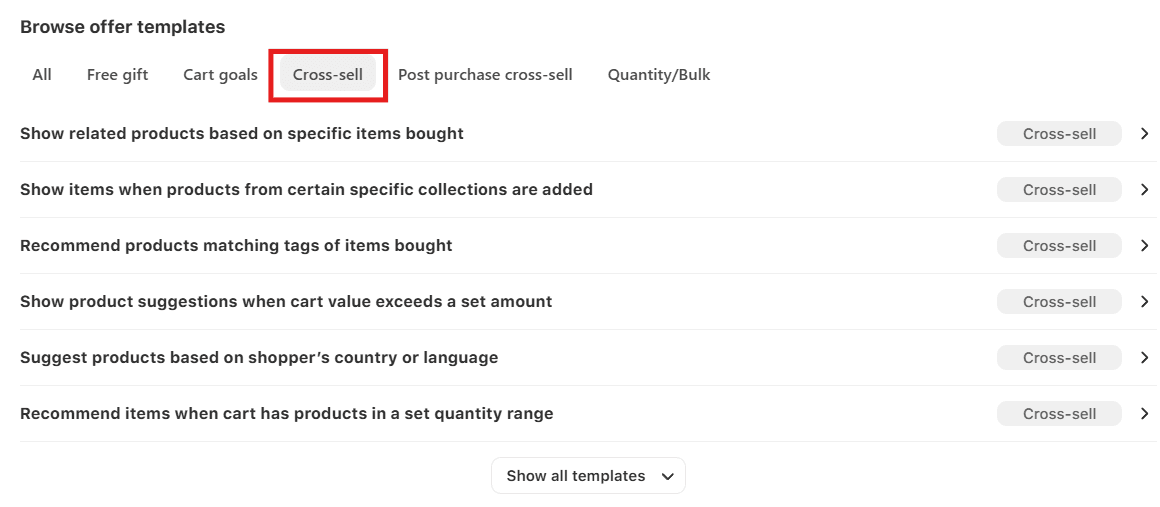
You control which products get recommended, on which pages, and under what conditions, giving you both the power of automation and the precision of manual curation.
Auto Frequently Bought Together Data
You can set up Monk’s cross sell settings to display your store's real order data to drive accurate Frequently Bought Together (FBT) widgets.
This is how the FBT offer will appear when configured using Monk:
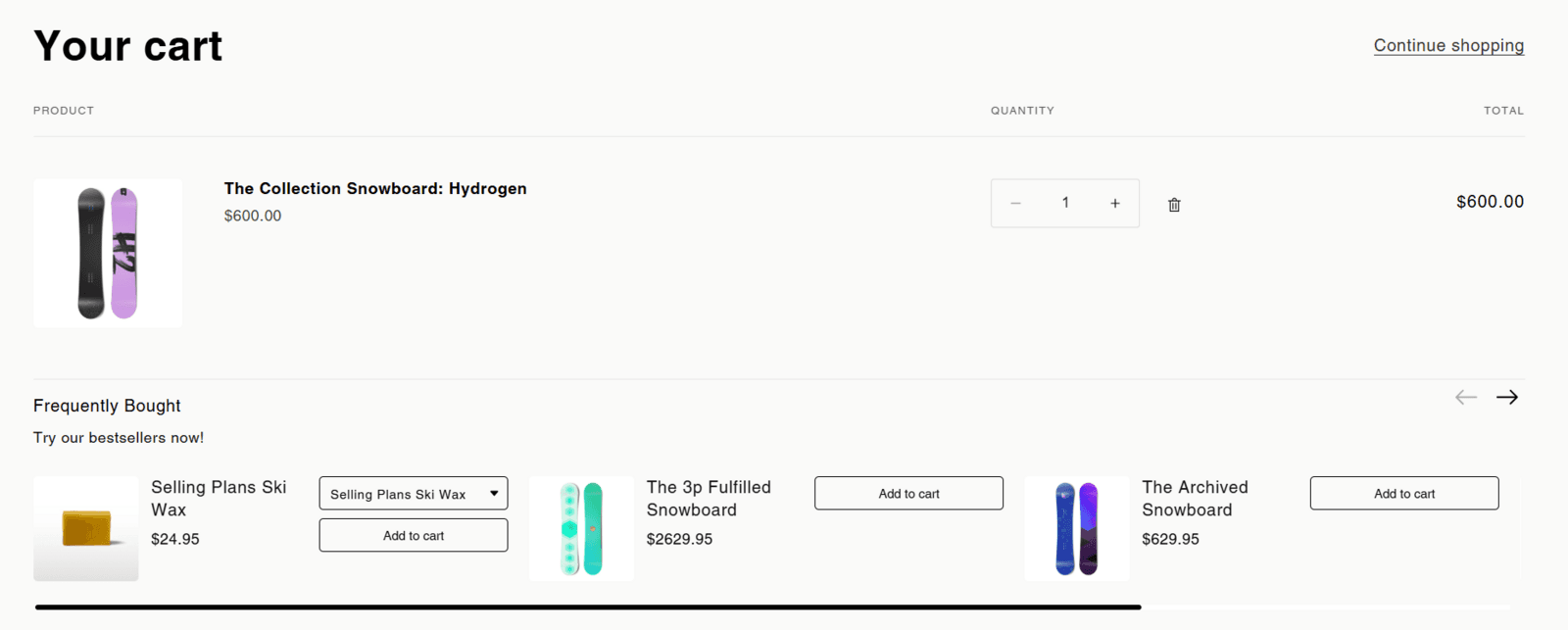
Monk's FBT logic is grounded in your actual customer purchase behavior, making the combinations genuinely relevant and conversion-optimized.
Flexible Placement
Monk supports recommendation placement across all the key pages in your funnel: product pages, the cart drawer, the checkout (Shopify Plus), and the post-purchase thank you page.
Here is an example:
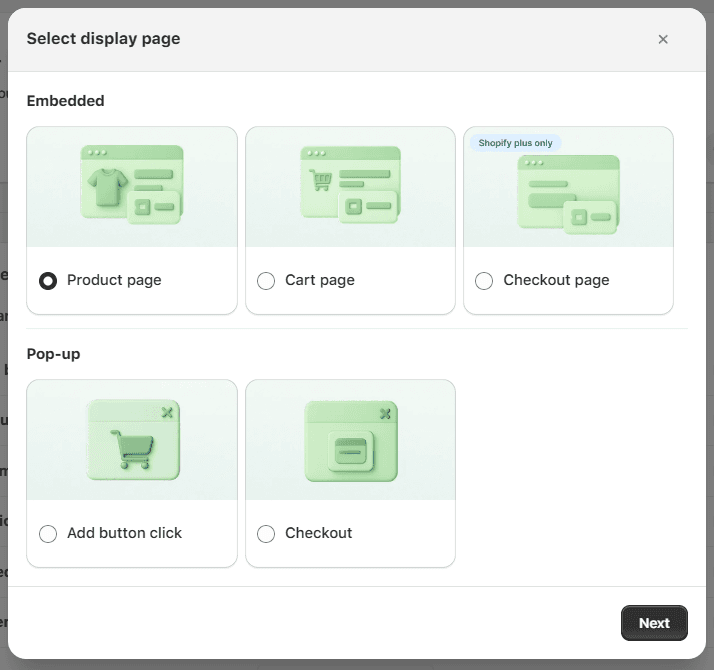
Each placement is independently configurable, allowing you to tailor the recommendation type and style to the context.
Thorough Customization
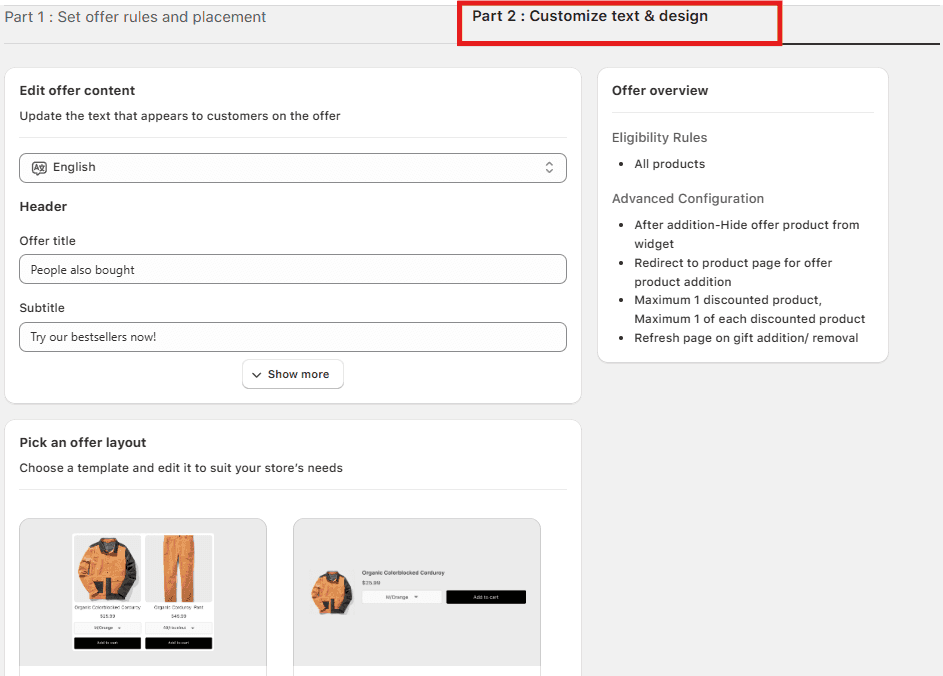
Every recommendation widget in Monk is fully customizable, from the number of products displayed to the layout, color scheme, button labels, and messaging. You can match your store's brand perfectly without touching a line of CSS.
Monk also gives you complete freedom to define the text and design of your widget:
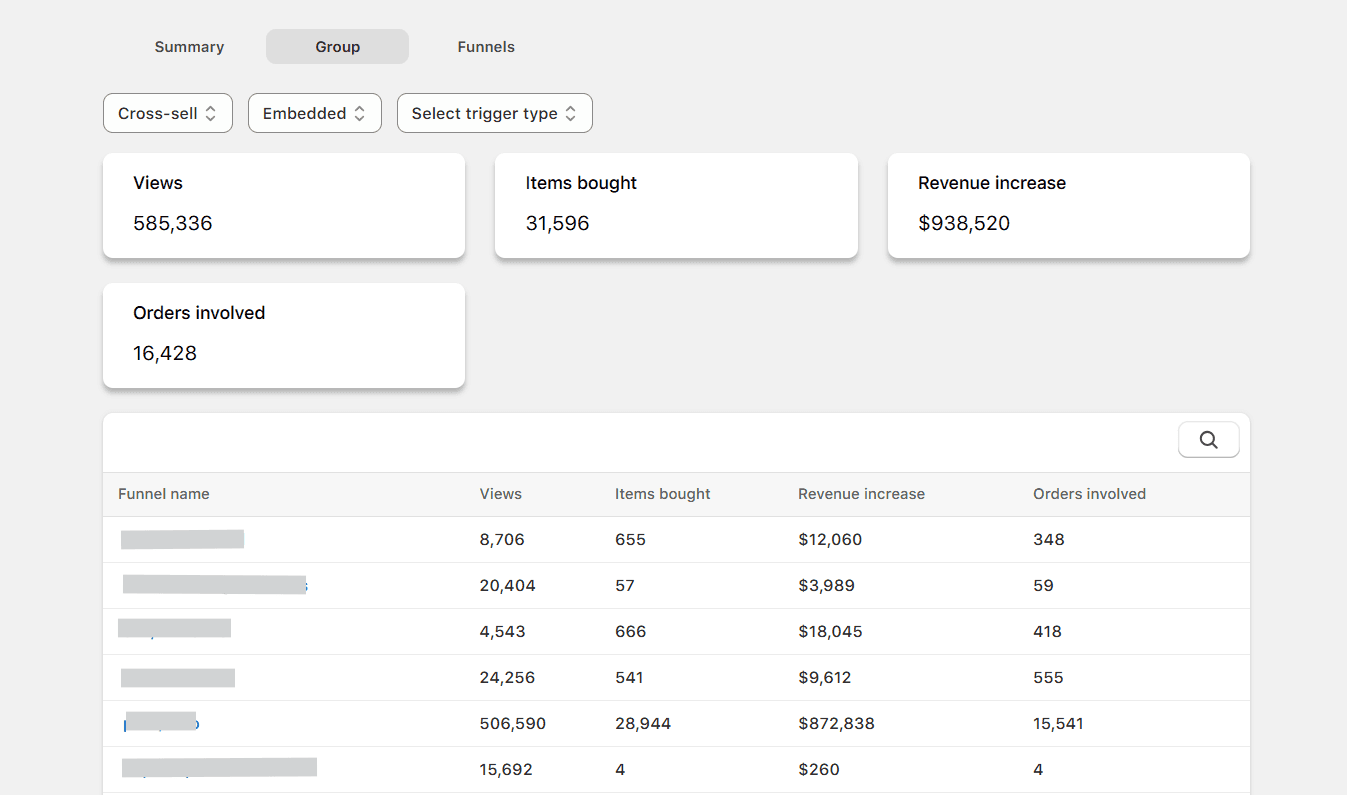
Detailed Offer-Level Analytics
Monk provides granular, offer-level analytics showing impressions, click-through rates, add-to-cart rates, and revenue generated for each recommendation widget. Tracking these helps you know exactly what's working and where you can improve.
Common Mistakes to Avoid
Here's where most Shopify stores go wrong:
Recommending irrelevant products: Showing products that have no logical relationship to what the customer is viewing destroys trust and feels spammy.
✅ Always tie recommendations to the product being viewed, what's in the cart, or the customer's browsing history.
Overloading pages with widgets: Too many recommendation sections compete with each other and with your primary CTAs, creating decision paralysis and reducing conversions.
✅ Pick one or two high-impact placements per page and do those well rather than cluttering every section.
Ignoring mobile experience: A beautifully designed recommendation widget on desktop can become a clunky mess on mobile.
✅ Since you’re designing UI for real users, make sure to test on real devices.
Not updating recommendations as your catalog evolves: Seasonal products, discontinued items, and new arrivals should all be reflected in your recommendation logic.
✅ Build a monthly audit into your workflow to keep pairings fresh and relevant.
Recommending out-of-stock products: Nothing ruins the upsell experience faster than a customer clicking through to a recommendation only to find it's unavailable.
✅ Ensure your recommendation engine filters out out-of-stock products automatically and verify this is working regularly.
Failing to measure performance: If you're not tracking which recommendations drive revenue, you're flying blind.
✅ Monitor performance at the widget level, like impressions, click-through rate, and attributed revenue, rather than just store-wide metrics.
A/B testing without statistical significance: Don't make changes based on small sample sizes.
✅ Give your tests enough time and traffic to reach meaningful conclusions before acting on the data.
Strategically Place Product Recommendations with Monk
When implemented thoughtfully across the full customer funnel, product recommendations increase Average Order Value, improve product discoverability, personalize the shopping experience, and turn one-time buyers into repeat customers.
The key is to approach recommendations strategically: understand the different types, place them in the right context, back them with social proof, keep them relevant, and continuously optimize based on real performance data.
Frequently Asked Questions
1. Do Shopify apps support product recommendations?
Yes, Shopify apps fully support product recommendations through a solid ecosystem of specialized tools designed for upselling and cross-selling.
Apps like Monk Free Gift Bogo & Upsell let you implement advanced strategies without coding. They integrate directly into your Shopify admin, offering visual editors to configure widgets, post-purchase offers, and detailed analytics to track the performance of your recommendations.
2. Where in my Shopify store can I add product recommendations?
You can add product recommendations throughout your entire Shopify store funnel to maximize visibility and conversion depending on your product and offer strategy.
The most effective placements include the homepage for trending items, product pages for frequently bought together bundles, and the cart drawer for high-converting impulse add-ons.
For a complete strategy, you should also include recommendations on the post-purchase thank-you page and within automated email or SMS flows to reach customers even after they have left your site.
3. Can I recommend products based on customers' purchase history or best-selling products?
Absolutely, most advanced Shopify recommendation apps let you power your offers with specific data points such as customer purchase history, real-time browsing behavior, and bestseller logic.
Recommending products based on an individual’s past purchases is a highly effective way to drive repeat sales from returning customers, while bestseller-based recommendations help build trust with first-time visitors who are still exploring your catalog.
4. Can I offer a discount on the recommended products in my store?
Yes, offering a discount on recommended products is a highly effective tactic for increasing conversion rates and Average Order Value (AOV).
Most Shopify upsell apps, including Monk, allow you to attach specific incentives to a recommendation, such as ‘Add this item now and save 15%’ or offering a free gift once a spending threshold is met.
These targeted discounts work particularly well in the cart drawer or on post-purchase pages, where a small price reduction can easily tip the customer's decision in favor of adding one more item.
Shopify Product Recommendation Strategies to Increase AOV & Conversions
Summary
Product recommendations in Shopify increase average order value and conversions by showing relevant products across the customer journey instead of relying only on traffic. Types include cross-sells, upsells, frequently bought together, personalized, similar, recently viewed, trending, new arrivals, cart-based and post-purchase suggestions. Placed on product pages, cart, checkout and post-purchase flows, they improve discoverability, reduce friction and drive repeat purchases. Effective strategies match intent, use behavior and purchase data, and are continuously tested. Tools like Monk help merchants implement and customize recommendations without code while tracking performance and revenue per order.
You might be focusing heavily on driving traffic for your Shopify stores, but traffic alone doesn't pay the bills. Converting more of that traffic into buyers and getting each buyer to spend more does.
This makes product recommendation strategies non-negotiable. It’s a good fit whether you’re running a lean DTC brand or a high-volume Shopify Plus store. Strategic product recommendations are one of the highest-ROI levers you can pull.
They work around the clock, guide shoppers toward relevant products, and gently nudge average order values upward without any extra ad spend.
In this guide, we'll break down every major type of Shopify product recommendation strategy for upselling in Shopify, where to place them for maximum impact, and how tools like Monk can help you execute them without writing a single line of code.
What are Product Recommendations in Shopify?
Product recommendations in Shopify are algorithmically or manually curated suggestions shown to shoppers during their browsing and buying journey.
Shopify's native recommendation engine uses collaborative filtering and purchase history to power basic suggestions. But many growing stores go further, using third-party apps and custom logic to show smarter, more targeted recommendations based on customer behavior, product relationships, and merchandising rules.
Done well, product recommendations are like helpful guidance from a knowledgeable salesperson, increasing the likelihood of purchase and the size of each order.
Why Product Recommendations are Critical for Shopify Stores
Here's why every growing Shopify store should prioritize them:
AOV growth: Increase the average amount each customer spends per order by surfacing relevant add-ons and upgrades at the right moment.
Product discoverability: Expose your full catalog to shoppers who would otherwise only see your top-listed or most-advertised SKUs.
Decision simplification: Reduce choice paralysis by curating a small, relevant selection instead of leaving customers to browse endlessly.
Repeat purchase encouragement: Bring customers back by introducing complementary products they didn't know they needed, turning one-time buyers into loyal shoppers.
Cart abandonment reduction: Keep shoppers engaged and moving toward checkout by showing them products that reinforce the value of what's already in their cart.
Zero extra ad spend: Drive more revenue from your existing traffic without increasing your customer acquisition cost.
Personalization at scale: Deliver a tailored shopping experience to every visitor, automatically, based on their behavior and preferences.
In short: product recommendations turn a one-product purchase into a two- or three-product purchase. Over thousands of monthly transactions, that compounds into serious revenue growth.
Types of Shopify Product Recommendations and Best Placement Areas
Different recommendation types serve different purposes, and they work best when placed in the right context. Here's a comprehensive breakdown:
Cross-Sell Recommendations / Complementary Products
Cross-sell recommendations suggest products that complement what a customer is currently viewing or has added to their cart. The classic example: a customer adds a camera to their cart, and you suggest a compatible memory card, carrying case, or lens cleaning kit.
Cross-selling in Shopify works by expanding the scope of the purchase without replacing it. You're not convincing someone to buy a different product. Instead, you're showing them what else they might need to get full value from what they're already buying.
Best placement areas:
Product page: ‘You might also need’ or ‘Complete the look’ blocks directly below the product description.
Cart drawer: ‘Add this too’ prompts are shown while the customer reviews their cart: high-intent moment, low friction.
Email flows: Post-browse or post-cart-abandon emails featuring complementary items to the last viewed product.
Upsell Recommendations
Upsells prompt customers to consider a higher-priced version of the product they're considering. For example, they might consider a premium tier, a larger size, or a more feature-rich variant. The goal is to increase the revenue per transaction by positioning the upgrade compellingly.
👀 Important to remember: Effective upsells communicate the value of upgrading. Rather than simply showing a more expensive option, they highlight the additional benefits: ‘For just $15 more, get the Pro version with double the capacity and a 2-year warranty.’
Best placement areas:
Product page: Display the premium variant prominently alongside the standard one with a comparison callout.
Cart drawer: Show the upgrade option with a clear value proposition before the customer checks out.
Checkout (Shopify Plus): Shopify Plus merchants can add upsell offers natively within the checkout flow, catching customers at the highest-intent moment.
Upsell vs Cross-sell in Shopify: Learn the difference
Frequently Bought Together
Frequently Bought Together (FBT) recommendations surface product combinations that customers commonly purchase together. This technique carries implicit social proof: if other customers bought these together, there must be a good reason.
FBT widgets typically allow customers to select additional items and add the entire bundle to their cart in a single click, reducing friction and making the decision feel like a no-brainer.
Best placement areas:
Product page: A dedicated FBT widget below the main product details, showing 2–3 complementary items with a combined price and an ‘Add all to cart’ CTA.
Cart drawer: ‘Others also added’ prompts based on the items currently in the cart.
Personalized Recommendations
Personalized recommendations are driven by individual customer data, such as purchase history, browsing behavior, wishlist items, and even demographic signals. Instead of showing every visitor the same products, personalized engines tailor suggestions to each individual's demonstrated interests.
For returning customers, this is especially critical. A customer who always buys skincare from your store should see skincare recommendations first, instead of makeup products.
Best placement areas:
Homepage: A ‘Picks for you’ or ‘Based on your history’ section for returning visitors.
Email and SMS flows: Highly personalized product recommendations based on purchase frequency and browsing patterns are far more effective than generic newsletters.
Product page: ‘You might like’ sections that shift based on the viewer's profile.
Similar / Related Products
Similar products show alternatives to what a customer is currently viewing. This might include products in the same category, at a similar price point, or with comparable features. It is valuable when a customer might not purchase the specific product they're viewing, but could be persuaded by a close alternative.
Best placement areas:
Product page: Below the fold, after the primary product details and reviews. Helps reduce exit rates when customers aren't convinced by the current product.
Out-of-stock pages: When a product is unavailable, related product recommendations keep customers engaged rather than sending them away.
Recently Viewed Products
Recently viewed recommendations show customers the products they've browsed in the current or previous sessions, allowing them to easily pick up where they left off. This is especially useful for comparison shoppers who browse multiple items before committing.
Best placement areas:
Product page: A persistent ‘Continue where you left off’ rail that follows the customer through their session.
Homepage: Displayed prominently for returning visitors to quickly resume their shopping journey.
Cart drawer: A gentle reminder of what they browsed but didn't add.
Trending / Bestsellers
Trending and bestseller recommendations use social proof at scale. Showing customers what other shoppers are buying creates a sense of popularity and urgency because nobody wants to miss out on what everyone else is getting.
These work particularly well for new visitors who haven't yet established browsing history on your store, giving them a trustworthy starting point.
Best placement areas:
Homepage: A ‘Top sellers this week’ or ‘Most popular’ section as a primary discovery tool for new visitors.
Category pages: Sorting or highlighting trending items at the top of collection grids.
Email and SMS flows: ‘What's trending right now’ campaigns for re-engagement.
New Arrivals
New arrival recommendations cater to repeat customers and loyal fans who want to be among the first to discover your latest products. They create a sense of freshness and give customers a reason to return regularly.
Best placement areas:
Homepage: A dedicated ‘New In’ section to capture the attention of returning visitors.
Email flows: ‘Just dropped’ campaigns sent to your most engaged subscriber segments.
Product page: A sidebar or footer row showing newly launched items from the same category.
Cart-Based Recommendations
Cart-based recommendations analyze the items in a customer's cart in real time and suggest complementary or frequently paired products. These are among the highest-converting recommendations because they reach customers at peak purchase intent, that is, when they've already decided to buy something.
Best placement areas:
Cart drawer: The primary home for cart-based recommendations. A well-placed ‘Add to your order’ block inside the cart drawer can significantly increase add-to-cart rates.
Checkout (Shopify Plus): Order-bump-style recommendations on the checkout page that can be added with a single click without interrupting the flow.
Post-Purchase Recommendations
Post-purchase recommendations appear after a customer completes their transaction. At this point, the customer is at their highest level of trust because they've committed to your brand. This makes it an ideal moment to introduce products they haven't considered yet.
Post-purchase recommendations also help reduce the ‘buyer's remorse’ window by keeping customers engaged and excited about expanding their purchase.
Best placement areas:
Thank you page: A native or app-powered post-purchase upsell shown immediately after the order confirmation, before the customer leaves your store.
Email and SMS flows: A ‘Complete your purchase’ or ‘Customers who bought X also loved Y’ email sent 1–3 days post-purchase.
Table 1: Shopify product recommendations and best placement areas
Product recommendation strategy | Product Type | Best Placement Areas |
Cross-sell recommendations |
|
|
Upsell Recommendations |
|
|
Frequently Bought Together |
|
|
Personalized recommendations |
|
|
Related Product recommendations |
|
|
Recently Viewed Products |
|
|
Trending recommendations |
|
|
New Arrivals |
|
|
Cart-Based Recommendations |
|
|
Top Shopify Product Recommendation Strategies
Now that we know the different types of product recommendations and their ideal placements, let’s see how to execute them to drive revenue.
Cover Every Stage of the Customer Journey
You cannot expect your Shopify store to work if you stop after dropping a single recommendation widget on your product page. The stores that see AOV (average order value) and conversion increases treat recommendations as a full-funnel system.
Which means every touchpoint from homepage to post-purchase has a role to play.
To get started: Map out your funnel, identify gaps, and ensure no stage is left without a relevant recommendation. |
Match the Recommendation Type to the Intent Signal
Not every recommendation type works at every moment. A customer browsing for the first time responds to trending and bestseller signals. Similarly, a returning customer responds to personalization.
Follow this: Train yourself to think about what the customer is trying to do right now and serve the recommendation type that fits that intent, not just what's easiest to implement. |
Lead with Value
A recommendation widget that just shows a product image and price is easy to ignore. The ones that convert frame the recommendation around value:
What problem does this solve?
What does the customer save?
Why do other customers buy it together?
For example: A label like ‘Most customers also grab this to protect their order’ outperforms a generic ‘You might also like’ every time. |
Use Discounts Surgically
Discounting every recommended product trains customers to wait for offers, eroding your margins. Instead, use discounts selectively:
Post-purchase upsells where the customer has already converted
Bundle upgrades where the combined saving feels meaningful
Exit-intent triggers as a genuine last resort
Let AI Handle Scale
AI-powered recommendation engines are excellent at processing behavioral data and surfacing relevant products at scale, but they still need strategic guardrails. Left completely unchecked, algorithms can surface irrelevant pairings, out-of-stock products, or low-margin items.
Important: Use AI for repetitive, manual, and analytical work, but set rules around which products are eligible, which are excluded, and which placements are off-limits. |
Build Recommendations Into Your Email and SMS Flows
On-site recommendations only reach customers who are already browsing. Email and SMS flows let you bring recommendations to customers who've left, and because they're triggered by real behavior (like a recent purchase), they land with far more relevance than a generic campaign.
Therefore, every major post-purchase, win-back, and browse-abandonment flow should have a recommendation component.
Test One Variable at a Time
Recommendation performance is easy to misinterpret when you're changing multiple things at once. Test widget placement separately from product selection and product selection separately from copy and framing.
Why do this: Small, controlled tests give you clean data. Which then tells you exactly what to double down on and what to reduce. |
Analyze and Calibrate Regularly
A recommendation that performed well six months ago may be actively hurting conversions today. This is even more critical if the products it surfaces are out of season, out of stock, or no longer relevant to your catalog.
Do this instead: Build a monthly or quarterly audit into your workflow. Remove underperformers, refresh stale combinations, and ensure every active widget is earning its place on the page. |
How Monk Helps You Implement These Strategies
Monk is a Shopify app built specifically to help merchants execute advanced upsell, cross-sell, and product recommendation strategies without needing a developer or writing any code.
Smart Cross-Sell Engine
Monk's cross-sell engine lets you define precise product relationships manually or have the system surface complementary products automatically based on purchase data.
Monk offers various templates for smart and ready-to-set-up cross-selling offers.
You control which products get recommended, on which pages, and under what conditions, giving you both the power of automation and the precision of manual curation.
Auto Frequently Bought Together Data
You can set up Monk’s cross sell settings to display your store's real order data to drive accurate Frequently Bought Together (FBT) widgets.
This is how the FBT offer will appear when configured using Monk:
Monk's FBT logic is grounded in your actual customer purchase behavior, making the combinations genuinely relevant and conversion-optimized.
Flexible Placement
Monk supports recommendation placement across all the key pages in your funnel: product pages, the cart drawer, the checkout (Shopify Plus), and the post-purchase thank you page.
Here is an example:
Each placement is independently configurable, allowing you to tailor the recommendation type and style to the context.
Thorough Customization
Every recommendation widget in Monk is fully customizable, from the number of products displayed to the layout, color scheme, button labels, and messaging. You can match your store's brand perfectly without touching a line of CSS.
Monk also gives you complete freedom to define the text and design of your widget:
Detailed Offer-Level Analytics
Monk provides granular, offer-level analytics showing impressions, click-through rates, add-to-cart rates, and revenue generated for each recommendation widget. Tracking these helps you know exactly what's working and where you can improve.
Common Mistakes to Avoid
Here's where most Shopify stores go wrong:
Recommending irrelevant products: Showing products that have no logical relationship to what the customer is viewing destroys trust and feels spammy.
✅ Always tie recommendations to the product being viewed, what's in the cart, or the customer's browsing history.
Overloading pages with widgets: Too many recommendation sections compete with each other and with your primary CTAs, creating decision paralysis and reducing conversions.
✅ Pick one or two high-impact placements per page and do those well rather than cluttering every section.
Ignoring mobile experience: A beautifully designed recommendation widget on desktop can become a clunky mess on mobile.
✅ Since you’re designing UI for real users, make sure to test on real devices.
Not updating recommendations as your catalog evolves: Seasonal products, discontinued items, and new arrivals should all be reflected in your recommendation logic.
✅ Build a monthly audit into your workflow to keep pairings fresh and relevant.
Recommending out-of-stock products: Nothing ruins the upsell experience faster than a customer clicking through to a recommendation only to find it's unavailable.
✅ Ensure your recommendation engine filters out out-of-stock products automatically and verify this is working regularly.
Failing to measure performance: If you're not tracking which recommendations drive revenue, you're flying blind.
✅ Monitor performance at the widget level, like impressions, click-through rate, and attributed revenue, rather than just store-wide metrics.
A/B testing without statistical significance: Don't make changes based on small sample sizes.
✅ Give your tests enough time and traffic to reach meaningful conclusions before acting on the data.
Strategically Place Product Recommendations with Monk
When implemented thoughtfully across the full customer funnel, product recommendations increase Average Order Value, improve product discoverability, personalize the shopping experience, and turn one-time buyers into repeat customers.
The key is to approach recommendations strategically: understand the different types, place them in the right context, back them with social proof, keep them relevant, and continuously optimize based on real performance data.
Frequently Asked Questions
1. Do Shopify apps support product recommendations?
Yes, Shopify apps fully support product recommendations through a solid ecosystem of specialized tools designed for upselling and cross-selling.
Apps like Monk Free Gift Bogo & Upsell let you implement advanced strategies without coding. They integrate directly into your Shopify admin, offering visual editors to configure widgets, post-purchase offers, and detailed analytics to track the performance of your recommendations.
2. Where in my Shopify store can I add product recommendations?
You can add product recommendations throughout your entire Shopify store funnel to maximize visibility and conversion depending on your product and offer strategy.
The most effective placements include the homepage for trending items, product pages for frequently bought together bundles, and the cart drawer for high-converting impulse add-ons.
For a complete strategy, you should also include recommendations on the post-purchase thank-you page and within automated email or SMS flows to reach customers even after they have left your site.
3. Can I recommend products based on customers' purchase history or best-selling products?
Absolutely, most advanced Shopify recommendation apps let you power your offers with specific data points such as customer purchase history, real-time browsing behavior, and bestseller logic.
Recommending products based on an individual’s past purchases is a highly effective way to drive repeat sales from returning customers, while bestseller-based recommendations help build trust with first-time visitors who are still exploring your catalog.
4. Can I offer a discount on the recommended products in my store?
Yes, offering a discount on recommended products is a highly effective tactic for increasing conversion rates and Average Order Value (AOV).
Most Shopify upsell apps, including Monk, allow you to attach specific incentives to a recommendation, such as ‘Add this item now and save 15%’ or offering a free gift once a spending threshold is met.
These targeted discounts work particularly well in the cart drawer or on post-purchase pages, where a small price reduction can easily tip the customer's decision in favor of adding one more item.
Ravish (RV)
Co-Founder, Monk Commerce
Ravish is an ecommerce and SaaS marketing expert with 6+ years of experience in Shopify and ecommerce and 10+ years of experience in marketing, and growth strategy. He has worked closely with Shopify merchants to solve real ecommerce challenges and shares practical, research-backed insights, industry best practices, and emerging trends.
Contents
Related Articles
Tiered Rewards Strategy to Boost Ecommerce Loyalty
10 Best Upsell Apps for Shopify to Boost Sales & AOV in 2026
How to Increase Average Order Value in E-commerce
Get Monk Free Gift app for just $1/month this Black Friday
First month: $1 after your 7-day free trial. All features included. Offer live!
Claim offer now

Get Monk Free Gift app for just $1/month this Black Friday
First month: $1 after your 7-day free trial. All features included. Offer live!
Claim offer now
Get Monk Free Gift app for just $1/month this Black Friday
First month: $1 after your 7-day free trial. All features included. Offer live!
Claim offer now