
Stop Using the Wrong Shopify Free Gift Apps
Summary
Free gift with purchase offers can increase conversions and average order value by making customers feel they are getting extra value. However, many Shopify gift apps fail in real scenarios, causing issues like gifts not triggering, slow carts, or conflicts with discounts. These problems create friction at checkout and reduce sales. A reliable app should auto add gifts, handle rules consistently, work with discounts, and perform well on mobile. Stores often make mistakes like overcomplicating rules or not testing properly. Choosing the right app and keeping the setup simple is key to making gift offers effective and scalable.

Ravish (RV)
Senior Content Writer
Ravish is an ecommerce and SaaS marketing expert with 6+ years of experience in Shopify and ecommerce and 10+ years of experience in marketing, and growth strategy. He has worked closely with Shopify merchants to solve real ecommerce challenges and shares practical, research-backed insights, industry best practices, and emerging trends.
Key Takeaways
Free gift with purchase offers can increase conversions and average order value by making customers feel they are getting extra value. However, many Shopify gift apps fail in real scenarios, causing issues like gifts not triggering, slow carts, or conflicts with discounts. These problems create friction at checkout and reduce sales. A reliable app should auto add gifts, handle rules consistently, work with discounts, and perform well on mobile. Stores often make mistakes like overcomplicating rules or not testing properly. Choosing the right app and keeping the setup simple is key to making gift offers effective and scalable.
Many Shopify stores use free gift apps, expecting higher conversions. But many end up doing the opposite. The gift doesn’t trigger. The cart breaks down. Discounts stop working together. And customers get confused or abuse the offer.
More than the upsell or the discount strategy, the setup is what lets you down.
A proper free gift offer can lift average order value and make buying feel easier. But only if it works smoothly in the cart and checkout.
The problem is, most Shopify free gift apps look similar on the surface.
But they’re not. Small differences in how they handle rules, automation, and cart behavior can determine whether you gain or lose revenue.
In this guide, we’ll look at:
Why free gift offers work for your store
Where most Shopify free gift apps fall short
The best Shopify gift apps worth using, and how to pick them
Let’s get started.
Why Free Gift With Purchase Offers Work So Well
Free-gift-with-purchase offers look simple, but they work. They tap into how people think while shopping. And that’s what makes them effective at increasing conversions and order value.
Here are three key reasons why they work well for online merchants.
They make customers feel like they are getting more
Free gifts shift the focus from spending to gaining. Customers don't think they are spending $200 for what they bought. They leave your store thinking they got more than they paid for.
For example, if you offer a free skincare sample on orders above $200, the buyer doesn’t see it as an extra cost.
It feels like a bonus added to their purchase, which makes the decision easier.
They naturally increase average order value
These offers give customers a clear reason to spend more. When they are close to unlocking a reward, they’ll often add another item just to qualify.
Say a customer has $250 in their cart and sees they are $10 away from a free gift. Instead of checking out, they will likely add a small product to reach the threshold.
This allows them to get the free gift, and the store benefits from the additional product ordered. That’s how you increase order value without forcing it.
They work better than discounts in many cases
Discounts lower the price, but gifts add perceived value. And that usually feels better to the customer.
For instance, a $10 discount might go unnoticed. But a free product worth $10 feels tangible. It’s something customers can see and use.
That’s why free gift offers often convert better than standard percentage or flat discounts.
Learn More: How to Add a Free Gift With Purchase on Shopify
The Problem - Most Shopify Gift Apps Don’t Work as Expected
Shopify gift apps promise automatic gifts, flexible rules, and smooth integration with your store. But once you actually start using them, the gaps show up quickly.
The issue is how poorly many apps handle real-world scenarios.
What works in a demo often breaks down in an actual cart with discounts, multiple products, and varied customer behaviors.
Here’s where things usually go wrong:
The free gift doesn’t auto-add to the cart consistently
Customers need to manually add the gift themselves
The app slows down the cart or checkout experience
Offers break when discount codes are applied
Mobile experience feels clunky or confusing
This creates friction at the worst possible moment: right before checkout. Instead of helping conversions, the wrong app ends up costing you sales.
Learn More: Top 10 Shopify Apps to Raise Average Order Value
7 Signs you are using the wrong Shopify gift app
Often, a Shopify free gift promotion app works well during the setup. The issues arise when customers use your store. This means, with every issue the user encounters, you are losing sales.
If you are unsure whether your current app is working properly, these are the signs to watch for:
Manual gift process: Customers must add the free gift themselves instead of it being automatically added
No performance tracking: No clear way to measure how the offer is impacting conversions or AOV
Slow cart performance: The cart or checkout feels slower after installing the free gift Shopify plugin or app
Poor mobile experience: Mobile users struggle to see, understand, or apply the offer on mobile devices
Limited rule flexibility: You cannot properly set conditions for product-specific or tiered gifts
Inconsistent triggering: The offer occasionally fails to activate at the set cart value, leading to customer complaints
Broken discount compatibility: The free gift displayed disappears or fails when a discount code is applied
If you are seeing even a couple of these, the app isn’t doing its job. A free gift setup should feel invisible and smooth, and not something customers need to figure out.
What Should a Good Shopify Free Gift App Actually Do?
A lot of Shopify discount and gift apps can add a free product. The problem is what happens after that, when cart rules, discounts, and real behavior come into play.
Here is what a good Shopify free gift-with-purchase app must do and why it matters:
Feature | What It Should Do | How It Helps You |
Automatic gift addition | Adds the free gift instantly when conditions are met, without requiring customer action | Removes friction and ensures customers don’t miss the offer |
Reliable rule handling | Triggers correctly based on cart value, products, or collections without breaking | Prevents inconsistent behavior that can frustrate users |
Discount compatibility | Works smoothly alongside discount codes and other promotions | Avoids conflicts that can cancel offers or confuse customers |
Fast performance | Doesn’t slow down the cart or checkout experience, especially on mobile | Keeps the buying process smooth and reduces drop-offs |
Flexible setup | Allows multiple rules, tiers, and conditions without limitations | Allows you to run better offers as your store grows |
Clean cart experience | Feels natural inside the cart, without popups or confusion | Helps customers understand the offer quickly and act on it |
Performance tracking | Allows you to measure the impact on AOV and conversions | Helps you know if the offer is actually working |
Common Mistakes Store Owners Make with Shopify Free Gift with Purchase Apps
Store owners don’t pick the wrong app on purpose. They just choose based on what looks good during setup instead of what actually works in the long run for their store.
1. Choosing an app based on features, not real behavior
A lot of apps feel smooth when you first install them. You test once or twice, and it seems done. But real carts are not that simple.
Customers add multiple products. They remove items. They refresh. They switch devices. That’s where things start to fall apart. The gift may not trigger, or even if it does, it may disappear halfway through checkout.
This gap between ‘demo behavior’ and ‘real behavior’ is where most apps fail. And it’s something you don’t notice until it’s already affecting conversions.
How to avoid this mistake: Don’t rely on features and a single test alone. Simulate real behavior by adding multiple products, refreshing the cart, switching devices, and trying different combinations. If any of these scenarios feel inconsistent, it suggests the issue may worsen with real users. |
2. Setting up too many rules from the start
Shopify merchants tend to build the best offer right away using the app. Hence, they look for such an app that offers multiple tiers, different gifts, product-specific conditions, and more.
While it sounds good in theory, in practice, more rules mean more chances for things to clash.
You might end up with the following issues:
Offers are triggering at the wrong time
Gifts are stacking when they should not
Customers do not understand what they are getting
A simple setup usually performs better. One clear rule is easier to manage and easier for customers to follow.
How to avoid this mistake: Start with one simple offer. Let it run, observe how customers respond, learn how it works, and only then add complexity. Build in layers, not all at once. |
3. Overlooking how the app handles discounts
Store owners don’t think about how gift offers interact with discounts until they run their first campaign.
Then problems, like disappearing free gifts or discounts and gifts conflicting with each other, show up.
For example, a customer applies a 10% discount code expecting to keep the free gift. Instead, the gift gets removed. That creates confusion right before checkout and often leads to drop-offs.
How to avoid this mistake: Before finalizing the app, test it with active discount codes. Try percentage discounts, fixed discounts, and automatic promotions. If the gift doesn’t hold up across these, it’s not the right tool. |
4. Testing stops after the first check
Once the setup looks right, most merchants move on and stop testing the app. You need to understand that one test doesn’t reflect how users actually behave.
You must push the app to its limits to see how it behaves with actual customers by:
Adding and removing items from the cart
Testing on mobile instead of just desktop
This helps you often find small breaks that don’t show up in a basic test but affect real users.
How to avoid this mistake: Create a small testing routine. Every time you update an offer, run through key scenarios such as cart changes, discount usage, and mobile flow. Treat it like part of your setup, not a one-time task. |
5. Failing to factor in mobile experience and performance
It is easy to miss this if you are setting everything up on a laptop. But most customers are browsing on their phones.
Sometimes the offer is technically working in the store. However, on mobile devices, the following issues can come up:
The message is not visible
The offer layout feels cramped
The interaction is unclear on the app
Even small friction on mobile can reduce conversions. If the offer is not obvious, it won’t convert.
How to avoid this mistake: Test your offers and discount plans directly on your phone, not just a browser preview. Check how the offer appears, how easy it is to understand, whether any steps feel unclear, and if it makes cart slow. This helps you ensure the best user experience for its users. |
6. Setting a gift threshold without using real data
A lot of store owners pick a minimum spend that feels right rather than basing it on how customers actually shop.
That’s where things go wrong.
If the threshold is too low, you are giving away margin without really increasing order value. If it is too high, most customers won’t even try to reach it.
For example, if your average order value is around $200, setting the gift at $220 might nudge people to add one more item. But pushing it to $300? That’s too far. Most customers will ignore the offer completely.
The threshold should feel just within reach. It must not be chosen random and unrealistic.
How to avoid this mistake: Look at your current average order value and set the threshold slightly above it. Then adjust based on results. Don’t guess; use your store data instead. |
Best Shopify Free Gift With Purchase Apps
Automatic gifts, flexible rules, friendly UI, and easy setup are what most Shopify gift apps offer in 2026. But as you start using them, you know they just fail to meet your expectations. Some break under real cart conditions, while others handle offers more reliably.
So you need an app that meets your goals without being complex or heavy on the store. Here are three Shopify free gift apps that stand out, and where each one fits best.
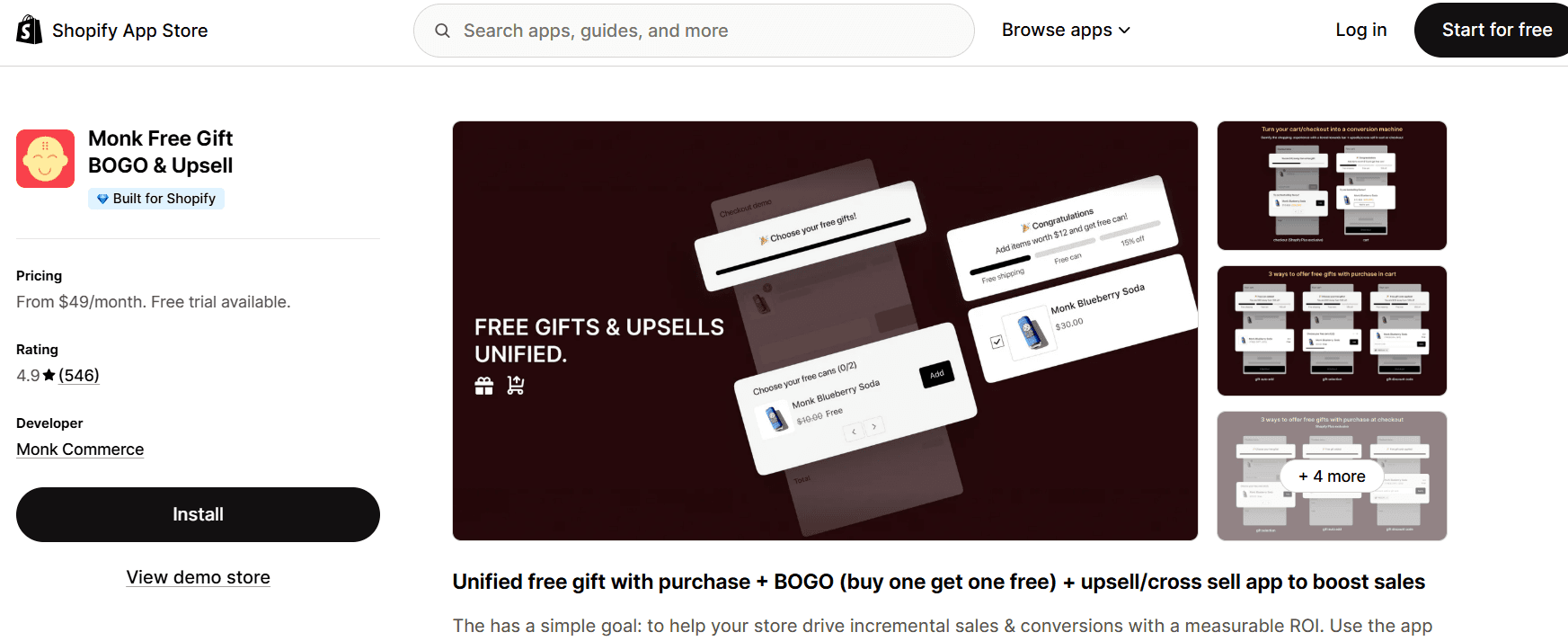
Monk Free Gift is built for stores that want full control over how gift offers behave inside the cart. It supports automatic gift addition, multiple conditions, and tiered offers without breaking under more complex setups.
It focuses more on ensuring offers actually work in real-world scenarios and generate revenue, rather than on quick setup alone.
Key features
Unified app: It combines bundles, BOGO, and upsells to replace multiple upsell apps
Advanced targeting: Triggers based on VIP tags, location, or specific cart contents
Total funnel: Deploy offers from the product page through to post-purchase
Speed optimized: "Built for Shopify" certified for minimal impact on page load
Smooth logic: Complex 'Buy X Get Y' rules without site lag or performance issues
Tiered rewards: Single progress bar for multiple goals, like shipping, gift, and discount
Monk is a better fit for stores that want more control and fewer problems as their offers get more complex. Setup can take a little longer, but it handles long-term growth more reliably.
Learn how to create a free gift with purchase offer on Shopify using Monk in just 5 minutes
BOGOS: Free gift Bundle Upsell
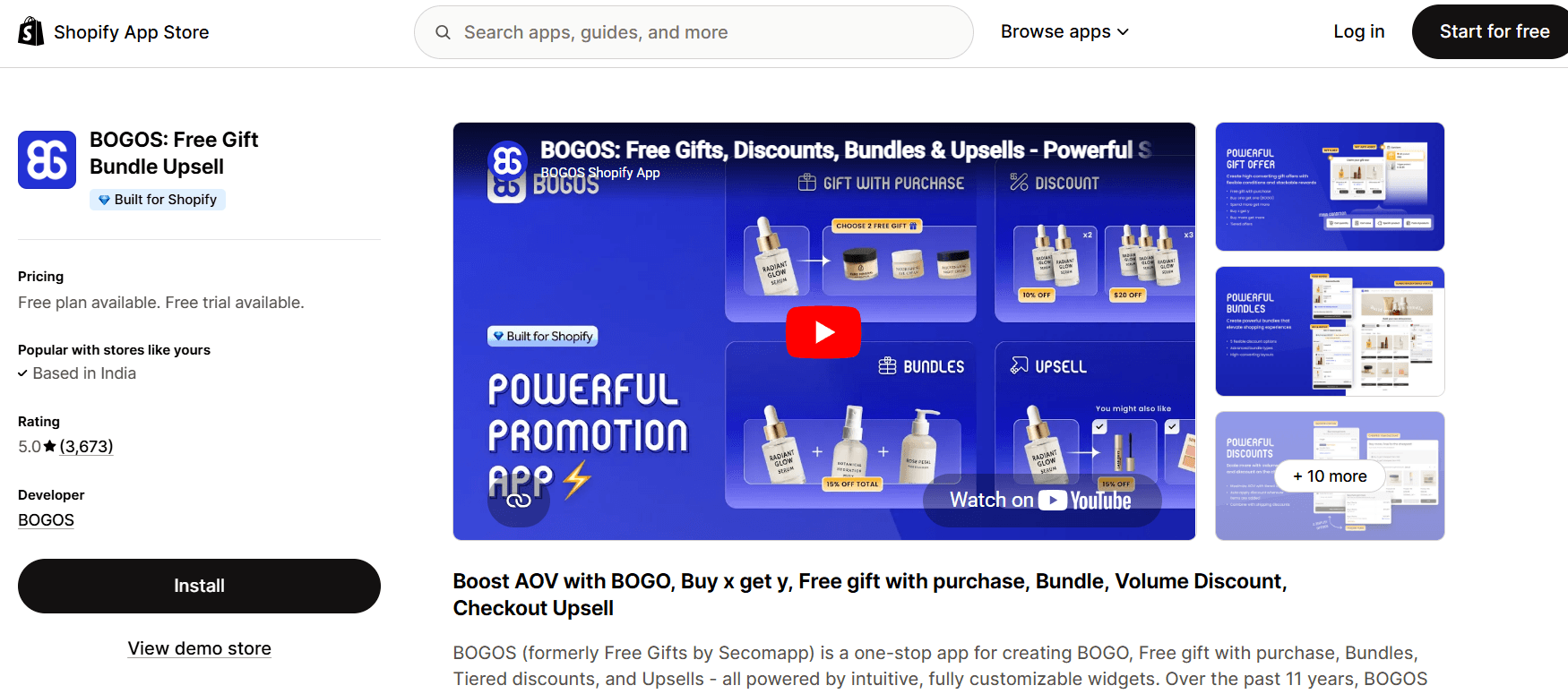
BOGOS focuses on simple promotional offers, such as buy-one-get-one and basic free-gift setups. It is easy to install and quick to launch. This simplicity also makes it a top choice for stores that want to run free gift-with-purchase campaigns without much configuration.
Key features
GWP specialist: Deep focus on complex ‘Gift With Purchase’ and BOGO configurations
Promo scheduling: Precise start/end times for automated flash sales and launches
Clean automation: Flawlessly adds or removes gifts as cart quantities change
Lightweight Build: Minimalist code designed to maintain fast checkout speeds
Flexible UI: Highly customizable pop-ups and sliders to match premium brand styles
Smaller stores or those running single, simple offers can benefit the most from BOGOS. If you don’t need advanced logic, it does the job without much effort.
Gift Box + Free Gift Purchase
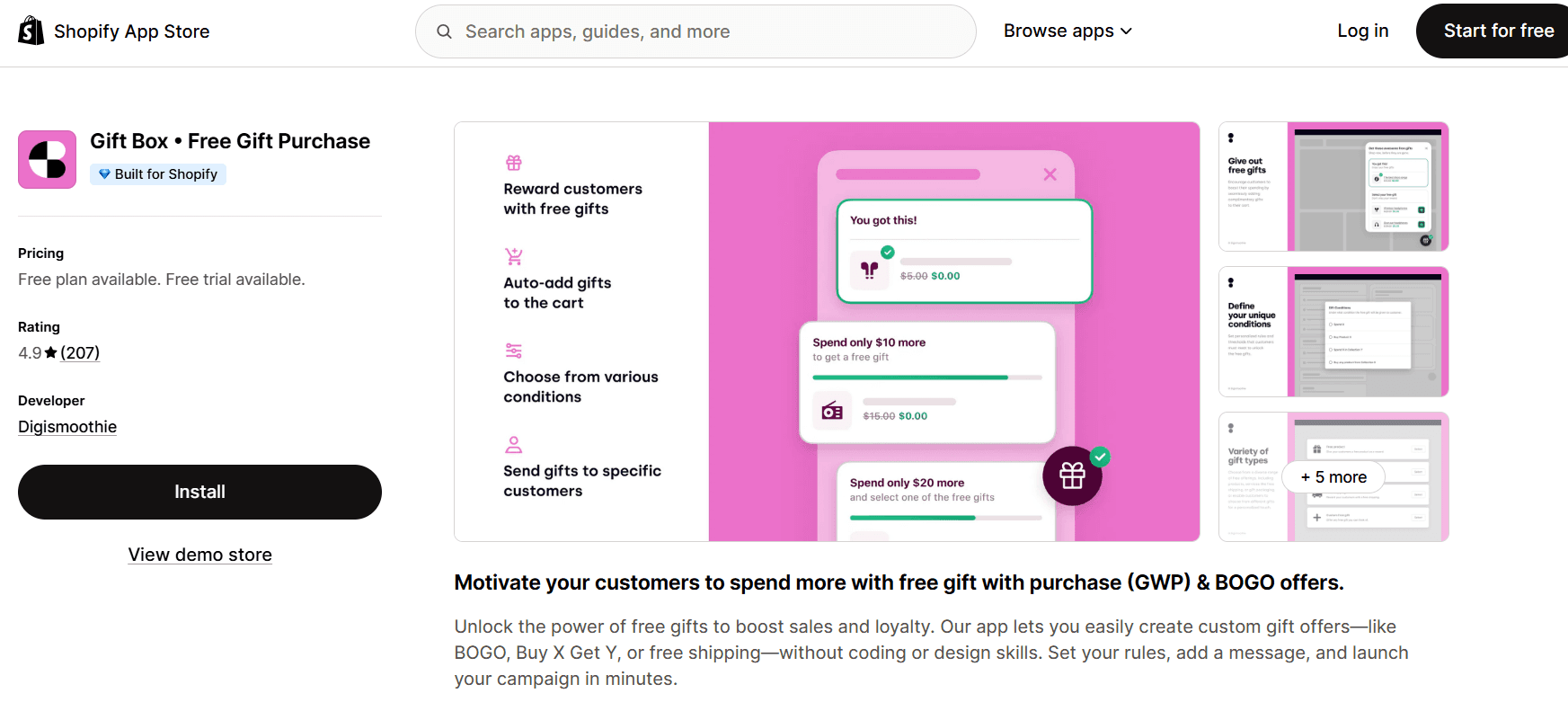
Gift Box is a lightweight option for running basic free gift campaigns. It offers a clean interface and supports standard cart-based gift offers, making it easy to get started without much setup. With Gift Box, you can set up rules, add messages, test offers, and launch campaigns in a matter of minutes.
Key features
Flicker-less performance: Uses high-performance scripts to display free gifts without lag
Pure GWP focus: Streamlined exclusively for ‘Gift with Purchase’ and BOGO
Tiered milestones: Easily create spending thresholds to boost AOV
Global Readiness: Built-in support for multi-currency and multi-language stores
Theme-based design: Adapts its styling to your store’s CSS for a native in-app look
Gift Box is ideal for stores that want a simple, no-frills solution. It is a good starting point, but it may feel limiting if you need more advanced control later.
Why Shopify Stores Prefer Monk Free Gift: 4 Key Reasons
Shopify gift apps often look similar at first. But once you start running real offers, they start to break. This is even more evident when you work with multiple discounts, products, devices, and cart conditions.
That’s where Monk stands out.
Monk handles real cart behavior more consistently
Many apps work well in controlled environments but struggle when customers interact with the cart freely. Monk is more stable in these situations, where most issues usually occur.
Without affecting the performance of the site, Monk can handle:
Customers adding and removing items multiple times
Cart value going above and below the threshold
Switching between different product combinations
Instead of breaking or resetting, the gift logic adjusts as expected. That consistency reduces confusion and keeps the experience smooth.
Monk works more reliably with discounts
Discount compatibility is where many apps fail. You set up a gift offer, then apply a discount, and something stops working. Monk is better at handling both together. The gift doesn’t randomly disappear, and the logic doesn’t collapse when another promotion is active.
This matters more than it seems because most stores don’t run just one offer. They combine discounts, bundles, and seasonal promotions.
If your gift app can’t handle that, it limits what you can do.
Monk gives you more control without adding complexity
Some apps are simple but restrictive. Others offer flexibility but become hard to manage. Monk sits somewhere in between.
You can build more advanced setups without things getting messy, such as:
Triggering offers for specific products or collections
Setting up different gifts based on cart value tiers
Combining gift offers with upsells or cross-sells
Adjusting rules without breaking existing setups
The key difference is that these don’t feel fragile. You are not constantly fixing things after making changes.
Monk adapts better as your store grows
Often, with your Shopify store, what starts as a simple Buy X Get Y offer rarely stays that way. As your store grows, you will want to test different thresholds, run multiple campaigns, remove offers, or target specific products.
With some apps, you hit limits quickly and need to switch. Monk gives you more room to expand without having to rework everything from scratch.
Monk offers just what you need to make offers work even when your store and product catalog grow.
Learn how to add a Shopify free gift with multiple purchase criteria
How to Choose the Right App for Your Store
Most apps list similar features. The real difference shows in how they behave inside your cart. That’s where things either work smoothly or start breaking.
Here’s a simple way to choose the best Shopify free gift with purchase app for your store:
Your Goal | What to Look For | Why It Matters |
You want a simple gift offer | Easy setup with basic cart value rules | Helps you launch quickly without overcomplicating things |
You plan to run multiple offers | Flexible rule system with tiered conditions | Prevents conflicts when you add more campaigns later |
You use discount codes often | Strong discount compatibility | Ensures your gift offer doesn’t break when discounts are applied |
Most of your traffic is mobile | Clean and responsive cart experience | Keeps the offer clear and usable on smaller screens |
You want to increase AOV consistently | Reliable auto-add gift functionality | Removes friction and improves chances of conversion |
You sell different product categories | Product-based or collection-based triggers | Lets you target offers more precisely |
You are planning to scale your store | An app that supports advanced rules and changes | Avoids switching tools as your setup becomes more complex |
Final Thoughts
As a Shopify merchant, you may have already noticed that Shopify upsell and cross-sell apps don’t break when they are set up. The issues start way after that, like when customers actually interact with them. Gifts don’t trigger, discounts conflict, offers break mid-way, or the experience feels clunky, especially on mobile.
These aren’t small issues. They directly affect conversions and order value. The difference comes down to how the app behaves under real conditions. If it can’t handle cart changes, multiple rules, or stacked promotions, it becomes a liability.
That’s why choosing the right app matters more than the offer itself. Your focus must be on keeping the setup simple, testing it properly, and using tools that don’t fall apart as you scale.
Frequently Asked Questions
Do Shopify gift apps affect website speed?
Yes. Poorly built free gift apps can slow down the cart. However, lightweight apps with clean logic, like Monk, keep things seamless so the user experience stays smooth.
Can I set multiple gift rules in Shopify?
Yes, you can set multiple gift rules in Shopify. You can set up easy yet layered offers like "Buy X Get Y and a minimum cart value range" using the native Shopify Discounts. But for more targeted and specific multiple gift rules, use free gift apps like Monk from the Shopify App Store.
Are free gift apps on Shopify really free?
Even though there are some truly free apps available on the Shopify App Store, it is advisable you look for a well-built free gift app that matches your goal and budget for a free gift campaign. Most apps offer a 7-day free trial that you can opt for. Or, you can get basic features from these apps.
Monk has a growth-based pricing tier that offers the same features across all the plans.
How do I automatically add a free gift to the cart in Shopify?
Shopify's native discounting features are limited, as the customer manually has to add the gift product to avail the offer. You need an app with auto-add functionality to automatically add a free gift to the cart in Shopify. Once the cart meets your eligibility criteria, like a minimum spend, the gift is added automatically. Apps like Monk handle this seamlessly for a better user experience.
Which Shopify gift app is best for beginners?
If you just want to try out gift offers, Shopify's native discount features are easier to start with. But they can feel limiting later. Starting with something like Monk gives you room to grow without changing tools.
Can gift apps increase average order value?
Yes, Shopify apps for cart gift offers can help increase AOV. However, you must set the threshold appropriately to encourage users to buy one more item to meet it and unlock the gift.
How do I track the performance of gift offers in Shopify?
It is crucial to track the performance of your gift offer campaigns on Shopify. You can start by comparing AOV and conversions before and after the offer. Also, check how often the gift is triggered. Some apps, like Monk, show the results directly so you don’t have to piece it together manually.
Stop Using the Wrong Shopify Free Gift Apps
Summary
Free gift with purchase offers can increase conversions and average order value by making customers feel they are getting extra value. However, many Shopify gift apps fail in real scenarios, causing issues like gifts not triggering, slow carts, or conflicts with discounts. These problems create friction at checkout and reduce sales. A reliable app should auto add gifts, handle rules consistently, work with discounts, and perform well on mobile. Stores often make mistakes like overcomplicating rules or not testing properly. Choosing the right app and keeping the setup simple is key to making gift offers effective and scalable.
Many Shopify stores use free gift apps, expecting higher conversions. But many end up doing the opposite. The gift doesn’t trigger. The cart breaks down. Discounts stop working together. And customers get confused or abuse the offer.
More than the upsell or the discount strategy, the setup is what lets you down.
A proper free gift offer can lift average order value and make buying feel easier. But only if it works smoothly in the cart and checkout.
The problem is, most Shopify free gift apps look similar on the surface.
But they’re not. Small differences in how they handle rules, automation, and cart behavior can determine whether you gain or lose revenue.
In this guide, we’ll look at:
Why free gift offers work for your store
Where most Shopify free gift apps fall short
The best Shopify gift apps worth using, and how to pick them
Let’s get started.
Why Free Gift With Purchase Offers Work So Well
Free-gift-with-purchase offers look simple, but they work. They tap into how people think while shopping. And that’s what makes them effective at increasing conversions and order value.
Here are three key reasons why they work well for online merchants.
They make customers feel like they are getting more
Free gifts shift the focus from spending to gaining. Customers don't think they are spending $200 for what they bought. They leave your store thinking they got more than they paid for.
For example, if you offer a free skincare sample on orders above $200, the buyer doesn’t see it as an extra cost.
It feels like a bonus added to their purchase, which makes the decision easier.
They naturally increase average order value
These offers give customers a clear reason to spend more. When they are close to unlocking a reward, they’ll often add another item just to qualify.
Say a customer has $250 in their cart and sees they are $10 away from a free gift. Instead of checking out, they will likely add a small product to reach the threshold.
This allows them to get the free gift, and the store benefits from the additional product ordered. That’s how you increase order value without forcing it.
They work better than discounts in many cases
Discounts lower the price, but gifts add perceived value. And that usually feels better to the customer.
For instance, a $10 discount might go unnoticed. But a free product worth $10 feels tangible. It’s something customers can see and use.
That’s why free gift offers often convert better than standard percentage or flat discounts.
Learn More: How to Add a Free Gift With Purchase on Shopify
The Problem - Most Shopify Gift Apps Don’t Work as Expected
Shopify gift apps promise automatic gifts, flexible rules, and smooth integration with your store. But once you actually start using them, the gaps show up quickly.
The issue is how poorly many apps handle real-world scenarios.
What works in a demo often breaks down in an actual cart with discounts, multiple products, and varied customer behaviors.
Here’s where things usually go wrong:
The free gift doesn’t auto-add to the cart consistently
Customers need to manually add the gift themselves
The app slows down the cart or checkout experience
Offers break when discount codes are applied
Mobile experience feels clunky or confusing
This creates friction at the worst possible moment: right before checkout. Instead of helping conversions, the wrong app ends up costing you sales.
Learn More: Top 10 Shopify Apps to Raise Average Order Value
7 Signs you are using the wrong Shopify gift app
Often, a Shopify free gift promotion app works well during the setup. The issues arise when customers use your store. This means, with every issue the user encounters, you are losing sales.
If you are unsure whether your current app is working properly, these are the signs to watch for:
Manual gift process: Customers must add the free gift themselves instead of it being automatically added
No performance tracking: No clear way to measure how the offer is impacting conversions or AOV
Slow cart performance: The cart or checkout feels slower after installing the free gift Shopify plugin or app
Poor mobile experience: Mobile users struggle to see, understand, or apply the offer on mobile devices
Limited rule flexibility: You cannot properly set conditions for product-specific or tiered gifts
Inconsistent triggering: The offer occasionally fails to activate at the set cart value, leading to customer complaints
Broken discount compatibility: The free gift displayed disappears or fails when a discount code is applied
If you are seeing even a couple of these, the app isn’t doing its job. A free gift setup should feel invisible and smooth, and not something customers need to figure out.
What Should a Good Shopify Free Gift App Actually Do?
A lot of Shopify discount and gift apps can add a free product. The problem is what happens after that, when cart rules, discounts, and real behavior come into play.
Here is what a good Shopify free gift-with-purchase app must do and why it matters:
Feature | What It Should Do | How It Helps You |
Automatic gift addition | Adds the free gift instantly when conditions are met, without requiring customer action | Removes friction and ensures customers don’t miss the offer |
Reliable rule handling | Triggers correctly based on cart value, products, or collections without breaking | Prevents inconsistent behavior that can frustrate users |
Discount compatibility | Works smoothly alongside discount codes and other promotions | Avoids conflicts that can cancel offers or confuse customers |
Fast performance | Doesn’t slow down the cart or checkout experience, especially on mobile | Keeps the buying process smooth and reduces drop-offs |
Flexible setup | Allows multiple rules, tiers, and conditions without limitations | Allows you to run better offers as your store grows |
Clean cart experience | Feels natural inside the cart, without popups or confusion | Helps customers understand the offer quickly and act on it |
Performance tracking | Allows you to measure the impact on AOV and conversions | Helps you know if the offer is actually working |
Common Mistakes Store Owners Make with Shopify Free Gift with Purchase Apps
Store owners don’t pick the wrong app on purpose. They just choose based on what looks good during setup instead of what actually works in the long run for their store.
1. Choosing an app based on features, not real behavior
A lot of apps feel smooth when you first install them. You test once or twice, and it seems done. But real carts are not that simple.
Customers add multiple products. They remove items. They refresh. They switch devices. That’s where things start to fall apart. The gift may not trigger, or even if it does, it may disappear halfway through checkout.
This gap between ‘demo behavior’ and ‘real behavior’ is where most apps fail. And it’s something you don’t notice until it’s already affecting conversions.
How to avoid this mistake: Don’t rely on features and a single test alone. Simulate real behavior by adding multiple products, refreshing the cart, switching devices, and trying different combinations. If any of these scenarios feel inconsistent, it suggests the issue may worsen with real users. |
2. Setting up too many rules from the start
Shopify merchants tend to build the best offer right away using the app. Hence, they look for such an app that offers multiple tiers, different gifts, product-specific conditions, and more.
While it sounds good in theory, in practice, more rules mean more chances for things to clash.
You might end up with the following issues:
Offers are triggering at the wrong time
Gifts are stacking when they should not
Customers do not understand what they are getting
A simple setup usually performs better. One clear rule is easier to manage and easier for customers to follow.
How to avoid this mistake: Start with one simple offer. Let it run, observe how customers respond, learn how it works, and only then add complexity. Build in layers, not all at once. |
3. Overlooking how the app handles discounts
Store owners don’t think about how gift offers interact with discounts until they run their first campaign.
Then problems, like disappearing free gifts or discounts and gifts conflicting with each other, show up.
For example, a customer applies a 10% discount code expecting to keep the free gift. Instead, the gift gets removed. That creates confusion right before checkout and often leads to drop-offs.
How to avoid this mistake: Before finalizing the app, test it with active discount codes. Try percentage discounts, fixed discounts, and automatic promotions. If the gift doesn’t hold up across these, it’s not the right tool. |
4. Testing stops after the first check
Once the setup looks right, most merchants move on and stop testing the app. You need to understand that one test doesn’t reflect how users actually behave.
You must push the app to its limits to see how it behaves with actual customers by:
Adding and removing items from the cart
Testing on mobile instead of just desktop
This helps you often find small breaks that don’t show up in a basic test but affect real users.
How to avoid this mistake: Create a small testing routine. Every time you update an offer, run through key scenarios such as cart changes, discount usage, and mobile flow. Treat it like part of your setup, not a one-time task. |
5. Failing to factor in mobile experience and performance
It is easy to miss this if you are setting everything up on a laptop. But most customers are browsing on their phones.
Sometimes the offer is technically working in the store. However, on mobile devices, the following issues can come up:
The message is not visible
The offer layout feels cramped
The interaction is unclear on the app
Even small friction on mobile can reduce conversions. If the offer is not obvious, it won’t convert.
How to avoid this mistake: Test your offers and discount plans directly on your phone, not just a browser preview. Check how the offer appears, how easy it is to understand, whether any steps feel unclear, and if it makes cart slow. This helps you ensure the best user experience for its users. |
6. Setting a gift threshold without using real data
A lot of store owners pick a minimum spend that feels right rather than basing it on how customers actually shop.
That’s where things go wrong.
If the threshold is too low, you are giving away margin without really increasing order value. If it is too high, most customers won’t even try to reach it.
For example, if your average order value is around $200, setting the gift at $220 might nudge people to add one more item. But pushing it to $300? That’s too far. Most customers will ignore the offer completely.
The threshold should feel just within reach. It must not be chosen random and unrealistic.
How to avoid this mistake: Look at your current average order value and set the threshold slightly above it. Then adjust based on results. Don’t guess; use your store data instead. |
Best Shopify Free Gift With Purchase Apps
Automatic gifts, flexible rules, friendly UI, and easy setup are what most Shopify gift apps offer in 2026. But as you start using them, you know they just fail to meet your expectations. Some break under real cart conditions, while others handle offers more reliably.
So you need an app that meets your goals without being complex or heavy on the store. Here are three Shopify free gift apps that stand out, and where each one fits best.
Monk Free Gift is built for stores that want full control over how gift offers behave inside the cart. It supports automatic gift addition, multiple conditions, and tiered offers without breaking under more complex setups.
It focuses more on ensuring offers actually work in real-world scenarios and generate revenue, rather than on quick setup alone.
Key features
Unified app: It combines bundles, BOGO, and upsells to replace multiple upsell apps
Advanced targeting: Triggers based on VIP tags, location, or specific cart contents
Total funnel: Deploy offers from the product page through to post-purchase
Speed optimized: "Built for Shopify" certified for minimal impact on page load
Smooth logic: Complex 'Buy X Get Y' rules without site lag or performance issues
Tiered rewards: Single progress bar for multiple goals, like shipping, gift, and discount
Monk is a better fit for stores that want more control and fewer problems as their offers get more complex. Setup can take a little longer, but it handles long-term growth more reliably.
Learn how to create a free gift with purchase offer on Shopify using Monk in just 5 minutes
BOGOS: Free gift Bundle Upsell
BOGOS focuses on simple promotional offers, such as buy-one-get-one and basic free-gift setups. It is easy to install and quick to launch. This simplicity also makes it a top choice for stores that want to run free gift-with-purchase campaigns without much configuration.
Key features
GWP specialist: Deep focus on complex ‘Gift With Purchase’ and BOGO configurations
Promo scheduling: Precise start/end times for automated flash sales and launches
Clean automation: Flawlessly adds or removes gifts as cart quantities change
Lightweight Build: Minimalist code designed to maintain fast checkout speeds
Flexible UI: Highly customizable pop-ups and sliders to match premium brand styles
Smaller stores or those running single, simple offers can benefit the most from BOGOS. If you don’t need advanced logic, it does the job without much effort.
Gift Box + Free Gift Purchase
Gift Box is a lightweight option for running basic free gift campaigns. It offers a clean interface and supports standard cart-based gift offers, making it easy to get started without much setup. With Gift Box, you can set up rules, add messages, test offers, and launch campaigns in a matter of minutes.
Key features
Flicker-less performance: Uses high-performance scripts to display free gifts without lag
Pure GWP focus: Streamlined exclusively for ‘Gift with Purchase’ and BOGO
Tiered milestones: Easily create spending thresholds to boost AOV
Global Readiness: Built-in support for multi-currency and multi-language stores
Theme-based design: Adapts its styling to your store’s CSS for a native in-app look
Gift Box is ideal for stores that want a simple, no-frills solution. It is a good starting point, but it may feel limiting if you need more advanced control later.
Why Shopify Stores Prefer Monk Free Gift: 4 Key Reasons
Shopify gift apps often look similar at first. But once you start running real offers, they start to break. This is even more evident when you work with multiple discounts, products, devices, and cart conditions.
That’s where Monk stands out.
Monk handles real cart behavior more consistently
Many apps work well in controlled environments but struggle when customers interact with the cart freely. Monk is more stable in these situations, where most issues usually occur.
Without affecting the performance of the site, Monk can handle:
Customers adding and removing items multiple times
Cart value going above and below the threshold
Switching between different product combinations
Instead of breaking or resetting, the gift logic adjusts as expected. That consistency reduces confusion and keeps the experience smooth.
Monk works more reliably with discounts
Discount compatibility is where many apps fail. You set up a gift offer, then apply a discount, and something stops working. Monk is better at handling both together. The gift doesn’t randomly disappear, and the logic doesn’t collapse when another promotion is active.
This matters more than it seems because most stores don’t run just one offer. They combine discounts, bundles, and seasonal promotions.
If your gift app can’t handle that, it limits what you can do.
Monk gives you more control without adding complexity
Some apps are simple but restrictive. Others offer flexibility but become hard to manage. Monk sits somewhere in between.
You can build more advanced setups without things getting messy, such as:
Triggering offers for specific products or collections
Setting up different gifts based on cart value tiers
Combining gift offers with upsells or cross-sells
Adjusting rules without breaking existing setups
The key difference is that these don’t feel fragile. You are not constantly fixing things after making changes.
Monk adapts better as your store grows
Often, with your Shopify store, what starts as a simple Buy X Get Y offer rarely stays that way. As your store grows, you will want to test different thresholds, run multiple campaigns, remove offers, or target specific products.
With some apps, you hit limits quickly and need to switch. Monk gives you more room to expand without having to rework everything from scratch.
Monk offers just what you need to make offers work even when your store and product catalog grow.
Learn how to add a Shopify free gift with multiple purchase criteria
How to Choose the Right App for Your Store
Most apps list similar features. The real difference shows in how they behave inside your cart. That’s where things either work smoothly or start breaking.
Here’s a simple way to choose the best Shopify free gift with purchase app for your store:
Your Goal | What to Look For | Why It Matters |
You want a simple gift offer | Easy setup with basic cart value rules | Helps you launch quickly without overcomplicating things |
You plan to run multiple offers | Flexible rule system with tiered conditions | Prevents conflicts when you add more campaigns later |
You use discount codes often | Strong discount compatibility | Ensures your gift offer doesn’t break when discounts are applied |
Most of your traffic is mobile | Clean and responsive cart experience | Keeps the offer clear and usable on smaller screens |
You want to increase AOV consistently | Reliable auto-add gift functionality | Removes friction and improves chances of conversion |
You sell different product categories | Product-based or collection-based triggers | Lets you target offers more precisely |
You are planning to scale your store | An app that supports advanced rules and changes | Avoids switching tools as your setup becomes more complex |
Final Thoughts
As a Shopify merchant, you may have already noticed that Shopify upsell and cross-sell apps don’t break when they are set up. The issues start way after that, like when customers actually interact with them. Gifts don’t trigger, discounts conflict, offers break mid-way, or the experience feels clunky, especially on mobile.
These aren’t small issues. They directly affect conversions and order value. The difference comes down to how the app behaves under real conditions. If it can’t handle cart changes, multiple rules, or stacked promotions, it becomes a liability.
That’s why choosing the right app matters more than the offer itself. Your focus must be on keeping the setup simple, testing it properly, and using tools that don’t fall apart as you scale.
Frequently Asked Questions
Do Shopify gift apps affect website speed?
Yes. Poorly built free gift apps can slow down the cart. However, lightweight apps with clean logic, like Monk, keep things seamless so the user experience stays smooth.
Can I set multiple gift rules in Shopify?
Yes, you can set multiple gift rules in Shopify. You can set up easy yet layered offers like "Buy X Get Y and a minimum cart value range" using the native Shopify Discounts. But for more targeted and specific multiple gift rules, use free gift apps like Monk from the Shopify App Store.
Are free gift apps on Shopify really free?
Even though there are some truly free apps available on the Shopify App Store, it is advisable you look for a well-built free gift app that matches your goal and budget for a free gift campaign. Most apps offer a 7-day free trial that you can opt for. Or, you can get basic features from these apps.
Monk has a growth-based pricing tier that offers the same features across all the plans.
How do I automatically add a free gift to the cart in Shopify?
Shopify's native discounting features are limited, as the customer manually has to add the gift product to avail the offer. You need an app with auto-add functionality to automatically add a free gift to the cart in Shopify. Once the cart meets your eligibility criteria, like a minimum spend, the gift is added automatically. Apps like Monk handle this seamlessly for a better user experience.
Which Shopify gift app is best for beginners?
If you just want to try out gift offers, Shopify's native discount features are easier to start with. But they can feel limiting later. Starting with something like Monk gives you room to grow without changing tools.
Can gift apps increase average order value?
Yes, Shopify apps for cart gift offers can help increase AOV. However, you must set the threshold appropriately to encourage users to buy one more item to meet it and unlock the gift.
How do I track the performance of gift offers in Shopify?
It is crucial to track the performance of your gift offer campaigns on Shopify. You can start by comparing AOV and conversions before and after the offer. Also, check how often the gift is triggered. Some apps, like Monk, show the results directly so you don’t have to piece it together manually.
Ravish (RV)
Co-Founder, Monk Commerce
Ravish is an ecommerce and SaaS marketing expert with 6+ years of experience in Shopify and ecommerce and 10+ years of experience in marketing, and growth strategy. He has worked closely with Shopify merchants to solve real ecommerce challenges and shares practical, research-backed insights, industry best practices, and emerging trends.
Contents
Related Articles
Free Gift Campaigns for Shopify Stores: Tips, Strategies & Benefits
20+ Best Free Gift Ideas for Shopify Stores That Drive More Sales
Free Gift With Purchase Shopify Setup in 5 Minutes
Get Monk Free Gift app for just $1/month this Black Friday
First month: $1 after your 7-day free trial. All features included. Offer live!
Claim offer now

Get Monk Free Gift app for just $1/month this Black Friday
First month: $1 after your 7-day free trial. All features included. Offer live!
Claim offer now
Get Monk Free Gift app for just $1/month this Black Friday
First month: $1 after your 7-day free trial. All features included. Offer live!
Claim offer now