
How to Create a Discount Code in Shopify in 2026: A Step-by-Step Guide
Summary
In 2026, Shopify discounts are used to increase conversions, clear inventory, attract customers, and raise order value. Types include percentage, fixed amount, free shipping, and Buy X Get Y, offered as manual or automatic discounts. Setup involves choosing discount type, defining eligibility, limits, and scheduling. Shopify is limited by weak stacking, one automatic discount, basic targeting, and simple BXGY logic. Apps like Monk Free Gift add tiered offers and better targeting. Best practice is seasonal use, controlled discounting, analytics tracking, and multi-channel promotion. Common issues include eligibility errors and discount conflicts.

Key Takeaways
In 2026, Shopify discounts are used to increase conversions, clear inventory, attract customers, and raise order value. Types include percentage, fixed amount, free shipping, and Buy X Get Y, offered as manual or automatic discounts. Setup involves choosing discount type, defining eligibility, limits, and scheduling. Shopify is limited by weak stacking, one automatic discount, basic targeting, and simple BXGY logic. Apps like Monk Free Gift add tiered offers and better targeting. Best practice is seasonal use, controlled discounting, analytics tracking, and multi-channel promotion. Common issues include eligibility errors and discount conflicts.
Discounts aren't just for advertising anymore; they're also a great way to generate revenue. In 2026, smarter discount strategies help Shopify businesses get rid of old stock, get new customers, and raise the average order value - all without cutting into their profits.
Want to know how to create a Shopify discount code? Here’s a step-by-step guide to various types of discounts in Shopify, how to create and utilize them.
Understanding the Types of Discounts in Shopify
boosting short-term sales, increasing conversion rates, and moving inventory, but overuse can erode margins and train customers to wait for deals. It's crucial to know your options before making a decision.
Percentage Discounts
Give a discount of a certain percentage, such as 10% OFF.
Great for store-wide specials or campaigns to get new customers.
Fixed Amount Discounts
Give a set amount off, like ₹500 OFF.
Works great for things that cost a lot.
Free Shipping Discounts
Take away shipping expenses to lower the number of people who leave their carts and finish their purchases.
Buy X Get Y Discounts
Offer deals that make people want to buy more (like "Buy 2 Get 1 Free").
Great for getting rid of stock or boosting sales volume.
Automatic vs. Manual Discount Codes
Manual codes require customers to enter a code at checkout.
Automatic discounts apply instantly when conditions are met.
A lot of brands utilize third-party apps like Monk Free Gift to provide more complex conditional logic and combine tiered offers with progress bars.
Prerequisites Before Creating a Discount Code
When you add a discount code to Shopify, there are a few important things to keep in mind. If you plan these settings ahead of time, the discount will function perfectly at checkout, and you won't have to deal with problems like invalid codes, products that aren't available, or blunders at checkout.
Shopify Plan Requirements
You may use most of the discount features with any Shopify plan. However, some other capabilities, including automated discounts, app integrations, or more complex promotional logic, may only be available on certain tiers or when you use third-party apps. Make sure your store is on an active Shopify plan and that you can see the discount option in your admin panel.
Access to Shopify Admin
To produce and manage discount codes, you need to access the Shopify Admin interface. Most of the time, only store owners or employees with the necessary credentials can set up, alter, and keep an eye on discount programs. Make sure your account has permission to handle discounts before you continue.
Inventory and Product Configuration
Before you give a discount, make sure that the items or collections you want to discount are live, priced correctly, and in stock. Make sure you have adequate stock on hand so that customers may get the discount without having to worry about things being out of stock if inventory tracking is turned on.
How to Create a Discount Code in Shopify (2026 Interface)
Shopify lets store owners use discount coupons to run sales, gain more customers, and make more money. The Shopify admin interface makes it easy to set up and administer many different types of discounts in just a few steps.
Step 1 - Creating a Discount
Go to Discounts from the Shopify Admin dashboard.
Click the Create Discount button.
Select the type of discount, discount code, or an automatic discount.
Step 2 - Define Discount Type and Eligibility
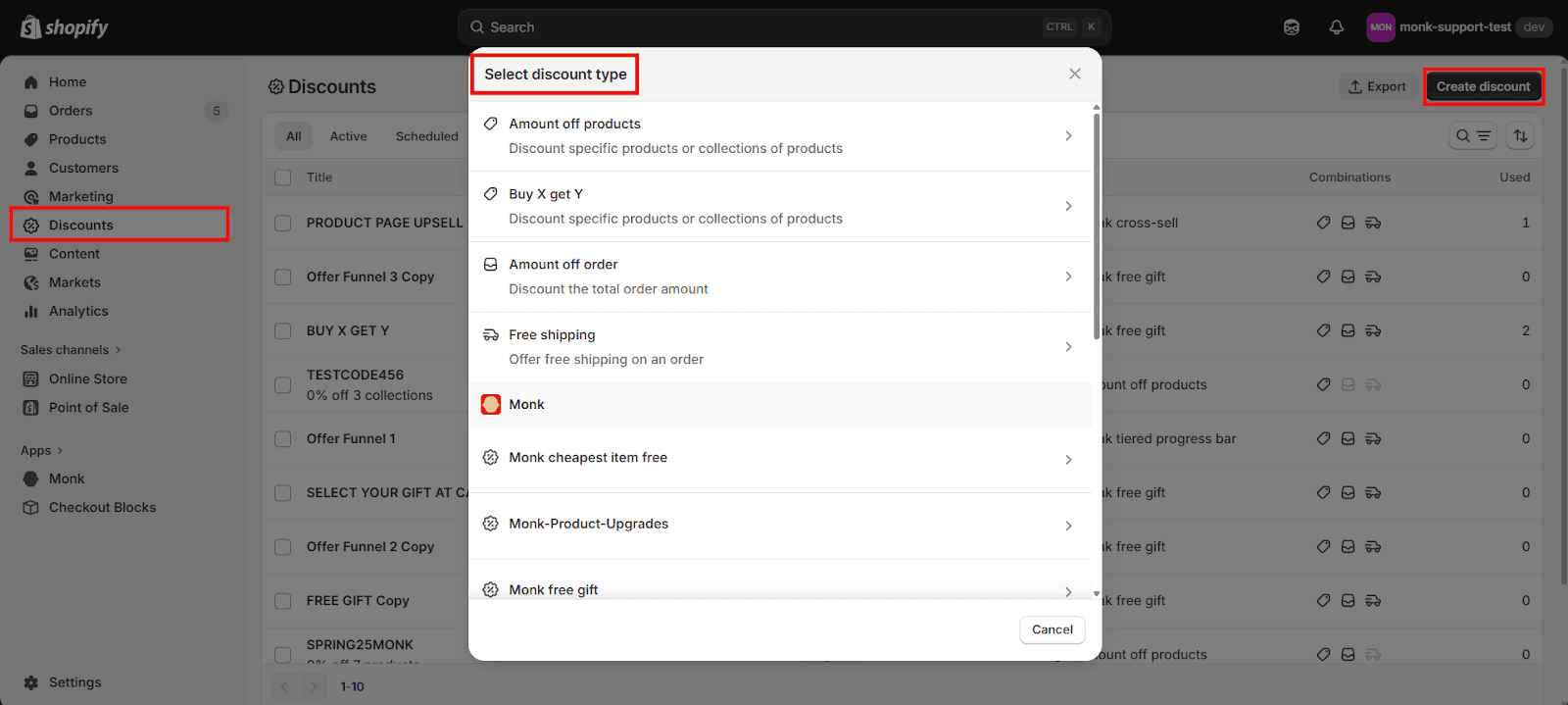
Choose what type of discount you wish to give. You can offer a lot of various kinds of offers on Shopify, such as a percentage off, a set amount off, free shipping, and "Buy X Get Y" (BXGY) promotions.
Enter the discount amount. For example, you can say "10% off," "20% off," or adjust the value of a BXGY offer.
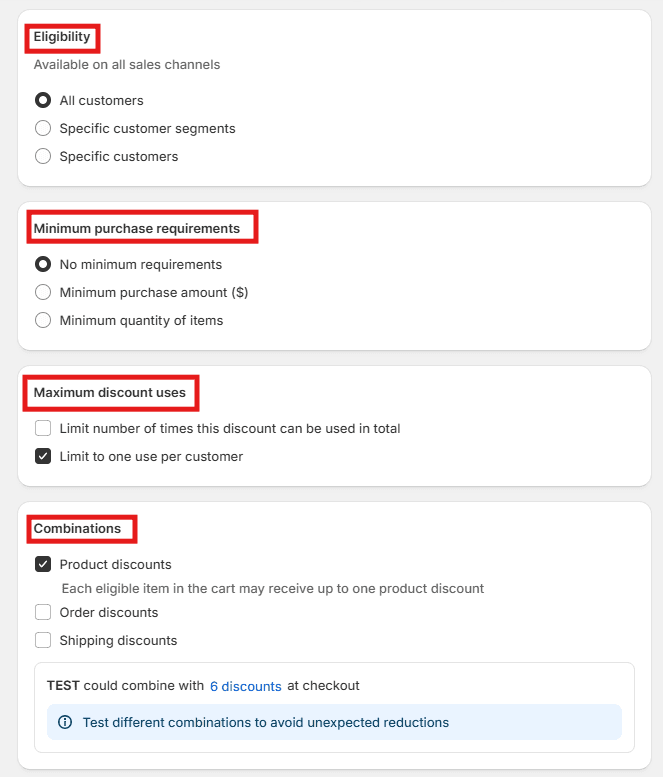
If you wish to have the discount only apply to select items, full collections, or groups of customers, you can set that while creating the discount.
You can establish optional minimum restrictions for the discount to work, such as a minimum purchase amount or a minimum number of items in the cart.
Usage limitations let you remember how many times you can utilize a deal. It can only be used a certain number of times. Limit the number of times any customer can use the discount code.
Only one per customer: If you want each customer to only be able to utilize the discount once, use this option.
Limit by Group of Customers: If you need to, only let particular types or groups of clients take advantage of the offer.
In order to stack Shopify discounts with other discounts, ensure that combination settings are enabled so that all the codes can be applied to the customer’s cart seamlessly.
Step 3 - Schedule, Save and Test
Pick the dates when the discount will start and finish. This is useful for running deals that only last a brief time, like Christmas or seasonal sales.
After checking all the settings, click Save. It's a good idea to check the discount by putting eligible goods in your cart and using the coupon at checkout to make sure it works.
Note: Shopify's discounts work well and require no additional charges but are extremely limited to basic discounting functions.
|
How to Create Automatic Discounts in Shopify
Customers can get a discount without having to input a code at checkout using automatic discounts. When the set requirements are met, the discount is automatically added to the cart. This functionality in Shopify is helpful for running promotions that go off without a hitch, such seasonal sales, storewide deals, or discounts on certain products.
Steps to Set Up Automatic Discounts
From the left sidebar of your Shopify Admin, click on Discounts > Create Discount > Automatic Discount.
Choose the kind of discount you want, like a percentage off, a set amount off, free delivery, or "Buy X Get Y."
Choose the eligible collections, or order conditions and choose the discount amount.
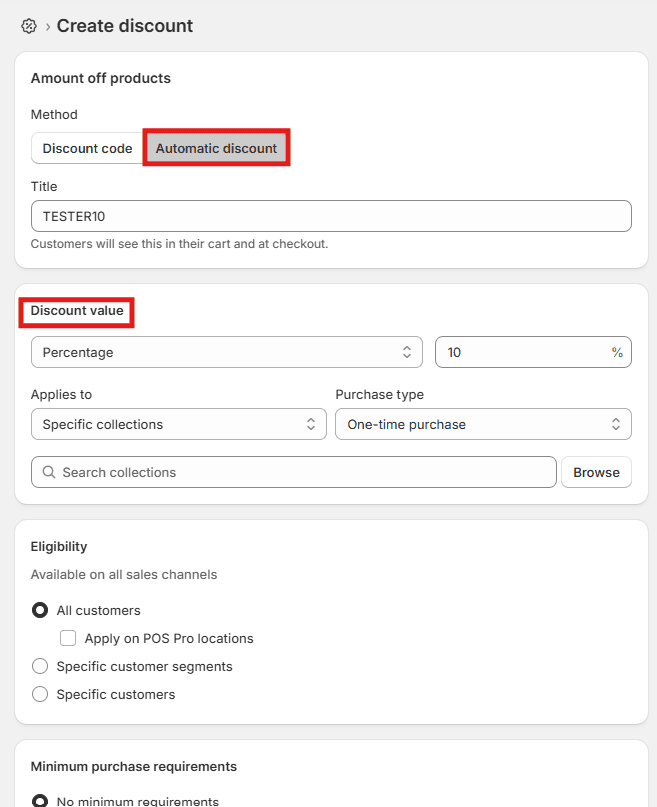
If you need to, add any minimum purchase requirements.
Choose the promotion's start and end dates.
Click "Save" to turn on the automatic discount.
Limitations of Automatic Discounts
Automatic reductions are helpful, but they do have certain limits.
In Shopify, only one automated discount can be active at a time.
Customers also can't manually add another automatic promotion at checkout.
Also, depending on how your store's discount settings are set up, automatic discounts could not work with some other promotions.
When to Use Automatic vs. Manual Codes
Use automatic discounts for sitewide promotions.
Use manual codes for influencer campaigns or email marketing.
Use third-party Shopify apps like Monk Free Gift for advanced multi-offer logic.
Want Smarter Discounts That Convert Better?
Basic Shopify discounts work, but they’re limited. However, the Shopify App Store has a variety of apps that provide great alternatives to these limitations and ease discounting and gifting for your Shopify stores.
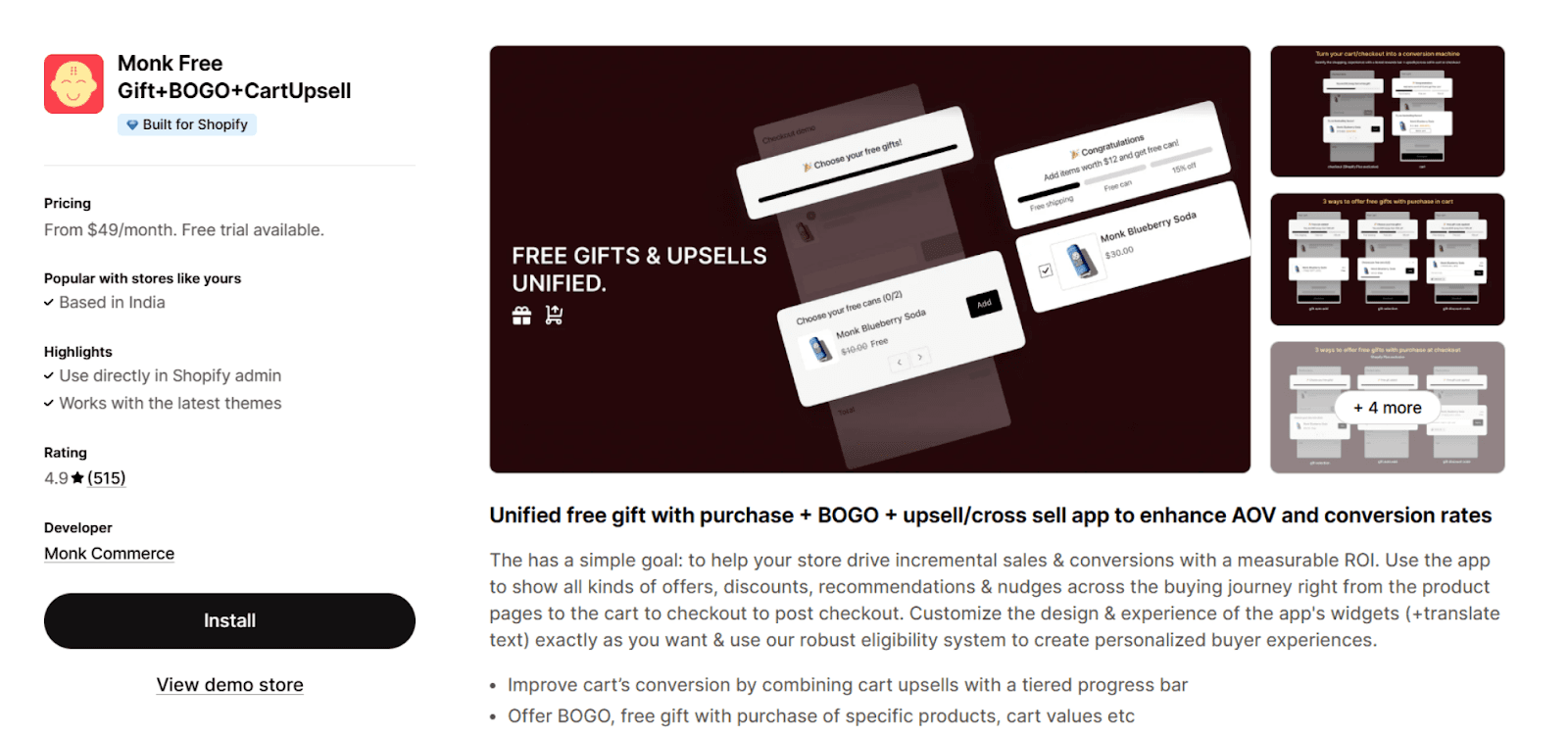
With third-party apps like Monk Free Gift, you can:
Create tiered progress bar discounts
Run Free Gift, BOGO + upsell combination.
Target offers by cart value, item quantity, custom collections, specific product tag etc.
Track detailed conversion analytics
Best Practices for Discount Codes in 2026
When utilized wisely, discount coupons may be a very effective way to market. The most important thing with Shopify is not simply making discounts but also deploying them in a strategic way that boosts sales, raises the average order value, and builds stronger relationships with customers.
Shopify apps like Monk Free Gift can make your promotions even better by helping you target your offers more effectively and giving you greater analytics.
Use Seasonal and Limited-Time Promotions
Seasonal marketing and reductions that only last for a short time make people feel like they need to buy right away. During holidays, product launches, or clearance sales, running short promotional windows can greatly increase conversions and engagement.
Avoid Over-Discounting
Too many or too frequent discounts can make people think the product is less valuable and decrease company margins. Instead, employ smart discounts like bundles, upsells, or "Buy X Get Y" deals. Track\
Performance in Shopify Analytics
Keeping an eye on how well discounts operate helps you figure out what works. Use Shopify's analytics to keep an eye on things like redemption rates, conversion impact, and average order value so you can improve your future campaigns.
Promote Codes via Email, SMS, and Social Media
A discount code won't work if clients don't see it. Email campaigns, SMS marketing, and social media are all great ways to get the word out about your deals to more people.
Learn How to Set Up a BOGO Offer to create high-converting volume-based promotions.
Common Issues and How to Fix Them
Sometimes, even the best-planned discount programs can run into problems. When you conduct promotions on Shopify, it's vital to find and fix these problems fast so that you don't lose sales and make customers angry. Merchants may also manage complicated promotions more easily with offer management systems like Monk Commerce.
Discount Not Applying at Checkout
This normally happens when the cart doesn't satisfy the requirements, like the minimum order value or the products that are allowed. Before you start the campaign, be sure to test your discount.
Errors with Eligibility
If the chosen products, collections, or customer groups aren't set up correctly, discounts might not work. Check the eligibility parameters again to make sure the relevant customers and items are included in the campaign.
Conflicts with Other Active Discounts
In many cases, discounts cannot stack with other active offers. If multiple promotions are running, customers may see one override another. Using offer management apps such as Monk Commerce can help merchants control how offers interact and avoid conflicts.
Customer-Specific Discount Problems
Sometimes discount codes are restricted to certain customers or segments, which can cause confusion if others try to use them. Make sure the eligibility rules are clear in your promotion messaging and ensure the right customer groups are selected when setting up the offer.
Conclusion
Learning how to create a discount code in Shopify is essential for running profitable promotions in 2026. Shopify's built-in tools are good for the basics, but for growing brands to really scale, they need smarter targeting, better bundling logic, and more in-depth data.
FAQs
What is the difference between a discount code and an automatic discount?
In Shopify, a discount code requires customers to manually enter a code at checkout, while an automatic discount is applied automatically when the conditions are met.
Why is my Shopify discount code not working?
There are various reasons why a Shopify code isn’t working. For example, if it has an end date, a minimum purchase amount, or only works on specific items. The code may also not work if there is another code already being applied. In your Shopify dashboard, do consider checking the rules that have been set for the code to work.
Can I limit discount usage to specific customers?
Yes. You may limit discounts to select customers, groups, or email lists with Shopify. This is helpful for promotions that reward loyal customers or VIPs.
Does Shopify allow stacking multiple discount codes in 2026?
Even in 2026, stacking multiple discount codes is limited in Shopify. Certain discount codes can be combined, but it can be challenging to run promotions that are hard to understand when there are a lot of rules.
Whereas third-party apps from the Shopify store, like Monk Free Gift, make it easy for businesses to develop intricate marketing programs and packages without having to deal with them in a hard way.
Can I apply discounts to specific products or collections?
Yes. Shopify lets you give discounts on certain products or groups of products instead of on your full business. This is helpful for getting rid of surplus stock or promoting certain things.
How do I track the performance of discount codes in Shopify?
With Shopify Analytics, you can see how many people utilize discounts, how many people buy things, and how many people use the discounts. This can help you find out which sales are making you the most money.
How to Create a Discount Code in Shopify in 2026: A Step-by-Step Guide
Summary
In 2026, Shopify discounts are used to increase conversions, clear inventory, attract customers, and raise order value. Types include percentage, fixed amount, free shipping, and Buy X Get Y, offered as manual or automatic discounts. Setup involves choosing discount type, defining eligibility, limits, and scheduling. Shopify is limited by weak stacking, one automatic discount, basic targeting, and simple BXGY logic. Apps like Monk Free Gift add tiered offers and better targeting. Best practice is seasonal use, controlled discounting, analytics tracking, and multi-channel promotion. Common issues include eligibility errors and discount conflicts.
Discounts aren't just for advertising anymore; they're also a great way to generate revenue. In 2026, smarter discount strategies help Shopify businesses get rid of old stock, get new customers, and raise the average order value - all without cutting into their profits.
Want to know how to create a Shopify discount code? Here’s a step-by-step guide to various types of discounts in Shopify, how to create and utilize them.
Understanding the Types of Discounts in Shopify
boosting short-term sales, increasing conversion rates, and moving inventory, but overuse can erode margins and train customers to wait for deals. It's crucial to know your options before making a decision.
Percentage Discounts
Give a discount of a certain percentage, such as 10% OFF.
Great for store-wide specials or campaigns to get new customers.
Fixed Amount Discounts
Give a set amount off, like ₹500 OFF.
Works great for things that cost a lot.
Free Shipping Discounts
Take away shipping expenses to lower the number of people who leave their carts and finish their purchases.
Buy X Get Y Discounts
Offer deals that make people want to buy more (like "Buy 2 Get 1 Free").
Great for getting rid of stock or boosting sales volume.
Automatic vs. Manual Discount Codes
Manual codes require customers to enter a code at checkout.
Automatic discounts apply instantly when conditions are met.
A lot of brands utilize third-party apps like Monk Free Gift to provide more complex conditional logic and combine tiered offers with progress bars.
Prerequisites Before Creating a Discount Code
When you add a discount code to Shopify, there are a few important things to keep in mind. If you plan these settings ahead of time, the discount will function perfectly at checkout, and you won't have to deal with problems like invalid codes, products that aren't available, or blunders at checkout.
Shopify Plan Requirements
You may use most of the discount features with any Shopify plan. However, some other capabilities, including automated discounts, app integrations, or more complex promotional logic, may only be available on certain tiers or when you use third-party apps. Make sure your store is on an active Shopify plan and that you can see the discount option in your admin panel.
Access to Shopify Admin
To produce and manage discount codes, you need to access the Shopify Admin interface. Most of the time, only store owners or employees with the necessary credentials can set up, alter, and keep an eye on discount programs. Make sure your account has permission to handle discounts before you continue.
Inventory and Product Configuration
Before you give a discount, make sure that the items or collections you want to discount are live, priced correctly, and in stock. Make sure you have adequate stock on hand so that customers may get the discount without having to worry about things being out of stock if inventory tracking is turned on.
How to Create a Discount Code in Shopify (2026 Interface)
Shopify lets store owners use discount coupons to run sales, gain more customers, and make more money. The Shopify admin interface makes it easy to set up and administer many different types of discounts in just a few steps.
Step 1 - Creating a Discount
Go to Discounts from the Shopify Admin dashboard.
Click the Create Discount button.
Select the type of discount, discount code, or an automatic discount.
Step 2 - Define Discount Type and Eligibility
Choose what type of discount you wish to give. You can offer a lot of various kinds of offers on Shopify, such as a percentage off, a set amount off, free shipping, and "Buy X Get Y" (BXGY) promotions.
Enter the discount amount. For example, you can say "10% off," "20% off," or adjust the value of a BXGY offer.
If you wish to have the discount only apply to select items, full collections, or groups of customers, you can set that while creating the discount.
You can establish optional minimum restrictions for the discount to work, such as a minimum purchase amount or a minimum number of items in the cart.
Usage limitations let you remember how many times you can utilize a deal. It can only be used a certain number of times. Limit the number of times any customer can use the discount code.
Only one per customer: If you want each customer to only be able to utilize the discount once, use this option.
Limit by Group of Customers: If you need to, only let particular types or groups of clients take advantage of the offer.
In order to stack Shopify discounts with other discounts, ensure that combination settings are enabled so that all the codes can be applied to the customer’s cart seamlessly.
Step 3 - Schedule, Save and Test
Pick the dates when the discount will start and finish. This is useful for running deals that only last a brief time, like Christmas or seasonal sales.
After checking all the settings, click Save. It's a good idea to check the discount by putting eligible goods in your cart and using the coupon at checkout to make sure it works.
Note: Shopify's discounts work well and require no additional charges but are extremely limited to basic discounting functions.
|
How to Create Automatic Discounts in Shopify
Customers can get a discount without having to input a code at checkout using automatic discounts. When the set requirements are met, the discount is automatically added to the cart. This functionality in Shopify is helpful for running promotions that go off without a hitch, such seasonal sales, storewide deals, or discounts on certain products.
Steps to Set Up Automatic Discounts
From the left sidebar of your Shopify Admin, click on Discounts > Create Discount > Automatic Discount.
Choose the kind of discount you want, like a percentage off, a set amount off, free delivery, or "Buy X Get Y."
Choose the eligible collections, or order conditions and choose the discount amount.
If you need to, add any minimum purchase requirements.
Choose the promotion's start and end dates.
Click "Save" to turn on the automatic discount.
Limitations of Automatic Discounts
Automatic reductions are helpful, but they do have certain limits.
In Shopify, only one automated discount can be active at a time.
Customers also can't manually add another automatic promotion at checkout.
Also, depending on how your store's discount settings are set up, automatic discounts could not work with some other promotions.
When to Use Automatic vs. Manual Codes
Use automatic discounts for sitewide promotions.
Use manual codes for influencer campaigns or email marketing.
Use third-party Shopify apps like Monk Free Gift for advanced multi-offer logic.
Want Smarter Discounts That Convert Better?
Basic Shopify discounts work, but they’re limited. However, the Shopify App Store has a variety of apps that provide great alternatives to these limitations and ease discounting and gifting for your Shopify stores.
With third-party apps like Monk Free Gift, you can:
Create tiered progress bar discounts
Run Free Gift, BOGO + upsell combination.
Target offers by cart value, item quantity, custom collections, specific product tag etc.
Track detailed conversion analytics
Best Practices for Discount Codes in 2026
When utilized wisely, discount coupons may be a very effective way to market. The most important thing with Shopify is not simply making discounts but also deploying them in a strategic way that boosts sales, raises the average order value, and builds stronger relationships with customers.
Shopify apps like Monk Free Gift can make your promotions even better by helping you target your offers more effectively and giving you greater analytics.
Use Seasonal and Limited-Time Promotions
Seasonal marketing and reductions that only last for a short time make people feel like they need to buy right away. During holidays, product launches, or clearance sales, running short promotional windows can greatly increase conversions and engagement.
Avoid Over-Discounting
Too many or too frequent discounts can make people think the product is less valuable and decrease company margins. Instead, employ smart discounts like bundles, upsells, or "Buy X Get Y" deals. Track\
Performance in Shopify Analytics
Keeping an eye on how well discounts operate helps you figure out what works. Use Shopify's analytics to keep an eye on things like redemption rates, conversion impact, and average order value so you can improve your future campaigns.
Promote Codes via Email, SMS, and Social Media
A discount code won't work if clients don't see it. Email campaigns, SMS marketing, and social media are all great ways to get the word out about your deals to more people.
Learn How to Set Up a BOGO Offer to create high-converting volume-based promotions.
Common Issues and How to Fix Them
Sometimes, even the best-planned discount programs can run into problems. When you conduct promotions on Shopify, it's vital to find and fix these problems fast so that you don't lose sales and make customers angry. Merchants may also manage complicated promotions more easily with offer management systems like Monk Commerce.
Discount Not Applying at Checkout
This normally happens when the cart doesn't satisfy the requirements, like the minimum order value or the products that are allowed. Before you start the campaign, be sure to test your discount.
Errors with Eligibility
If the chosen products, collections, or customer groups aren't set up correctly, discounts might not work. Check the eligibility parameters again to make sure the relevant customers and items are included in the campaign.
Conflicts with Other Active Discounts
In many cases, discounts cannot stack with other active offers. If multiple promotions are running, customers may see one override another. Using offer management apps such as Monk Commerce can help merchants control how offers interact and avoid conflicts.
Customer-Specific Discount Problems
Sometimes discount codes are restricted to certain customers or segments, which can cause confusion if others try to use them. Make sure the eligibility rules are clear in your promotion messaging and ensure the right customer groups are selected when setting up the offer.
Conclusion
Learning how to create a discount code in Shopify is essential for running profitable promotions in 2026. Shopify's built-in tools are good for the basics, but for growing brands to really scale, they need smarter targeting, better bundling logic, and more in-depth data.
FAQs
What is the difference between a discount code and an automatic discount?
In Shopify, a discount code requires customers to manually enter a code at checkout, while an automatic discount is applied automatically when the conditions are met.
Why is my Shopify discount code not working?
There are various reasons why a Shopify code isn’t working. For example, if it has an end date, a minimum purchase amount, or only works on specific items. The code may also not work if there is another code already being applied. In your Shopify dashboard, do consider checking the rules that have been set for the code to work.
Can I limit discount usage to specific customers?
Yes. You may limit discounts to select customers, groups, or email lists with Shopify. This is helpful for promotions that reward loyal customers or VIPs.
Does Shopify allow stacking multiple discount codes in 2026?
Even in 2026, stacking multiple discount codes is limited in Shopify. Certain discount codes can be combined, but it can be challenging to run promotions that are hard to understand when there are a lot of rules.
Whereas third-party apps from the Shopify store, like Monk Free Gift, make it easy for businesses to develop intricate marketing programs and packages without having to deal with them in a hard way.
Can I apply discounts to specific products or collections?
Yes. Shopify lets you give discounts on certain products or groups of products instead of on your full business. This is helpful for getting rid of surplus stock or promoting certain things.
How do I track the performance of discount codes in Shopify?
With Shopify Analytics, you can see how many people utilize discounts, how many people buy things, and how many people use the discounts. This can help you find out which sales are making you the most money.
Contents
Related Articles
7 Best Shopify Discount Apps to Boost Sales in 2026
BOGO Strategy for Shopify Stores to Boost Revenue
Free Gift Promotion Strategy [8 Proven Ways to Boost Conversions, AOV & Customer Loyalty]
Get Monk Free Gift app for just $1/month this Black Friday
First month: $1 after your 7-day free trial. All features included. Offer live!
Claim offer now

Get Monk Free Gift app for just $1/month this Black Friday
First month: $1 after your 7-day free trial. All features included. Offer live!
Claim offer now
Get Monk Free Gift app for just $1/month this Black Friday
First month: $1 after your 7-day free trial. All features included. Offer live!
Claim offer now