How to Create a Buy X Get Y (BXGY) Offer on Shopify?
Summary
Buy X Get Y (BXGY) is a powerful Shopify promotion that increases conversions and average order value by rewarding customers with a free or discounted product. While Shopify supports basic BXGY discounts, it lacks advanced features like auto-add gifts, tiered offers, and cart-level messaging. BXGY works by driving higher cart value, encouraging product discovery, and improving perceived value. With the right setup using apps, merchants can create seamless, high-converting offers with automation, targeting, and real-time cart visibility.

Ravish (RV)
Senior Content Writer
Ravish is an ecommerce and SaaS marketing expert with 6+ years of experience in Shopify and ecommerce and 10+ years of experience in marketing, and growth strategy. He has worked closely with Shopify merchants to solve real ecommerce challenges and shares practical, research-backed insights, industry best practices, and emerging trends.
Key Takeaways
Buy X Get Y (BXGY) is a powerful Shopify promotion that increases conversions and average order value by rewarding customers with a free or discounted product. While Shopify supports basic BXGY discounts, it lacks advanced features like auto-add gifts, tiered offers, and cart-level messaging. BXGY works by driving higher cart value, encouraging product discovery, and improving perceived value. With the right setup using apps, merchants can create seamless, high-converting offers with automation, targeting, and real-time cart visibility.
Customers rarely pay full price anymore. Discounts and deals have become the norm, and among all the offer types, Buy X Get Y (BXGY) consistently stands out. The reason is simple: customers aren't just getting a product at a lower price. They're walking away with something extra, and that psychological win is hard to beat.
But knowing how it works and actually setting Buy X Get Y on Shopify store are two very different things. Whether you want a straightforward Buy 1 Get 1 free deal or a more advanced tiered offer, this guide walks you through everything.
What Is a BXGY Offer in Shopify?
BXGY stands for "Buy X, Get Y." It's a promotional structure where a customer buys a qualifying product or quantity (the X) and receives another product (the Y) either for free or at a discount.
It's one of the most versatile offer types in e-commerce. The classic example is Buy 1 Get 1 Free, but BXGY covers a lot more ground than that. You can use it to cross-sell complementary products, move slow-moving inventory, reward bulk buyers, or simply give your average order value (AOV) a push.
Types of BXGY Offers You Can Create
Before you set anything up, it helps to know what kind of offer you're actually running. Here are the three main formats:
Buy X Get Y Free (Product-Based)
This is the most common format of BXGY. The customer buys a specific product (X) and gets another product (Y) for free.
What makes this format powerful is its flexibility in defining eligibility. You're not limited to simple product-for-product swaps; you can expand it into broader conditions:
Buy X product, Get Y product (standard use case)
Buy X from a collection, Get Y (great for stores with broad catalogs)
Buy X over $50, Get Y free (adds a cart value threshold to qualify)
Each of these variations lets you tailor the offer to your store's goals, whether it’s clearing inventory, driving discovery of new products, or simply increasing cart size.
Buy X Get Y Products (Quantity-Based)
Here, X and Y refer to quantities rather than specific products. Common examples are:
Buy 1 Get 1 (BOGO)
Buy 2 Get 1 Free
Buy 3 Get 2 free
When multiple quantity tiers are combined (e.g., Buy 2 Get 1, Buy 4 Get 2), this becomes tiered BXGY. This format works especially well for consumables, fashion basics, or anything customers tend to stock up on. It naturally encourages customers to increase quantity to unlock better value.
Buy X Get Y at a Lower price
Instead of giving the Y product entirely free, this format applies a discount. For example:
Buy 2, Get 20% off the third
Buy X, get Y at 50% off
You're still creating a compelling offer, but you're not giving away the full value of the second product. It's a smart middle ground, especially for higher-ticket items.
Why BXGY Offers Work for Shopify
BXGY offers convert well because of these four core reasons:
The perceived gain is high: When someone gets an extra product instead of just a lower price, it feels like more. A 50% discount and a free item of equal value are mathematically identical, but the free item wins almost every time.
It increases AOV naturally: to unlock the offer, customers have to add more to their cart. That's good for your revenue per order and your shipping economics.
It clears inventory efficiently: Pairing a bestseller with a slower-moving product in a BXGY deal moves stock without resorting to blanket markdowns.
It drives product discovery: Customers who get a free or discounted product they've never tried before are more likely to come back and buy it at full price next time.
How to Create a BXGY Offer on Shopify (Native Method)
Shopify's built-in discount tool lets you set up a basic BXGY offer without any apps. Here's how:
Go to your Shopify Admin and click on Discounts in the left sidebar.
Click Create discount and select Buy X Get Y from the discount types.
Choose whether this will be a discount code (customers enter it at checkout) or an automatic discount (applies without any code).
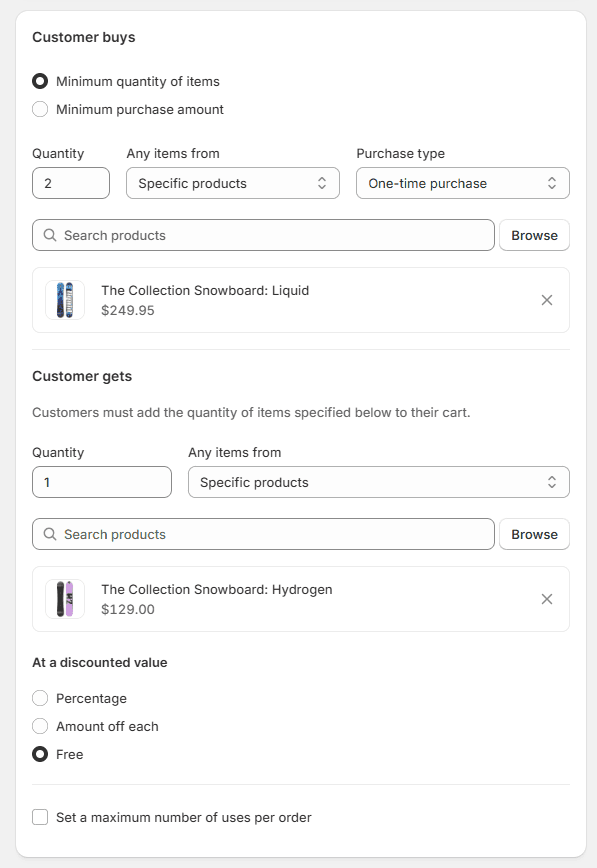
Under Customer buys, set the minimum quantity or purchase amount and select the eligible products or collections.
Under Customer gets, choose the product(s) the customer will receive and set the discount, either free (100% off), a percentage off, or a fixed amount off.
Optionally set a maximum number of uses to control how many times the offer can be redeemed.
Set your start and end dates if it's a time-limited promotion.
Click Save discount.
Limitations of Shopify's Native BXGY Feature
Shopify's native BXGY tool is a good starting point, but it can create friction as your promotions get more complex. These include:
Customers have to add the free item themselves: By default, the Y product isn't added to the cart automatically. If a customer doesn't know to look for it, they'll complete checkout without it, and the offer won't apply. That's a conversion you've just lost.
No tiered offers in one rule: Want to run "Buy 2 Get 10%, Buy 3 Get 20%, Buy 4 Get 30%"? Native Shopify can't handle that in a single discount. You'd have to create separate discount codes for each tier, which is clunky for both you and the customer.
Limited stacking: Shopify has strict rules around combining discounts. Automatic discounts generally can't be stacked with discount codes, which makes running layered promotions difficult.
No cart-level messaging: Native BXGY offers don't show a progress bar or indicator in the cart telling customers how close they are to unlocking the deal. That's a missed opportunity for urgency and nudging.
Minimal targeting options: You can't easily restrict native BXGY offers to specific customer segments, tags, or purchase history without workarounds.
How to Create Advanced BXGY Offers Using an App (Recommended Method)
When you want to overcome Shopify's native feature limitations, you can rely on Monk Free Gift + BOGO. It is built specifically for the kind of BXGY and free gift offers that native Shopify struggles with, such as auto-adding gifts, tiered rules, cart-level display, and more.
Here's how to set up a BXGY offer using Monk Free Gift + BOGO:
Step 1: Install Monk Free Gift + BOGO
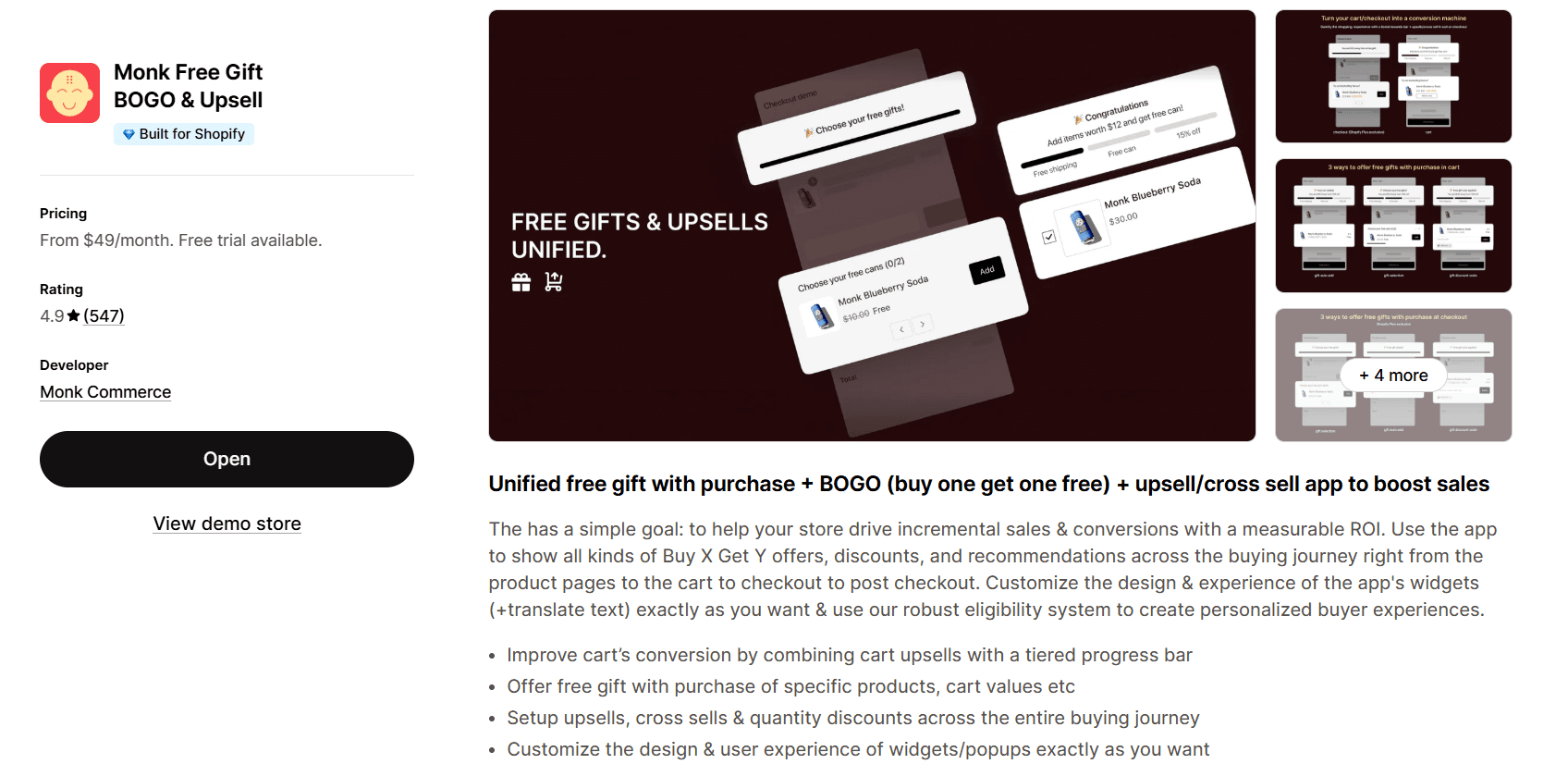
Head to the Shopify App Store, search for Monk Free Gift + BOGO, and install it. Once installed, open the app from your Shopify Admin.
Step 2: Create a New Offer
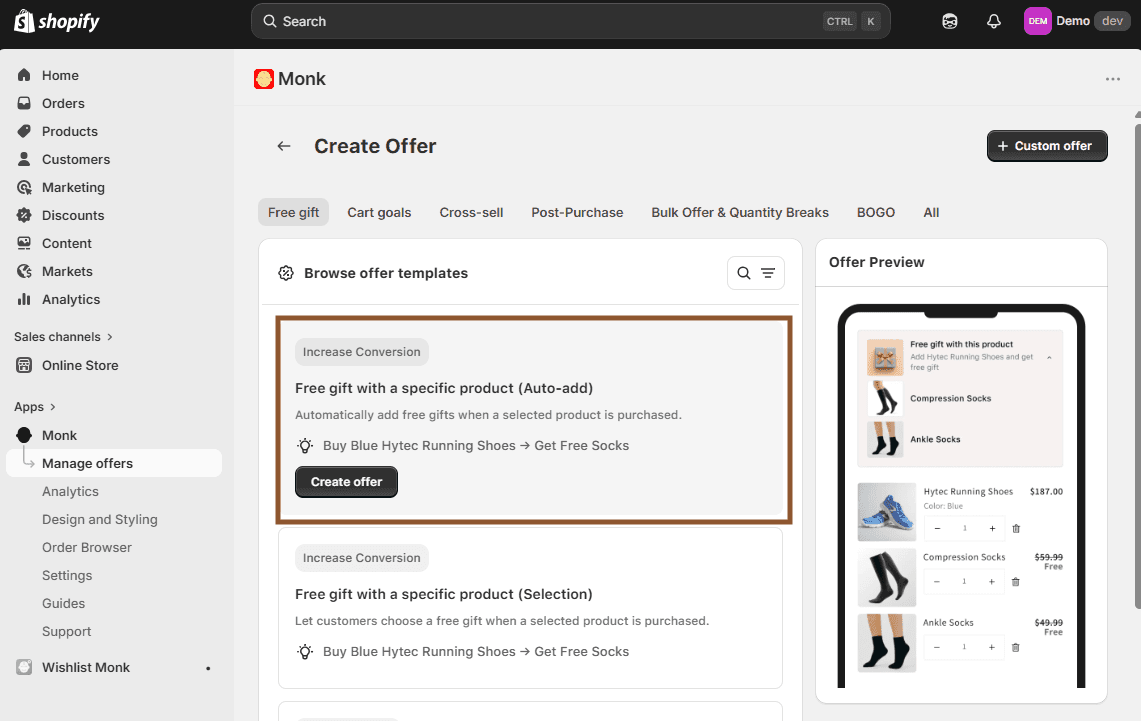
From the Monk Free Gift + BOGO dashboard, click on Create Offer. You'll see various offer types and ready-to-implement offer templates. For a product-based Buy X Get Y, choose the ‘Free Gift’ category and the ‘Free gift with a specific product (Auto-Add)’ offer template.
Name your offer carefully, as the name will appear as the discount name in the checkout later. Avoid naming anything generic, like BXGY, B1G1, BOGO, etc., to prevent any misuse.
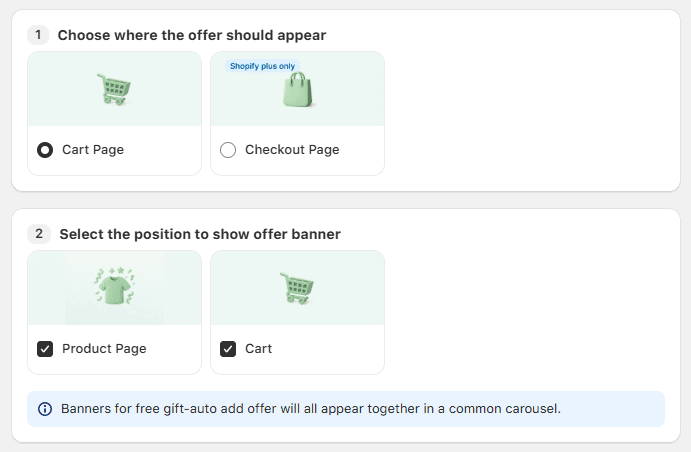
Step 3: Set Offer placements
Choose where you want the offer to be applied, the cart or the checkout.
You can also show the offer details using a banner so the customers don’t miss out. You can show the offer on the product page and in the cart. The banner is fully customizable according to your brand guidelines and theme.
Step 4: Configure the Offer Rules
Define what the customer needs to do to qualify. You can set this as:
A minimum quantity of specific products
A minimum quantity from a collection
A minimum cart value (e.g., spend $50 or more)
Choose what the customer gets. Options include:
A specific free product (auto-added to cart)
A product from a collection at a set discount
A percentage or fixed amount off the Y item
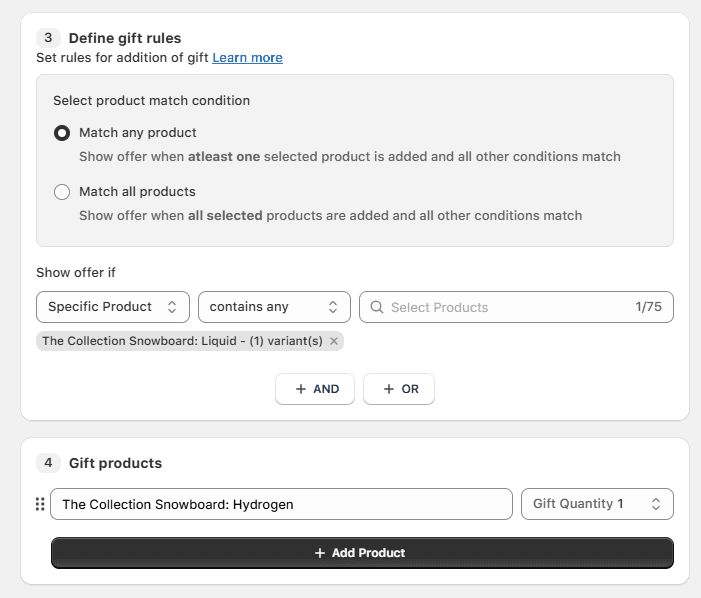
For a standard product-based Buy X Get Y offer:
‘Show offer if’ -> ‘Specific product’ -> ‘contains any’ -> product X
‘Gift products’ -> Choose product Y
With Monk Free Gift + BOGO, the free product is automatically added to the cart the moment the customer qualifies. You can also opt for an auto-remove functionality using the app, which automatically removes the free gift product Y if the customer is no longer eligible for the gift.
You can add more eligibility conditions to the same offer, like Item quantity, cart value threshold, customer tags, first-time buyers, etc.
Step 5: Customize text and Save
Customize how all the texts appear in the cart before and after the offer is availed. Once you're happy, hit "Activate," and your BXGY offer goes live. Test and optimize the offer accordingly.
Best Practices for High-Converting BXGY Offers
Setting up the offer is half the job. Here's how to make sure it actually converts:
Make the offer impossible to miss: Display it on product pages, in the cart, and at checkout. If customers don't know the deal exists, they can't take advantage of it. Monk Free Gift + BOGO's cart widget does this for you.
Keep the conditions simple: The more complicated your eligibility rules, the more customers will give up before understanding them. "Buy any 2 items, get a free tote bag" is clear. " Buy 2 items from Collection A or spend $60 on Collection B, then add a qualifying item from Collection C" is not.
Pair products that make sense together: A BXGY offer works best when X and Y are naturally complementary. A skincare brand pairing a cleanser with a sample moisturizer makes sense, but pairing a shampoo with a phone case doesn't.
Use urgency: Time-limited offers ("This weekend only") or stock-limited offers ("Only 50 free gifts left") push customers to act now rather than later.
Test your offer before going live: Add the qualifying products to a test cart, confirm the gift is auto-added, and check the discount applies correctly at checkout on both desktop and mobile.
Common Mistakes to Avoid
While setting up the offer, here are some common mistakes you should avoid:
Ignoring mobile: If the BXGY UI is hard to find or interact with on a phone, you're losing a significant chunk of your potential conversions. Always test the experience on mobile.
Setting the X threshold too high: If customers have to spend $200 to get a $5 gift, the offer doesn't feel worth it. Match the reward to the effort required.
Forgetting about margins: Run the numbers before you launch. If your margins on X are thin, giving Y away for free might actually cost you money on each order.
Running BXGY on products you can't afford to give away: BXGY works best on products with healthy margins or items you have excess stock of. Be intentional about what goes in the Y slot.
How to Track BXGY Offer Performance
You can't improve what you don't measure. Here's what to keep an eye on:
Average Order Value (AOV): Compare AOV during the BXGY period against your baseline. A well-configured BXGY offer should push this number up.
Redemption rate: How many customers who saw the offer actually claimed it? A low redemption rate might point to unclear messaging or too-high thresholds.
Conversion rate: Did the offer help more visitors complete a purchase? Or did it add confusion to the checkout flow?
Revenue per session: A broad metric that accounts for both AOV and conversion and is useful for getting a holistic read on how the campaign performed.
Return rate on Y products: If customers are claiming the free product and then returning it, that's worth flagging. It might mean the Y product isn't resonating or isn't genuinely useful to buyers.
Monk Free Gift + BOGO provides offer-based key performance data within the app dashboard so you can see which offers are driving results without needing to build custom reports.
Conclusion
Buy X Get Y is one of the most effective tools in a Shopify merchant's promotional toolkit, but only when it's set up to actually work. Shopify's native feature gets you started, but for auto-adding gifts, tiered rules, cart progress bars, and customer targeting, you need something more capable and practical.
That's exactly what Monk Free Gift + BOGO is built for. From a simple Buy 1 Get 1 to a multi-tier "spend more, get more" structure, Monk Free Gift + BOGO gives you the flexibility to run BXGY the way it's meant to be run, without the friction.
FAQs
Can BXGY offers be applied automatically in Shopify?
Yes, both Shopify's native tool and Monk Free Gift + BOGO support automatic discounts, meaning the offer applies without customers needing to enter a code. Monk Free Gift + BOGO takes it further by automatically adding the free product to the cart as well.
How do I restrict BXGY offers to specific customers?
Native Shopify has limited targeting options. With Monk Free Gift + BOGO, you can restrict offers by customer tags, purchase history, location, or even make an offer accessible only via a specific link, giving you precise control over who sees and qualifies for the deal.
Can I combine BXGY with other discounts in Shopify?
Shopify has strict rules about discount stacking, so automatic discounts generally can't be combined with discount codes. Monk Free Gift + BOGO is designed to work alongside your existing discount setup, but it's worth testing your specific combination before going live.
Does BXGY affect profit margins significantly?
Whether BXGY will affect profit margins depends on what you put in the Y slot. Giving away a high-margin product or clearing dead stock can make BXGY very profitable. The key is to run the numbers before you launch, such as factoring in product cost, shipping, and your average return rate.
How do I show BXGY offers on the cart page?
Shopify's native tool doesn't provide cart-level messaging by default. Monk Free Gift + BOGO includes a customizable cart widget with a progress bar that shows customers exactly how close they are to unlocking their reward.
What is the difference between manual and automatic BXGY discounts?
A manual discount requires customers to enter a code at checkout. An automatic discount applies on its own once the cart conditions are met. Automatic discounts tend to convert better because they remove a step from the process, so customers don't have to remember or hunt for a code.
How do I optimize BXGY offers for mobile users?
Keep the offer simple and visible. Make sure the cart widget or progress bar renders clearly on small screens, the free product is auto-added (so there's no need for customers to navigate back and search for it), and the checkout flow stays smooth. Always test your BXGY offer on a real mobile device before going live.
How to Create a Buy X Get Y (BXGY) Offer on Shopify?
Summary
Buy X Get Y (BXGY) is a powerful Shopify promotion that increases conversions and average order value by rewarding customers with a free or discounted product. While Shopify supports basic BXGY discounts, it lacks advanced features like auto-add gifts, tiered offers, and cart-level messaging. BXGY works by driving higher cart value, encouraging product discovery, and improving perceived value. With the right setup using apps, merchants can create seamless, high-converting offers with automation, targeting, and real-time cart visibility.
Customers rarely pay full price anymore. Discounts and deals have become the norm, and among all the offer types, Buy X Get Y (BXGY) consistently stands out. The reason is simple: customers aren't just getting a product at a lower price. They're walking away with something extra, and that psychological win is hard to beat.
But knowing how it works and actually setting Buy X Get Y on Shopify store are two very different things. Whether you want a straightforward Buy 1 Get 1 free deal or a more advanced tiered offer, this guide walks you through everything.
What Is a BXGY Offer in Shopify?
BXGY stands for "Buy X, Get Y." It's a promotional structure where a customer buys a qualifying product or quantity (the X) and receives another product (the Y) either for free or at a discount.
It's one of the most versatile offer types in e-commerce. The classic example is Buy 1 Get 1 Free, but BXGY covers a lot more ground than that. You can use it to cross-sell complementary products, move slow-moving inventory, reward bulk buyers, or simply give your average order value (AOV) a push.
Types of BXGY Offers You Can Create
Before you set anything up, it helps to know what kind of offer you're actually running. Here are the three main formats:
Buy X Get Y Free (Product-Based)
This is the most common format of BXGY. The customer buys a specific product (X) and gets another product (Y) for free.
What makes this format powerful is its flexibility in defining eligibility. You're not limited to simple product-for-product swaps; you can expand it into broader conditions:
Buy X product, Get Y product (standard use case)
Buy X from a collection, Get Y (great for stores with broad catalogs)
Buy X over $50, Get Y free (adds a cart value threshold to qualify)
Each of these variations lets you tailor the offer to your store's goals, whether it’s clearing inventory, driving discovery of new products, or simply increasing cart size.
Buy X Get Y Products (Quantity-Based)
Here, X and Y refer to quantities rather than specific products. Common examples are:
Buy 1 Get 1 (BOGO)
Buy 2 Get 1 Free
Buy 3 Get 2 free
When multiple quantity tiers are combined (e.g., Buy 2 Get 1, Buy 4 Get 2), this becomes tiered BXGY. This format works especially well for consumables, fashion basics, or anything customers tend to stock up on. It naturally encourages customers to increase quantity to unlock better value.
Buy X Get Y at a Lower price
Instead of giving the Y product entirely free, this format applies a discount. For example:
Buy 2, Get 20% off the third
Buy X, get Y at 50% off
You're still creating a compelling offer, but you're not giving away the full value of the second product. It's a smart middle ground, especially for higher-ticket items.
Why BXGY Offers Work for Shopify
BXGY offers convert well because of these four core reasons:
The perceived gain is high: When someone gets an extra product instead of just a lower price, it feels like more. A 50% discount and a free item of equal value are mathematically identical, but the free item wins almost every time.
It increases AOV naturally: to unlock the offer, customers have to add more to their cart. That's good for your revenue per order and your shipping economics.
It clears inventory efficiently: Pairing a bestseller with a slower-moving product in a BXGY deal moves stock without resorting to blanket markdowns.
It drives product discovery: Customers who get a free or discounted product they've never tried before are more likely to come back and buy it at full price next time.
How to Create a BXGY Offer on Shopify (Native Method)
Shopify's built-in discount tool lets you set up a basic BXGY offer without any apps. Here's how:
Go to your Shopify Admin and click on Discounts in the left sidebar.
Click Create discount and select Buy X Get Y from the discount types.
Choose whether this will be a discount code (customers enter it at checkout) or an automatic discount (applies without any code).
Under Customer buys, set the minimum quantity or purchase amount and select the eligible products or collections.
Under Customer gets, choose the product(s) the customer will receive and set the discount, either free (100% off), a percentage off, or a fixed amount off.
Optionally set a maximum number of uses to control how many times the offer can be redeemed.
Set your start and end dates if it's a time-limited promotion.
Click Save discount.
Limitations of Shopify's Native BXGY Feature
Shopify's native BXGY tool is a good starting point, but it can create friction as your promotions get more complex. These include:
Customers have to add the free item themselves: By default, the Y product isn't added to the cart automatically. If a customer doesn't know to look for it, they'll complete checkout without it, and the offer won't apply. That's a conversion you've just lost.
No tiered offers in one rule: Want to run "Buy 2 Get 10%, Buy 3 Get 20%, Buy 4 Get 30%"? Native Shopify can't handle that in a single discount. You'd have to create separate discount codes for each tier, which is clunky for both you and the customer.
Limited stacking: Shopify has strict rules around combining discounts. Automatic discounts generally can't be stacked with discount codes, which makes running layered promotions difficult.
No cart-level messaging: Native BXGY offers don't show a progress bar or indicator in the cart telling customers how close they are to unlocking the deal. That's a missed opportunity for urgency and nudging.
Minimal targeting options: You can't easily restrict native BXGY offers to specific customer segments, tags, or purchase history without workarounds.
How to Create Advanced BXGY Offers Using an App (Recommended Method)
When you want to overcome Shopify's native feature limitations, you can rely on Monk Free Gift + BOGO. It is built specifically for the kind of BXGY and free gift offers that native Shopify struggles with, such as auto-adding gifts, tiered rules, cart-level display, and more.
Here's how to set up a BXGY offer using Monk Free Gift + BOGO:
Step 1: Install Monk Free Gift + BOGO
Head to the Shopify App Store, search for Monk Free Gift + BOGO, and install it. Once installed, open the app from your Shopify Admin.
Step 2: Create a New Offer
From the Monk Free Gift + BOGO dashboard, click on Create Offer. You'll see various offer types and ready-to-implement offer templates. For a product-based Buy X Get Y, choose the ‘Free Gift’ category and the ‘Free gift with a specific product (Auto-Add)’ offer template.
Name your offer carefully, as the name will appear as the discount name in the checkout later. Avoid naming anything generic, like BXGY, B1G1, BOGO, etc., to prevent any misuse.
Step 3: Set Offer placements
Choose where you want the offer to be applied, the cart or the checkout.
You can also show the offer details using a banner so the customers don’t miss out. You can show the offer on the product page and in the cart. The banner is fully customizable according to your brand guidelines and theme.
Step 4: Configure the Offer Rules
Define what the customer needs to do to qualify. You can set this as:
A minimum quantity of specific products
A minimum quantity from a collection
A minimum cart value (e.g., spend $50 or more)
Choose what the customer gets. Options include:
A specific free product (auto-added to cart)
A product from a collection at a set discount
A percentage or fixed amount off the Y item
For a standard product-based Buy X Get Y offer:
‘Show offer if’ -> ‘Specific product’ -> ‘contains any’ -> product X
‘Gift products’ -> Choose product Y
With Monk Free Gift + BOGO, the free product is automatically added to the cart the moment the customer qualifies. You can also opt for an auto-remove functionality using the app, which automatically removes the free gift product Y if the customer is no longer eligible for the gift.
You can add more eligibility conditions to the same offer, like Item quantity, cart value threshold, customer tags, first-time buyers, etc.
Step 5: Customize text and Save
Customize how all the texts appear in the cart before and after the offer is availed. Once you're happy, hit "Activate," and your BXGY offer goes live. Test and optimize the offer accordingly.
Best Practices for High-Converting BXGY Offers
Setting up the offer is half the job. Here's how to make sure it actually converts:
Make the offer impossible to miss: Display it on product pages, in the cart, and at checkout. If customers don't know the deal exists, they can't take advantage of it. Monk Free Gift + BOGO's cart widget does this for you.
Keep the conditions simple: The more complicated your eligibility rules, the more customers will give up before understanding them. "Buy any 2 items, get a free tote bag" is clear. " Buy 2 items from Collection A or spend $60 on Collection B, then add a qualifying item from Collection C" is not.
Pair products that make sense together: A BXGY offer works best when X and Y are naturally complementary. A skincare brand pairing a cleanser with a sample moisturizer makes sense, but pairing a shampoo with a phone case doesn't.
Use urgency: Time-limited offers ("This weekend only") or stock-limited offers ("Only 50 free gifts left") push customers to act now rather than later.
Test your offer before going live: Add the qualifying products to a test cart, confirm the gift is auto-added, and check the discount applies correctly at checkout on both desktop and mobile.
Common Mistakes to Avoid
While setting up the offer, here are some common mistakes you should avoid:
Ignoring mobile: If the BXGY UI is hard to find or interact with on a phone, you're losing a significant chunk of your potential conversions. Always test the experience on mobile.
Setting the X threshold too high: If customers have to spend $200 to get a $5 gift, the offer doesn't feel worth it. Match the reward to the effort required.
Forgetting about margins: Run the numbers before you launch. If your margins on X are thin, giving Y away for free might actually cost you money on each order.
Running BXGY on products you can't afford to give away: BXGY works best on products with healthy margins or items you have excess stock of. Be intentional about what goes in the Y slot.
How to Track BXGY Offer Performance
You can't improve what you don't measure. Here's what to keep an eye on:
Average Order Value (AOV): Compare AOV during the BXGY period against your baseline. A well-configured BXGY offer should push this number up.
Redemption rate: How many customers who saw the offer actually claimed it? A low redemption rate might point to unclear messaging or too-high thresholds.
Conversion rate: Did the offer help more visitors complete a purchase? Or did it add confusion to the checkout flow?
Revenue per session: A broad metric that accounts for both AOV and conversion and is useful for getting a holistic read on how the campaign performed.
Return rate on Y products: If customers are claiming the free product and then returning it, that's worth flagging. It might mean the Y product isn't resonating or isn't genuinely useful to buyers.
Monk Free Gift + BOGO provides offer-based key performance data within the app dashboard so you can see which offers are driving results without needing to build custom reports.
Conclusion
Buy X Get Y is one of the most effective tools in a Shopify merchant's promotional toolkit, but only when it's set up to actually work. Shopify's native feature gets you started, but for auto-adding gifts, tiered rules, cart progress bars, and customer targeting, you need something more capable and practical.
That's exactly what Monk Free Gift + BOGO is built for. From a simple Buy 1 Get 1 to a multi-tier "spend more, get more" structure, Monk Free Gift + BOGO gives you the flexibility to run BXGY the way it's meant to be run, without the friction.
FAQs
Can BXGY offers be applied automatically in Shopify?
Yes, both Shopify's native tool and Monk Free Gift + BOGO support automatic discounts, meaning the offer applies without customers needing to enter a code. Monk Free Gift + BOGO takes it further by automatically adding the free product to the cart as well.
How do I restrict BXGY offers to specific customers?
Native Shopify has limited targeting options. With Monk Free Gift + BOGO, you can restrict offers by customer tags, purchase history, location, or even make an offer accessible only via a specific link, giving you precise control over who sees and qualifies for the deal.
Can I combine BXGY with other discounts in Shopify?
Shopify has strict rules about discount stacking, so automatic discounts generally can't be combined with discount codes. Monk Free Gift + BOGO is designed to work alongside your existing discount setup, but it's worth testing your specific combination before going live.
Does BXGY affect profit margins significantly?
Whether BXGY will affect profit margins depends on what you put in the Y slot. Giving away a high-margin product or clearing dead stock can make BXGY very profitable. The key is to run the numbers before you launch, such as factoring in product cost, shipping, and your average return rate.
How do I show BXGY offers on the cart page?
Shopify's native tool doesn't provide cart-level messaging by default. Monk Free Gift + BOGO includes a customizable cart widget with a progress bar that shows customers exactly how close they are to unlocking their reward.
What is the difference between manual and automatic BXGY discounts?
A manual discount requires customers to enter a code at checkout. An automatic discount applies on its own once the cart conditions are met. Automatic discounts tend to convert better because they remove a step from the process, so customers don't have to remember or hunt for a code.
How do I optimize BXGY offers for mobile users?
Keep the offer simple and visible. Make sure the cart widget or progress bar renders clearly on small screens, the free product is auto-added (so there's no need for customers to navigate back and search for it), and the checkout flow stays smooth. Always test your BXGY offer on a real mobile device before going live.
Ravish (RV)
Co-Founder, Monk Commerce
Ravish is an ecommerce and SaaS marketing expert with 6+ years of experience in Shopify and ecommerce and 10+ years of experience in marketing, and growth strategy. He has worked closely with Shopify merchants to solve real ecommerce challenges and shares practical, research-backed insights, industry best practices, and emerging trends.
Contents
Related Articles
How to Enable Free Gift Selection on Shopify
10 Best Shopify Buy X Get Y Apps in 2026
How to Run BOGO on Shopify Without Discount Codes
Get Monk Free Gift app for just $1/month this Black Friday
First month: $1 after your 7-day free trial. All features included. Offer live!
Claim offer now

Get Monk Free Gift app for just $1/month this Black Friday
First month: $1 after your 7-day free trial. All features included. Offer live!
Claim offer now
Get Monk Free Gift app for just $1/month this Black Friday
First month: $1 after your 7-day free trial. All features included. Offer live!
Claim offer now