
How to Automatically Apply Discount Codes on Shopify?
Summary
Automatically applying discount codes in Shopify reduces friction at checkout by removing the need for customers to manually enter coupons, improving conversion rates and average order value. It works through native automatic discounts, URL-based discount links, Shopify Functions or Scripts, custom theme code, and third-party apps. Shopify’s built-in tools are simple but limited in stacking, targeting, and advanced logic. URL links improve campaign flow but lack flexibility and persistence. Advanced methods enable dynamic, rule-based discounts using cart value, products, or customer segments but often require technical setup. Apps provide the most scalable solution by combining real-time discount triggers with cart visibility, upsells, and free gifts.

Key Takeaways
Automatically applying discount codes in Shopify reduces friction at checkout by removing the need for customers to manually enter coupons, improving conversion rates and average order value. It works through native automatic discounts, URL-based discount links, Shopify Functions or Scripts, custom theme code, and third-party apps. Shopify’s built-in tools are simple but limited in stacking, targeting, and advanced logic. URL links improve campaign flow but lack flexibility and persistence. Advanced methods enable dynamic, rule-based discounts using cart value, products, or customer segments but often require technical setup. Apps provide the most scalable solution by combining real-time discount triggers with cart visibility, upsells, and free gifts.
One of the best strategies to get more people to buy from your online store is to provide discounts. But there is a common problem: customers often forget to add discount coupons when they check out.
Many people leave their cart without using a promotional code, even if you send them an email or ad about it. Hence, many Shopify store owners prefer discount coupons that apply automatically.
The discount is applied automatically when customers get to the checkout, instead of having to copy and paste a code.
The result:
More people who buy
Less trouble at checkout
Better tracking of campaigns
A higher average order value (AOV)
We'll show you how to automatically apply discount codes in Shopify in this article. We'll also talk about the numerous ways to do it and how solutions like Monk Free Gift can help merchants run smarter promotions and increase revenue.
What Does “Automatically Apply Discount Code” Mean in Shopify?
As the name suggests, a discount code automatically applies to the customer’s basket, and the consumer doesn't have to enter a coupon during checkout when specific requirements are met.
How the feature works:
When customers click a link shared via email or SMS, the discount is applied automatically. This can either reduce the total cart value or add a free gift with purchase to the cart.
Similarly, when customers add items and meet the offer conditions, a discount code is applied automatically in the cart. Depending on the setup, this could unlock a free gift, apply a discount to specific products, or reduce the overall cart value.
How to Set Up “Automatically Apply Discount Code” in Shopify
There are five ways to automatically apply discount codes in Shopify. Some are built into Shopify, while others require apps or custom development. Let's dive into each method, its key benefits, functionalities, and limitations in detail.
Method 1 – Use Shopify’s Built-In Automatic Discounts
Shopify's native Automatic Discounts functionality is the easiest way to apply discounts automatically to a store. Customers don't have to enter a code; the discount will automatically apply at the checkout when they meet the eligibility.
Common use cases include simple promotions (e.g., 10% off, BOGO)
Key Benefits:
Sales over the whole site
Promotions for collections
Deals where you buy X and get Y
Discounts for buying in bulk
Offers for free shipping
How to set it up?
Go to the Shopify Admin dashboard > Discounts > Create Discounts
Choose your desired discount type. Shopify currently supports the following discounts: percentage discounts, fixed-amount discounts, free shipping discounts, Buy X Get Y promotions
Set the method to Automatic Discount
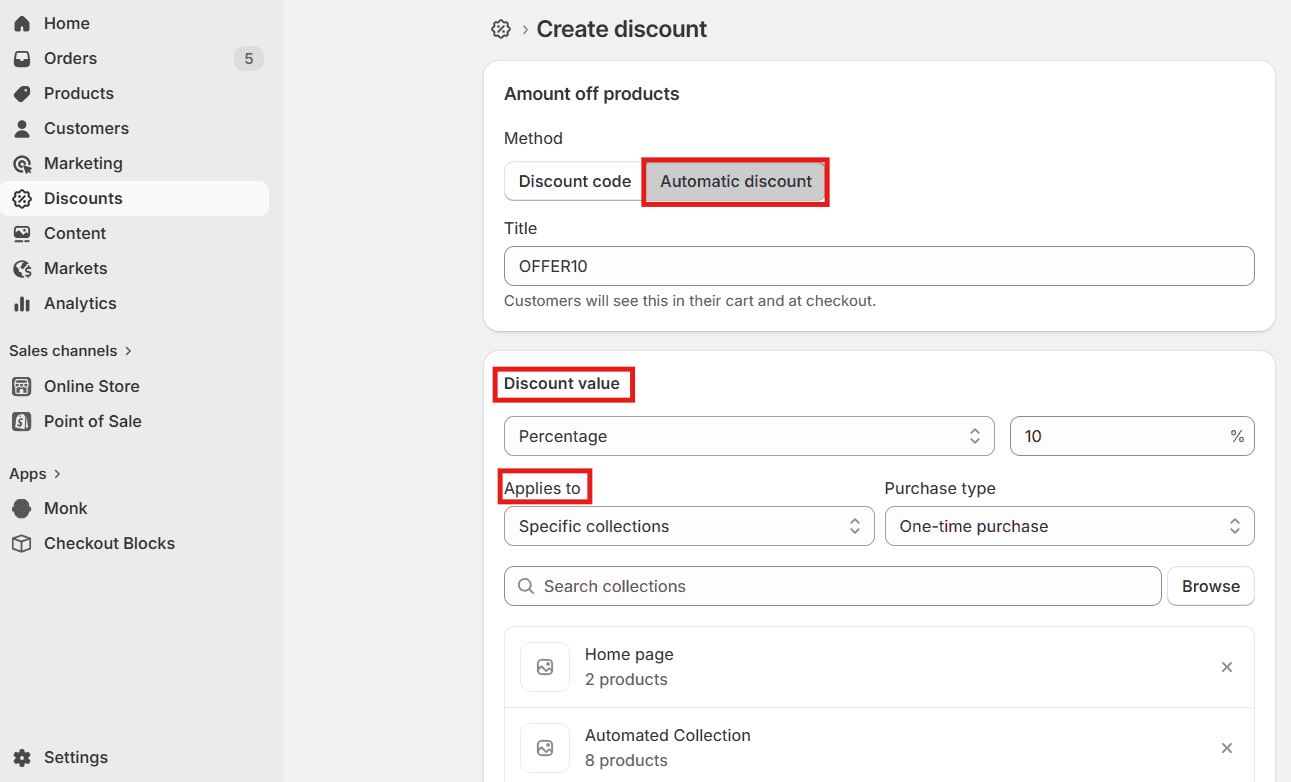
Set eligibility conditions as required.
Save and test
Shopify automatically gives the discount to customers who meet the requirements.
Limitations:
Native automatic discounts in Shopify can be limiting:
You can’t run multiple automatic discounts simultaneously
Stacking different kinds of automatic discounts is impossible.
Missing advanced triggers like specific location, language, etc.
Limited free gift and BOGO offer flexibility
Method 2 – Use Auto-Apply Discount Links (URL Parameter Method)
Another common approach in Shopify is using discount links that apply offers automatically when customers click on them.
Auto-apply links make it much easier for people to convert because they remove friction.
For example: https://yourstore.com/discount/SAVE10 Instead of seeing ‘Type in the code SAVE10’, customers see the discount applied. |
Since the discount is already applied, clients don't have to remember the code.
How it works:
The discount code is embedded within a URL
When a customer clicks the link, the discount is applied instantly to their cart
No manual code entry is required
Key benefit:
Seamless experience for customers, especially in email and SMS campaigns
Limitations:
Works only when the customer clicks the link
Not reliable across sessions (may not persist)
Supports only one discount at a time
No dynamic or personalized logic
Limited visibility of applied discount in the journey
Depends on external channels (email, SMS, ads)
Basic tracking and analytics capabilities
Method 3 – Shopify Functions / Scripts (Advanced)
For merchants who need precise control over discount logic, this method enables fully automated and dynamic discounting at checkout. It’s best suited for stores that want to move beyond basic rules and implement tailored pricing strategies.
How it works:
Uses Shopify Functions (available more broadly) or Shopify Scripts (for Shopify Plus) to define custom discount logic
Evaluates conditions in real time based on:
Cart value and contents
Customer tags or segments
Product types, collections, or quantities
Automatically applies the most relevant discount during checkout without requiring user input
Key benefits:
Highly flexible and customizable discount logic
Supports tiered pricing, BOGO, and customer-specific offers
Enables seamless, automatic application without relying on codes or links
Scales well for complex promotional strategies
Limitations:
Requires technical expertise or developer support
Shopify Scripts are limited to Shopify Plus plans
Setup and testing can be time-intensive
Limited native UI for managing or visualizing logic compared to apps
Method 4 – Auto-Apply Discount Codes With Custom Code (Non-Plus Stores)
This approach uses front-end customization to automatically apply discount codes without requiring Shopify Plus. It relies on injecting logic into your theme to trigger discounts in the background.
How it works:
Developers modify JavaScript or Liquid in the theme
A background request is triggered when the cart or page loads
Example: fetch('/discount/DISCOUNTCODE')
This silently applies the discount code using Shopify’s discount URL mechanism
Logic can be added to conditionally trigger the code based on:
Customer tags (e.g., VIP)
First-time visitors
Newsletter subscribers
Key benefits:
Enables auto-apply behavior without Shopify Plus
Allows basic customer segmentation using theme logic
Works well for simple targeted offers
Can be implemented without relying on third-party apps
Limitations:
Requires developer support for setup and maintenance
Limited scalability for complex campaigns
No robust tracking or analytics
Harder to manage and iterate for marketing teams
Depends on front-end execution (may fail if scripts don’t load properly)
Method 5 – Apply Discount Codes Automatically via Apps- (The most effective method)
For most merchants on Shopify, using apps is the most practical and scalable way to auto-apply discounts. It removes native limitations and gives you real-time control over how and when discounts are triggered.
How it works:
Apps monitor customer behavior in real time
Discounts are triggered automatically based on conditions like:
Cart value
Product combinations
Customer segments
Upsell interactions
Discounts can be applied directly in the cart, not just at checkout
Many apps also surface offers visually during the shopping journey (product page, cart, etc.)
What apps solve:
Native and URL-based discounts often apply late (at checkout), which means customers don’t clearly see savings while browsing.
Apps address this by:
Showing discounts directly on product and cart pages
Applying dynamic discounts as the cart updates
Triggering offers based on real-time cart changes
Combining discounts with upsells and cross-sells
Learn the difference between upsell and Cross-sell offers in Shopify
Why is Monk a strong choice for automatically applying discounts?
Monk is built specifically for Shopify stores to create conversion-focused promotions, helping merchants go beyond basic discounting. Monk is highly rated by over 530+ Shopify merchants for its easy-to-use features and flexible discount promotions.

What it enables:
Automatically apply discounts directly in the cart
Real-time, dynamic discount application
Enables combining discounts and layering offers
Supports complex logic; tiered offers, bundles, BOGO, etc.
Trigger discounts, free gifts and upsells based on cart value and customer behavior
Highly targeted offers for customers
Offer free gifts and bundle deals seamlessly
Increase Average Order Value (AOV) without hurting margins
Highly customizable and blends seamlessly with the native cart
Provides offer-level analytics for better tracking
Example flow
Customer adds a product → discount is auto-applied → a relevant upsell is shown → customer adds another item → cart value increases
Common Issues & How to Fix Them
Auto-apply discounts are powerful, but merchants often encounter issues. Here are the most common problems and how to fix them.
Discount Not Applying at Checkout
This frequently happens when the cart doesn't follow rules for discounts.
Common reasons:
Did not meet the minimum purchase requirement
Items in the cart that aren't eligible
The customer is not in the permitted segment
Solution :
|
Conflicts With Other Discounts
Discounts don't always stack on Shopify. If a consumer tries to use more than one discount that can't be combined, Shopify only uses the best one.
Solution:
|
App Integration Conflicts
Multiple apps may try to give discounts at the same time. This may cause:
Discounts overriding each other
Checkout loading errors
Incorrect pricing
Solution:
|
URL Discount Not Working
This is usually because of :
Wrong URL redirects
Links in the campaign that don't work
Shopify stores with more than one domain
If parameters are lost via redirects or across domains, discount URLs may not work.
Solution:
|
Best Practices for Using Auto-Apply Discount Codes
When used with effective marketing methods, auto-apply discounts work best.Here are some tried-and-true best practices.
Use Clear Messaging on Homepage & Product Pages
Customers should be aware that the discount has already been applied. Use messages like "10% OFF automatically applied at checkout" or "Discount for a limited time". This builds trust and speeds up the checkout process.
Promote Discount Links
Discount links are a very useful tool for marketing.
Get the word out about them by:
Email marketing
SMS promotions
Marketing using influencers
Ads on social media
Instead of giving customers a code, send them directly to a discounted page.
Keep Rules Simple to Avoid Confusion
Customers get confused by complicated discount rules. Be sure to use banners and in-cart messaging to clearly notify customers about the offer.
Use Urgency (Timers, Popups, Banners)
Urgency makes conversion rates go up a lot.
Some good strategies are the following:
Timers that count down
Popups for exit intent
Reminders for your cart
Discounts that only last for a short time
Mistakes to Avoid
Don't make these typical discount mistakes :
Giving too many discounts at the same time
Giving too many discounts on things
Using hard-to-understand rules
Not keeping track of how well the campaign is doing
Showing discounts only after you check out
Instead of just lowering prices, smart merchants focus on promotions that boost order value and conversion rates.
Final Thoughts
One of the easiest ways to boost Shopify checkout conversions is to automatically apply discount coupons. You make the checkout process easier by not making users enter codes manually.
But most Shopify shops that are growing rapidly figure out that simple discounts aren't enough. The best chance is to provide people discounts together with upsells, bundles, and cart bonuses.
That’s where tools like Monk become crucial.
Instead of just offering a discount, merchants can:
Trigger upsells
Offer free gifts
Increase average order value
Personalize promotions
The result: higher revenue from every visitor!
FAQs
Does Shopify support URL discount links?
Yes, Shopify supports URL discount links by letting store owners make links that give customers a discount when they click on them. For instance: yourstore.com/discount/CODE. When customers open the link, the discount is automatically added to their cart.
Can I auto-apply multiple discount codes on Shopify?
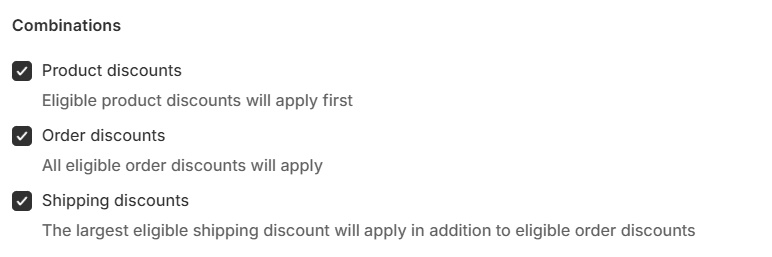
No, Shopify does not support auto-applying multiple discount codes at once. You can enable discount combinations (like product + shipping discounts), but only one code can be auto-applied per session. For more advanced stacking, discounting apps like Monk or custom logic is typically required.
How do I share an auto-apply discount link with customers?
After creating an auto-apply discount URL, you can distribute it via email, SMS, ads, or social channels. When customers click on the URL, the discount is applied automatically.
Can automatic discounts be stacked with manual discount codes?
In Shopify, automatic discounts generally cannot be stacked with manual discount codes by default. However, you can enable discount combinations for certain discount types, which allows limited stacking (e.g., product discount + shipping discount), depending on your setup.
Do I need coding knowledge to create an auto-apply discount link?
No, you don't need prior coding knowledge to create an auto-apply discount link. You can create discount links right in Shopify or by adding /discount/CODE to the end of their store URL. But to use advanced discount automation, you normally need discounting applications like Monk or custom coding the logic into your store.
How to Automatically Apply Discount Codes on Shopify?
Summary
Automatically applying discount codes in Shopify reduces friction at checkout by removing the need for customers to manually enter coupons, improving conversion rates and average order value. It works through native automatic discounts, URL-based discount links, Shopify Functions or Scripts, custom theme code, and third-party apps. Shopify’s built-in tools are simple but limited in stacking, targeting, and advanced logic. URL links improve campaign flow but lack flexibility and persistence. Advanced methods enable dynamic, rule-based discounts using cart value, products, or customer segments but often require technical setup. Apps provide the most scalable solution by combining real-time discount triggers with cart visibility, upsells, and free gifts.
One of the best strategies to get more people to buy from your online store is to provide discounts. But there is a common problem: customers often forget to add discount coupons when they check out.
Many people leave their cart without using a promotional code, even if you send them an email or ad about it. Hence, many Shopify store owners prefer discount coupons that apply automatically.
The discount is applied automatically when customers get to the checkout, instead of having to copy and paste a code.
The result:
More people who buy
Less trouble at checkout
Better tracking of campaigns
A higher average order value (AOV)
We'll show you how to automatically apply discount codes in Shopify in this article. We'll also talk about the numerous ways to do it and how solutions like Monk Free Gift can help merchants run smarter promotions and increase revenue.
What Does “Automatically Apply Discount Code” Mean in Shopify?
As the name suggests, a discount code automatically applies to the customer’s basket, and the consumer doesn't have to enter a coupon during checkout when specific requirements are met.
How the feature works:
When customers click a link shared via email or SMS, the discount is applied automatically. This can either reduce the total cart value or add a free gift with purchase to the cart.
Similarly, when customers add items and meet the offer conditions, a discount code is applied automatically in the cart. Depending on the setup, this could unlock a free gift, apply a discount to specific products, or reduce the overall cart value.
How to Set Up “Automatically Apply Discount Code” in Shopify
There are five ways to automatically apply discount codes in Shopify. Some are built into Shopify, while others require apps or custom development. Let's dive into each method, its key benefits, functionalities, and limitations in detail.
Method 1 – Use Shopify’s Built-In Automatic Discounts
Shopify's native Automatic Discounts functionality is the easiest way to apply discounts automatically to a store. Customers don't have to enter a code; the discount will automatically apply at the checkout when they meet the eligibility.
Common use cases include simple promotions (e.g., 10% off, BOGO)
Key Benefits:
Sales over the whole site
Promotions for collections
Deals where you buy X and get Y
Discounts for buying in bulk
Offers for free shipping
How to set it up?
Go to the Shopify Admin dashboard > Discounts > Create Discounts
Choose your desired discount type. Shopify currently supports the following discounts: percentage discounts, fixed-amount discounts, free shipping discounts, Buy X Get Y promotions
Set the method to Automatic Discount
Set eligibility conditions as required.
Save and test
Shopify automatically gives the discount to customers who meet the requirements.
Limitations:
Native automatic discounts in Shopify can be limiting:
You can’t run multiple automatic discounts simultaneously
Stacking different kinds of automatic discounts is impossible.
Missing advanced triggers like specific location, language, etc.
Limited free gift and BOGO offer flexibility
Method 2 – Use Auto-Apply Discount Links (URL Parameter Method)
Another common approach in Shopify is using discount links that apply offers automatically when customers click on them.
Auto-apply links make it much easier for people to convert because they remove friction.
For example: https://yourstore.com/discount/SAVE10 Instead of seeing ‘Type in the code SAVE10’, customers see the discount applied. |
Since the discount is already applied, clients don't have to remember the code.
How it works:
The discount code is embedded within a URL
When a customer clicks the link, the discount is applied instantly to their cart
No manual code entry is required
Key benefit:
Seamless experience for customers, especially in email and SMS campaigns
Limitations:
Works only when the customer clicks the link
Not reliable across sessions (may not persist)
Supports only one discount at a time
No dynamic or personalized logic
Limited visibility of applied discount in the journey
Depends on external channels (email, SMS, ads)
Basic tracking and analytics capabilities
Method 3 – Shopify Functions / Scripts (Advanced)
For merchants who need precise control over discount logic, this method enables fully automated and dynamic discounting at checkout. It’s best suited for stores that want to move beyond basic rules and implement tailored pricing strategies.
How it works:
Uses Shopify Functions (available more broadly) or Shopify Scripts (for Shopify Plus) to define custom discount logic
Evaluates conditions in real time based on:
Cart value and contents
Customer tags or segments
Product types, collections, or quantities
Automatically applies the most relevant discount during checkout without requiring user input
Key benefits:
Highly flexible and customizable discount logic
Supports tiered pricing, BOGO, and customer-specific offers
Enables seamless, automatic application without relying on codes or links
Scales well for complex promotional strategies
Limitations:
Requires technical expertise or developer support
Shopify Scripts are limited to Shopify Plus plans
Setup and testing can be time-intensive
Limited native UI for managing or visualizing logic compared to apps
Method 4 – Auto-Apply Discount Codes With Custom Code (Non-Plus Stores)
This approach uses front-end customization to automatically apply discount codes without requiring Shopify Plus. It relies on injecting logic into your theme to trigger discounts in the background.
How it works:
Developers modify JavaScript or Liquid in the theme
A background request is triggered when the cart or page loads
Example: fetch('/discount/DISCOUNTCODE')
This silently applies the discount code using Shopify’s discount URL mechanism
Logic can be added to conditionally trigger the code based on:
Customer tags (e.g., VIP)
First-time visitors
Newsletter subscribers
Key benefits:
Enables auto-apply behavior without Shopify Plus
Allows basic customer segmentation using theme logic
Works well for simple targeted offers
Can be implemented without relying on third-party apps
Limitations:
Requires developer support for setup and maintenance
Limited scalability for complex campaigns
No robust tracking or analytics
Harder to manage and iterate for marketing teams
Depends on front-end execution (may fail if scripts don’t load properly)
Method 5 – Apply Discount Codes Automatically via Apps- (The most effective method)
For most merchants on Shopify, using apps is the most practical and scalable way to auto-apply discounts. It removes native limitations and gives you real-time control over how and when discounts are triggered.
How it works:
Apps monitor customer behavior in real time
Discounts are triggered automatically based on conditions like:
Cart value
Product combinations
Customer segments
Upsell interactions
Discounts can be applied directly in the cart, not just at checkout
Many apps also surface offers visually during the shopping journey (product page, cart, etc.)
What apps solve:
Native and URL-based discounts often apply late (at checkout), which means customers don’t clearly see savings while browsing.
Apps address this by:
Showing discounts directly on product and cart pages
Applying dynamic discounts as the cart updates
Triggering offers based on real-time cart changes
Combining discounts with upsells and cross-sells
Learn the difference between upsell and Cross-sell offers in Shopify
Why is Monk a strong choice for automatically applying discounts?
Monk is built specifically for Shopify stores to create conversion-focused promotions, helping merchants go beyond basic discounting. Monk is highly rated by over 530+ Shopify merchants for its easy-to-use features and flexible discount promotions.
What it enables:
Automatically apply discounts directly in the cart
Real-time, dynamic discount application
Enables combining discounts and layering offers
Supports complex logic; tiered offers, bundles, BOGO, etc.
Trigger discounts, free gifts and upsells based on cart value and customer behavior
Highly targeted offers for customers
Offer free gifts and bundle deals seamlessly
Increase Average Order Value (AOV) without hurting margins
Highly customizable and blends seamlessly with the native cart
Provides offer-level analytics for better tracking
Example flow
Customer adds a product → discount is auto-applied → a relevant upsell is shown → customer adds another item → cart value increases
Common Issues & How to Fix Them
Auto-apply discounts are powerful, but merchants often encounter issues. Here are the most common problems and how to fix them.
Discount Not Applying at Checkout
This frequently happens when the cart doesn't follow rules for discounts.
Common reasons:
Did not meet the minimum purchase requirement
Items in the cart that aren't eligible
The customer is not in the permitted segment
Solution :
|
Conflicts With Other Discounts
Discounts don't always stack on Shopify. If a consumer tries to use more than one discount that can't be combined, Shopify only uses the best one.
Solution:
|
App Integration Conflicts
Multiple apps may try to give discounts at the same time. This may cause:
Discounts overriding each other
Checkout loading errors
Incorrect pricing
Solution:
|
URL Discount Not Working
This is usually because of :
Wrong URL redirects
Links in the campaign that don't work
Shopify stores with more than one domain
If parameters are lost via redirects or across domains, discount URLs may not work.
Solution:
|
Best Practices for Using Auto-Apply Discount Codes
When used with effective marketing methods, auto-apply discounts work best.Here are some tried-and-true best practices.
Use Clear Messaging on Homepage & Product Pages
Customers should be aware that the discount has already been applied. Use messages like "10% OFF automatically applied at checkout" or "Discount for a limited time". This builds trust and speeds up the checkout process.
Promote Discount Links
Discount links are a very useful tool for marketing.
Get the word out about them by:
Email marketing
SMS promotions
Marketing using influencers
Ads on social media
Instead of giving customers a code, send them directly to a discounted page.
Keep Rules Simple to Avoid Confusion
Customers get confused by complicated discount rules. Be sure to use banners and in-cart messaging to clearly notify customers about the offer.
Use Urgency (Timers, Popups, Banners)
Urgency makes conversion rates go up a lot.
Some good strategies are the following:
Timers that count down
Popups for exit intent
Reminders for your cart
Discounts that only last for a short time
Mistakes to Avoid
Don't make these typical discount mistakes :
Giving too many discounts at the same time
Giving too many discounts on things
Using hard-to-understand rules
Not keeping track of how well the campaign is doing
Showing discounts only after you check out
Instead of just lowering prices, smart merchants focus on promotions that boost order value and conversion rates.
Final Thoughts
One of the easiest ways to boost Shopify checkout conversions is to automatically apply discount coupons. You make the checkout process easier by not making users enter codes manually.
But most Shopify shops that are growing rapidly figure out that simple discounts aren't enough. The best chance is to provide people discounts together with upsells, bundles, and cart bonuses.
That’s where tools like Monk become crucial.
Instead of just offering a discount, merchants can:
Trigger upsells
Offer free gifts
Increase average order value
Personalize promotions
The result: higher revenue from every visitor!
FAQs
Does Shopify support URL discount links?
Yes, Shopify supports URL discount links by letting store owners make links that give customers a discount when they click on them. For instance: yourstore.com/discount/CODE. When customers open the link, the discount is automatically added to their cart.
Can I auto-apply multiple discount codes on Shopify?
No, Shopify does not support auto-applying multiple discount codes at once. You can enable discount combinations (like product + shipping discounts), but only one code can be auto-applied per session. For more advanced stacking, discounting apps like Monk or custom logic is typically required.
How do I share an auto-apply discount link with customers?
After creating an auto-apply discount URL, you can distribute it via email, SMS, ads, or social channels. When customers click on the URL, the discount is applied automatically.
Can automatic discounts be stacked with manual discount codes?
In Shopify, automatic discounts generally cannot be stacked with manual discount codes by default. However, you can enable discount combinations for certain discount types, which allows limited stacking (e.g., product discount + shipping discount), depending on your setup.
Do I need coding knowledge to create an auto-apply discount link?
No, you don't need prior coding knowledge to create an auto-apply discount link. You can create discount links right in Shopify or by adding /discount/CODE to the end of their store URL. But to use advanced discount automation, you normally need discounting applications like Monk or custom coding the logic into your store.
Contents
Related Articles
How to Add a Free Gift With Purchase on Shopify
How to Create a Discount Code in Shopify in 2026: A Step-by-Step Guide
7 Best Shopify Discount Apps to Boost Sales in 2026
Get Monk Free Gift app for just $1/month this Black Friday
First month: $1 after your 7-day free trial. All features included. Offer live!
Claim offer now

Get Monk Free Gift app for just $1/month this Black Friday
First month: $1 after your 7-day free trial. All features included. Offer live!
Claim offer now
Get Monk Free Gift app for just $1/month this Black Friday
First month: $1 after your 7-day free trial. All features included. Offer live!
Claim offer now