

7 Best Shopify Apps for Buy One Get One Offers
Summary
BOGO offers are one of the most effective Shopify promotions for increasing conversions and average order value by encouraging customers to add more items to their cart. Unlike percentage discounts, BOGO creates higher perceived value while helping clear inventory and protect margins. Shopify’s native discount system supports basic setups, but dedicated apps enable advanced features like auto-add gifts, targeting, and cart widgets. With the right strategy and tools, BOGO campaigns can drive higher engagement, reduce cart abandonment, and maximize revenue, and solutions like Monk make it easy to implement and scale these offers.

Key Takeaways
BOGO offers are one of the most effective Shopify promotions for increasing conversions and average order value by encouraging customers to add more items to their cart. Unlike percentage discounts, BOGO creates higher perceived value while helping clear inventory and protect margins. Shopify’s native discount system supports basic setups, but dedicated apps enable advanced features like auto-add gifts, targeting, and cart widgets. With the right strategy and tools, BOGO campaigns can drive higher engagement, reduce cart abandonment, and maximize revenue, and solutions like Monk make it easy to implement and scale these offers.
If your conversion rate is plateauing and discount codes feel like background noise, a well-run Buy One Get One (BOGO) offer can shake things up.
BOGO gives shoppers a tangible reason to add a second item to their cart without feeling like they're being sold to. The perceived value is high, the math feels generous, and the merchant gets a bigger basket.
But running BOGO on Shopify natively is painful. The default discount engine handles basic cases. But when you want tiered gifts, auto add-to-cart, eligibility rules, or a clean widget that nudges the customer, you need an app.
This guide breaks down the seven best Shopify BOGO apps, what each one does well, where it falls short, and how to pick the right one for your store.
Why BOGO Works for Shopify Stores
Before we get into tools, it is worth understanding why BOGO outperforms most other discount mechanics. Percentage-off discounts erode margin and train customers to wait for sales. BOGO offers feel like bonuses rather than markdowns. Which keeps your brand positioning intact while still moving units.
A few reasons BOGO converts better than flat discounts:
Higher perceived value: Shoppers consistently rate ‘free’ or ‘extra’ as more compelling than equivalent dollar-off discounts, even when the math is identical.
Inventory clearance without margin destruction: Pair slow-moving SKUs as the ‘get’ item with bestsellers as the ‘buy’ item.
AOV lift: A buy-2-get-1 offer naturally increases the cart size. Combined with a free shipping threshold, the lift compounds.
Reduced cart abandonment: Auto-added gifts at the cart or checkout stage create a positive surprise right when shoppers drop off.
7 Best Shopify Apps for Buy One Get One Offers
The apps below cover every major BOGO use case, from simple ‘buy X get Y’ rules to advanced tiered gifting, post-purchase upsells, and full-store flash sales. Each entry tells you who it is for, what it solves, and the trade-off to watch for.
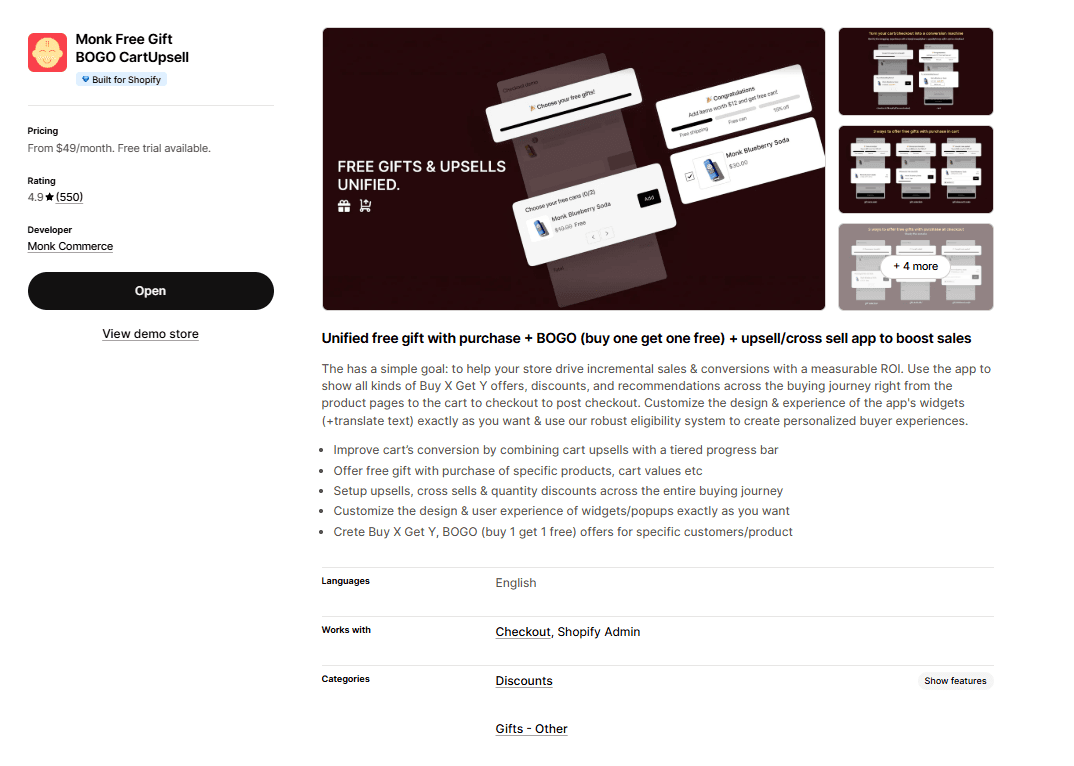
Best for: Stores that want a single app to handle BOGO, free gifts, and upsells across the entire buying journey.
Monk treats BOGO as part of a larger AOV strategy rather than a standalone feature. You can run a buy-one-get-one offer on the product page, layer it with a cart progress bar pushing shoppers to the next tier, and hit them again with a checkout upsell if you are on Shopify Plus.
The eligibility engine is the standout. You can target offers by product, collection, cart value, customer tag, or quantity, so you are not stuck running one blanket BOGO across your entire store. You can also mould it to fit your brand identity by using customizable widgets.
The trade-off: the checkout-level features (one-click upsells, post-purchase offers, tiered rewards) are Shopify Plus exclusives. On regular plans, you still get a strong toolkit, but not the full stack.
Pros
Unified app for BOGO, free gifts, cart upsells, and checkout upsells (no need to stack multiple tools)
Granular eligibility rules (product, cart value, customer tag, quantity)
Highly customizable widgets and popups that match your store's design
Strong customer support with live chat and video walkthroughs
Cons
Best checkout-level features are locked to Shopify Plus
The eligibility engine has a learning curve if you want complex, layered offers
Pricing
Free trial
$49/month
$149/month
Reviews
Shopify: 4.9/5
Also Read: Configure a BOGO offer using Monk Free Gift BOGO & Upsell on your Shopify store
BOGOS: Free Gift Bundle Upsell
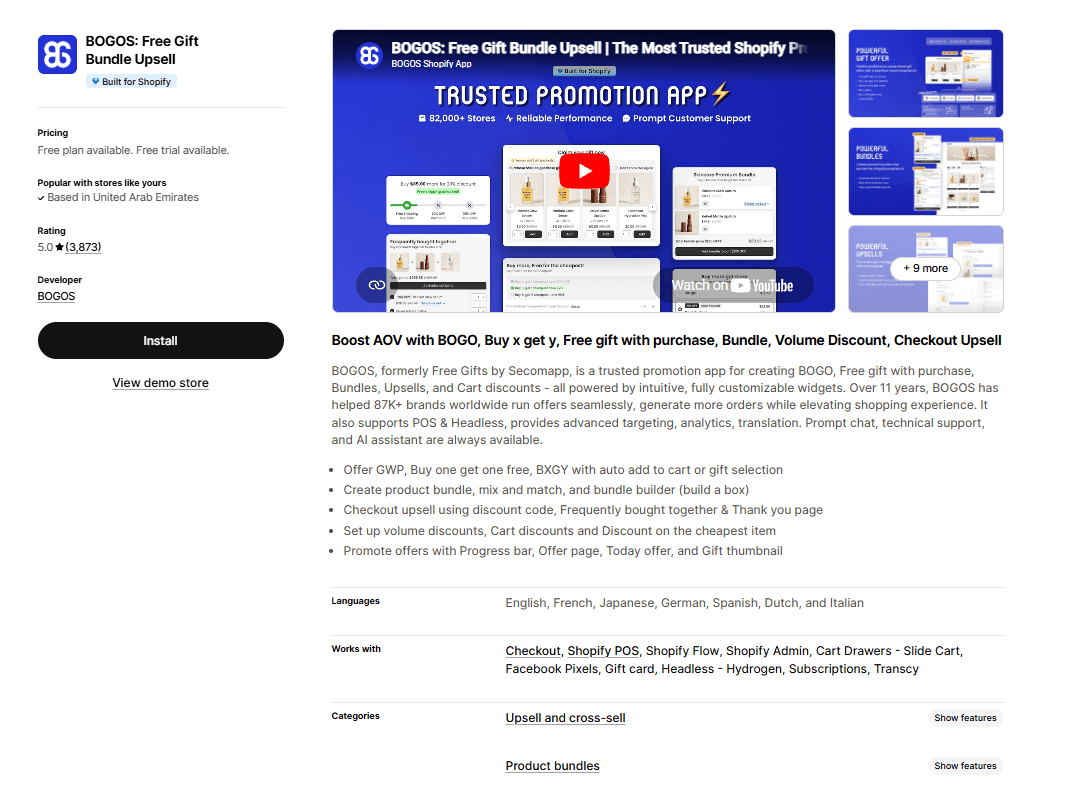
Best for: High-volume stores that need a battle-tested, all-in-one promotions engine.
BOGOS is the veteran here. The app handles BOGO, Buy X Get Y, Spend X Get Y, free gifts, bundles, volume discounts, and quantity breaks under one roof. You can serve gifts via auto-add-to-cart or a gift slider. And targeting covers customer location, order history, customer tags, and specific URLs.
Real-time analytics let you run multiple overlapping offers, see what is converting, and adjust on the fly. It also supports headless storefronts, Shopify POS, and mobile apps.
The trade-off: the interface is busy. Power users love it, but if you only need a simple BOGO, the dashboard feels like overkill. Custom theme installs sometimes need support.
Pros
Massive feature set (BOGO, bundles, volume discounts, free gifts, tiered offers)
Advanced targeting by location, customer tag, URL, and purchase history
Real-time analytics to optimize live campaigns
Works across Shopify POS, headless, and mobile
Cons
Dashboard can feel overwhelming for first-time users
Custom theme setup sometimes requires support assistance
Pricing
Basic: $29.99/month
Grow: $49.99/month
Advanced: $69.99/month
Plus: $109.99/month
Reviews
Shopify: 5/5
Upsell.com ‑ ReConvert Upsell
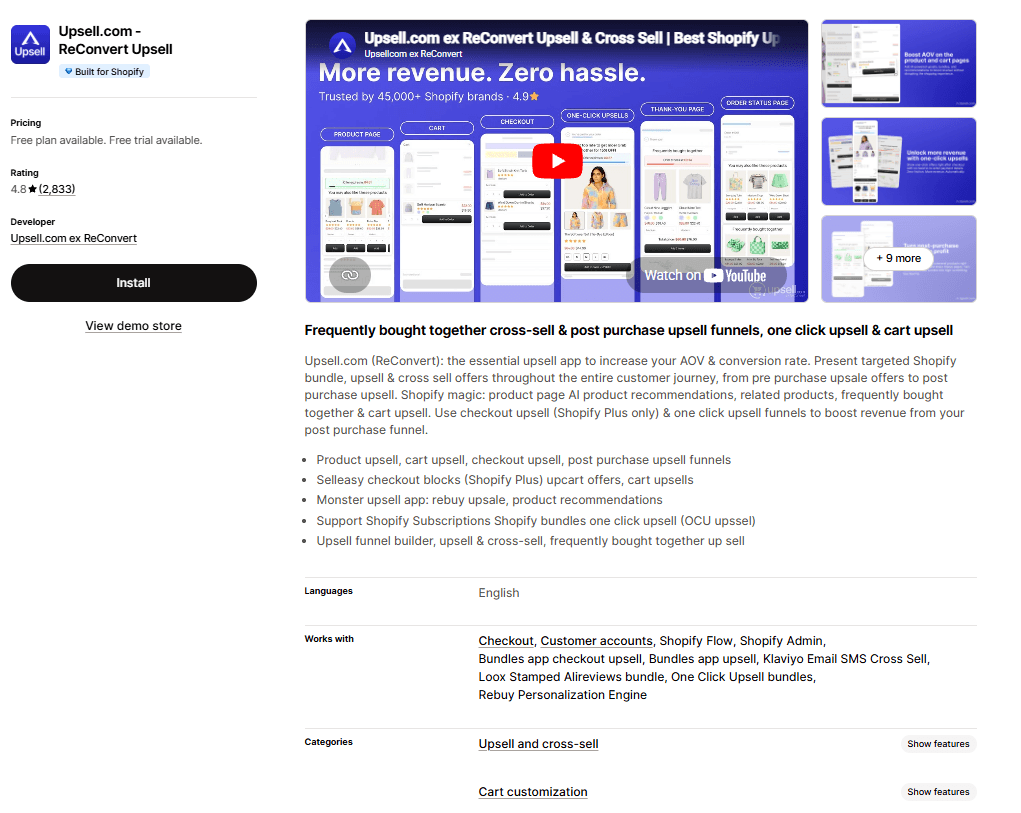
Best for: Stores that want to run BOGO offers at the post-purchase and thank-you page stage.
ReConvert (now branded as Upsell.com) is the leader in post-purchase upsells. While most BOGO apps focus on the product page and cart, Upsell.com flips the model.
It runs BOGO and one-click upsell offers after the customer has already paid, which is the moment of highest commitment and lowest friction. A one-click ‘add this second item at 50% off’ on the thank-you page converts at rates regular product-page BOGOs cannot touch. The drag-and-drop funnel builder lets you create these flows without code.
The trade-off: this is post-purchase only. Most stores end up running ReConvert alongside Monk or BOGOS rather than instead of them.
Pros
Post-purchase one-click upsells convert at very high rates
Drag-and-drop funnel builder requires zero code
Thank-you page optimization with surveys, birthday collection, and offers
Cons
Only handles post-purchase, not product page or cart-stage BOGO
Some users report a learning curve on the funnel builder UI
Pricing
Paid plans start at $4.99/month
Reviews
Shopify: 4.8/5
Bundler ‑ Product Bundles App
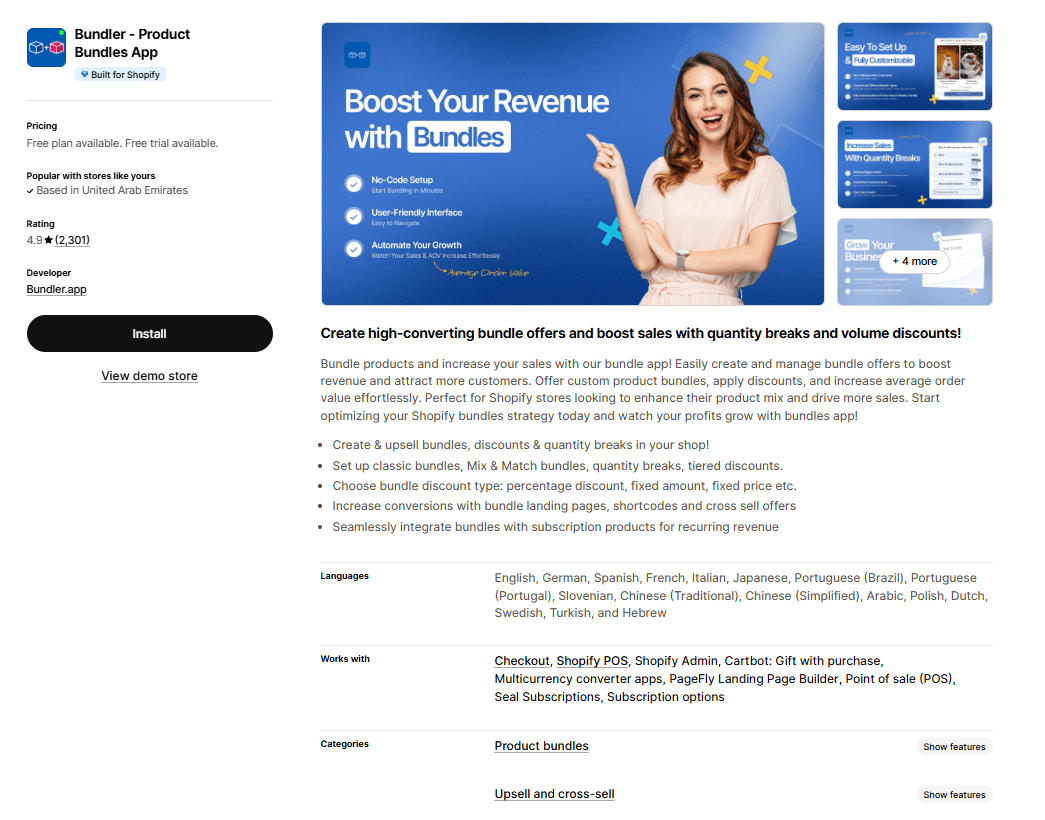
Best for: Stores where BOGO is really a bundling play (mix-and-match, kits, sets).
Bundler approaches BOGO from the bundle angle. Instead of treating ‘buy one get one’ as a discount rule, it treats it as a product configuration. You build a bundle containing two products, set the second to free or discounted, and the customer sees it as a single offer on the product page.
This works for stores selling complementary products (skincare sets, apparel kits, supplement stacks) where BOGO is part of merchandising, not a temporary promotion. The mix-and-match feature is the killer use case: customers pick any two items from a collection, and the discount applies automatically.
The trade-off: it is bundle-first, not BOGO-first. For urgency-driven, time-bound BOGO campaigns with countdown timers, this is not the right tool.
Pros
Excellent for mix-and-match and curated bundle offers
Clean product page integration (feels native, not bolted on)
Strong fit for premium brands that avoid heavy discount language
Cons
Not built for flash sales or time-limited BOGO campaigns
Limited post-purchase or checkout-level upsell features
Pricing
Free plan
Premium: $9.99/monthly
Executive: $19.99/monthly
Reviews
Shopify: 4.9/5
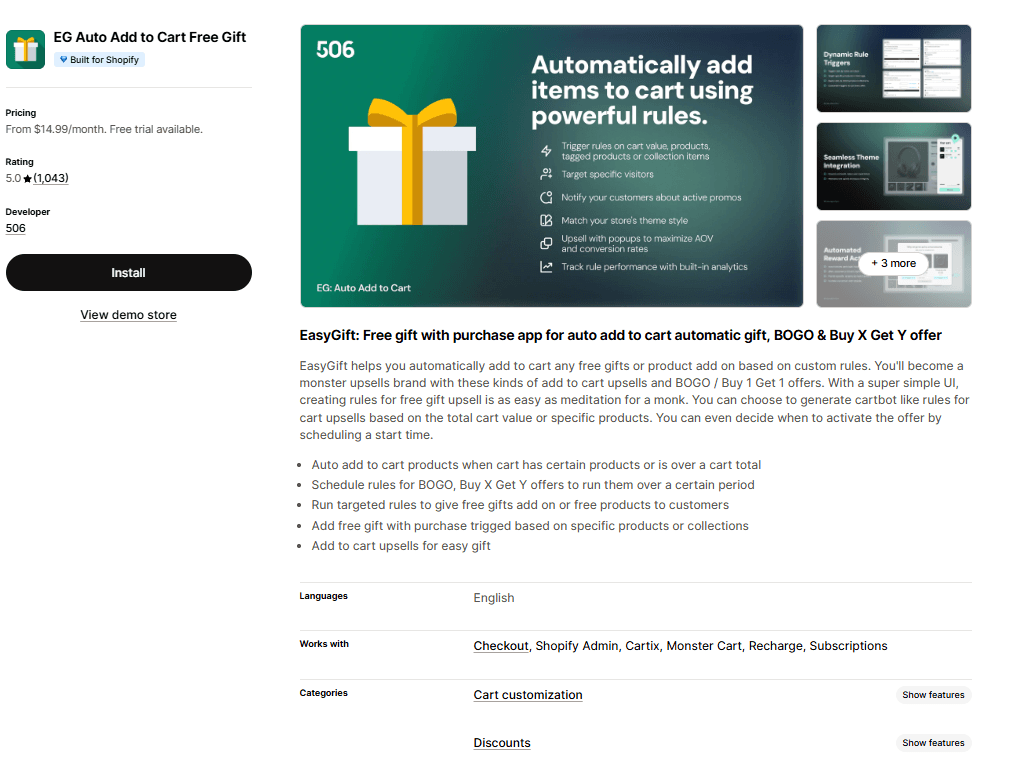
EG Auto Add to Cart Free Gift
Best for: Beginners and small stores that need a simple, no-fuss BOGO setup.
EasyGift is the app to pick when you want BOGO running in under 10 minutes without reading a manual. It does one thing well: automatically adds a free or discounted gift to the cart when a customer meets a condition you set.
Buy two, get one free? Set the rule, pick the products, done.
The interface is beginner-friendly, and setup is fast. It is the right pick for new stores, side projects, or merchants who want to test BOGO before investing in a heavier tool.
The trade-off: feature ceiling is low. Once you want tiered offers, customer segmentation, or checkout-level upsells, you will outgrow it.
Pros
Genuinely simple setup (offers live in under 10 minutes)
Auto-add-to-cart works reliably across most themes
Clean, uncluttered interface
Cons
Limited advanced targeting and segmentation
No post-purchase or checkout upsell features
Pricing
Standard: $14.99/month
Unlimited: $29.99/month
Reviews
Shopify: 5/5
Benefits of Using BOGO Apps
Here is what a dedicated BOGO app does for your store compared to Shopify's native discount engine:
Automation that survives scale: Native discounts require codes. BOGO apps trigger automatically based on cart contents, so you do not lose conversions to customers who forgot to apply a code.
Granular targeting: Run different offers for first-time visitors versus returning customers, for one collection versus another, or for specific cart value thresholds.
Visual nudges that convert: Progress bars, gift sliders, and cart widgets give customers a clear signal of what they need to do to unlock the offer.
Offer-level performance data: See which offers converted, what the AOV lift was, and whether the promotion paid for itself. Native Shopify reports do not break this down.
Multi-stage campaigns: Run a BOGO on the product page, a free gift at $75 in the cart, and a checkout upsell, all coordinated through one app.
How to Choose the Right Shopify BOGO App
The right app depends less on feature lists and more on what you are trying to do. Use this table to match your situation to the best pick:
Your situation | Best app to pick |
You want one app for BOGO, gifts, and upsells across the buying journey | Monk Free Gift+Checkout Upsell |
You run high volume and need advanced targeting and analytics | BOGOS.io |
You want post-purchase and thank-you page BOGO offers | ReConvert |
You need complex stacked promotions with discount code compatibility | Monk Free Gift+Checkout Upsell |
BOGO is part of your product merchandising (kits, mix-and-match) | Bundler |
You are new to Shopify and want a simple BOGO live in minutes | EasyGift |
You are on Shopify Plus and want checkout-level BOGO and upsells | Monk Free Gift+Checkout Upsell |
You sell premium products and want to avoid heavy discount language | Bundler |
You want a free plan to test BOGO before paying | EasyGift or ReConvert |
Best Practices for Running BOGO Offers
Picking the right app is half the battle. The other half is running offers that actually convert. A few things worth getting right:
Pair the right products: Use BOGO to move slower SKUs by pairing them as the ‘get’ item with bestsellers as the ‘buy’ item. Do not give away your best-selling product.
Communicate the offer clearly above the fold: If shoppers have to scroll or click to discover the BOGO, conversion drops sharply. Use a cart progress bar, a banner, or a product page widget to make the offer unmissable.
Set a clear end date when possible: Time-bound offers convert better than evergreen ones because urgency drives action. If you run permanent BOGOs, refresh the creative every quarter to avoid offer blindness.
Track AOV and margin: A BOGO can lift conversions while destroying margin. Look at total profit per order, not just whether the promotion worked.
Test one variable at a time: Run a buy-2-get-1 against a buy-1-get-1 at 50% off. Same math, very different perceived value. You will not know which converts better for your audience until you test.
Common Mistakes to Avoid
A few patterns recur when merchants run BOGO, and the results disappoint. Here is what goes wrong and how to fix it:
Mistake | Consequence | Fix |
Giving away your bestseller as the ‘get’ item | Margin collapse, no real AOV lift | Use bestsellers as the ‘buy’ item, slower SKUs as the ‘get’ |
Running BOGO sitewide with no targeting | Cannibalizes full-price sales from customers who would have bought anyway | Target by customer tag, traffic source, or cart value |
Hiding the offer in a banner or footer | Low awareness, weak conversion lift | Show the offer in the cart, on the PDP, and via progress bars |
Stacking BOGO with discount codes accidentally | Customers check out at 70% off, profit disappears | Use an app like Discount Ninja or disable stacking in settings |
Running the same BOGO for six months straight | Customers stop noticing, conversion decays | Refresh the offer or rotate products quarterly |
Not tracking offer-level performance | You cannot tell which offers work | Use an app with built-in analytics, or tag orders in Shopify |
Ignoring the mobile presentation | Desktop widgets break on small screens | Test every BOGO widget on mobile before launching |
Picking Your BOGO App: Final Thoughts
The best Shopify BOGO app for your store depends on where you are in your journey and the kind of offers you want to run.
If you want a single, well-rounded tool that grows with you, Monk Free Gift+Checkout Upsell is hard to beat.
For high-volume promotions with a deep rule engine, BOGOS.io has the track record.
For post-purchase plays, Upsell.com is the standard.
For stores just getting started, EasyGift gets you live in minutes.
Whichever tool you pick, BOGO is one of the highest-ROI mechanics in ecommerce when executed well. Pair the right products, communicate clearly, track the right metrics, and refresh regularly. Get those four things right, and the app will pay for itself many times over.
FAQs
What is a BOGO offer in Shopify?
A BOGO (Buy One Get One) offer is a promotion in which a customer receives a second product free or at a discount when they buy a qualifying first product. On Shopify, BOGO offers are typically set up through a dedicated app since the native discount engine has limited BOGO functionality.
Which is the best Shopify app for Buy One Get One deals?
Monk Free Gift+Checkout Upsell and BOGOS.io are the two strongest all-around options. Monk is best for stores wanting one app to handle BOGO, gifts, and upsells across the buying journey. BOGOS.io is best for high-volume stores needing deep targeting and analytics.
Can I create BOGO offers without an app in Shopify?
Yes, Shopify's native discount engine supports basic ‘Buy X Get Y’ rules. However, it lacks automation, eligibility targeting, cart widgets, and analytics. For anything beyond a single simple offer, a dedicated BOGO app is significantly more effective.
Do BOGO offers increase sales?
Yes. BOGO offers consistently outperform percentage-off discounts because customers perceive ‘free’ or ‘extra’ as higher value than equivalent dollar discounts. They also lift average order value by encouraging shoppers to add a second item.
Are Shopify BOGO apps free?
Some Shopify BOGO apps offer free plans or trials, but most advanced features like auto-add gifts, targeting rules, and analytics are available in paid plans. Monk Free Gift BOGO & Upsell provides a free trial along with flexible pricing, so you can test and scale your BOGO campaigns as your store grows.
How do I track BOGO campaign performance?
You can track BOGO campaign performance by monitoring key metrics like conversion rate, average order value, and revenue generated from each offer. With Monk Free Gift BOGO & Upsell, built-in analytics help you measure how each campaign performs so you can optimize and scale what works.
What is the difference between BOGO and bundle offers?
A BOGO offer rewards a second purchase with a discount or free item (buy one shirt, get the second free). A bundle is a pre-packaged set of products sold together at a fixed discount (a three-pack of skincare at 20% off). BOGO is offer-driven, bundles are product-driven.
Which BOGO app is best for beginners?
For beginners, Monk Free Gift BOGO & Upsell is a great choice because it’s easy to set up and lets you create BOGO and free gift offers without any technical skills. It also gives you room to grow with features like auto-add gifts and rule-based promotions, so you can start simple and scale as your store grows.
7 Best Shopify Apps for Buy One Get One Offers
Summary
BOGO offers are one of the most effective Shopify promotions for increasing conversions and average order value by encouraging customers to add more items to their cart. Unlike percentage discounts, BOGO creates higher perceived value while helping clear inventory and protect margins. Shopify’s native discount system supports basic setups, but dedicated apps enable advanced features like auto-add gifts, targeting, and cart widgets. With the right strategy and tools, BOGO campaigns can drive higher engagement, reduce cart abandonment, and maximize revenue, and solutions like Monk make it easy to implement and scale these offers.
If your conversion rate is plateauing and discount codes feel like background noise, a well-run Buy One Get One (BOGO) offer can shake things up.
BOGO gives shoppers a tangible reason to add a second item to their cart without feeling like they're being sold to. The perceived value is high, the math feels generous, and the merchant gets a bigger basket.
But running BOGO on Shopify natively is painful. The default discount engine handles basic cases. But when you want tiered gifts, auto add-to-cart, eligibility rules, or a clean widget that nudges the customer, you need an app.
This guide breaks down the seven best Shopify BOGO apps, what each one does well, where it falls short, and how to pick the right one for your store.
Why BOGO Works for Shopify Stores
Before we get into tools, it is worth understanding why BOGO outperforms most other discount mechanics. Percentage-off discounts erode margin and train customers to wait for sales. BOGO offers feel like bonuses rather than markdowns. Which keeps your brand positioning intact while still moving units.
A few reasons BOGO converts better than flat discounts:
Higher perceived value: Shoppers consistently rate ‘free’ or ‘extra’ as more compelling than equivalent dollar-off discounts, even when the math is identical.
Inventory clearance without margin destruction: Pair slow-moving SKUs as the ‘get’ item with bestsellers as the ‘buy’ item.
AOV lift: A buy-2-get-1 offer naturally increases the cart size. Combined with a free shipping threshold, the lift compounds.
Reduced cart abandonment: Auto-added gifts at the cart or checkout stage create a positive surprise right when shoppers drop off.
7 Best Shopify Apps for Buy One Get One Offers
The apps below cover every major BOGO use case, from simple ‘buy X get Y’ rules to advanced tiered gifting, post-purchase upsells, and full-store flash sales. Each entry tells you who it is for, what it solves, and the trade-off to watch for.
Best for: Stores that want a single app to handle BOGO, free gifts, and upsells across the entire buying journey.
Monk treats BOGO as part of a larger AOV strategy rather than a standalone feature. You can run a buy-one-get-one offer on the product page, layer it with a cart progress bar pushing shoppers to the next tier, and hit them again with a checkout upsell if you are on Shopify Plus.
The eligibility engine is the standout. You can target offers by product, collection, cart value, customer tag, or quantity, so you are not stuck running one blanket BOGO across your entire store. You can also mould it to fit your brand identity by using customizable widgets.
The trade-off: the checkout-level features (one-click upsells, post-purchase offers, tiered rewards) are Shopify Plus exclusives. On regular plans, you still get a strong toolkit, but not the full stack.
Pros
Unified app for BOGO, free gifts, cart upsells, and checkout upsells (no need to stack multiple tools)
Granular eligibility rules (product, cart value, customer tag, quantity)
Highly customizable widgets and popups that match your store's design
Strong customer support with live chat and video walkthroughs
Cons
Best checkout-level features are locked to Shopify Plus
The eligibility engine has a learning curve if you want complex, layered offers
Pricing
Free trial
$49/month
$149/month
Reviews
Shopify: 4.9/5
Also Read: Configure a BOGO offer using Monk Free Gift BOGO & Upsell on your Shopify store
BOGOS: Free Gift Bundle Upsell
Best for: High-volume stores that need a battle-tested, all-in-one promotions engine.
BOGOS is the veteran here. The app handles BOGO, Buy X Get Y, Spend X Get Y, free gifts, bundles, volume discounts, and quantity breaks under one roof. You can serve gifts via auto-add-to-cart or a gift slider. And targeting covers customer location, order history, customer tags, and specific URLs.
Real-time analytics let you run multiple overlapping offers, see what is converting, and adjust on the fly. It also supports headless storefronts, Shopify POS, and mobile apps.
The trade-off: the interface is busy. Power users love it, but if you only need a simple BOGO, the dashboard feels like overkill. Custom theme installs sometimes need support.
Pros
Massive feature set (BOGO, bundles, volume discounts, free gifts, tiered offers)
Advanced targeting by location, customer tag, URL, and purchase history
Real-time analytics to optimize live campaigns
Works across Shopify POS, headless, and mobile
Cons
Dashboard can feel overwhelming for first-time users
Custom theme setup sometimes requires support assistance
Pricing
Basic: $29.99/month
Grow: $49.99/month
Advanced: $69.99/month
Plus: $109.99/month
Reviews
Shopify: 5/5
Upsell.com ‑ ReConvert Upsell
Best for: Stores that want to run BOGO offers at the post-purchase and thank-you page stage.
ReConvert (now branded as Upsell.com) is the leader in post-purchase upsells. While most BOGO apps focus on the product page and cart, Upsell.com flips the model.
It runs BOGO and one-click upsell offers after the customer has already paid, which is the moment of highest commitment and lowest friction. A one-click ‘add this second item at 50% off’ on the thank-you page converts at rates regular product-page BOGOs cannot touch. The drag-and-drop funnel builder lets you create these flows without code.
The trade-off: this is post-purchase only. Most stores end up running ReConvert alongside Monk or BOGOS rather than instead of them.
Pros
Post-purchase one-click upsells convert at very high rates
Drag-and-drop funnel builder requires zero code
Thank-you page optimization with surveys, birthday collection, and offers
Cons
Only handles post-purchase, not product page or cart-stage BOGO
Some users report a learning curve on the funnel builder UI
Pricing
Paid plans start at $4.99/month
Reviews
Shopify: 4.8/5
Bundler ‑ Product Bundles App
Best for: Stores where BOGO is really a bundling play (mix-and-match, kits, sets).
Bundler approaches BOGO from the bundle angle. Instead of treating ‘buy one get one’ as a discount rule, it treats it as a product configuration. You build a bundle containing two products, set the second to free or discounted, and the customer sees it as a single offer on the product page.
This works for stores selling complementary products (skincare sets, apparel kits, supplement stacks) where BOGO is part of merchandising, not a temporary promotion. The mix-and-match feature is the killer use case: customers pick any two items from a collection, and the discount applies automatically.
The trade-off: it is bundle-first, not BOGO-first. For urgency-driven, time-bound BOGO campaigns with countdown timers, this is not the right tool.
Pros
Excellent for mix-and-match and curated bundle offers
Clean product page integration (feels native, not bolted on)
Strong fit for premium brands that avoid heavy discount language
Cons
Not built for flash sales or time-limited BOGO campaigns
Limited post-purchase or checkout-level upsell features
Pricing
Free plan
Premium: $9.99/monthly
Executive: $19.99/monthly
Reviews
Shopify: 4.9/5
EG Auto Add to Cart Free Gift
Best for: Beginners and small stores that need a simple, no-fuss BOGO setup.
EasyGift is the app to pick when you want BOGO running in under 10 minutes without reading a manual. It does one thing well: automatically adds a free or discounted gift to the cart when a customer meets a condition you set.
Buy two, get one free? Set the rule, pick the products, done.
The interface is beginner-friendly, and setup is fast. It is the right pick for new stores, side projects, or merchants who want to test BOGO before investing in a heavier tool.
The trade-off: feature ceiling is low. Once you want tiered offers, customer segmentation, or checkout-level upsells, you will outgrow it.
Pros
Genuinely simple setup (offers live in under 10 minutes)
Auto-add-to-cart works reliably across most themes
Clean, uncluttered interface
Cons
Limited advanced targeting and segmentation
No post-purchase or checkout upsell features
Pricing
Standard: $14.99/month
Unlimited: $29.99/month
Reviews
Shopify: 5/5
Benefits of Using BOGO Apps
Here is what a dedicated BOGO app does for your store compared to Shopify's native discount engine:
Automation that survives scale: Native discounts require codes. BOGO apps trigger automatically based on cart contents, so you do not lose conversions to customers who forgot to apply a code.
Granular targeting: Run different offers for first-time visitors versus returning customers, for one collection versus another, or for specific cart value thresholds.
Visual nudges that convert: Progress bars, gift sliders, and cart widgets give customers a clear signal of what they need to do to unlock the offer.
Offer-level performance data: See which offers converted, what the AOV lift was, and whether the promotion paid for itself. Native Shopify reports do not break this down.
Multi-stage campaigns: Run a BOGO on the product page, a free gift at $75 in the cart, and a checkout upsell, all coordinated through one app.
How to Choose the Right Shopify BOGO App
The right app depends less on feature lists and more on what you are trying to do. Use this table to match your situation to the best pick:
Your situation | Best app to pick |
You want one app for BOGO, gifts, and upsells across the buying journey | Monk Free Gift+Checkout Upsell |
You run high volume and need advanced targeting and analytics | BOGOS.io |
You want post-purchase and thank-you page BOGO offers | ReConvert |
You need complex stacked promotions with discount code compatibility | Monk Free Gift+Checkout Upsell |
BOGO is part of your product merchandising (kits, mix-and-match) | Bundler |
You are new to Shopify and want a simple BOGO live in minutes | EasyGift |
You are on Shopify Plus and want checkout-level BOGO and upsells | Monk Free Gift+Checkout Upsell |
You sell premium products and want to avoid heavy discount language | Bundler |
You want a free plan to test BOGO before paying | EasyGift or ReConvert |
Best Practices for Running BOGO Offers
Picking the right app is half the battle. The other half is running offers that actually convert. A few things worth getting right:
Pair the right products: Use BOGO to move slower SKUs by pairing them as the ‘get’ item with bestsellers as the ‘buy’ item. Do not give away your best-selling product.
Communicate the offer clearly above the fold: If shoppers have to scroll or click to discover the BOGO, conversion drops sharply. Use a cart progress bar, a banner, or a product page widget to make the offer unmissable.
Set a clear end date when possible: Time-bound offers convert better than evergreen ones because urgency drives action. If you run permanent BOGOs, refresh the creative every quarter to avoid offer blindness.
Track AOV and margin: A BOGO can lift conversions while destroying margin. Look at total profit per order, not just whether the promotion worked.
Test one variable at a time: Run a buy-2-get-1 against a buy-1-get-1 at 50% off. Same math, very different perceived value. You will not know which converts better for your audience until you test.
Common Mistakes to Avoid
A few patterns recur when merchants run BOGO, and the results disappoint. Here is what goes wrong and how to fix it:
Mistake | Consequence | Fix |
Giving away your bestseller as the ‘get’ item | Margin collapse, no real AOV lift | Use bestsellers as the ‘buy’ item, slower SKUs as the ‘get’ |
Running BOGO sitewide with no targeting | Cannibalizes full-price sales from customers who would have bought anyway | Target by customer tag, traffic source, or cart value |
Hiding the offer in a banner or footer | Low awareness, weak conversion lift | Show the offer in the cart, on the PDP, and via progress bars |
Stacking BOGO with discount codes accidentally | Customers check out at 70% off, profit disappears | Use an app like Discount Ninja or disable stacking in settings |
Running the same BOGO for six months straight | Customers stop noticing, conversion decays | Refresh the offer or rotate products quarterly |
Not tracking offer-level performance | You cannot tell which offers work | Use an app with built-in analytics, or tag orders in Shopify |
Ignoring the mobile presentation | Desktop widgets break on small screens | Test every BOGO widget on mobile before launching |
Picking Your BOGO App: Final Thoughts
The best Shopify BOGO app for your store depends on where you are in your journey and the kind of offers you want to run.
If you want a single, well-rounded tool that grows with you, Monk Free Gift+Checkout Upsell is hard to beat.
For high-volume promotions with a deep rule engine, BOGOS.io has the track record.
For post-purchase plays, Upsell.com is the standard.
For stores just getting started, EasyGift gets you live in minutes.
Whichever tool you pick, BOGO is one of the highest-ROI mechanics in ecommerce when executed well. Pair the right products, communicate clearly, track the right metrics, and refresh regularly. Get those four things right, and the app will pay for itself many times over.
FAQs
What is a BOGO offer in Shopify?
A BOGO (Buy One Get One) offer is a promotion in which a customer receives a second product free or at a discount when they buy a qualifying first product. On Shopify, BOGO offers are typically set up through a dedicated app since the native discount engine has limited BOGO functionality.
Which is the best Shopify app for Buy One Get One deals?
Monk Free Gift+Checkout Upsell and BOGOS.io are the two strongest all-around options. Monk is best for stores wanting one app to handle BOGO, gifts, and upsells across the buying journey. BOGOS.io is best for high-volume stores needing deep targeting and analytics.
Can I create BOGO offers without an app in Shopify?
Yes, Shopify's native discount engine supports basic ‘Buy X Get Y’ rules. However, it lacks automation, eligibility targeting, cart widgets, and analytics. For anything beyond a single simple offer, a dedicated BOGO app is significantly more effective.
Do BOGO offers increase sales?
Yes. BOGO offers consistently outperform percentage-off discounts because customers perceive ‘free’ or ‘extra’ as higher value than equivalent dollar discounts. They also lift average order value by encouraging shoppers to add a second item.
Are Shopify BOGO apps free?
Some Shopify BOGO apps offer free plans or trials, but most advanced features like auto-add gifts, targeting rules, and analytics are available in paid plans. Monk Free Gift BOGO & Upsell provides a free trial along with flexible pricing, so you can test and scale your BOGO campaigns as your store grows.
How do I track BOGO campaign performance?
You can track BOGO campaign performance by monitoring key metrics like conversion rate, average order value, and revenue generated from each offer. With Monk Free Gift BOGO & Upsell, built-in analytics help you measure how each campaign performs so you can optimize and scale what works.
What is the difference between BOGO and bundle offers?
A BOGO offer rewards a second purchase with a discount or free item (buy one shirt, get the second free). A bundle is a pre-packaged set of products sold together at a fixed discount (a three-pack of skincare at 20% off). BOGO is offer-driven, bundles are product-driven.
Which BOGO app is best for beginners?
For beginners, Monk Free Gift BOGO & Upsell is a great choice because it’s easy to set up and lets you create BOGO and free gift offers without any technical skills. It also gives you room to grow with features like auto-add gifts and rule-based promotions, so you can start simple and scale as your store grows.
Contents
Related Articles

Wish to know how Monk can help increase AOV?
Average Order Value
$120
25%
with Monk
without Monk
Wish to know how Monk can help increase AOV?
Average Order Value
$120
25%
with Monk
without Monk