
How to Set Up BOGO Offers on Shopify (Step-by-Step Guide)
Summary
BOGO (Buy One Get One) offers on Shopify are promotions where customers get a second item free or at a discount after meeting a purchase condition. Common types include Buy One Get One Free, Buy One Get One 50% Off, and Buy Two Get One Free. These deals work by setting a trigger product and a reward item that is automatically applied in the cart. BOGO helps increase average order value, improve conversion rates, and clear slow-moving inventory by making the offer feel high value compared to percentage discounts. It can increase AOV by 20 to 30 percent by encouraging customers to add more items. However, poor setup can cause confusion, margin loss, or broken discount logic. Shopify’s native tools are limited, so apps like Monk Free Gift add automation, better targeting, and smoother cart experience. Successful use depends on clear rules, good product pairing, testing, and proper promotion.

Ravish (RV)
Senior Content Writer
Ravish is an ecommerce and SaaS marketing expert with 6+ years of experience in Shopify and ecommerce and 10+ years of experience in marketing, and growth strategy. He has worked closely with Shopify merchants to solve real ecommerce challenges and shares practical, research-backed insights, industry best practices, and emerging trends.
Key Takeaways
BOGO (Buy One Get One) offers on Shopify are promotions where customers get a second item free or at a discount after meeting a purchase condition. Common types include Buy One Get One Free, Buy One Get One 50% Off, and Buy Two Get One Free. These deals work by setting a trigger product and a reward item that is automatically applied in the cart. BOGO helps increase average order value, improve conversion rates, and clear slow-moving inventory by making the offer feel high value compared to percentage discounts. It can increase AOV by 20 to 30 percent by encouraging customers to add more items. However, poor setup can cause confusion, margin loss, or broken discount logic. Shopify’s native tools are limited, so apps like Monk Free Gift add automation, better targeting, and smoother cart experience. Successful use depends on clear rules, good product pairing, testing, and proper promotion.
While the ‘Buy One, Get One’ (BOGO) deal is a classic retail strategy, it can be messy for an online store. Because broken discount logic increases cart abandonment, confusing rules cause shoppers to churn, and over-discounting high-margin products eats into sustainable revenue.
In this article, we’re going to walk you through exactly how BOGO offers work and how you can set them up on your own Shopify store without any stress.
What is a BOGO Offer in Shopify?
A Shopify Buy One Get One offer is a promotional tool that incentivizes customers to increase their purchase volume by offering an additional item either for free or at a significant discount. In the competitive Shopify landscape, these offers are essential for improving inventory turnover and creating a sense of urgency among shoppers.
Unlike flat percentage discounts, BOGO deals focus on quantity, helping clear out specific stock while maintaining a higher perceived value for the brand.
BOGO deals come in several flavors:
Buy One, Get One Free: The classic value play
Buy One, Get One 50% Off: A way to protect margins while still driving volume
Buy Two, Get One Free: Ideal for consumables like skincare or supplements
In Shopify, a BOGO offer works by defining a purchase condition (“buy X”) and a corresponding reward (“get Y”). When a customer adds the required items to their cart, the system automatically applies the discount or adds the free item, making the offer seamless and easy to understand.
This removes the need for manual calculations and ensures a smooth, low-friction shopping experience.
Why BOGO Offers Work for Ecommerce Growth
BOGO offers tap into the psychological phenomenon of loss aversion. Shoppers aren't just looking at what they spend; they are looking at the value they might lose if they don't take the deal.
This creates an effect in which the perceived benefit of the additional item far outweighs the cost of the initial purchase, effectively lowering the barrier to entry for new customers and rewarding loyal customers with high perceived value.
Increases Average Order Value (AOV): Set a threshold, such as ‘Buy Two, Get One,' and nudge customers to spend more than they originally intended.
BOGO campaigns typically result in a 20% to 30% lift in average order value because consumers prioritize the gain of an extra item over the extra money they would spend to get it.
Clears Stagnant Inventory: Move older SKUs or seasonal items without slapping a ‘Clearance’ sticker on your entire site, which can sometimes devalue your brand.
BOGO lets you pair slow-moving items with bestsellers, freeing up warehouse space for new arrivals while still generating revenue from every unit shipped.
Boosts Conversion Rates: Use a ‘Free’ gift or a half-off second item as the final push to bring the hesitant browser to hit ‘Checkout.’
The word 'free' is one of the most enticing triggers in marketing; it simplifies the decision-making process by making the deal feel like a no-brainer, significantly reducing cart abandonment during peak shopping periods.
💡Pro-Tip: When running a BOGO campaign, always highlight the total savings at the cart level. Showing a ‘You saved $XX’ message reinforces the positive emotional response and reduces post-purchase dissonance.
Why Use Monk Free Gift for BOGO Offers on Shopify?
While Shopify has native ‘Buy X Get Y’ functionality, it’s often rigid. You frequently can’t customize the UI, stack certain discounts, or offer cross-sell BOGOs that appear right in the cart.
Monk Free Gift bridges this gap by giving you granular control over the logic and the look. It allows you to build sophisticated, high-converting offers that feel like a native part of your store’s design rather than a clunky afterthought.
How to Set Up BOGO Offers on Shopify Using Monk Commerce
Ready to launch? Here is the actionable, step-by-step flow to getting your first high-converting campaign live using Monk Commerce.
1. Installing Monk Free Gift on Shopify
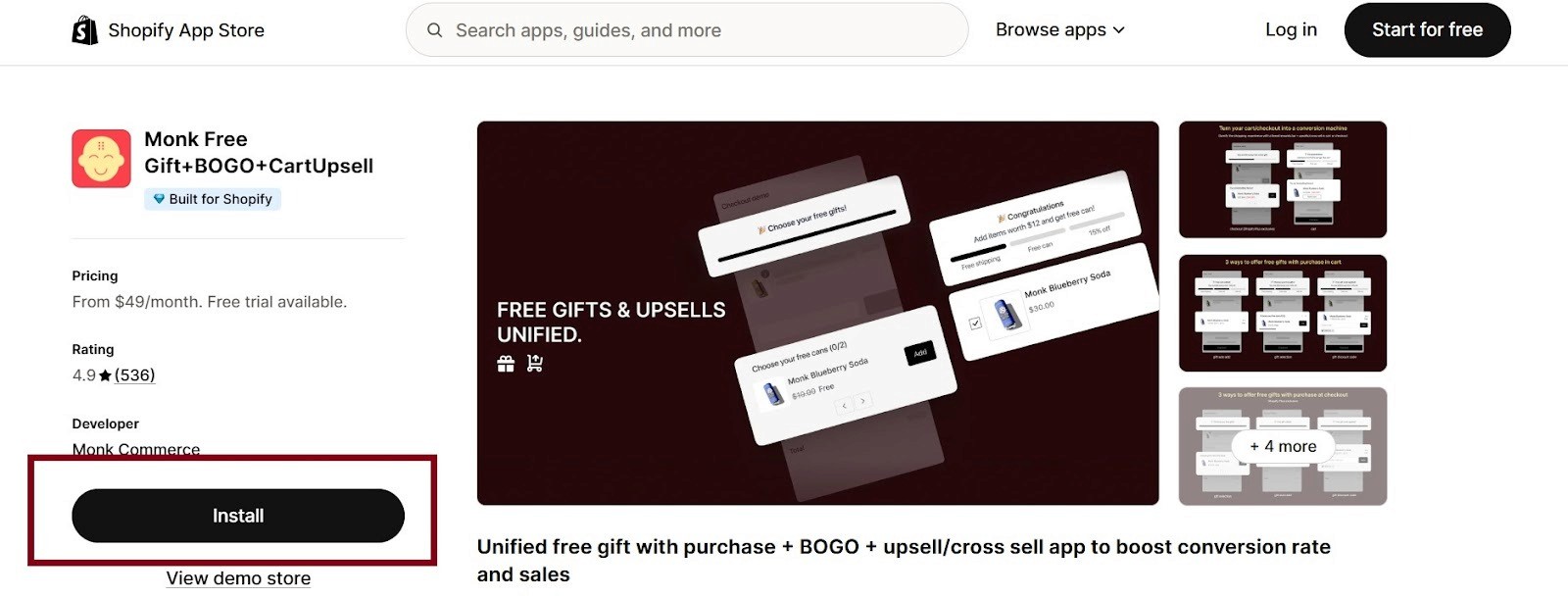
Monk Free Gift is a third-party application, so the first crucial step is integrating it seamlessly into your Shopify store.
Install Monk Free Gift from the Shopify App Store.
💡Pro Tip: Once installed, take a moment to familiarize yourself with the dashboard. It’s designed specifically for marketers, providing a streamlined interface that separates complex offer logic from Shopify’s standard settings.
2. Choosing the BOGO Offer Type
After installation, you can create the offer inside Monk, where you select the fundamental structure and mechanism of your promotional deal.
Under the Monk dashboard look for the ‘Create Offer’ option.
Choose BOGO from the pre-built templates.

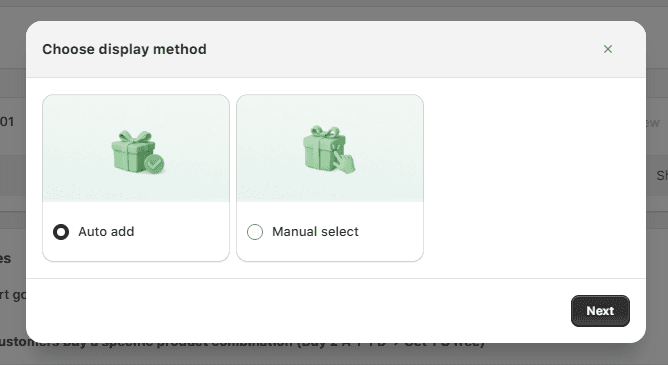
There are 2 ways to add the gift product to the customer’s cart using Monk.
Auto-Add: automatically add the gift to the cart
Manual Select: Customers can select the gift of their choice from a selection provided on your store.
💡Pro Tip: Prioritize Auto-Add: It is advised to choose the auto-add feature for creating BOGO offers. It creates a frictionless experience for customers and significantly reduces the risk of cart abandonment due to confusion.
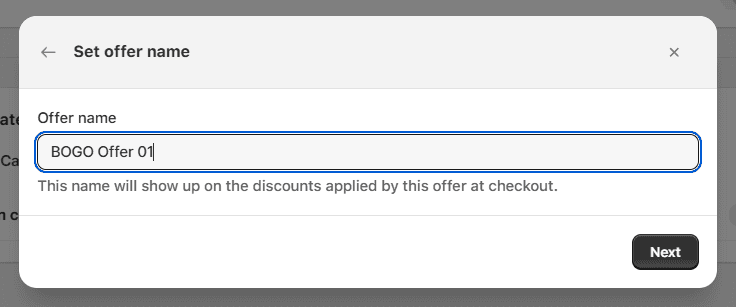
Finally, give your BOGO offer a clear, descriptive name for internal tracking. Keep in mind that the name of the offer will appear as the discount at the cart and the checkout.
Ensure not to use a generic name to not only avoid confusion but also prevent misuse.
3. Selecting Eligibility Condition and Gift products
Monk Free Gift lets you showcase the BOGO offer in the cart and the checkout page of your store. Along with that, using Monk’s highly customizable banners, you can clearly notify your customer regarding the BOGO offer and its details.
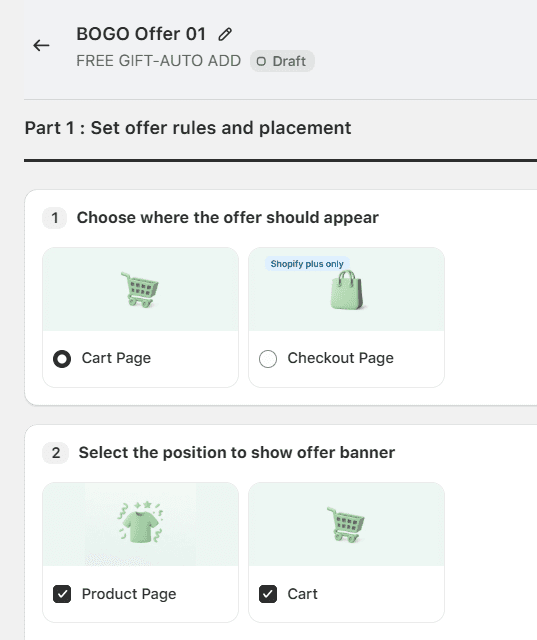
This step is critical for protecting your margins and meeting inventory goals. Here, you define the core mechanics of the deal: what the customer must buy and what they receive in return.
Choose Trigger: Choose the specific products, product tags, or entire collections that unlock the deal.
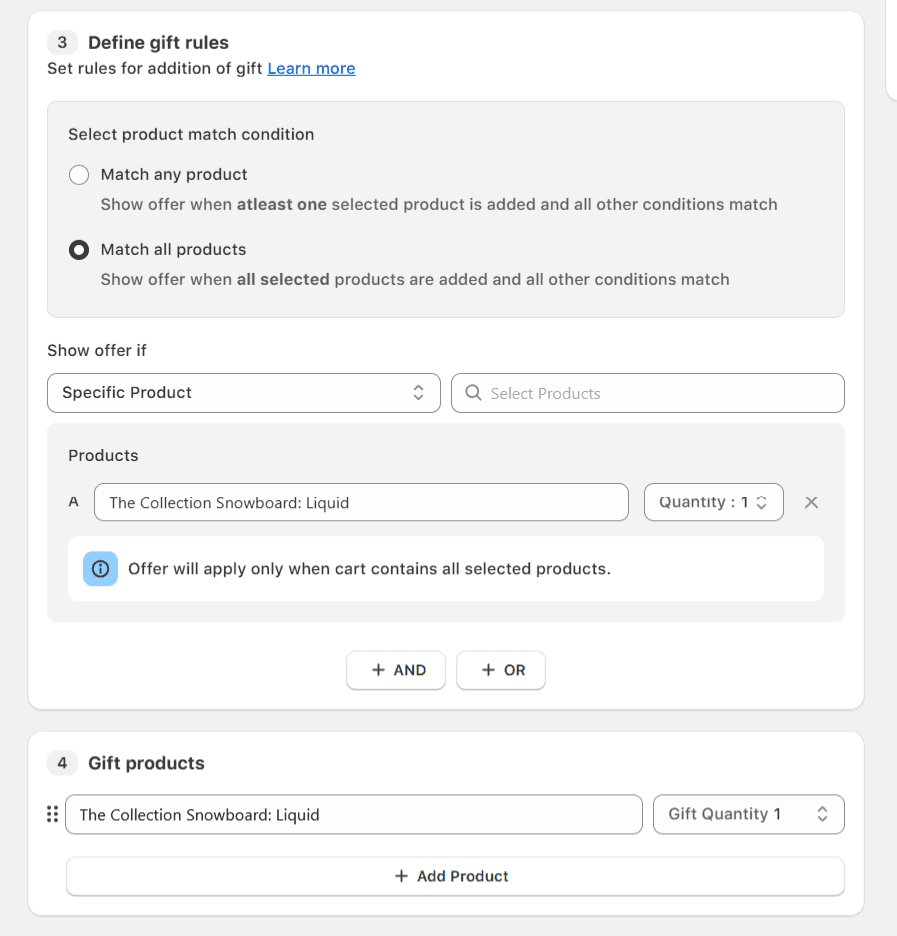
Choose Reward: Select the item that will be discounted or given for free.
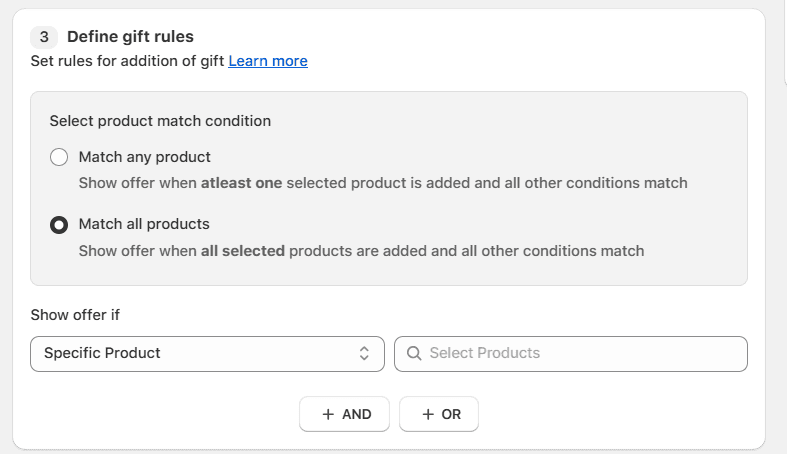
There are various ways to configure a BOGO offer using Monk; let’s take a look at configuring the classic Buy One Get One offer, where the trigger product and the offer product are the same.
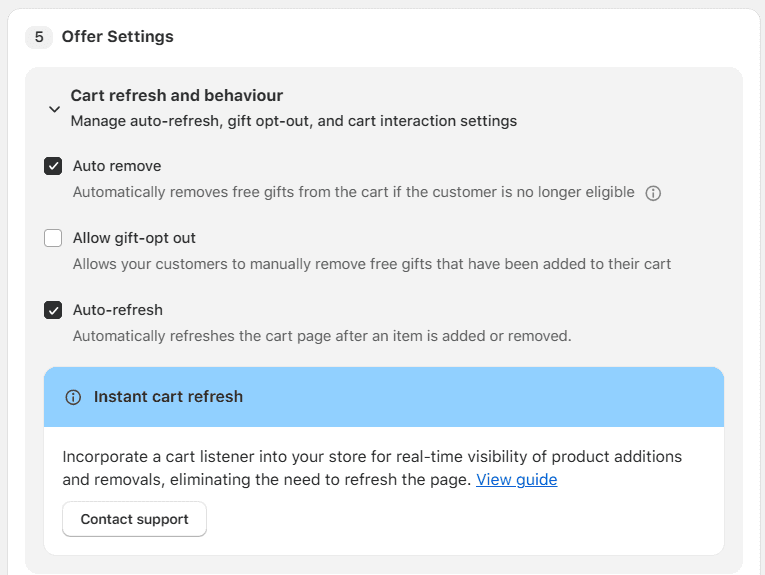
Beyond the basic product logic, Monk Free Gift allows you to set sophisticated rules for how the deal behaves throughout the customer journey, ensuring a professional and error-free experience.
One of the most important aspects is you can not only automatically add the gift product to the customer’s cart when they are eligible, but you can also automatically remove the gift product when the conditions are no longer met.
You can also let your customers remove the gift item from their cart if they want to.
4. Customize your BOGO offer
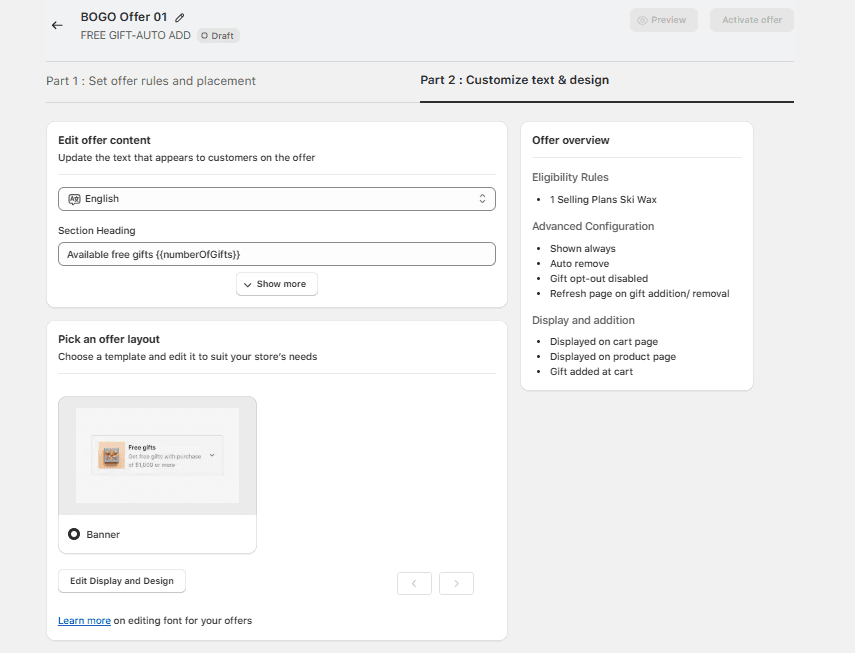
Monk is highly customizable to match your store’s theme and brand guidelines. For a seamless look, you can customize the text, font style, size, color, and design of your offer banners.
Matching the visual style to your brand ensures the promotion feels native and trustworthy, boosting click-through rates and brand consistency.
For higher visibility, you can use media of your choice on the banner using Monk Free Gift.
5. Activating and Testing the BOGO Offer
The final and most crucial step is rigorous testing. A successful BOGO offer is one that is flawlessly executed, applying the correct discount logic 100% of the time.
Before activating, use Shopify’s ‘Preview’ mode to test the offer live on your site.
Add the trigger item(s) to your cart and ensure the discount applies correctly to the reward item.
📌Critical Checkpoint: Try removing the trigger product and confirm the reward is automatically removed as well. Broken or sticky discounts instantly destroy customer trust and require immediate intervention.
Once you are satisfied that the offer logic is flawless, click ‘Activate’ to take your BOGO campaign live.
Common Mistakes to Avoid When Creating BOGO Deals
While the offer logic may be simple, execution can be complex. Avoid these common strategic and technical missteps that lead to customer frustration and diminished returns.
Poor product pairing: Combining unrelated products based on inventory needs rather than customer intent, such as offering a winter coat as a reward for a lightweight headscarf purchase.
✅How to fix it: Use data-driven cross-selling on Shopify to pair complementary items, such as offering a discounted necklace when a customer buys a dress.
Confusing discount rules: Overly complex logic often forces customers to read long paragraphs of terms to calculate their savings, creating friction and leading to immediate churn.
✅How to fix it: Clearly highlight the ‘Free’ or ‘50% Off’ reward in the cart to provide immediate psychological reassurance to the buyer.
Over-discounting high-margin products: Applying aggressive BOGO Free logic to low-margin or luxury products can erode brand value and make the promotion financially unsustainable.
✅How to fix it: Set a minimum spend threshold to unlock the BOGO deal, which protects your profit margins while increasing Average Order Value.
Ignoring mobile experience: Large, unresponsive pop-ups or banners frequently obstruct the 'Checkout' button on smaller screens, making it physically impossible for mobile shoppers to complete their purchase.
✅How to fix it: Implement a responsive design that stacks elements vertically and uses one-tap mobile payments to reduce friction for mobile users.
Not testing before launch: Failing to verify the automation often results in broken discount logic, leaving items at full price and instantly destroying customer trust at the point of sale.
✅How to fix it: Run A/B tests on different offer combinations to see what resonates most with your audience before committing to a full-scale campaign.
How to Promote BOGO Offers Effectively
A BOGO offer is only as good as its visibility. To ensure yours doesn't arrive DOA (dead on arrival), you must answer the ‘so what?’ for your customer by showing exactly what that deal removes from their life, whether it's a high price barrier or a lack of variety.
Display offers on product pages: Use a small badge or text line near the ‘Add to Cart’ button that says ‘Buy 1, Get 1 Free’
This targets the micro-moment of choice, transforming an abstract benefit into immediate psychological relief for a shopper hesitant to hit the checkout.
Cart-level messaging: Use Monk Free Gift’s tiered progress bars to show customers how close they are to unlocking their reward (e.g., ‘Add $10 more to get a free gift!’).
This leverages loss aversion, as customers feel the potential loss of a free item more intensely than the minor gain of keeping that extra $10.
Email and SMS campaigns: Send a ‘BOGO Flash Sale’ alert to your most loyal customers.
To make the numbers pop, zoom out and show the collective value: ‘Buy 2 pairs of leggings today and save $60—that's a full outfit for the gym this month for free’.
Paid Ads: Use contrast stories in your creative, showing a specific person struggling with a single item vs. the relief and style options of having two for the price of one.
BOGO offers generally have much higher Click-Through Rates (CTRs) on Instagram and TikTok.
Why Monk Free Gift is Ideal for Scalable Shopify Promotions
Monk Free Gift is a suitable conversion rate optimization (CRO) platform that empowers Shopify merchants to automate even the most complex promotional logic, such as tiered BOGO offers, without manual monitoring.
The platform ensures that your high-level campaigns run flawlessly as your store continues to scale by streamlining these retail strategies.
Beyond its technical logic, Monk provides a complete no-code setup that allows teams to deploy sophisticated strategies in minutes while fully customizing the UI to match brand fonts and colors. To see how these tools can transform your business growth, sign up for a Monk demo today.
Frequently Asked Questions (FAQs)
What is a BOGO offer in Shopify?
A BOGO (Buy One, Get One) offer in Shopify is a promotional strategy in which a customer receives a second item for free or at a discount after purchasing a specified quantity of a product. This tactic is used by merchants to move inventory faster while increasing the perceived value of every transaction.
Can Shopify create BOGO offers without apps?
Yes, BOGO offers can be created using Shopify's native 'Buy X Get Y' discount, but it has a major limitation, as the customer must manually add the gift item to their cart to trigger the discount. Third-party apps like Monk Free Gift solve this by automatically adding the free gift to the cart, providing customizable banners, and allowing for more complex conditional offers that Shopify’s basic admin cannot handle.
How does Monk Commerce help set up BOGO offers?
Monk Commerce helps set up BOGO offers by automating the logic that triggers a discount based on specific cart conditions, such as spending thresholds or product tags. Unlike standard Shopify setups, Monk provides high-converting UI elements, such as cart widgets and pop-ups, that inform customers about the reward, ensuring the gift is added automatically without manual effort.
What types of BOGO deals work best for Shopify stores?
The types of BOGO deals that work best depend on your goals; 'Buy One Get One Free' is most effective for clearing out seasonal stock or slow-moving inventory, while 'Buy One Get One 50% Off' is better for maintaining higher profit margins while still encouraging a higher volume of items per sale.
Do BOGO offers increase average order value?
Yes, BOGO offers increase Average Order Value (AOV) by requiring a specific quantity of items or a minimum spend to unlock a reward. This naturally encourages customers to add more to their cart than they originally intended, increasing both the total item count and the final order amount.
Can I limit BOGO offers to specific products or collections?
Yes, you can limit BOGO offers to specific products or collections by using Monk Free Gift to set 'Trigger' and 'Reward' rules. This allows you to restrict the promotion to individual SKUs, specific product tags, or entire categories, ensuring your margins stay protected by only offering gifts on the products you choose.
How do BOGO offers appear in the Shopify cart and checkout?
BOGO offers typically appear in the Shopify cart as an automatically added line item with a $0 or discounted price, making the value immediately clear to the shopper. With Monk Commerce, these rewards can also be displayed as selectable options in the cart drawer or via a 'reward unlocked' notification to prevent confusion during checkout.
Are BOGO offers better than percentage discounts?
BOGO offers are often better than percentage discounts because they move more physical inventory and carry a higher perceived value. 'Buy One Get One Free' often sounds more enticing to a shopper than '50% off two items.' Additionally, BOGO helps protect your brand’s price integrity by keeping the individual product's value high while rewarding bulk purchases.
How to Set Up BOGO Offers on Shopify (Step-by-Step Guide)
Summary
BOGO (Buy One Get One) offers on Shopify are promotions where customers get a second item free or at a discount after meeting a purchase condition. Common types include Buy One Get One Free, Buy One Get One 50% Off, and Buy Two Get One Free. These deals work by setting a trigger product and a reward item that is automatically applied in the cart. BOGO helps increase average order value, improve conversion rates, and clear slow-moving inventory by making the offer feel high value compared to percentage discounts. It can increase AOV by 20 to 30 percent by encouraging customers to add more items. However, poor setup can cause confusion, margin loss, or broken discount logic. Shopify’s native tools are limited, so apps like Monk Free Gift add automation, better targeting, and smoother cart experience. Successful use depends on clear rules, good product pairing, testing, and proper promotion.
While the ‘Buy One, Get One’ (BOGO) deal is a classic retail strategy, it can be messy for an online store. Because broken discount logic increases cart abandonment, confusing rules cause shoppers to churn, and over-discounting high-margin products eats into sustainable revenue.
In this article, we’re going to walk you through exactly how BOGO offers work and how you can set them up on your own Shopify store without any stress.
What is a BOGO Offer in Shopify?
A Shopify Buy One Get One offer is a promotional tool that incentivizes customers to increase their purchase volume by offering an additional item either for free or at a significant discount. In the competitive Shopify landscape, these offers are essential for improving inventory turnover and creating a sense of urgency among shoppers.
Unlike flat percentage discounts, BOGO deals focus on quantity, helping clear out specific stock while maintaining a higher perceived value for the brand.
BOGO deals come in several flavors:
Buy One, Get One Free: The classic value play
Buy One, Get One 50% Off: A way to protect margins while still driving volume
Buy Two, Get One Free: Ideal for consumables like skincare or supplements
In Shopify, a BOGO offer works by defining a purchase condition (“buy X”) and a corresponding reward (“get Y”). When a customer adds the required items to their cart, the system automatically applies the discount or adds the free item, making the offer seamless and easy to understand.
This removes the need for manual calculations and ensures a smooth, low-friction shopping experience.
Why BOGO Offers Work for Ecommerce Growth
BOGO offers tap into the psychological phenomenon of loss aversion. Shoppers aren't just looking at what they spend; they are looking at the value they might lose if they don't take the deal.
This creates an effect in which the perceived benefit of the additional item far outweighs the cost of the initial purchase, effectively lowering the barrier to entry for new customers and rewarding loyal customers with high perceived value.
Increases Average Order Value (AOV): Set a threshold, such as ‘Buy Two, Get One,' and nudge customers to spend more than they originally intended.
BOGO campaigns typically result in a 20% to 30% lift in average order value because consumers prioritize the gain of an extra item over the extra money they would spend to get it.
Clears Stagnant Inventory: Move older SKUs or seasonal items without slapping a ‘Clearance’ sticker on your entire site, which can sometimes devalue your brand.
BOGO lets you pair slow-moving items with bestsellers, freeing up warehouse space for new arrivals while still generating revenue from every unit shipped.
Boosts Conversion Rates: Use a ‘Free’ gift or a half-off second item as the final push to bring the hesitant browser to hit ‘Checkout.’
The word 'free' is one of the most enticing triggers in marketing; it simplifies the decision-making process by making the deal feel like a no-brainer, significantly reducing cart abandonment during peak shopping periods.
💡Pro-Tip: When running a BOGO campaign, always highlight the total savings at the cart level. Showing a ‘You saved $XX’ message reinforces the positive emotional response and reduces post-purchase dissonance.
Why Use Monk Free Gift for BOGO Offers on Shopify?
While Shopify has native ‘Buy X Get Y’ functionality, it’s often rigid. You frequently can’t customize the UI, stack certain discounts, or offer cross-sell BOGOs that appear right in the cart.
Monk Free Gift bridges this gap by giving you granular control over the logic and the look. It allows you to build sophisticated, high-converting offers that feel like a native part of your store’s design rather than a clunky afterthought.
How to Set Up BOGO Offers on Shopify Using Monk Commerce
Ready to launch? Here is the actionable, step-by-step flow to getting your first high-converting campaign live using Monk Commerce.
1. Installing Monk Free Gift on Shopify
Monk Free Gift is a third-party application, so the first crucial step is integrating it seamlessly into your Shopify store.
Install Monk Free Gift from the Shopify App Store.
💡Pro Tip: Once installed, take a moment to familiarize yourself with the dashboard. It’s designed specifically for marketers, providing a streamlined interface that separates complex offer logic from Shopify’s standard settings.
2. Choosing the BOGO Offer Type
After installation, you can create the offer inside Monk, where you select the fundamental structure and mechanism of your promotional deal.
Under the Monk dashboard look for the ‘Create Offer’ option.
Choose BOGO from the pre-built templates.
There are 2 ways to add the gift product to the customer’s cart using Monk.
Auto-Add: automatically add the gift to the cart
Manual Select: Customers can select the gift of their choice from a selection provided on your store.
💡Pro Tip: Prioritize Auto-Add: It is advised to choose the auto-add feature for creating BOGO offers. It creates a frictionless experience for customers and significantly reduces the risk of cart abandonment due to confusion.
Finally, give your BOGO offer a clear, descriptive name for internal tracking. Keep in mind that the name of the offer will appear as the discount at the cart and the checkout.
Ensure not to use a generic name to not only avoid confusion but also prevent misuse.
3. Selecting Eligibility Condition and Gift products
Monk Free Gift lets you showcase the BOGO offer in the cart and the checkout page of your store. Along with that, using Monk’s highly customizable banners, you can clearly notify your customer regarding the BOGO offer and its details.
This step is critical for protecting your margins and meeting inventory goals. Here, you define the core mechanics of the deal: what the customer must buy and what they receive in return.
Choose Trigger: Choose the specific products, product tags, or entire collections that unlock the deal.
Choose Reward: Select the item that will be discounted or given for free.
There are various ways to configure a BOGO offer using Monk; let’s take a look at configuring the classic Buy One Get One offer, where the trigger product and the offer product are the same.
Beyond the basic product logic, Monk Free Gift allows you to set sophisticated rules for how the deal behaves throughout the customer journey, ensuring a professional and error-free experience.
One of the most important aspects is you can not only automatically add the gift product to the customer’s cart when they are eligible, but you can also automatically remove the gift product when the conditions are no longer met.
You can also let your customers remove the gift item from their cart if they want to.
4. Customize your BOGO offer
Monk is highly customizable to match your store’s theme and brand guidelines. For a seamless look, you can customize the text, font style, size, color, and design of your offer banners.
Matching the visual style to your brand ensures the promotion feels native and trustworthy, boosting click-through rates and brand consistency.
For higher visibility, you can use media of your choice on the banner using Monk Free Gift.
5. Activating and Testing the BOGO Offer
The final and most crucial step is rigorous testing. A successful BOGO offer is one that is flawlessly executed, applying the correct discount logic 100% of the time.
Before activating, use Shopify’s ‘Preview’ mode to test the offer live on your site.
Add the trigger item(s) to your cart and ensure the discount applies correctly to the reward item.
📌Critical Checkpoint: Try removing the trigger product and confirm the reward is automatically removed as well. Broken or sticky discounts instantly destroy customer trust and require immediate intervention.
Once you are satisfied that the offer logic is flawless, click ‘Activate’ to take your BOGO campaign live.
Common Mistakes to Avoid When Creating BOGO Deals
While the offer logic may be simple, execution can be complex. Avoid these common strategic and technical missteps that lead to customer frustration and diminished returns.
Poor product pairing: Combining unrelated products based on inventory needs rather than customer intent, such as offering a winter coat as a reward for a lightweight headscarf purchase.
✅How to fix it: Use data-driven cross-selling on Shopify to pair complementary items, such as offering a discounted necklace when a customer buys a dress.
Confusing discount rules: Overly complex logic often forces customers to read long paragraphs of terms to calculate their savings, creating friction and leading to immediate churn.
✅How to fix it: Clearly highlight the ‘Free’ or ‘50% Off’ reward in the cart to provide immediate psychological reassurance to the buyer.
Over-discounting high-margin products: Applying aggressive BOGO Free logic to low-margin or luxury products can erode brand value and make the promotion financially unsustainable.
✅How to fix it: Set a minimum spend threshold to unlock the BOGO deal, which protects your profit margins while increasing Average Order Value.
Ignoring mobile experience: Large, unresponsive pop-ups or banners frequently obstruct the 'Checkout' button on smaller screens, making it physically impossible for mobile shoppers to complete their purchase.
✅How to fix it: Implement a responsive design that stacks elements vertically and uses one-tap mobile payments to reduce friction for mobile users.
Not testing before launch: Failing to verify the automation often results in broken discount logic, leaving items at full price and instantly destroying customer trust at the point of sale.
✅How to fix it: Run A/B tests on different offer combinations to see what resonates most with your audience before committing to a full-scale campaign.
How to Promote BOGO Offers Effectively
A BOGO offer is only as good as its visibility. To ensure yours doesn't arrive DOA (dead on arrival), you must answer the ‘so what?’ for your customer by showing exactly what that deal removes from their life, whether it's a high price barrier or a lack of variety.
Display offers on product pages: Use a small badge or text line near the ‘Add to Cart’ button that says ‘Buy 1, Get 1 Free’
This targets the micro-moment of choice, transforming an abstract benefit into immediate psychological relief for a shopper hesitant to hit the checkout.
Cart-level messaging: Use Monk Free Gift’s tiered progress bars to show customers how close they are to unlocking their reward (e.g., ‘Add $10 more to get a free gift!’).
This leverages loss aversion, as customers feel the potential loss of a free item more intensely than the minor gain of keeping that extra $10.
Email and SMS campaigns: Send a ‘BOGO Flash Sale’ alert to your most loyal customers.
To make the numbers pop, zoom out and show the collective value: ‘Buy 2 pairs of leggings today and save $60—that's a full outfit for the gym this month for free’.
Paid Ads: Use contrast stories in your creative, showing a specific person struggling with a single item vs. the relief and style options of having two for the price of one.
BOGO offers generally have much higher Click-Through Rates (CTRs) on Instagram and TikTok.
Why Monk Free Gift is Ideal for Scalable Shopify Promotions
Monk Free Gift is a suitable conversion rate optimization (CRO) platform that empowers Shopify merchants to automate even the most complex promotional logic, such as tiered BOGO offers, without manual monitoring.
The platform ensures that your high-level campaigns run flawlessly as your store continues to scale by streamlining these retail strategies.
Beyond its technical logic, Monk provides a complete no-code setup that allows teams to deploy sophisticated strategies in minutes while fully customizing the UI to match brand fonts and colors. To see how these tools can transform your business growth, sign up for a Monk demo today.
Frequently Asked Questions (FAQs)
What is a BOGO offer in Shopify?
A BOGO (Buy One, Get One) offer in Shopify is a promotional strategy in which a customer receives a second item for free or at a discount after purchasing a specified quantity of a product. This tactic is used by merchants to move inventory faster while increasing the perceived value of every transaction.
Can Shopify create BOGO offers without apps?
Yes, BOGO offers can be created using Shopify's native 'Buy X Get Y' discount, but it has a major limitation, as the customer must manually add the gift item to their cart to trigger the discount. Third-party apps like Monk Free Gift solve this by automatically adding the free gift to the cart, providing customizable banners, and allowing for more complex conditional offers that Shopify’s basic admin cannot handle.
How does Monk Commerce help set up BOGO offers?
Monk Commerce helps set up BOGO offers by automating the logic that triggers a discount based on specific cart conditions, such as spending thresholds or product tags. Unlike standard Shopify setups, Monk provides high-converting UI elements, such as cart widgets and pop-ups, that inform customers about the reward, ensuring the gift is added automatically without manual effort.
What types of BOGO deals work best for Shopify stores?
The types of BOGO deals that work best depend on your goals; 'Buy One Get One Free' is most effective for clearing out seasonal stock or slow-moving inventory, while 'Buy One Get One 50% Off' is better for maintaining higher profit margins while still encouraging a higher volume of items per sale.
Do BOGO offers increase average order value?
Yes, BOGO offers increase Average Order Value (AOV) by requiring a specific quantity of items or a minimum spend to unlock a reward. This naturally encourages customers to add more to their cart than they originally intended, increasing both the total item count and the final order amount.
Can I limit BOGO offers to specific products or collections?
Yes, you can limit BOGO offers to specific products or collections by using Monk Free Gift to set 'Trigger' and 'Reward' rules. This allows you to restrict the promotion to individual SKUs, specific product tags, or entire categories, ensuring your margins stay protected by only offering gifts on the products you choose.
How do BOGO offers appear in the Shopify cart and checkout?
BOGO offers typically appear in the Shopify cart as an automatically added line item with a $0 or discounted price, making the value immediately clear to the shopper. With Monk Commerce, these rewards can also be displayed as selectable options in the cart drawer or via a 'reward unlocked' notification to prevent confusion during checkout.
Are BOGO offers better than percentage discounts?
BOGO offers are often better than percentage discounts because they move more physical inventory and carry a higher perceived value. 'Buy One Get One Free' often sounds more enticing to a shopper than '50% off two items.' Additionally, BOGO helps protect your brand’s price integrity by keeping the individual product's value high while rewarding bulk purchases.
Ravish (RV)
Co-Founder, Monk Commerce
Ravish is an ecommerce and SaaS marketing expert with 6+ years of experience in Shopify and ecommerce and 10+ years of experience in marketing, and growth strategy. He has worked closely with Shopify merchants to solve real ecommerce challenges and shares practical, research-backed insights, industry best practices, and emerging trends.
Contents
Related Articles
How to Run a Profitable Buy One Get One Free (BOGO) Campaign in 2026
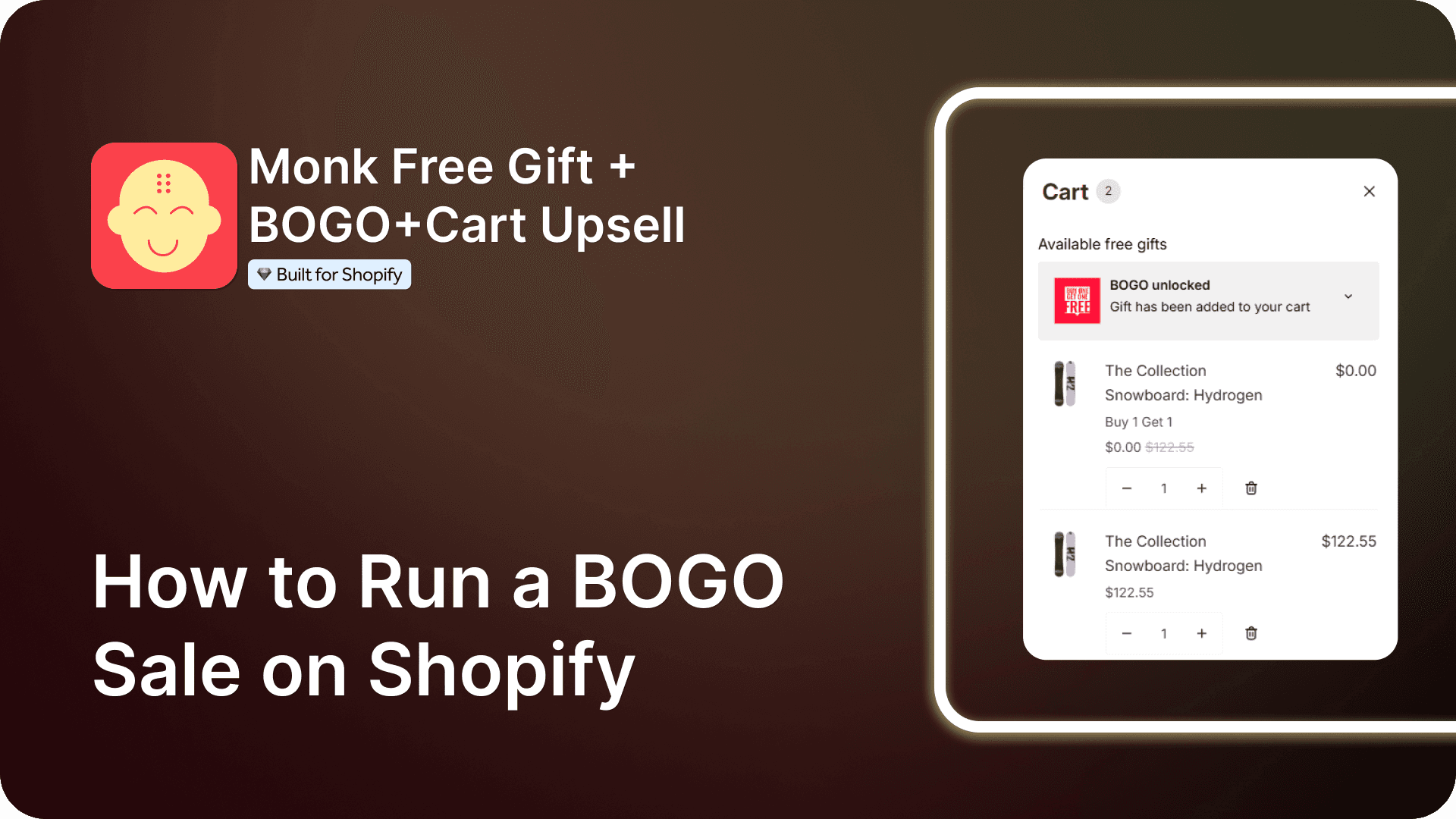
How to Run a BOGO Sale on Shopify
BOGO Strategy for Shopify Stores to Boost Revenue
Get Monk Free Gift app for just $1/month this Black Friday
First month: $1 after your 7-day free trial. All features included. Offer live!
Claim offer now

Get Monk Free Gift app for just $1/month this Black Friday
First month: $1 after your 7-day free trial. All features included. Offer live!
Claim offer now
Get Monk Free Gift app for just $1/month this Black Friday
First month: $1 after your 7-day free trial. All features included. Offer live!
Claim offer now