
How to Run BOGO on Shopify Without Discount Codes
Summary
BOGO offers on Shopify boost conversions and average order value by encouraging customers to buy more, but discount codes often reduce effectiveness due to friction at checkout. Code free BOGO solves this by applying offers automatically when cart conditions are met, improving user experience and reducing drop-offs. Shopify supports basic automatic discounts, but has limits like manual gift addition and restricted logic. Apps like Monk enable advanced BOGO with auto add gifts, flexible rules, and better targeting. When executed well, code free BOGO drives higher sales, smoother checkout, and more scalable promotions.

Ravish (RV)
Senior Content Writer
Ravish is an ecommerce and SaaS marketing expert with 6+ years of experience in Shopify and ecommerce and 10+ years of experience in marketing, and growth strategy. He has worked closely with Shopify merchants to solve real ecommerce challenges and shares practical, research-backed insights, industry best practices, and emerging trends.
Key Takeaways
BOGO offers on Shopify boost conversions and average order value by encouraging customers to buy more, but discount codes often reduce effectiveness due to friction at checkout. Code free BOGO solves this by applying offers automatically when cart conditions are met, improving user experience and reducing drop-offs. Shopify supports basic automatic discounts, but has limits like manual gift addition and restricted logic. Apps like Monk enable advanced BOGO with auto add gifts, flexible rules, and better targeting. When executed well, code free BOGO drives higher sales, smoother checkout, and more scalable promotions.
BOGO deals are widely used for a reason; they grab attention and get people buying. One of the quickest methods to boost sales is to have a Buy One, Get One (BOGO) sale.
But if you’re using Shopify, you might not want customers to enter discount coupons every time because discount codes kill BOGO conversions. Customers forget to enter them, enter them wrong, or abandon the cart entirely when the discount doesn't apply. Every extra step at checkout is a drop-off point you can't afford.
The fix is simpler than most merchants realize: BOGO offers on Shopify can run automatically, triggered the moment the cart qualifies; no code required.
In this guide, we’ll show you how to set it up using Shopify’s native discounts and Monk Free Gift, including limitations, benefits, and mistakes to avoid so customers get the deal instantly at checkout.
What Is a BOGO Offer in Shopify?
A Shopify Buy One Get One (BOGO) deal typically works in one of these common ways:
BOGO Free: Buy one item, get another of equal or lesser value free
BOGO 50% Off: Buy one item, get the second at a discounted price
BOGO Fixed Deal: Buy one, get another at a specific reduced price
Mix-and-Match BOGO: Customers can choose different items within a category
Why Shopify merchants use BOGO offers in Shopify?
Merchants on e-commerce platforms like Shopify rely on BOGO discounts a lot since they are simple, work well, and make people feel good. This is why:
Increases the number of sales:
Customers are compelled to purchase more than they initially intended in order to secure the deal.
Clears inventory:
BOGO deals help get rid of extra or slow-moving goods without having to deeply discount one item.
Shoppers add more items to their cart instead of just one to get the deal.
Brings in New Customers:
BOGO deals are eye-catching and are typically utilized in commercials to get people to buy for the first time.
Increases customer loyalty:
Getting something "extra" makes shopping more fun, which leads to more purchases.
Encourages finding new products:
Customers might buy things they wouldn't ordinarily buy, such as new or related items.
Why Avoid Discount Codes for BOGO on Shopify
Shopify's BOGO deals can be effective. However, using discount codes often makes things worse. Many stores don't use discount coupons for BOGO deals for the following reasons:
Poor user experience:
Customers have to type in a code at checkout, which makes things harder. A lot of people forget, write the wrong thing, or leave their cart when the discount doesn't work as intended. Automatic discounts feel natural and are more likely to lead to sales.
Limited ability to automate:
Shopify's built-in discount code system doesn't work well with complicated BOGO logic. For example, dealing with different sizes and colors, mix-and-match products, or tiered offers might get messy or not work at all.
Inconsistent application:
If the necessary steps aren't followed exactly, discount codes might not work correctly, potentially causing problems for customers and customer service. Automatic BOGO setups apply the discount right away when the conditions are met.
Lower conversion rates:
Every extra step in the checkout process makes it more likely that people will leave. When a code is required, it causes people to hesitate and interrupts the buying process, which might hurt conversions.
Leaking of codes:
People can readily distribute discount codes on coupon sites or social media, which might lead to unintentional use and lower profits. It's harder to take advantage of automatic reductions because they depend on certain criteria in the cart.
Harder to Promote:
With codes, you have to keep reminding people to use them in your marketing. Automatic BOGO discounts make it easier to send messages: "Buy one, get one free—no code needed."
Limited stackability:
You usually can't use discount coupons with other deals, like free shipping or loyalty benefits. This limits your ability to give deals.
How BOGO Without Discount Codes Works
Without discount coupons, BOGO works on cart-based logic, which means that the system keeps checking what a customer has added to their cart. No coupons needed.
Instead, it checks the cart in real time to see if it fulfills specific parameters, such as the number of items, the type of product, or the collection.
From the shopper's perspective, this makes the discount feel automatic and easy.
There are two main factors to the process:
The trigger is what the buyer has to do, like "buy 2 items from Collection A." The reward is what they get in return. |
The system immediately applies the reward logic as soon as the trigger condition is met, without the user having to do anything.
Difference between automatic discounts vs code-based discounts
Automatic discounts on Shopify are applied right away, with no need for a code. This makes purchasing easier, especially for BOGO or sitewide specials, but you can't customize or stack them.
Discounts based on codes need to be entered manually, which can lower conversions. However, they provide merchants more control over targeted marketing, influencer promotions, and exclusive deals.
Methods to Run BOGO Without Discount Codes on Shopify
Using Shopify Automatic Discounts
Shopify’s built-in automatic discounts are the simplest way to run BOGO offers without requiring customers to enter a code. Once set up, the discount is applied instantly when the cart meets your conditions.
How it works:
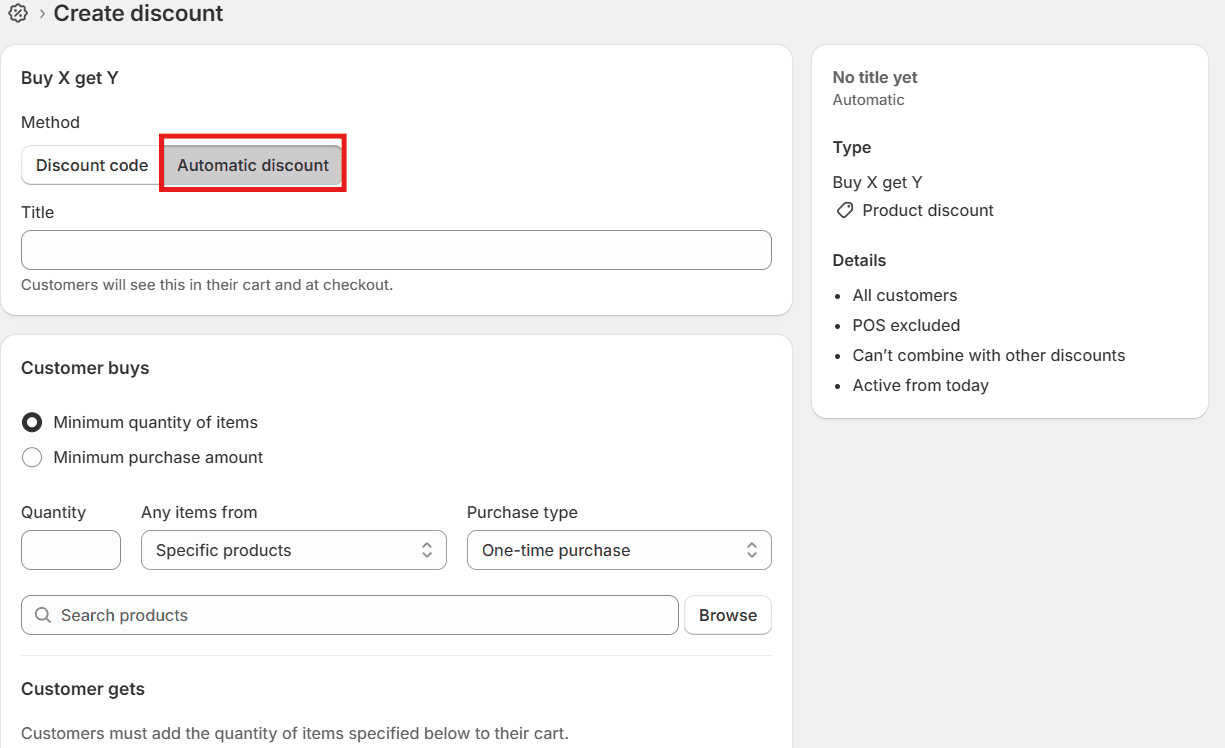
Go to your Shopify admin → Discounts → Create Discount
Choose ‘Buy X, Get Y’ as the discount code type
Select ‘Automatic discount.'
Define the products, quantities, and discount value (e.g., buy 1 get 1 free or buy 2 get 1 at 50% off)
Benefits:
Limitations:
|
Can Shopify Run BOGO Without Discount Codes?
Yes, Shopify can run BOGO through automatic discounts. The BOGO offer can be created using the ‘Buy X, Get Y’ discount type, which is applied automatically at cart/checkout. No manual code is required from customers.
Shopify’s native discount limitations
Free item is not automatically added
Shopify does not automatically add the free item to the cart. Customers will need to manually add the free item to their cart. The automatic discount code applies when products X and Y are both in the cart.
Limited offer logic
There are no advanced rules like conditional BOGO, i.e., based on tags, customer behavior, etc. It also works best with the same product OR defined collections.
One automatic discount at a time
You cannot stack multiple automatic discounts, and it restricts running multiple campaigns simultaneously.
Basic customer experience
There are no built-in progress bars, upsell prompts, or dynamic messaging.
Using Shopify Apps for Code-Free BOGO
Shopify apps provide you a lot more freedom and control for more complicated BOGO campaigns, and you don't have to use discount coupons.
Apps serve a lot of common use cases:
You can mix and combine BOGO deals from different collections.
Offers with tiers, such as buy two get one free or buy four get two free
Adding free items to the cart automatically
Custom messages and designs on product and cart pages
Benefits:
Limitations:
|
How Monk Free Gift + BOGO Enables Code-Free BOGO on Shopify
Monk Overview, Features & Capabilities
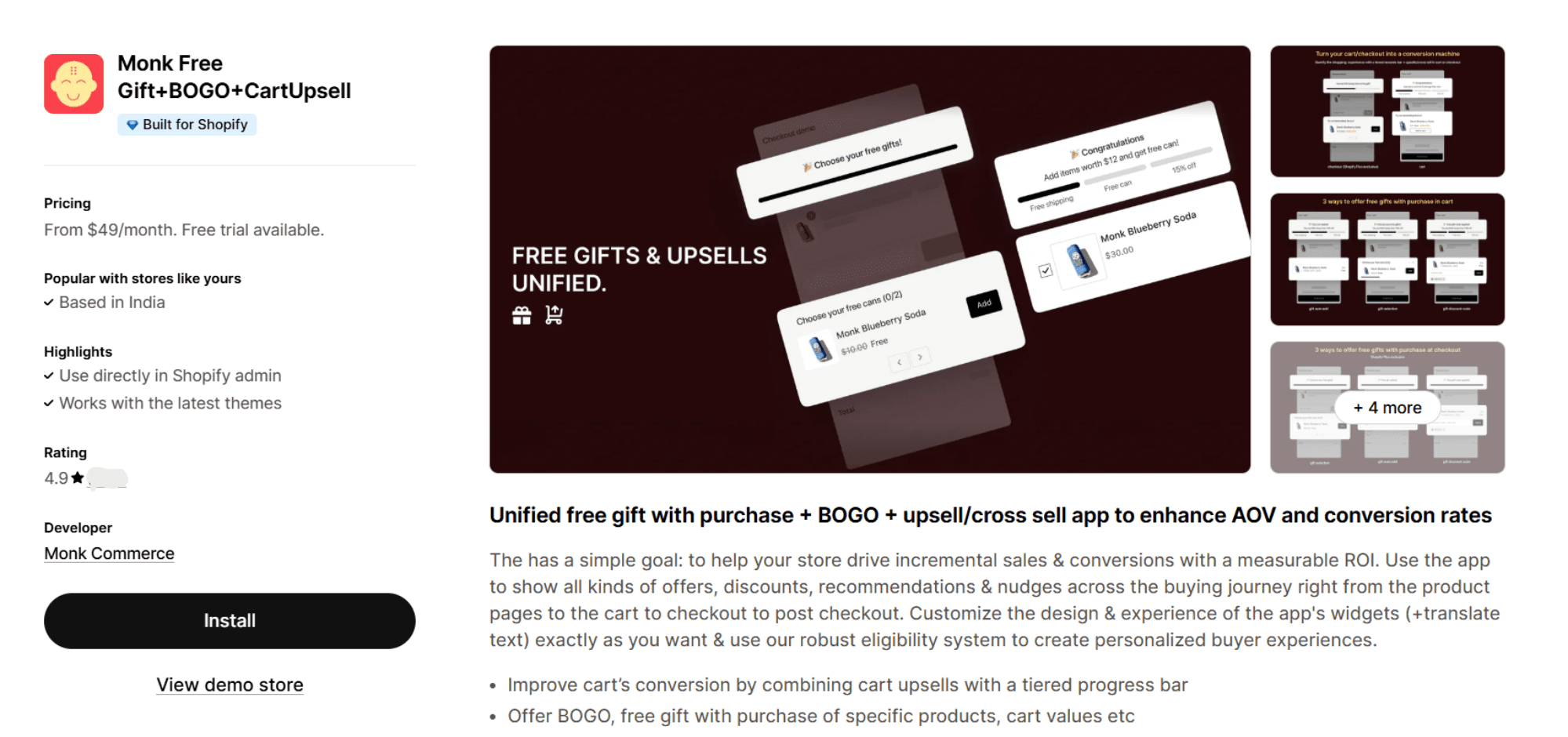
Monk is an all-in-one conversion and sales optimization app for Shopify stores, designed to boost revenue throughout the entire buying journey, from product pages to checkout and even post-purchase.
Monk provides an app-based system to create Buy One Get One (BOGO) and free gift offers directly within Shopify. It helps merchants increase order value with features like free gifts, BOGO deals, upsells, cross-sells, and targeted discounts.
What makes Monk useful:
Things to keep in mind:
|
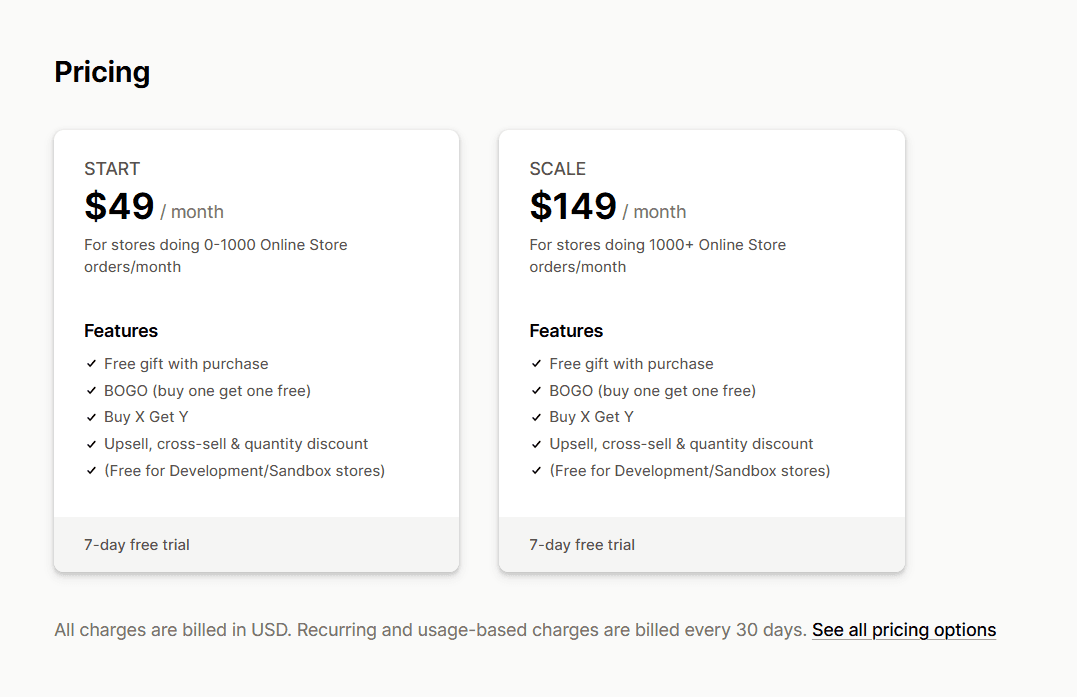
Overall, Monk is a powerful option for stores looking to run advanced, highly tailored promotions without juggling multiple apps. Monk has a growth-based pricing tier; all features are available in all tiers.
Rating: 4.9 ⭐ (545+)
Pricing: from $49 to $149
Free trial: 7-day free trial available with all pricing plans
Step-by-Step: Running a BOGO Without Discount Codes Using Monk
Step 1: Selecting the offer type and name
After installing Monk from the Shopify App Store, be sure to enable the app.
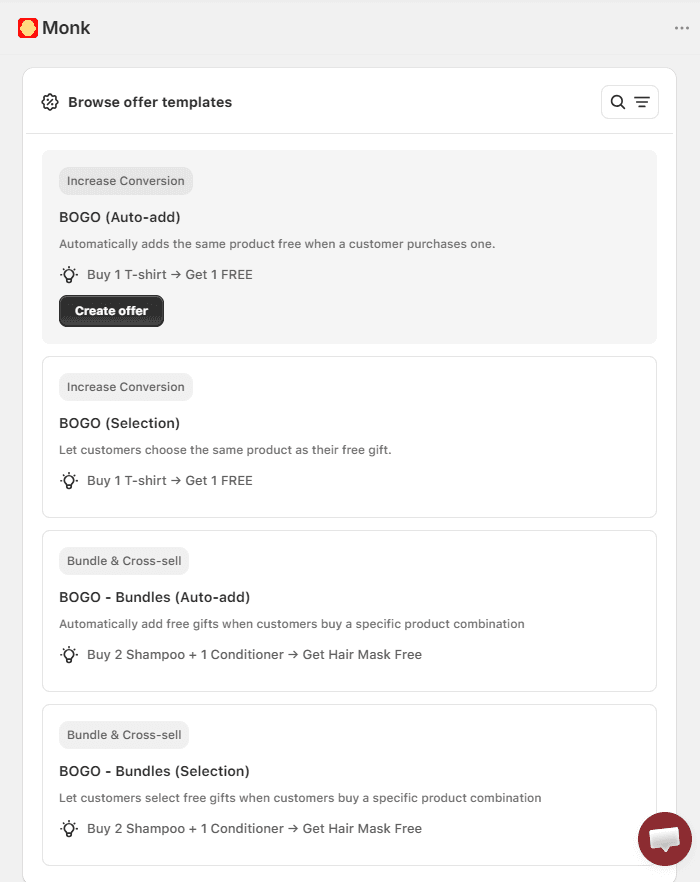
On the Monk dashboard, look for the “+ Create Offer” button. There are various offer templates to choose from, including free gift, upsell, volume discounts, bundles, and BOGO.
Look for BOGO (Auto-Add) under BOGO offer templates. The auto-add offer will add a BOGO gift product to the customer's basket right away.
Pick a strategically appropriate name for your BOGO offer, as the name will show up on the cart and checkout as the name of the discount.
Avoid using a generic offer name to avoid misuse.
Step 2: Setting ‘Buy’ and ‘Get’ rules
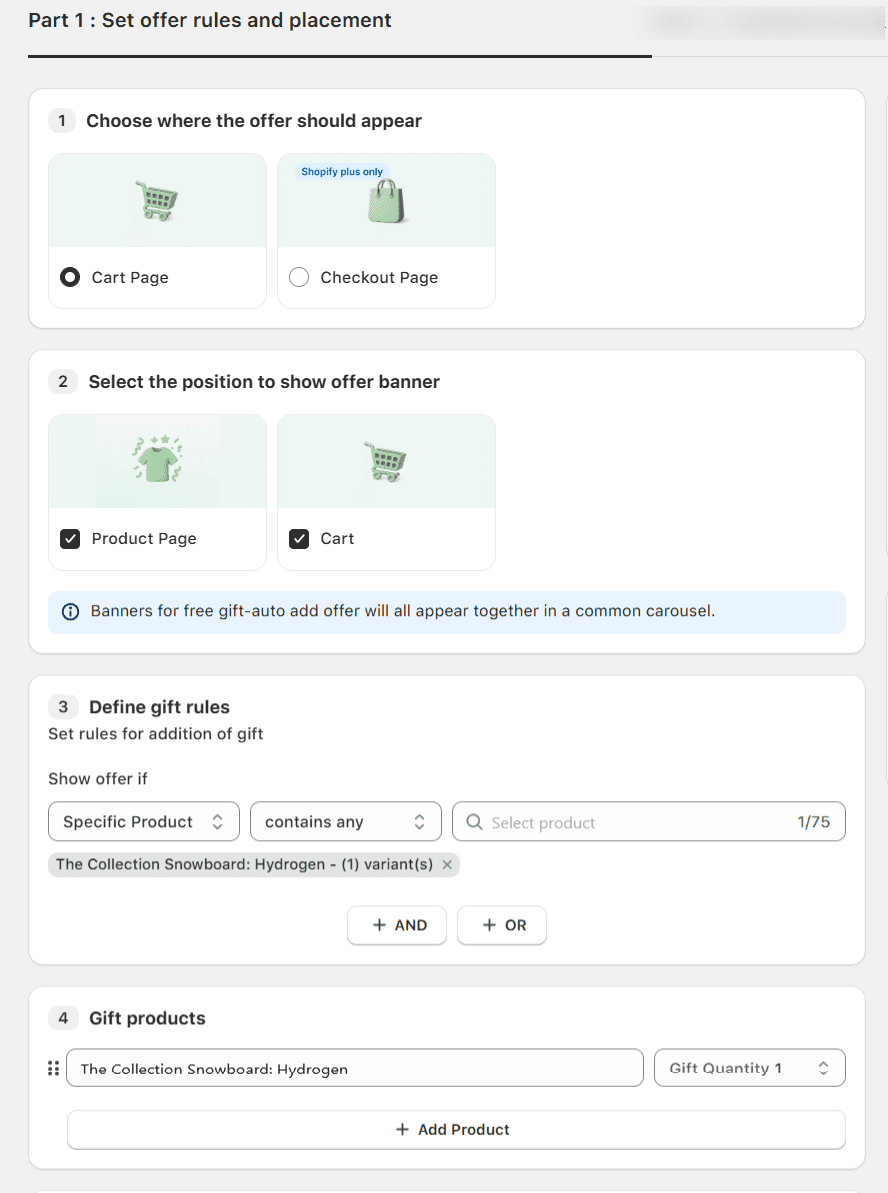
You can choose whether to show the offer on the cart page or the checkout page. You can also choose whether to show an offer banner on the product page and/or the cart.
Set the rule to "Show offer if -> Specific Product -> Contains Any ->" and then choose the BOGO product. This makes sure that the banners are still there when this item is put in the cart.
Since this is a BOGO offer, you should also add the same item as a gift.
In this step, using Monk, you can add an advanced layer of settings to customize your offer even more. Like:
Combine additional eligibility conditions like specific customer tag, specific country, languages, etc.
Remove the gift product automatically when the main product is removed
Increase gift products when the product quantity is increased
Let customers remove the gift if they want to
Schedule the BOGO offer for a certain time and date or occasion, like Black Friday, Cyber Monday, Labor Day, Independence Day etc.
Step 3: Customizing text and design
All the banners and widgets in Monk are highly customizable to blend with your store’s theme. You can edit the banner according to your campaign requirements and change the font type, size, color, and positioning accordingly.
Using Monk, you can even add media to your banners to increase your offer's visibility.
Make sure to save your BOGO sale offer and test it thoroughly before promoting.
Step 4: Testing the offer in cart/checkout
You can test the offer by clicking on the ‘Preview’ button next to the offer created in the 'Manage offers' tab. If the offers are created on the live theme of your store, then you can also test them in a new incognito window to avoid caching issues.
Best Practices for Running BOGO Offers on Shopify
Clear on-site messaging
Use simple, direct language like “Buy 1, Get 1 Free” and clearly mention any conditions (same product, collection, or mix). Keep messaging consistent across your homepage, product pages, and cart so customers don’t get confused.
Cart and product page visibility
Make the offer visible at every step with product badges, in-cart messaging, and progress prompts like “Add one more item to unlock your offer.” Clearly show how the discount is applied and auto-add free items to reduce friction.
Smart Inventory planning
Plan ahead for demand spikes by using past sales data. Combine bestsellers with slow-moving stock, set purchase limits if needed, and use dedicated collections to control which products are included.
Protecting your margins
Avoid margin loss by using offers like “Buy 1, Get 1 at 50% Off” or “Buy 2, Get 1 Free.” Prioritize discounting lower-priced items and account for costs like shipping and returns by focusing on high-margin products.
Common Mistakes to Avoid When Running BOGO Without Codes
Overlapping promotions
If you have multiple deals on Shopify at the same time as your BOGO, it can confuse buyers and lead to double discounts. To avoid losing money and having problems at checkout, always ensure that promotions are either mutually exclusive or explicitly prioritized.
Poor rule configuration
If the discount conditions are wrong, the offers might not work right or they might apply to the wrong products. Ensure that product eligibility, quantity limits, and automated application are correct so customers have a good experience.
Lack of Mobile testing
Since most of the traffic to Shopify originates from mobile devices, an unoptimized BOGO experience can significantly affect sales. Check how the offer appears on smaller screens, such as product pages and the basket, and ensure that the discounts function correctly.
Not tracking performance
If you don't monitor key metrics such as conversion rate, AOV, and profit per order, it becomes challenging to assess your performance. Use Shopify's analytics tools to see how well your campaigns are doing and to introduce changes to your approach for future campaigns.
Measuring the Success of Your BOGO Campaign
Conversion rate lift:
Measure how your conversion rate improves during the BOGO campaign compared to baseline performance on Shopify. A strong lift indicates the offer is effectively motivating purchases.
Average order value impact:
Track whether customers are spending more per order due to the BOGO incentive. Ideally, the promotion should increase the average order value (AOV), not just the number of transactions.
Cart abandonment analysis:
Analyze if abandonment rates drop or rise during the campaign. High abandonment may indicate confusion, poor user experience (UX), or problems with the application of the offer.
Repeat purchase behavior:
Monitor whether BOGO customers return for future purchases after the promotion ends. Strong repeat behavior suggests that the campaign is attracting quality, loyal customers, rather than just deal seekers.
Is Code-Free BOGO Right for Your Shopify Store?
If you're looking to increase conversions and average order value without adding friction at checkout, code-free BOGO can be a strong fit
If you're looking to simplify the shopping experience, automatic discounts remove the need for customers to enter promo codes
If you're running high-volume promotions or complex offers like free gifts or tiered discounts, code-free setups help you scale easily
If you're looking to reduce operational effort, removing discount codes minimizes manual setup and maintenance
If your store has healthy margins, code-free BOGO can be a profitable way to drive higher order values
If you're a premium or luxury brand that avoids frequent promotions, this approach may not align with your positioning
If you're focused on growth and can support promotional pricing, code-free BOGO can be an effective lever
Final Thoughts
The ideal way to run BOGO on Shopify without discount codes is to use automatic discount applications that apply deals immediately in the cart. This way, customers don't have to type anything at checkout. These deals can be Buy X Get Y, free gifts, or package discounts. This approach makes things easier, improves the user experience, and often leads to more sales and a higher average order value.
In conclusion, code-free BOGO is an effective and successful approach to increase sales on Shopify, as long as your profits can handle it.
FAQs
How can I run a BOGO offer on Shopify without using discount codes?
Yes, you can run a BOGO offer on Shopify without discount codes by using automatic discounts or third-party apps like Monk that apply the deal directly in the cart.
Does Shopify support automatic BOGO promotions?
Yes, Shopify supports automatic BOGO promotions, but it has a major limitation. The customer has to add the gift products manually. However, for more advanced BOGO setups like auto-adding gifts, complex rules, or multiple simultaneous offers, it is recommended to use third-party apps.
Why are discount-code-free BOGO offers better for conversions?
BOGO deals without discount codes work better, as they are seamless and enhance user experience. Customers don't have to remember or enter a code manually, so the discount is applied right away, which cuts down on people leaving the checkout page.
Do BOGO apps slow down Shopify stores?
Yes, some BOGO apps can slow down your Shopify stores, but not always. Well-built BOGO apps like Monk don’t take over your cart; rather, they blend seamlessly with your existing Shopify cart and hence don’t affect your store speed.
Most Shopify apps (including BOGO apps) add scripts, make external API calls, or modify the page. These can increase load time and affect performance. In fact, too many or poorly optimized apps are one of the biggest causes of slow stores and lower conversions.
Can I run multiple BOGO offers at the same time?
On Shopify, running multiple BOGO offers at the same time is limited; native automatic discounts typically don’t stack or run simultaneously. To run multiple or more complex BOGO campaigns together, you’ll usually need a third-party app that supports discount stacking and advanced logic.
Is it possible to create mix-and-match BOGO without discount codes?
Yes, it is possible to create mix-and-match BOGO offers on Shopify without discount codes but not with native features. You’ll need third-party apps to enable flexible mix-and-match rules (e.g., choose any items from a collection) and apply them automatically without requiring a code.
How does Monk handle BOGO logic in the cart?
Monk automatically detects when BOGO conditions are met (e.g., qualifying product added) and adds the free item to the cart without the customer needing to enter a code.
The app lets you set rules like “remove the gift if the main item is removed” or increase gift quantity as more qualifying products are added, keeping the cart logic dynamic and accurate.
You can also customize messaging and placement (product page/cart banners) so the customer clearly sees the BOGO offer in action before checkout.
Are code-free BOGO offers compatible with subscriptions?
Yes, code-free BOGO offers are compatible with subscriptions on Shopify.
How to Run BOGO on Shopify Without Discount Codes
Summary
BOGO offers on Shopify boost conversions and average order value by encouraging customers to buy more, but discount codes often reduce effectiveness due to friction at checkout. Code free BOGO solves this by applying offers automatically when cart conditions are met, improving user experience and reducing drop-offs. Shopify supports basic automatic discounts, but has limits like manual gift addition and restricted logic. Apps like Monk enable advanced BOGO with auto add gifts, flexible rules, and better targeting. When executed well, code free BOGO drives higher sales, smoother checkout, and more scalable promotions.
BOGO deals are widely used for a reason; they grab attention and get people buying. One of the quickest methods to boost sales is to have a Buy One, Get One (BOGO) sale.
But if you’re using Shopify, you might not want customers to enter discount coupons every time because discount codes kill BOGO conversions. Customers forget to enter them, enter them wrong, or abandon the cart entirely when the discount doesn't apply. Every extra step at checkout is a drop-off point you can't afford.
The fix is simpler than most merchants realize: BOGO offers on Shopify can run automatically, triggered the moment the cart qualifies; no code required.
In this guide, we’ll show you how to set it up using Shopify’s native discounts and Monk Free Gift, including limitations, benefits, and mistakes to avoid so customers get the deal instantly at checkout.
What Is a BOGO Offer in Shopify?
A Shopify Buy One Get One (BOGO) deal typically works in one of these common ways:
BOGO Free: Buy one item, get another of equal or lesser value free
BOGO 50% Off: Buy one item, get the second at a discounted price
BOGO Fixed Deal: Buy one, get another at a specific reduced price
Mix-and-Match BOGO: Customers can choose different items within a category
Why Shopify merchants use BOGO offers in Shopify?
Merchants on e-commerce platforms like Shopify rely on BOGO discounts a lot since they are simple, work well, and make people feel good. This is why:
Increases the number of sales:
Customers are compelled to purchase more than they initially intended in order to secure the deal.
Clears inventory:
BOGO deals help get rid of extra or slow-moving goods without having to deeply discount one item.
Shoppers add more items to their cart instead of just one to get the deal.
Brings in New Customers:
BOGO deals are eye-catching and are typically utilized in commercials to get people to buy for the first time.
Increases customer loyalty:
Getting something "extra" makes shopping more fun, which leads to more purchases.
Encourages finding new products:
Customers might buy things they wouldn't ordinarily buy, such as new or related items.
Why Avoid Discount Codes for BOGO on Shopify
Shopify's BOGO deals can be effective. However, using discount codes often makes things worse. Many stores don't use discount coupons for BOGO deals for the following reasons:
Poor user experience:
Customers have to type in a code at checkout, which makes things harder. A lot of people forget, write the wrong thing, or leave their cart when the discount doesn't work as intended. Automatic discounts feel natural and are more likely to lead to sales.
Limited ability to automate:
Shopify's built-in discount code system doesn't work well with complicated BOGO logic. For example, dealing with different sizes and colors, mix-and-match products, or tiered offers might get messy or not work at all.
Inconsistent application:
If the necessary steps aren't followed exactly, discount codes might not work correctly, potentially causing problems for customers and customer service. Automatic BOGO setups apply the discount right away when the conditions are met.
Lower conversion rates:
Every extra step in the checkout process makes it more likely that people will leave. When a code is required, it causes people to hesitate and interrupts the buying process, which might hurt conversions.
Leaking of codes:
People can readily distribute discount codes on coupon sites or social media, which might lead to unintentional use and lower profits. It's harder to take advantage of automatic reductions because they depend on certain criteria in the cart.
Harder to Promote:
With codes, you have to keep reminding people to use them in your marketing. Automatic BOGO discounts make it easier to send messages: "Buy one, get one free—no code needed."
Limited stackability:
You usually can't use discount coupons with other deals, like free shipping or loyalty benefits. This limits your ability to give deals.
How BOGO Without Discount Codes Works
Without discount coupons, BOGO works on cart-based logic, which means that the system keeps checking what a customer has added to their cart. No coupons needed.
Instead, it checks the cart in real time to see if it fulfills specific parameters, such as the number of items, the type of product, or the collection.
From the shopper's perspective, this makes the discount feel automatic and easy.
There are two main factors to the process:
The trigger is what the buyer has to do, like "buy 2 items from Collection A." The reward is what they get in return. |
The system immediately applies the reward logic as soon as the trigger condition is met, without the user having to do anything.
Difference between automatic discounts vs code-based discounts
Automatic discounts on Shopify are applied right away, with no need for a code. This makes purchasing easier, especially for BOGO or sitewide specials, but you can't customize or stack them.
Discounts based on codes need to be entered manually, which can lower conversions. However, they provide merchants more control over targeted marketing, influencer promotions, and exclusive deals.
Methods to Run BOGO Without Discount Codes on Shopify
Using Shopify Automatic Discounts
Shopify’s built-in automatic discounts are the simplest way to run BOGO offers without requiring customers to enter a code. Once set up, the discount is applied instantly when the cart meets your conditions.
How it works:
Go to your Shopify admin → Discounts → Create Discount
Choose ‘Buy X, Get Y’ as the discount code type
Select ‘Automatic discount.'
Define the products, quantities, and discount value (e.g., buy 1 get 1 free or buy 2 get 1 at 50% off)
Benefits:
Limitations:
|
Can Shopify Run BOGO Without Discount Codes?
Yes, Shopify can run BOGO through automatic discounts. The BOGO offer can be created using the ‘Buy X, Get Y’ discount type, which is applied automatically at cart/checkout. No manual code is required from customers.
Shopify’s native discount limitations
Free item is not automatically added
Shopify does not automatically add the free item to the cart. Customers will need to manually add the free item to their cart. The automatic discount code applies when products X and Y are both in the cart.
Limited offer logic
There are no advanced rules like conditional BOGO, i.e., based on tags, customer behavior, etc. It also works best with the same product OR defined collections.
One automatic discount at a time
You cannot stack multiple automatic discounts, and it restricts running multiple campaigns simultaneously.
Basic customer experience
There are no built-in progress bars, upsell prompts, or dynamic messaging.
Using Shopify Apps for Code-Free BOGO
Shopify apps provide you a lot more freedom and control for more complicated BOGO campaigns, and you don't have to use discount coupons.
Apps serve a lot of common use cases:
You can mix and combine BOGO deals from different collections.
Offers with tiers, such as buy two get one free or buy four get two free
Adding free items to the cart automatically
Custom messages and designs on product and cart pages
Benefits:
Limitations:
|
How Monk Free Gift + BOGO Enables Code-Free BOGO on Shopify
Monk Overview, Features & Capabilities
Monk is an all-in-one conversion and sales optimization app for Shopify stores, designed to boost revenue throughout the entire buying journey, from product pages to checkout and even post-purchase.
Monk provides an app-based system to create Buy One Get One (BOGO) and free gift offers directly within Shopify. It helps merchants increase order value with features like free gifts, BOGO deals, upsells, cross-sells, and targeted discounts.
What makes Monk useful:
Things to keep in mind:
|
Overall, Monk is a powerful option for stores looking to run advanced, highly tailored promotions without juggling multiple apps. Monk has a growth-based pricing tier; all features are available in all tiers.
Rating: 4.9 ⭐ (545+)
Pricing: from $49 to $149
Free trial: 7-day free trial available with all pricing plans
Step-by-Step: Running a BOGO Without Discount Codes Using Monk
Step 1: Selecting the offer type and name
After installing Monk from the Shopify App Store, be sure to enable the app.
On the Monk dashboard, look for the “+ Create Offer” button. There are various offer templates to choose from, including free gift, upsell, volume discounts, bundles, and BOGO.
Look for BOGO (Auto-Add) under BOGO offer templates. The auto-add offer will add a BOGO gift product to the customer's basket right away.
Pick a strategically appropriate name for your BOGO offer, as the name will show up on the cart and checkout as the name of the discount.
Avoid using a generic offer name to avoid misuse.
Step 2: Setting ‘Buy’ and ‘Get’ rules
You can choose whether to show the offer on the cart page or the checkout page. You can also choose whether to show an offer banner on the product page and/or the cart.
Set the rule to "Show offer if -> Specific Product -> Contains Any ->" and then choose the BOGO product. This makes sure that the banners are still there when this item is put in the cart.
Since this is a BOGO offer, you should also add the same item as a gift.
In this step, using Monk, you can add an advanced layer of settings to customize your offer even more. Like:
Combine additional eligibility conditions like specific customer tag, specific country, languages, etc.
Remove the gift product automatically when the main product is removed
Increase gift products when the product quantity is increased
Let customers remove the gift if they want to
Schedule the BOGO offer for a certain time and date or occasion, like Black Friday, Cyber Monday, Labor Day, Independence Day etc.
Step 3: Customizing text and design
All the banners and widgets in Monk are highly customizable to blend with your store’s theme. You can edit the banner according to your campaign requirements and change the font type, size, color, and positioning accordingly.
Using Monk, you can even add media to your banners to increase your offer's visibility.
Make sure to save your BOGO sale offer and test it thoroughly before promoting.
Step 4: Testing the offer in cart/checkout
You can test the offer by clicking on the ‘Preview’ button next to the offer created in the 'Manage offers' tab. If the offers are created on the live theme of your store, then you can also test them in a new incognito window to avoid caching issues.
Best Practices for Running BOGO Offers on Shopify
Clear on-site messaging
Use simple, direct language like “Buy 1, Get 1 Free” and clearly mention any conditions (same product, collection, or mix). Keep messaging consistent across your homepage, product pages, and cart so customers don’t get confused.
Cart and product page visibility
Make the offer visible at every step with product badges, in-cart messaging, and progress prompts like “Add one more item to unlock your offer.” Clearly show how the discount is applied and auto-add free items to reduce friction.
Smart Inventory planning
Plan ahead for demand spikes by using past sales data. Combine bestsellers with slow-moving stock, set purchase limits if needed, and use dedicated collections to control which products are included.
Protecting your margins
Avoid margin loss by using offers like “Buy 1, Get 1 at 50% Off” or “Buy 2, Get 1 Free.” Prioritize discounting lower-priced items and account for costs like shipping and returns by focusing on high-margin products.
Common Mistakes to Avoid When Running BOGO Without Codes
Overlapping promotions
If you have multiple deals on Shopify at the same time as your BOGO, it can confuse buyers and lead to double discounts. To avoid losing money and having problems at checkout, always ensure that promotions are either mutually exclusive or explicitly prioritized.
Poor rule configuration
If the discount conditions are wrong, the offers might not work right or they might apply to the wrong products. Ensure that product eligibility, quantity limits, and automated application are correct so customers have a good experience.
Lack of Mobile testing
Since most of the traffic to Shopify originates from mobile devices, an unoptimized BOGO experience can significantly affect sales. Check how the offer appears on smaller screens, such as product pages and the basket, and ensure that the discounts function correctly.
Not tracking performance
If you don't monitor key metrics such as conversion rate, AOV, and profit per order, it becomes challenging to assess your performance. Use Shopify's analytics tools to see how well your campaigns are doing and to introduce changes to your approach for future campaigns.
Measuring the Success of Your BOGO Campaign
Conversion rate lift:
Measure how your conversion rate improves during the BOGO campaign compared to baseline performance on Shopify. A strong lift indicates the offer is effectively motivating purchases.
Average order value impact:
Track whether customers are spending more per order due to the BOGO incentive. Ideally, the promotion should increase the average order value (AOV), not just the number of transactions.
Cart abandonment analysis:
Analyze if abandonment rates drop or rise during the campaign. High abandonment may indicate confusion, poor user experience (UX), or problems with the application of the offer.
Repeat purchase behavior:
Monitor whether BOGO customers return for future purchases after the promotion ends. Strong repeat behavior suggests that the campaign is attracting quality, loyal customers, rather than just deal seekers.
Is Code-Free BOGO Right for Your Shopify Store?
If you're looking to increase conversions and average order value without adding friction at checkout, code-free BOGO can be a strong fit
If you're looking to simplify the shopping experience, automatic discounts remove the need for customers to enter promo codes
If you're running high-volume promotions or complex offers like free gifts or tiered discounts, code-free setups help you scale easily
If you're looking to reduce operational effort, removing discount codes minimizes manual setup and maintenance
If your store has healthy margins, code-free BOGO can be a profitable way to drive higher order values
If you're a premium or luxury brand that avoids frequent promotions, this approach may not align with your positioning
If you're focused on growth and can support promotional pricing, code-free BOGO can be an effective lever
Final Thoughts
The ideal way to run BOGO on Shopify without discount codes is to use automatic discount applications that apply deals immediately in the cart. This way, customers don't have to type anything at checkout. These deals can be Buy X Get Y, free gifts, or package discounts. This approach makes things easier, improves the user experience, and often leads to more sales and a higher average order value.
In conclusion, code-free BOGO is an effective and successful approach to increase sales on Shopify, as long as your profits can handle it.
FAQs
How can I run a BOGO offer on Shopify without using discount codes?
Yes, you can run a BOGO offer on Shopify without discount codes by using automatic discounts or third-party apps like Monk that apply the deal directly in the cart.
Does Shopify support automatic BOGO promotions?
Yes, Shopify supports automatic BOGO promotions, but it has a major limitation. The customer has to add the gift products manually. However, for more advanced BOGO setups like auto-adding gifts, complex rules, or multiple simultaneous offers, it is recommended to use third-party apps.
Why are discount-code-free BOGO offers better for conversions?
BOGO deals without discount codes work better, as they are seamless and enhance user experience. Customers don't have to remember or enter a code manually, so the discount is applied right away, which cuts down on people leaving the checkout page.
Do BOGO apps slow down Shopify stores?
Yes, some BOGO apps can slow down your Shopify stores, but not always. Well-built BOGO apps like Monk don’t take over your cart; rather, they blend seamlessly with your existing Shopify cart and hence don’t affect your store speed.
Most Shopify apps (including BOGO apps) add scripts, make external API calls, or modify the page. These can increase load time and affect performance. In fact, too many or poorly optimized apps are one of the biggest causes of slow stores and lower conversions.
Can I run multiple BOGO offers at the same time?
On Shopify, running multiple BOGO offers at the same time is limited; native automatic discounts typically don’t stack or run simultaneously. To run multiple or more complex BOGO campaigns together, you’ll usually need a third-party app that supports discount stacking and advanced logic.
Is it possible to create mix-and-match BOGO without discount codes?
Yes, it is possible to create mix-and-match BOGO offers on Shopify without discount codes but not with native features. You’ll need third-party apps to enable flexible mix-and-match rules (e.g., choose any items from a collection) and apply them automatically without requiring a code.
How does Monk handle BOGO logic in the cart?
Monk automatically detects when BOGO conditions are met (e.g., qualifying product added) and adds the free item to the cart without the customer needing to enter a code.
The app lets you set rules like “remove the gift if the main item is removed” or increase gift quantity as more qualifying products are added, keeping the cart logic dynamic and accurate.
You can also customize messaging and placement (product page/cart banners) so the customer clearly sees the BOGO offer in action before checkout.
Are code-free BOGO offers compatible with subscriptions?
Yes, code-free BOGO offers are compatible with subscriptions on Shopify.
Ravish (RV)
Co-Founder, Monk Commerce
Ravish is an ecommerce and SaaS marketing expert with 6+ years of experience in Shopify and ecommerce and 10+ years of experience in marketing, and growth strategy. He has worked closely with Shopify merchants to solve real ecommerce challenges and shares practical, research-backed insights, industry best practices, and emerging trends.
Contents
Related Articles
How to Run a BOGO Sale on Shopify
BOGO Strategy for Shopify Stores to Boost Revenue
How to Run a Profitable Buy One Get One Free (BOGO) Campaign in 2026
Get Monk Free Gift app for just $1/month this Black Friday
First month: $1 after your 7-day free trial. All features included. Offer live!
Claim offer now

Get Monk Free Gift app for just $1/month this Black Friday
First month: $1 after your 7-day free trial. All features included. Offer live!
Claim offer now
Get Monk Free Gift app for just $1/month this Black Friday
First month: $1 after your 7-day free trial. All features included. Offer live!
Claim offer now