
Boost Your Checkout Conversion Fast: 8 Proven Techniques
Summary
Cart abandonment is high, often around 70 percent, mainly due to checkout friction rather than loss of intent. Improving checkout conversion involves removing barriers and adding incentives. Key UX fixes include simplifying forms, enabling guest checkout, using autofill, and minimizing steps. Trust can be improved through transparent pricing, clear return policies, and security badges. Mobile optimization and fast load times are critical, along with express payment options like Apple Pay and Google Pay. Offering multiple payment methods, including wallets, BNPL, and local options, reduces drop-offs. Reducing surprise costs like hidden fees further improves completion rates. Personalization and smart incentives such as BOGO, free gifts, and progress bars can increase AOV. Tools like Monk help unify and automate these offers across cart and checkout. Continuous A/B testing, session analysis, and feedback loops ensure ongoing optimization and higher conversion rates.

Ravish (RV)
Senior Content Writer
Ravish is an ecommerce and SaaS marketing expert with 6+ years of experience in Shopify and ecommerce and 10+ years of experience in marketing, and growth strategy. He has worked closely with Shopify merchants to solve real ecommerce challenges and shares practical, research-backed insights, industry best practices, and emerging trends.
Key Takeaways
Cart abandonment is high, often around 70 percent, mainly due to checkout friction rather than loss of intent. Improving checkout conversion involves removing barriers and adding incentives. Key UX fixes include simplifying forms, enabling guest checkout, using autofill, and minimizing steps. Trust can be improved through transparent pricing, clear return policies, and security badges. Mobile optimization and fast load times are critical, along with express payment options like Apple Pay and Google Pay. Offering multiple payment methods, including wallets, BNPL, and local options, reduces drop-offs. Reducing surprise costs like hidden fees further improves completion rates. Personalization and smart incentives such as BOGO, free gifts, and progress bars can increase AOV. Tools like Monk help unify and automate these offers across cart and checkout. Continuous A/B testing, session analysis, and feedback loops ensure ongoing optimization and higher conversion rates.
Merchants lose 7 out of 10 high-intent shoppers right before they initiate payment. Thus, making the average cart abandonment rate sit at 70.19%, as reported by Baymard.
This drop-off rarely happens because the customer changed their mind. It is usually the result of friction you’ve unintentionally built into the process. For example, a mandatory account creation or a shipping cost that appears too late can be good enough reasons for your sales momentum to dip.
Improving your checkout conversion is a two-step process. First, remove the UX obstacles that prompt customers to leave. Second, introduce incentive structures that give them a reason to stay and boost your checkout conversion fast.
This guide covers the foundational UX checkout conversion tips and fixes every store needs, as well as advanced strategies to turn a standard checkout into a high-value transaction.
Simplify the Checkout Process
Strategic incentives can increase Average Order Value during checkout but they need to be implemented carefully. Two incentives that work particularly well are Buy One Get One Offers and Free Gifts with Purchase on Shopify checkout, along with a Cart progress Bar. These offers encourage customers to add more items to their cart without interrupting the checkout flow.
A complex checkout acts as a physical barrier between your customer and their purchase. Put simply, every additional field you incorporate increases the buyer's cognitive load. You’re basically serving them a fresh opportunity to reconsider the transaction.
Instead, your goal should be to move the customer from the cart to the ‘Thank You’ page with the fewest possible interactions. Focus on these three areas to improve checkout flow:
Limit form fields: Remove any input requirements that do not directly contribute to shipping the order or processing the payment.
Enable guest checkout: Allow customers to complete their purchase without creating an account or repeatedly verifying their identity.
Auto-fill and smart suggestions: Integrate Google Places or similar APIs to predict addresses as the user types, reducing typing effort.
Outcome: Removing these technical hurdles directly impacts your Time-to-Purchase metric, ensuring that the customer's momentum carries them through to the final click. |
Build Trust and Credibility
Online shoppers are hyper-aware of data security and hidden costs. When a customer reaches your payment page, they are looking for reasons to trust you with their sensitive information.
Naturally, any ambiguity regarding the final price or your return policy will create hesitation, leading to abandonment. To maintain conversion momentum, answer security and logistical questions before the customer has to search for them.
For example, implement the following for a secure checkout system:
Display security badges: Place recognized trust seals, such as Norton, McAfee, or SSL certificates, near the payment fields to reassure users that their data is encrypted.
Transparent pricing and policies: List every cost, including taxes, shipping, and processing fees, early in the process so the final total is not surprising to your shopper.
Clear return and refund information: Link your return policy directly in the checkout footer to eliminate post-purchase confusion.
Outcome: Build credibility by designing a transparent and secure checkout system. It sets the foundation for long-term customer retention. |
Optimize for Mobile Experience
Mobile commerce brings in the majority of online shopping traffic, yet mobile checkout conversion rates often lag. You can call this either a ‘fat finger’ problem or a complex layout that makes it hard to find the ‘pay’ button.
Either way, your mobile checkout optimization should account for the physical constraints of a smaller screen. It should also account for the nomadic nature of shoppers, who may be distracted or on the move.
Follow these practices instead:
Responsive checkout design: Use fluid layouts that automatically resize elements and stack form fields vertically to ensure readability across all screen sizes.
Mobile-friendly payment options: Implement express checkout buttons for Apple Pay, Google Pay, or Shop Pay to let users bypass forms entirely with biometric authentication.
Outcome: Once you reduce the need for manual typing and ensure every button is easy to tap, you begin to accommodate the differing behaviours of mobile users. It also eliminates the delay that often costs you the sale. |
🔎For the first time, mobile and desktop conversion rates have achieved parity. 2.8% is the Average Conversion rate for both platforms, signaling that mobile-first checkout design is no longer just an advantage but a baseline requirement.
Offer Multiple Payment Methods
Providing a variety of payment options is no longer a luxury; it is a requirement for meeting diverse customer expectations and regional preferences. Shoppers want to see their preferred payment method at the checkout.
For example, a middle-aged person would be more comfortable selecting COD than entering their card information. On the other hand, a Gen Z might prefer to pay with a one-tap solution.
If either of them doesn’t see their preferred method, they can put off the purchase until later and move on.
Try these methods to implement payment process improvement and cover common checkout preferences:
Digital wallets: Integrate one-tap solutions like Apple Pay, Google Pay, and PayPal to eliminate manual data entry and speed up transactions.
Buy-now-pay-later options: Offer flexible financing through providers like Klarna or Affirm to lower the barrier for higher-priced orders by spreading out the cost.
Local payment methods: Support regional favorites such as iDEAL in the Netherlands or Pix in Brazil to build localized trust and capture international markets.
Outcome: By diversifying your gateway, you cater to different financial behaviors and remove the final technical barrier to the sale. A flexible payment stack also proves that your store is modern, accessible, and designed around the user's convenience. |
🔎Digital wallets now account for 50% of all global e-commerce purchases. Merchants who fail to offer one-tap options like Apple Pay or Google Pay risk alienating half of their potential customer base.
Improve Checkout Speed
Site speed is a direct determinant of conversion success. A slow-loading checkout page frustrates the user and conveys a lack of technical reliability. To maintain the sale's momentum, the transition from the cart to the final confirmation must feel instantaneous and require minimal effort from the shopper.
Accelerate this transition by focusing on technical performance like this:
Fast-loading pages: Optimize backend scripts and minimize heavy third-party tracking pixels to ensure the checkout environment loads in under two seconds.
One-click checkout options: Use stored credentials with Shop Pay or PayPal to let returning customers skip entering shipping and billing info.
Outcome: Eliminating the wait time between a customer’s decision to buy and their ability to pay captures the peak of their buying intent. Thus, technology ceases to be a reason your customer fails to complete their order. |
🔎Over 3 billion people are expected to use biometrics (facial recognition or fingerprint) to secure their digital payments, significantly reducing the friction of manual password entry at checkout.
Reduce Surprises and Friction
Hidden costs are the primary driver of cart abandonment during the final stages of a purchase. When a shopper sees a price increase at the last second, it creates a sense of bait-and-switch that erodes trust immediately.
To reduce cart abandonment, treat checkout as a transparent summary of the entire transaction. Here’s how:
Upfront shipping costs: Use geo-location or early-stage ZIP code entry to provide accurate shipping estimates before the customer reaches the final payment step.
Clear tax breakdown: Display a line-itemized view of sales tax or VAT so the shopper understands exactly why the total has changed.
Real-time cart updates: Ensure any changes to item quantities or applied discounts are reflected in the checkout total immediately, without requiring a page refresh.
Outcome: Removing a shock or unexpected fee keeps the customer in a positive buying state. This is also an act of reassurance, implying that the final transaction is fair and straightforward. |
Use Personalization & Smart Features
A generic checkout experience treats every buyer the same, missing the opportunity to leverage specific shopping behaviors. Smart features turn this process from passive order-taking into an active engagement strategy. This is where you move beyond simply not losing the customer and start maximizing the value of the interaction.
To implement this effectively, you need an enabling platform that can process complex offer logic in real-time. Monk serves as this unified layer, allowing you to manage free gifts, BOGOs, and tiered incentives in one place.
Instead of stacking multiple apps that might slow down your site, you can use a single platform to customize both your cart and checkout.
Strategic Customization Based on Your Shopify Plan
The way you deploy these smart features depends on your Shopify setup, but the goal remains the same: increasing Average Order Value (AOV) on Shopify without adding friction.
Here’s how Monk can help you with this:
For Shopify Plus Merchants: If you are on Shopify Plus, you can use checkout extensibility to place incentives directly at the final buying stage, where intent is highest.
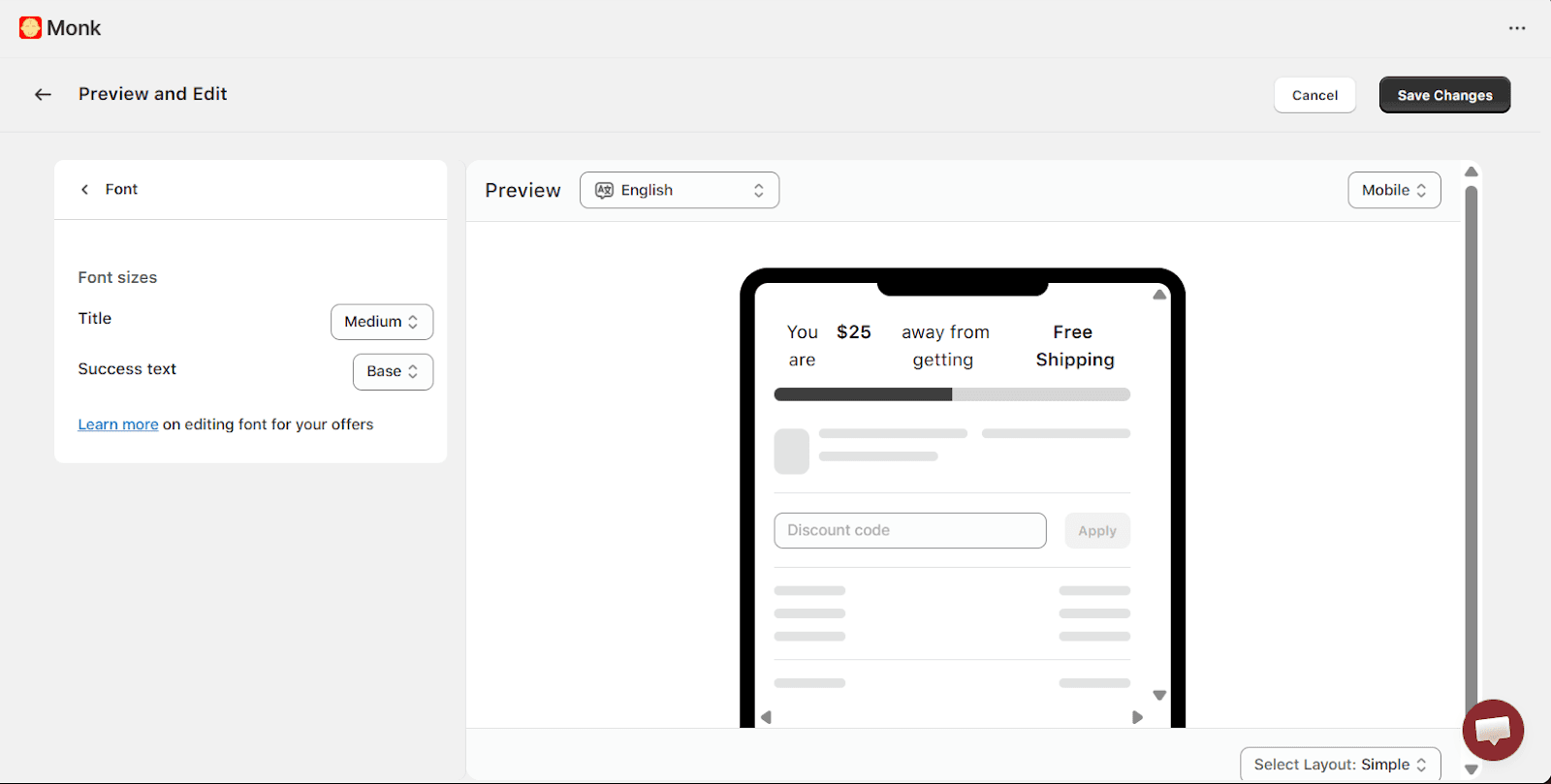
Customize font style, layout design, and more as a Shopify plus merchant using Monk
Embed rewards at checkout: Add tiered progress bars or free gift offers directly into the checkout page to gamify the final steps of the journey
Display auto-recommended upsells: Show personalized product suggestions within the checkout flow to capture last-minute additions to the order
Combine multiple offer types: Merge gifts, discounts, and upsells into a single automated flow to maximize the revenue potential of every session
💡Pro Tip: Run an A/B test on the offers to see which combination works best for your store, and refrain from overusing them or stuffing the checkout page.
Outcome: Automating the reward side of the transaction ensures your marketing incentives reach the customer at the peak of their buying intent. |
For Non-Shopify Plus Merchants: While checkout customization is restricted on standard plans, you can also drive checkout completions by focusing on cart optimization.
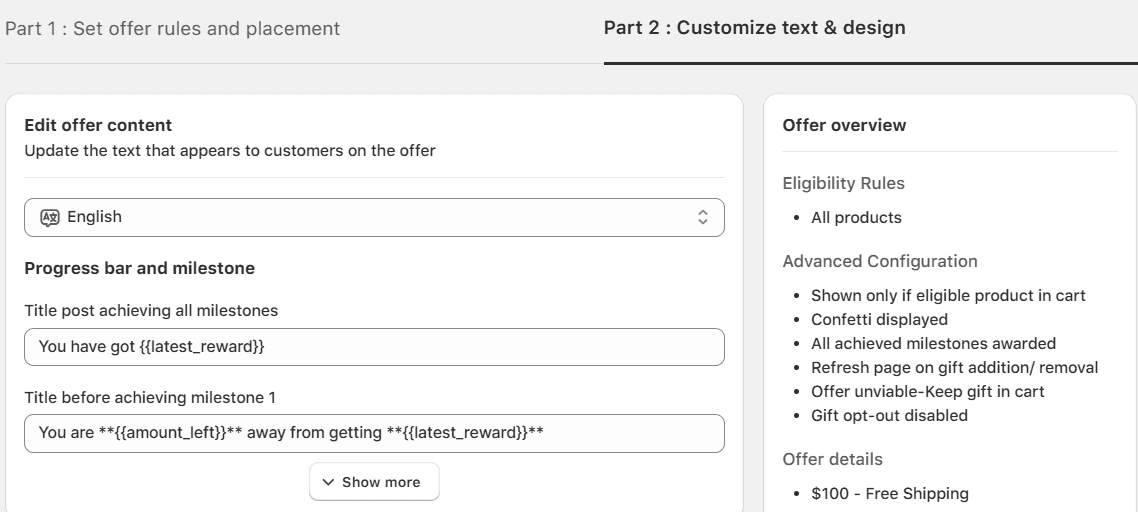
Edit your cart banner display as a Shopify merchant using Monk
Gamify the cart experience: Use tiered progress bars within carts for free shipping and gifts to motivate customers to reach a higher spend before hitting checkout.
Launch conditional gift campaigns: Run ‘Buy X, Get Y’ offers on Shopify where the free gift is automatically added to the cart, eliminating the native Shopify requirement to add the gift manually to the cart to avail
Target with precision: Use Monk’s powerful eligibility engine to trigger offers based on specific criteria like cart value, item quantity, geographic location, or customer tags
How Maverick & Co. scaled their monthly revenue by $40k While foundational UX prevents loss, intelligent incentive structuring drives growth. Maverick & Co., a global travel and luggage brand on Shopify Plus, used this shift to transform its native cart into a high-performance revenue engine. The brand faced a common challenge: they needed a way to gamify the shopping experience and increase Average Order Value (AOV) without resorting to invasive third-party cart drawers that disrupted their brand design. By implementing a logic-driven checkout optimization strategy through Monk, a built-for-Shopify tool designed to set up complex gamification in cart and checkout, they achieved the following:
The results were impressive:
By spending only one to two hours a week on maintenance, their team turned a static checkout step into a consistent conversion machine that requires zero manual intervention from the customer. |
Test, Track, and Optimize
Consumer behavior and payment preferences shift, meaning a flow that works today may lose its effectiveness as new shopping habits emerge. To maintain a competitive edge, treat your checkout as a continuous experiment.
You can do this by relying on objective data rather than assumptions. For example, identify the specific points where users hesitate or drop off and make iterative improvements that directly impact your revenue.
Use the following methods:
Method | Focus | Action |
A/B Testing | Statistical performance | Compare two versions of an element, like button color or shipping copy, to see which drives more completions. |
Session Replays | Qualitative behavior | Watch video recordings of real users to spot rage clicks or moments where customers struggle with form fields. |
Real-Time Feedback | Direct user sentiment | Deploy micro-surveys or feedback widgets to ask customers why they are leaving or what caused friction during the process. |
Outcome: When you base your design decisions on how users interact with your store, you can refine your incentives and UX until every hurdle is removed from the path to purchase. |
Why use Monk for conversion optimization?
Multiple offer types in one app, eliminating the need for several separate tools.
Built specifically for conversion optimization to increase revenue through upsells, cross-sells, and incentives.
Boosts Average Order Value (AOV) using cart upsells, free gifts, bundles, and smart product recommendations.
Flexible targeting rules based on cart value, products in cart, or customer behavior.
Optimizes multiple stages of the purchase journey including cart and post-purchase.
Clean, non-intrusive design that increases revenue without disrupting the checkout flow.
Easy to implement with minimal setup required for merchants.
Supports key promotional tactics like free shipping progress bars, banners and tiered rewards.
Performance-focused to ensure offers load quickly and don’t slow down the store.
Insight-driven optimization with performance tracking to refine campaigns over time.
Offer-based analytics for accurate performance tracking.

Next Steps to Build a Seamless Checkout Experience
You can optimize your checkout for user experience in two parts: first, remove the technical friction that costs you sales, then introduce the incentives that drive growth. While a fast, mobile-friendly, and transparent checkout provides the foundation, a dynamic incentive engine helps increase the average order value.
The next step is to move from manual, static processes to automated, logic-driven offers. Instead of hoping customers find your promotions, you can use an eligibility engine to ensure rewards, such as gifts and tiered discounts, are applied the moment they are earned. This transition eliminates customer confusion and captures buying intent at its peak.
Frequently Asked Questions (FAQs)
What is a good checkout conversion rate?
A good checkout conversion rate for e-commerce stores typically falls between 40% and 50%. This metric measures the percentage of users who complete a purchase after starting the checkout process. While industry averages vary, high-performing stores often achieve rates above 50% by minimizing form fields and offering express payment options.
How do coupon codes affect checkout conversions?
Coupon codes can both help and hinder conversions, depending on how they are implemented. While they incentivize a final purchase, an empty promo code box often prompts users to leave the checkout to search for a discount elsewhere. To prevent this, consider using auto-applied discounts or placing the code field in a less prominent location.
Why do customers abandon payment pages?
Customers primarily abandon payment pages due to unexpected extra costs, such as high shipping fees or taxes revealed at the final step. Other common reasons include mandatory account creation, a complicated checkout flow, and concerns over the security of the payment gateway.
Does free shipping increase checkout completion?
Free shipping is one of the most effective ways to increase checkout completion rates. Many shoppers view shipping costs as a hidden fee, so removing this barrier often outweighs the cost of the subsidy. You can protect your margins by setting a minimum spend threshold to unlock free shipping, which also helps increase your average order value.
How often should I test my checkout process?
You should test your checkout process at least once per quarter or whenever you introduce a new app or payment gateway. Regular testing ensures that your site remains compatible with new browser updates and mobile devices. Frequent A/B testing on smaller elements, like button placement or copy, helps maintain peak performance as consumer habits change.
Can social proof boost checkout conversions?
Social proof can boost checkout conversions by reducing buyer's remorse during the final decision phase. Displaying star ratings, trust badges, or verified purchase labels near the payment button provides the psychological reassurance needed to complete the transaction.
Do exit-intent popups help conversions?
Exit-intent popups help recover potentially lost sales by offering a last-second incentive, such as a discount or gift, when a user moves to close the tab. For these to be effective, the offer must be immediate and compelling enough to stop the customer from leaving the site entirely.
How does site speed impact checkout success?
Site speed has a direct correlation with checkout success; even a one-second delay can lead to a significant drop in conversions. High-intent shoppers expect an instantaneous experience, and any lag during the payment processing phase can lead to frustration or technical distrust.
What checkout tools work best for small stores?
The best checkout tools for small stores are those that integrate natively with platforms like Shopify to provide a seamless user experience. Look for tools that offer auto-add gift logic, tiered rewards, and one-click upsells, as these features help small merchants compete with larger retailers without requiring custom development.
Does live chat support improve conversions?
Live chat support improves conversions by providing real-time answers to customer concerns about shipping, sizing, or returns. Having a support option available directly on the checkout page reduces friction for hesitant buyers and prevents them from leaving the flow to seek help.
Boost Your Checkout Conversion Fast: 8 Proven Techniques
Summary
Cart abandonment is high, often around 70 percent, mainly due to checkout friction rather than loss of intent. Improving checkout conversion involves removing barriers and adding incentives. Key UX fixes include simplifying forms, enabling guest checkout, using autofill, and minimizing steps. Trust can be improved through transparent pricing, clear return policies, and security badges. Mobile optimization and fast load times are critical, along with express payment options like Apple Pay and Google Pay. Offering multiple payment methods, including wallets, BNPL, and local options, reduces drop-offs. Reducing surprise costs like hidden fees further improves completion rates. Personalization and smart incentives such as BOGO, free gifts, and progress bars can increase AOV. Tools like Monk help unify and automate these offers across cart and checkout. Continuous A/B testing, session analysis, and feedback loops ensure ongoing optimization and higher conversion rates.
Merchants lose 7 out of 10 high-intent shoppers right before they initiate payment. Thus, making the average cart abandonment rate sit at 70.19%, as reported by Baymard.
This drop-off rarely happens because the customer changed their mind. It is usually the result of friction you’ve unintentionally built into the process. For example, a mandatory account creation or a shipping cost that appears too late can be good enough reasons for your sales momentum to dip.
Improving your checkout conversion is a two-step process. First, remove the UX obstacles that prompt customers to leave. Second, introduce incentive structures that give them a reason to stay and boost your checkout conversion fast.
This guide covers the foundational UX checkout conversion tips and fixes every store needs, as well as advanced strategies to turn a standard checkout into a high-value transaction.
Simplify the Checkout Process
Strategic incentives can increase Average Order Value during checkout but they need to be implemented carefully. Two incentives that work particularly well are Buy One Get One Offers and Free Gifts with Purchase on Shopify checkout, along with a Cart progress Bar. These offers encourage customers to add more items to their cart without interrupting the checkout flow.
A complex checkout acts as a physical barrier between your customer and their purchase. Put simply, every additional field you incorporate increases the buyer's cognitive load. You’re basically serving them a fresh opportunity to reconsider the transaction.
Instead, your goal should be to move the customer from the cart to the ‘Thank You’ page with the fewest possible interactions. Focus on these three areas to improve checkout flow:
Limit form fields: Remove any input requirements that do not directly contribute to shipping the order or processing the payment.
Enable guest checkout: Allow customers to complete their purchase without creating an account or repeatedly verifying their identity.
Auto-fill and smart suggestions: Integrate Google Places or similar APIs to predict addresses as the user types, reducing typing effort.
Outcome: Removing these technical hurdles directly impacts your Time-to-Purchase metric, ensuring that the customer's momentum carries them through to the final click. |
Build Trust and Credibility
Online shoppers are hyper-aware of data security and hidden costs. When a customer reaches your payment page, they are looking for reasons to trust you with their sensitive information.
Naturally, any ambiguity regarding the final price or your return policy will create hesitation, leading to abandonment. To maintain conversion momentum, answer security and logistical questions before the customer has to search for them.
For example, implement the following for a secure checkout system:
Display security badges: Place recognized trust seals, such as Norton, McAfee, or SSL certificates, near the payment fields to reassure users that their data is encrypted.
Transparent pricing and policies: List every cost, including taxes, shipping, and processing fees, early in the process so the final total is not surprising to your shopper.
Clear return and refund information: Link your return policy directly in the checkout footer to eliminate post-purchase confusion.
Outcome: Build credibility by designing a transparent and secure checkout system. It sets the foundation for long-term customer retention. |
Optimize for Mobile Experience
Mobile commerce brings in the majority of online shopping traffic, yet mobile checkout conversion rates often lag. You can call this either a ‘fat finger’ problem or a complex layout that makes it hard to find the ‘pay’ button.
Either way, your mobile checkout optimization should account for the physical constraints of a smaller screen. It should also account for the nomadic nature of shoppers, who may be distracted or on the move.
Follow these practices instead:
Responsive checkout design: Use fluid layouts that automatically resize elements and stack form fields vertically to ensure readability across all screen sizes.
Mobile-friendly payment options: Implement express checkout buttons for Apple Pay, Google Pay, or Shop Pay to let users bypass forms entirely with biometric authentication.
Outcome: Once you reduce the need for manual typing and ensure every button is easy to tap, you begin to accommodate the differing behaviours of mobile users. It also eliminates the delay that often costs you the sale. |
🔎For the first time, mobile and desktop conversion rates have achieved parity. 2.8% is the Average Conversion rate for both platforms, signaling that mobile-first checkout design is no longer just an advantage but a baseline requirement.
Offer Multiple Payment Methods
Providing a variety of payment options is no longer a luxury; it is a requirement for meeting diverse customer expectations and regional preferences. Shoppers want to see their preferred payment method at the checkout.
For example, a middle-aged person would be more comfortable selecting COD than entering their card information. On the other hand, a Gen Z might prefer to pay with a one-tap solution.
If either of them doesn’t see their preferred method, they can put off the purchase until later and move on.
Try these methods to implement payment process improvement and cover common checkout preferences:
Digital wallets: Integrate one-tap solutions like Apple Pay, Google Pay, and PayPal to eliminate manual data entry and speed up transactions.
Buy-now-pay-later options: Offer flexible financing through providers like Klarna or Affirm to lower the barrier for higher-priced orders by spreading out the cost.
Local payment methods: Support regional favorites such as iDEAL in the Netherlands or Pix in Brazil to build localized trust and capture international markets.
Outcome: By diversifying your gateway, you cater to different financial behaviors and remove the final technical barrier to the sale. A flexible payment stack also proves that your store is modern, accessible, and designed around the user's convenience. |
🔎Digital wallets now account for 50% of all global e-commerce purchases. Merchants who fail to offer one-tap options like Apple Pay or Google Pay risk alienating half of their potential customer base.
Improve Checkout Speed
Site speed is a direct determinant of conversion success. A slow-loading checkout page frustrates the user and conveys a lack of technical reliability. To maintain the sale's momentum, the transition from the cart to the final confirmation must feel instantaneous and require minimal effort from the shopper.
Accelerate this transition by focusing on technical performance like this:
Fast-loading pages: Optimize backend scripts and minimize heavy third-party tracking pixels to ensure the checkout environment loads in under two seconds.
One-click checkout options: Use stored credentials with Shop Pay or PayPal to let returning customers skip entering shipping and billing info.
Outcome: Eliminating the wait time between a customer’s decision to buy and their ability to pay captures the peak of their buying intent. Thus, technology ceases to be a reason your customer fails to complete their order. |
🔎Over 3 billion people are expected to use biometrics (facial recognition or fingerprint) to secure their digital payments, significantly reducing the friction of manual password entry at checkout.
Reduce Surprises and Friction
Hidden costs are the primary driver of cart abandonment during the final stages of a purchase. When a shopper sees a price increase at the last second, it creates a sense of bait-and-switch that erodes trust immediately.
To reduce cart abandonment, treat checkout as a transparent summary of the entire transaction. Here’s how:
Upfront shipping costs: Use geo-location or early-stage ZIP code entry to provide accurate shipping estimates before the customer reaches the final payment step.
Clear tax breakdown: Display a line-itemized view of sales tax or VAT so the shopper understands exactly why the total has changed.
Real-time cart updates: Ensure any changes to item quantities or applied discounts are reflected in the checkout total immediately, without requiring a page refresh.
Outcome: Removing a shock or unexpected fee keeps the customer in a positive buying state. This is also an act of reassurance, implying that the final transaction is fair and straightforward. |
Use Personalization & Smart Features
A generic checkout experience treats every buyer the same, missing the opportunity to leverage specific shopping behaviors. Smart features turn this process from passive order-taking into an active engagement strategy. This is where you move beyond simply not losing the customer and start maximizing the value of the interaction.
To implement this effectively, you need an enabling platform that can process complex offer logic in real-time. Monk serves as this unified layer, allowing you to manage free gifts, BOGOs, and tiered incentives in one place.
Instead of stacking multiple apps that might slow down your site, you can use a single platform to customize both your cart and checkout.
Strategic Customization Based on Your Shopify Plan
The way you deploy these smart features depends on your Shopify setup, but the goal remains the same: increasing Average Order Value (AOV) on Shopify without adding friction.
Here’s how Monk can help you with this:
For Shopify Plus Merchants: If you are on Shopify Plus, you can use checkout extensibility to place incentives directly at the final buying stage, where intent is highest.
Customize font style, layout design, and more as a Shopify plus merchant using Monk
Embed rewards at checkout: Add tiered progress bars or free gift offers directly into the checkout page to gamify the final steps of the journey
Display auto-recommended upsells: Show personalized product suggestions within the checkout flow to capture last-minute additions to the order
Combine multiple offer types: Merge gifts, discounts, and upsells into a single automated flow to maximize the revenue potential of every session
💡Pro Tip: Run an A/B test on the offers to see which combination works best for your store, and refrain from overusing them or stuffing the checkout page.
Outcome: Automating the reward side of the transaction ensures your marketing incentives reach the customer at the peak of their buying intent. |
For Non-Shopify Plus Merchants: While checkout customization is restricted on standard plans, you can also drive checkout completions by focusing on cart optimization.
Edit your cart banner display as a Shopify merchant using Monk
Gamify the cart experience: Use tiered progress bars within carts for free shipping and gifts to motivate customers to reach a higher spend before hitting checkout.
Launch conditional gift campaigns: Run ‘Buy X, Get Y’ offers on Shopify where the free gift is automatically added to the cart, eliminating the native Shopify requirement to add the gift manually to the cart to avail
Target with precision: Use Monk’s powerful eligibility engine to trigger offers based on specific criteria like cart value, item quantity, geographic location, or customer tags
How Maverick & Co. scaled their monthly revenue by $40k While foundational UX prevents loss, intelligent incentive structuring drives growth. Maverick & Co., a global travel and luggage brand on Shopify Plus, used this shift to transform its native cart into a high-performance revenue engine. The brand faced a common challenge: they needed a way to gamify the shopping experience and increase Average Order Value (AOV) without resorting to invasive third-party cart drawers that disrupted their brand design. By implementing a logic-driven checkout optimization strategy through Monk, a built-for-Shopify tool designed to set up complex gamification in cart and checkout, they achieved the following:
The results were impressive:
By spending only one to two hours a week on maintenance, their team turned a static checkout step into a consistent conversion machine that requires zero manual intervention from the customer. |
Test, Track, and Optimize
Consumer behavior and payment preferences shift, meaning a flow that works today may lose its effectiveness as new shopping habits emerge. To maintain a competitive edge, treat your checkout as a continuous experiment.
You can do this by relying on objective data rather than assumptions. For example, identify the specific points where users hesitate or drop off and make iterative improvements that directly impact your revenue.
Use the following methods:
Method | Focus | Action |
A/B Testing | Statistical performance | Compare two versions of an element, like button color or shipping copy, to see which drives more completions. |
Session Replays | Qualitative behavior | Watch video recordings of real users to spot rage clicks or moments where customers struggle with form fields. |
Real-Time Feedback | Direct user sentiment | Deploy micro-surveys or feedback widgets to ask customers why they are leaving or what caused friction during the process. |
Outcome: When you base your design decisions on how users interact with your store, you can refine your incentives and UX until every hurdle is removed from the path to purchase. |
Why use Monk for conversion optimization?
Multiple offer types in one app, eliminating the need for several separate tools.
Built specifically for conversion optimization to increase revenue through upsells, cross-sells, and incentives.
Boosts Average Order Value (AOV) using cart upsells, free gifts, bundles, and smart product recommendations.
Flexible targeting rules based on cart value, products in cart, or customer behavior.
Optimizes multiple stages of the purchase journey including cart and post-purchase.
Clean, non-intrusive design that increases revenue without disrupting the checkout flow.
Easy to implement with minimal setup required for merchants.
Supports key promotional tactics like free shipping progress bars, banners and tiered rewards.
Performance-focused to ensure offers load quickly and don’t slow down the store.
Insight-driven optimization with performance tracking to refine campaigns over time.
Offer-based analytics for accurate performance tracking.
Next Steps to Build a Seamless Checkout Experience
You can optimize your checkout for user experience in two parts: first, remove the technical friction that costs you sales, then introduce the incentives that drive growth. While a fast, mobile-friendly, and transparent checkout provides the foundation, a dynamic incentive engine helps increase the average order value.
The next step is to move from manual, static processes to automated, logic-driven offers. Instead of hoping customers find your promotions, you can use an eligibility engine to ensure rewards, such as gifts and tiered discounts, are applied the moment they are earned. This transition eliminates customer confusion and captures buying intent at its peak.
Frequently Asked Questions (FAQs)
What is a good checkout conversion rate?
A good checkout conversion rate for e-commerce stores typically falls between 40% and 50%. This metric measures the percentage of users who complete a purchase after starting the checkout process. While industry averages vary, high-performing stores often achieve rates above 50% by minimizing form fields and offering express payment options.
How do coupon codes affect checkout conversions?
Coupon codes can both help and hinder conversions, depending on how they are implemented. While they incentivize a final purchase, an empty promo code box often prompts users to leave the checkout to search for a discount elsewhere. To prevent this, consider using auto-applied discounts or placing the code field in a less prominent location.
Why do customers abandon payment pages?
Customers primarily abandon payment pages due to unexpected extra costs, such as high shipping fees or taxes revealed at the final step. Other common reasons include mandatory account creation, a complicated checkout flow, and concerns over the security of the payment gateway.
Does free shipping increase checkout completion?
Free shipping is one of the most effective ways to increase checkout completion rates. Many shoppers view shipping costs as a hidden fee, so removing this barrier often outweighs the cost of the subsidy. You can protect your margins by setting a minimum spend threshold to unlock free shipping, which also helps increase your average order value.
How often should I test my checkout process?
You should test your checkout process at least once per quarter or whenever you introduce a new app or payment gateway. Regular testing ensures that your site remains compatible with new browser updates and mobile devices. Frequent A/B testing on smaller elements, like button placement or copy, helps maintain peak performance as consumer habits change.
Can social proof boost checkout conversions?
Social proof can boost checkout conversions by reducing buyer's remorse during the final decision phase. Displaying star ratings, trust badges, or verified purchase labels near the payment button provides the psychological reassurance needed to complete the transaction.
Do exit-intent popups help conversions?
Exit-intent popups help recover potentially lost sales by offering a last-second incentive, such as a discount or gift, when a user moves to close the tab. For these to be effective, the offer must be immediate and compelling enough to stop the customer from leaving the site entirely.
How does site speed impact checkout success?
Site speed has a direct correlation with checkout success; even a one-second delay can lead to a significant drop in conversions. High-intent shoppers expect an instantaneous experience, and any lag during the payment processing phase can lead to frustration or technical distrust.
What checkout tools work best for small stores?
The best checkout tools for small stores are those that integrate natively with platforms like Shopify to provide a seamless user experience. Look for tools that offer auto-add gift logic, tiered rewards, and one-click upsells, as these features help small merchants compete with larger retailers without requiring custom development.
Does live chat support improve conversions?
Live chat support improves conversions by providing real-time answers to customer concerns about shipping, sizing, or returns. Having a support option available directly on the checkout page reduces friction for hesitant buyers and prevents them from leaving the flow to seek help.
Ravish (RV)
Co-Founder, Monk Commerce
Ravish is an ecommerce and SaaS marketing expert with 6+ years of experience in Shopify and ecommerce and 10+ years of experience in marketing, and growth strategy. He has worked closely with Shopify merchants to solve real ecommerce challenges and shares practical, research-backed insights, industry best practices, and emerging trends.
Contents
Related Articles
10 Best Shopify Apps for Increasing Revenue
How to Increase AOV at Checkout on Shopify
7 Best Shopify Discount Apps to Boost Sales in 2026
Get Monk Free Gift app for just $1/month this Black Friday
First month: $1 after your 7-day free trial. All features included. Offer live!
Claim offer now

Get Monk Free Gift app for just $1/month this Black Friday
First month: $1 after your 7-day free trial. All features included. Offer live!
Claim offer now
Get Monk Free Gift app for just $1/month this Black Friday
First month: $1 after your 7-day free trial. All features included. Offer live!
Claim offer now