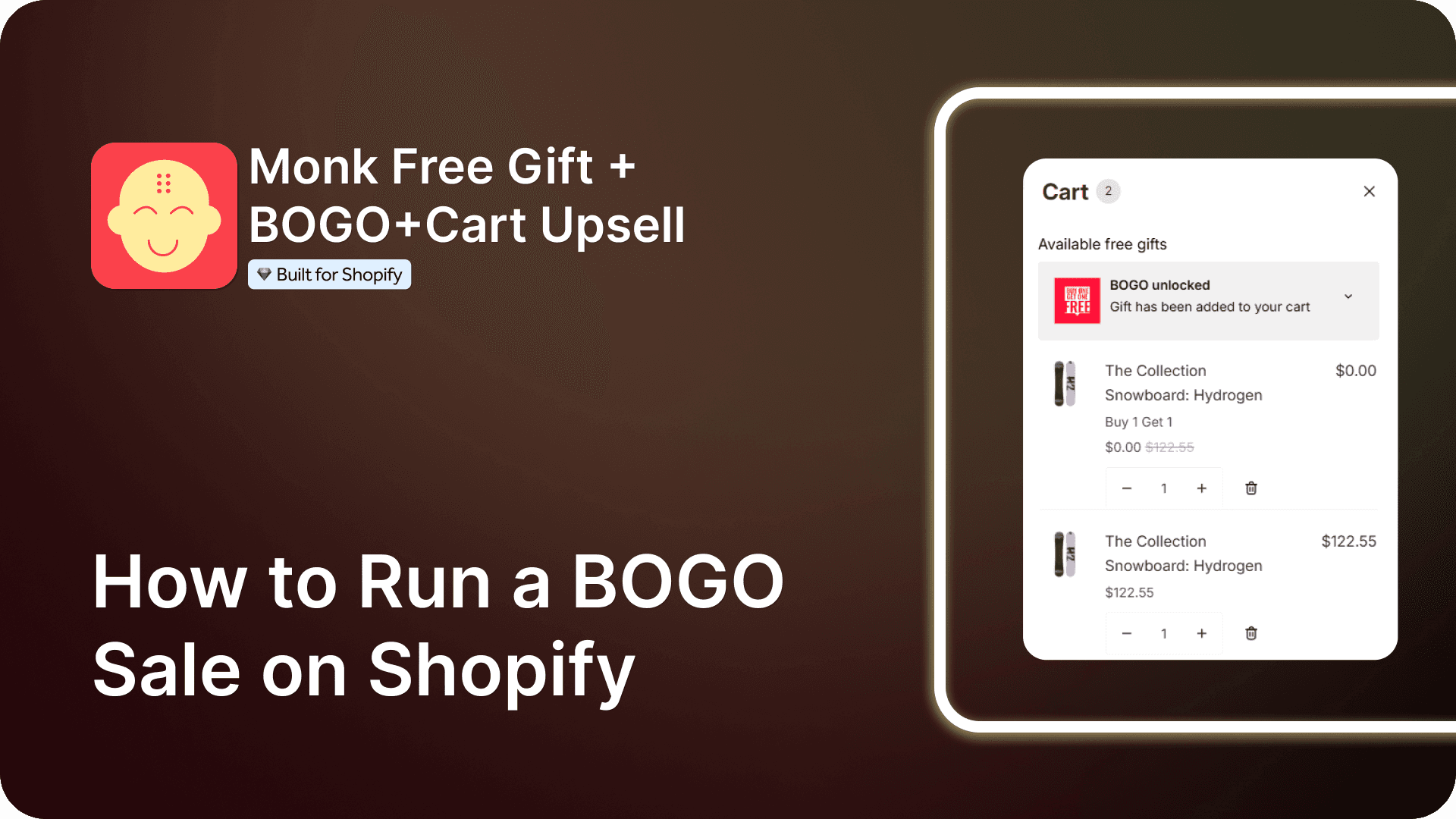
How to Run a BOGO Sale on Shopify
Summary
BOGO (Buy One Get One) is a promotion where customers receive a second item free or discounted after purchasing one, increasing order value, conversions, and perceived value. Formats include buy one get one free, buy X get Y, discounted second item, and conditional offers. On Shopify, BOGO can be created using native Buy X Get Y rules or third-party apps that automate gift addition and reduce checkout friction. Successful campaigns require selecting high-margin products, ensuring inventory, setting clear eligibility rules, defining duration, and enabling automation. Clear messaging, visibility, and tracking metrics like average order value, conversion rate, and revenue help optimize performance.

Ravish (RV)
Senior Content Writer
Ravish is an ecommerce and SaaS marketing expert with 6+ years of experience in Shopify and ecommerce and 10+ years of experience in marketing, and growth strategy. He has worked closely with Shopify merchants to solve real ecommerce challenges and shares practical, research-backed insights, industry best practices, and emerging trends.
Key Takeaways
BOGO (Buy One Get One) is a promotion where customers receive a second item free or discounted after purchasing one, increasing order value, conversions, and perceived value. Formats include buy one get one free, buy X get Y, discounted second item, and conditional offers. On Shopify, BOGO can be created using native Buy X Get Y rules or third-party apps that automate gift addition and reduce checkout friction. Successful campaigns require selecting high-margin products, ensuring inventory, setting clear eligibility rules, defining duration, and enabling automation. Clear messaging, visibility, and tracking metrics like average order value, conversion rate, and revenue help optimize performance.
BOGO stands for “Buy One, Get One,” a promotion where a customer buys one item and gets another item free. A BOGO sale is a popular way to give customers more value while encouraging them to buy faster.
By offering an extra item at no charge or at a reduced price, BOGO sales on Shopify can lead to larger shopping carts, reduce buyers' indecision, and make customers feel rewarded for buying from you.
This guide breaks down why BOGO sales work efficiently, how to design them effectively, and how to monitor their performance without complicating things, ultimately allowing you to increase revenue while keeping the customer experience simple and rewarding.
Types of BOGO Offers
Buy One Get One Free (BOGO Free): Buy one item and receive the same item free.
Buy X Get Y Free : also known as Free Gift with Purchase
Purchase one product and get a different product free.Buy One, Get One at a discount: The second item is offered at a reduced price (e.g., 50% off).
Buy One, Get One automatically applied: The free or discounted item is added automatically to the cart.
Conditional BOGO :The offer unlocks only when certain conditions are met, such as a minimum cart value or specific collections.
Preparing for a BOGO Sale
BOGO offers can quickly increase order volume, even small issues can impact revenue and customer trust. Hence, preparing for a BOGO sale in advance helps prevent overselling, checkout errors, and fulfillment delays.
Proper planning ensures the offer runs smoothly and delivers a better shopping experience while protecting margins.
Here’s a simple, practical way to prepare for a BOGO sale:
Choose the right products:
Pick items with healthy margins and enough stock. BOGO works best on a best-selling or a complementary product.
Check inventory and Plan fulfillment
Make sure you have enough inventory to cover the offer. Set quantity limits if needed to avoid overselling.
Factor in packaging, shipping costs, and handling time so the BOGO campaign does not slow down order processing or increase operational issues.
BOGO orders often increase the order volume. Prepare shipping, packing, and support teams in advance.
Set up the offer correctly
Test the BOGO logic before going live so the free or discounted item applies automatically at checkout.
BOGO orders often increase the order volume. Prepare shipping, packing, and support teams in advance.
Creating a BOGO sale in Shopify
There are two ways to create a BOGO sale on Shopify:
Shopify’s native Buy X Get Y:
Shopify’s native discount feature offers merchants a simple, quick, and cost-free solution to boost their sales. It doesn’t require prior coding experience and is ideal for beginner Shopify merchants who want to set up some simple and easy free gifting on their store.
Note: Setting up a BOGO offer using Buy X Get Y has a major limitation, as the customers have to add both products X and Y to their cart to activate the offer. This results in missed gift offers and abandoned carts due to the confusion.
Using apps from the Shopify App Store:
The Shopify App Store has numerous third-party apps that help merchants create highly successful BOGO campaigns.
For example:
Monk Free Gift + BOGO
EG Auto Add to Cart Free Gift
Monster Cart Upsell + Free Gift
These apps automatically detect when the qualifying conditions are met and add the BOGO product in real time, eliminating the need to add the gift manually.
Here are some additional features offered by the third-party apps for BOGO:
Automatic gift addition so customers do not miss the free item
Fewer checkout errors compared to Shopify’s rigid Buy X Get Y rules
More flexible conditions, including variants, bundles, and cart-value triggers
Clear cart messaging that shows exactly what the customer is getting
Better control over inventory and limits to prevent overselling
Reduced support tickets caused by missed or confusing offers
How to Run a BOGO Sale on Shopify
Using Shopify’s native Buy X Get Y:
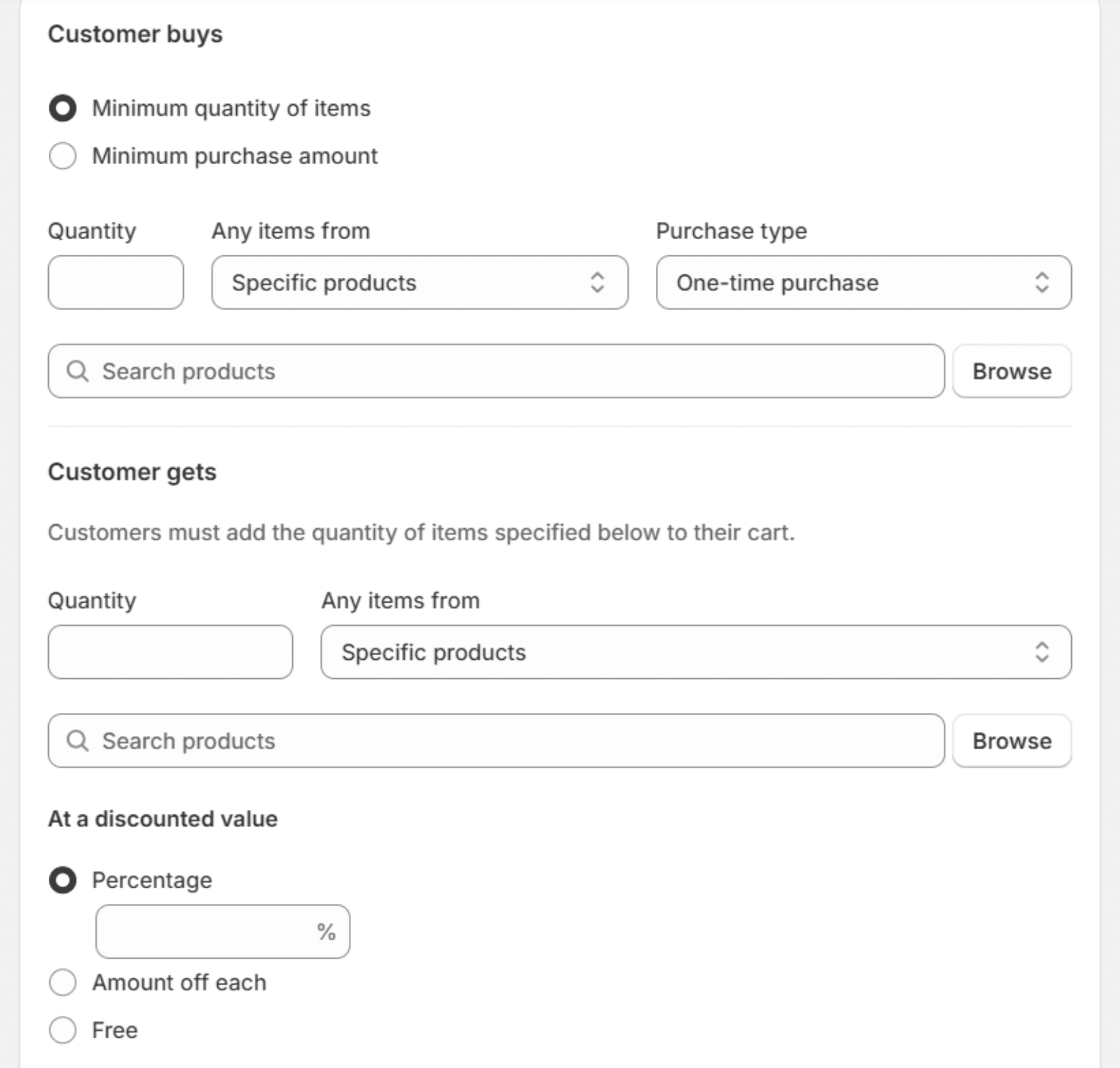
Create a discount from Shopify’s admin dashboard. Choose Buy X get Y and set the buying condition ‘X’ and the reward ‘Y’ as the same product for a BOGO offer.
Please consider adding a validity date if you are setting up a seasonal campaign. Make sure to save and test the offer on your store.
Note: Shopify’s Buy X get Y discount for BOGO won’t be applied unless 2 units of the same product are added to the customer’s cart.
Using Shopify App: Monk Free Gift + BOGO
Monk Free Gift + BOGO is a solid solution for running BOGO sales because it lets you create automatic free gift and buy one get one offers on Shopify that work throughout the shopping journey, reducing friction and missed deals at checkout.
Monk is beginner-friendly, requires no prior coding experience, yet supports advanced BOGO setup to cater to your campaign needs.

Monk is also highly customizable to match your store’s theme and brand guidelines for a uniform look and feel, making it a great option for running seasonal promotions.
Creating a BOGO offer using Monk consists of the following 3 major steps:
Step 1: Selecting the offer type and name
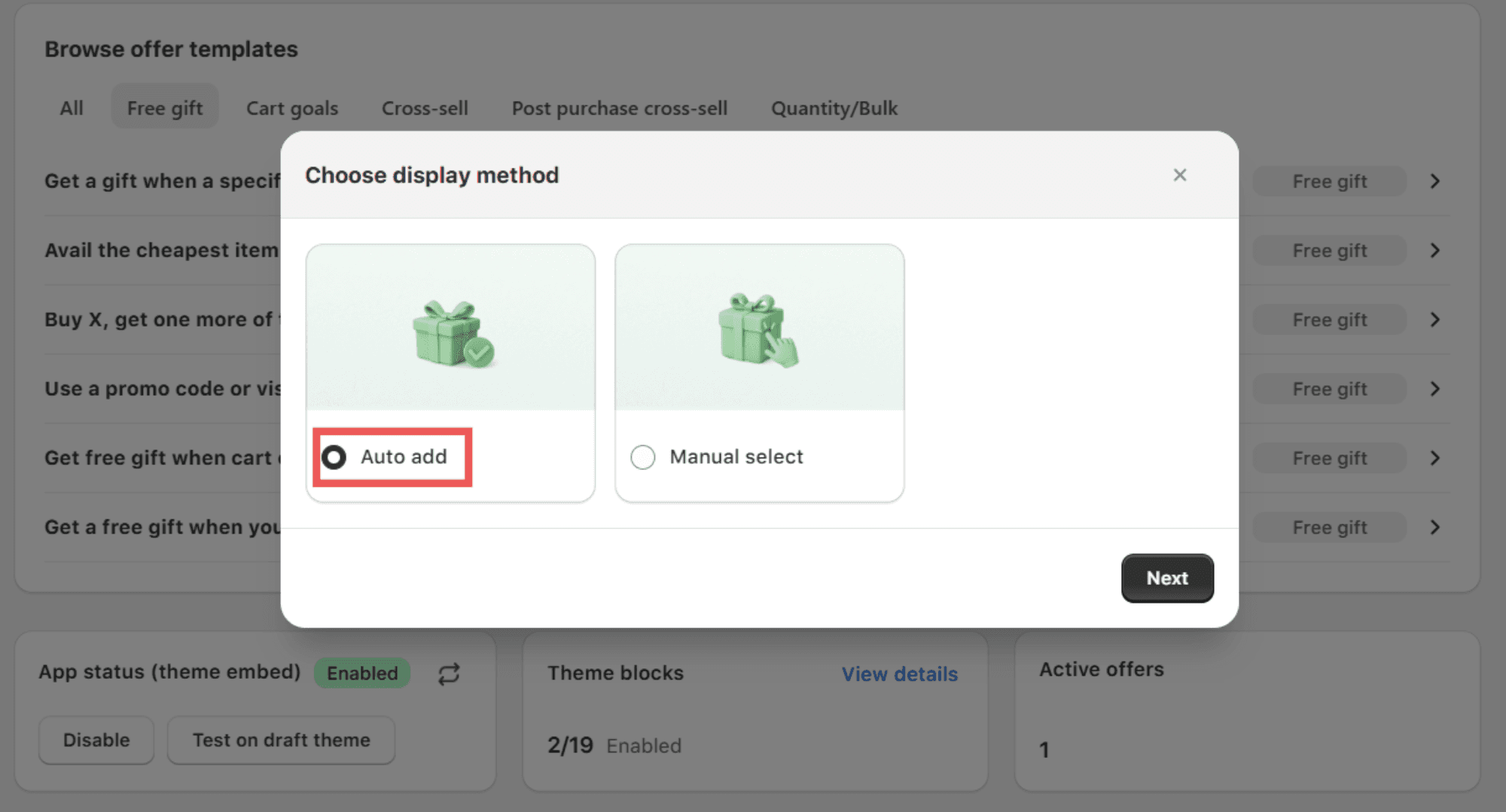
On the Monk dashboard, you'll find various templates to choose from. For a BOGO campaign, select the option “Buy X, get one more of the same item free (BOGO).”
If you want the gift to be automatically added, please set the display method to "Auto add" so that a free gift is added to the customer's cart instantly.
Choose an appropriate name for your BOGO offer, as the name will show up on the discounts applied by the offer at checkout.
Make sure not to use a generic offer name, as they may hurt both performance and customer experience and are prone to misuse.
Step 2: Setting Offer rules and placement
Choose whether you want to showcase the offer on the cart page or in the checkout and select whether you want to show an offer banner on the product page and/or the cart.
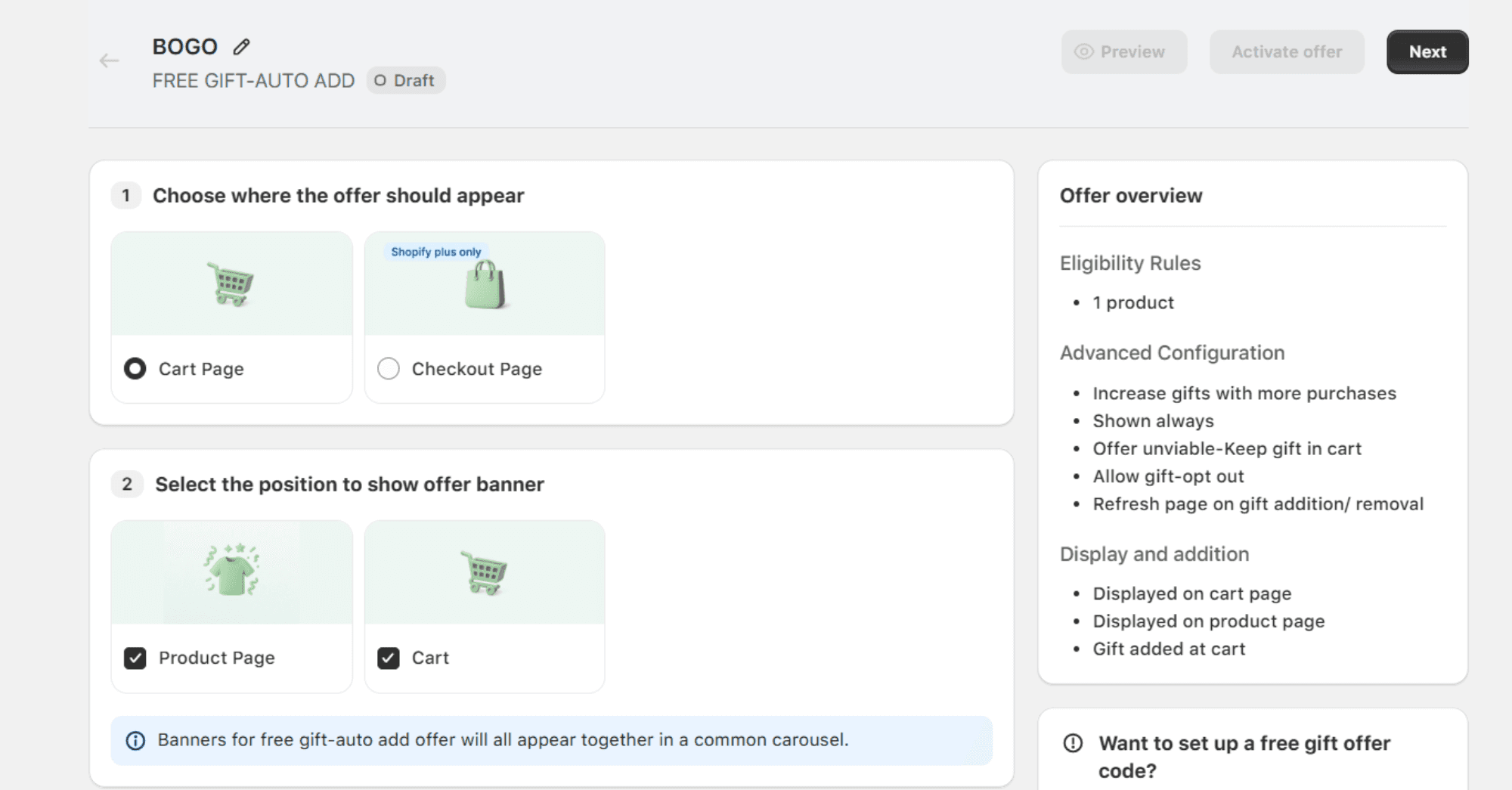
Make sure the rule is set to “Show offer if -> Specific Product -> Contains Any ->” and then select the BOGO product. This makes sure that the banners are visible when this particular product is added to the cart. Add the same product as the gift too, as this is a BOGO campaign.
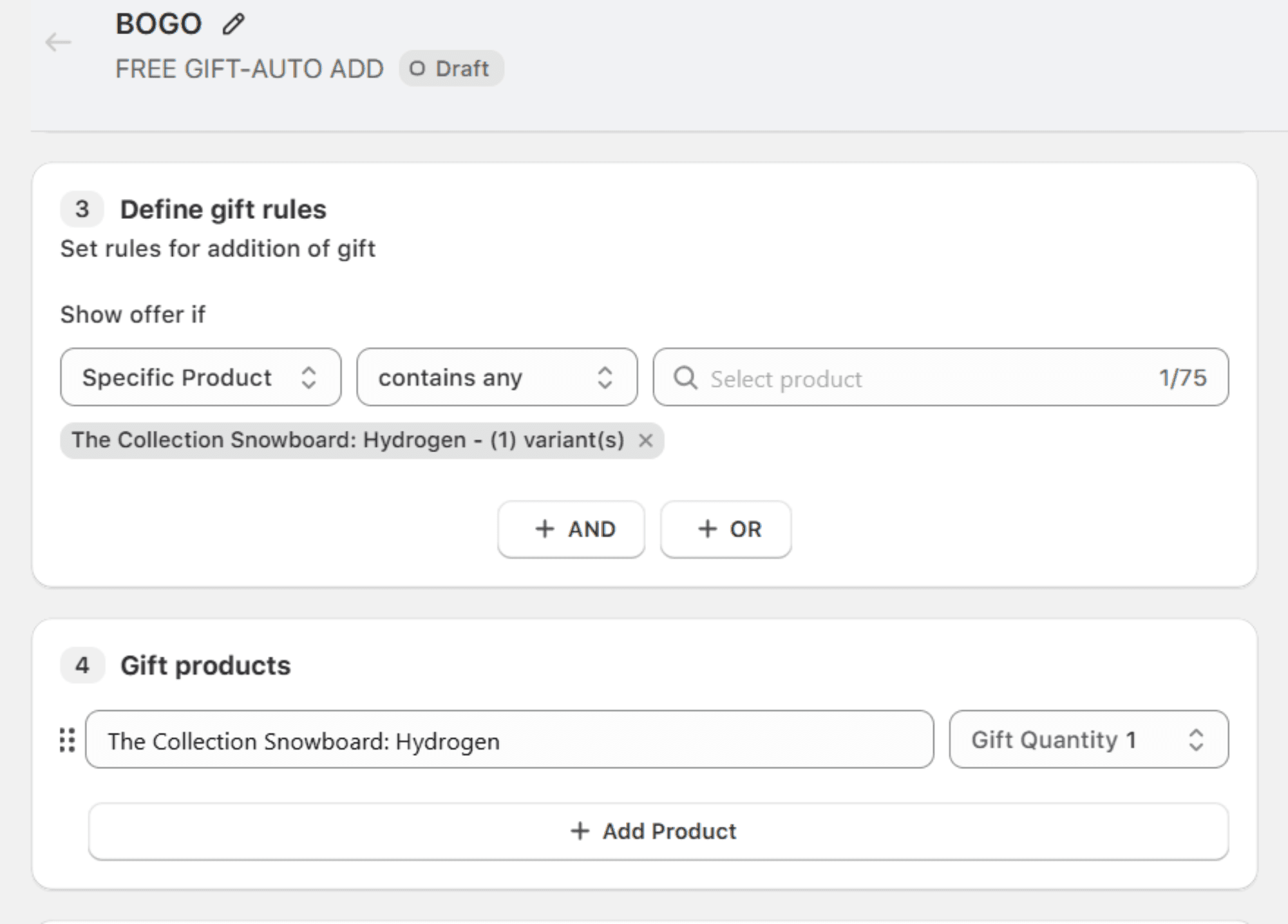
In this step, using Monk, you can add an advanced layer of settings to customize your offer even more. Like:
Remove the gift when the main product is removed
Increase gift products when the product quantity is increased
Let customers remove the gift if they want to
Step 3: Customizing text and design
All the banners and widgets in Monk are highly customizable to blend with your store’s theme. You can edit the banner according to your campaign requirements and change the font type, size, color, and positioning accordingly.
Using Monk, you can even add media to your banners to increase your offer visibility.
Make sure to save your BOGO sale offer and test it thoroughly before promoting.
Design your storefront for BOGO promotions:
Make the BOGO offer impossible to miss: Use a clear, bold headline across the homepage, banners, and product pages so customers immediately understand the deal.
Explain the rules and progress clearly: Clearly state eligible products and exclusions, and show cart progress bars in Shopify with clear message like “Add 1 more item to get 1 free” to guide customers.
Remove friction at checkout: Auto-apply the offer and visibly show the free item in the cart and checkout to build trust and avoid confusion.
Market your BOGO sale:
Make the offer easy to notice: Feature the BOGO clearly on the homepage and explain how it works in one simple line.
Promote it with urgency across channels: Use email, SMS, social media, and ads with clear visuals and time-bound messaging to drive action.
Reinforce the deal before checkout: Remind customers about the BOGO in the cart and at checkout so they don’t miss the offer.
Track your BOGO sale performance:
Track customer behavior and conversion quality: Measure Shopify store average order value, conversion rate, units per order, and revenue per session to understand how shoppers respond to the BOGO.
Evaluate profitability, not just volume: Compare paid versus free units, monitor gross margin, discount rate, and overall profitability to assess real growth.
Benchmark performance over time: Analyze new versus returning customers and compare results with non-promo periods and past campaigns.
Best practices and tips for a successful BOGO sale:
Run BOGO on high-margin or excess-inventory products
Keep rules simple, visible, and easy to understand
Always auto-apply the offer to remove friction
Limit duration or inventory to create urgency and control margins
Note: A successful BOGO sale should increase revenue while improving customer satisfaction, not just add cost.
Conclusion
BOGO sales are effective when they're straightforward, transparent, and truly valuable for the buyer. A clear offer, automatically applied, and backed by the right setup can boost order values without causing complications or operational problems.
Regardless of whether you leverage Shopify's built-in features or a specialized app, the essentials are preparation, visibility, and pre-launch testing. When executed correctly, a BOGO sale becomes more than just a price reduction; it's a seamless, trust-building experience that ultimately supports both your customers and your store's sustained expansion.
Frequently Asked Questions
How long should a BOGO sale last?
A typical BOGO sale should run for 3 to 7 days, as the duration is long enough to drive awareness and participation but short enough to maintain urgency while protecting margins.
For high-traffic events like BFCM or a product launch, a 24-72 hour duration may be ideal. Make sure to set a clear end date to motivate customers to purchase.
Can I run multiple BOGO offers at once?
Yes, using Monk Free Gift + BOGO, you can create and run multiple BOGO campaigns at once, each with their different rules and conditions.
This means you can target different products, collections, or cart values without conflicts while ensuring the right BOGO offer applies at the right moment.
How does BOGO affect customer loyalty?
BOGO can positively impact customer loyalty by giving customers extra value without any complicated rules and discount codes, as it creates a sense of appreciation and trust.
With a seamless and smooth experience and clear banners and messaging, especially when the gift is automatically added to the cart, BOGO offers create a lasting impact on the customers.
Is BOGO effective for new products?
Yes, BOGO offers work really well for new products and is often used as a strategy for product launches.
This helps new products get noticed faster and makes first-time buyers more comfortable placing an order.
Can I limit BOGO to certain customers?
Yes, Monk’s powerful eligibility engine lets you add another layer of eligibility criteria to your BOGO offers.
You can target specific customer segments by assigning them a customer tag. Once tagged, Monk can automatically add the BOGO gift to their carts.
How does BOGO impact average order value?
BOGO usually drives the average order value because of higher perceived value by the customers.
When paired with an additional layer of eligibility criteria like cart value range and item quantity present in the cart, BOGO offers have an even stronger impact on the AOV, as customers need to add more products to meet the criteria.
The BOGO offer encourages higher spending, driving AOV, and still feels rewarding because the customer gets something free or discounted in return.
Can I pause a BOGO discount anytime?
Yes, you can pause a BOGO discount anytime, whether using Shopify’s native discounts or third-party apps like Monk. This makes it easy to stop the promotion temporarily, make adjustments, and re-enable it when you are ready.
It is advisable to pause a BOGO discount only in case of technical or fulfillment issues to maintain a seamless customer experience.
How to Run a BOGO Sale on Shopify
Summary
BOGO (Buy One Get One) is a promotion where customers receive a second item free or discounted after purchasing one, increasing order value, conversions, and perceived value. Formats include buy one get one free, buy X get Y, discounted second item, and conditional offers. On Shopify, BOGO can be created using native Buy X Get Y rules or third-party apps that automate gift addition and reduce checkout friction. Successful campaigns require selecting high-margin products, ensuring inventory, setting clear eligibility rules, defining duration, and enabling automation. Clear messaging, visibility, and tracking metrics like average order value, conversion rate, and revenue help optimize performance.
BOGO stands for “Buy One, Get One,” a promotion where a customer buys one item and gets another item free. A BOGO sale is a popular way to give customers more value while encouraging them to buy faster.
By offering an extra item at no charge or at a reduced price, BOGO sales on Shopify can lead to larger shopping carts, reduce buyers' indecision, and make customers feel rewarded for buying from you.
This guide breaks down why BOGO sales work efficiently, how to design them effectively, and how to monitor their performance without complicating things, ultimately allowing you to increase revenue while keeping the customer experience simple and rewarding.
Types of BOGO Offers
Buy One Get One Free (BOGO Free): Buy one item and receive the same item free.
Buy X Get Y Free : also known as Free Gift with Purchase
Purchase one product and get a different product free.Buy One, Get One at a discount: The second item is offered at a reduced price (e.g., 50% off).
Buy One, Get One automatically applied: The free or discounted item is added automatically to the cart.
Conditional BOGO :The offer unlocks only when certain conditions are met, such as a minimum cart value or specific collections.
Preparing for a BOGO Sale
BOGO offers can quickly increase order volume, even small issues can impact revenue and customer trust. Hence, preparing for a BOGO sale in advance helps prevent overselling, checkout errors, and fulfillment delays.
Proper planning ensures the offer runs smoothly and delivers a better shopping experience while protecting margins.
Here’s a simple, practical way to prepare for a BOGO sale:
Choose the right products:
Pick items with healthy margins and enough stock. BOGO works best on a best-selling or a complementary product.
Check inventory and Plan fulfillment
Make sure you have enough inventory to cover the offer. Set quantity limits if needed to avoid overselling.
Factor in packaging, shipping costs, and handling time so the BOGO campaign does not slow down order processing or increase operational issues.
BOGO orders often increase the order volume. Prepare shipping, packing, and support teams in advance.
Set up the offer correctly
Test the BOGO logic before going live so the free or discounted item applies automatically at checkout.
BOGO orders often increase the order volume. Prepare shipping, packing, and support teams in advance.
Creating a BOGO sale in Shopify
There are two ways to create a BOGO sale on Shopify:
Shopify’s native Buy X Get Y:
Shopify’s native discount feature offers merchants a simple, quick, and cost-free solution to boost their sales. It doesn’t require prior coding experience and is ideal for beginner Shopify merchants who want to set up some simple and easy free gifting on their store.
Note: Setting up a BOGO offer using Buy X Get Y has a major limitation, as the customers have to add both products X and Y to their cart to activate the offer. This results in missed gift offers and abandoned carts due to the confusion.
Using apps from the Shopify App Store:
The Shopify App Store has numerous third-party apps that help merchants create highly successful BOGO campaigns.
For example:
Monk Free Gift + BOGO
EG Auto Add to Cart Free Gift
Monster Cart Upsell + Free Gift
These apps automatically detect when the qualifying conditions are met and add the BOGO product in real time, eliminating the need to add the gift manually.
Here are some additional features offered by the third-party apps for BOGO:
Automatic gift addition so customers do not miss the free item
Fewer checkout errors compared to Shopify’s rigid Buy X Get Y rules
More flexible conditions, including variants, bundles, and cart-value triggers
Clear cart messaging that shows exactly what the customer is getting
Better control over inventory and limits to prevent overselling
Reduced support tickets caused by missed or confusing offers
How to Run a BOGO Sale on Shopify
Using Shopify’s native Buy X Get Y:
Create a discount from Shopify’s admin dashboard. Choose Buy X get Y and set the buying condition ‘X’ and the reward ‘Y’ as the same product for a BOGO offer.
Please consider adding a validity date if you are setting up a seasonal campaign. Make sure to save and test the offer on your store.
Note: Shopify’s Buy X get Y discount for BOGO won’t be applied unless 2 units of the same product are added to the customer’s cart.
Using Shopify App: Monk Free Gift + BOGO
Monk Free Gift + BOGO is a solid solution for running BOGO sales because it lets you create automatic free gift and buy one get one offers on Shopify that work throughout the shopping journey, reducing friction and missed deals at checkout.
Monk is beginner-friendly, requires no prior coding experience, yet supports advanced BOGO setup to cater to your campaign needs.
Monk is also highly customizable to match your store’s theme and brand guidelines for a uniform look and feel, making it a great option for running seasonal promotions.
Creating a BOGO offer using Monk consists of the following 3 major steps:
Step 1: Selecting the offer type and name
On the Monk dashboard, you'll find various templates to choose from. For a BOGO campaign, select the option “Buy X, get one more of the same item free (BOGO).”
If you want the gift to be automatically added, please set the display method to "Auto add" so that a free gift is added to the customer's cart instantly.
Choose an appropriate name for your BOGO offer, as the name will show up on the discounts applied by the offer at checkout.
Make sure not to use a generic offer name, as they may hurt both performance and customer experience and are prone to misuse.
Step 2: Setting Offer rules and placement
Choose whether you want to showcase the offer on the cart page or in the checkout and select whether you want to show an offer banner on the product page and/or the cart.
Make sure the rule is set to “Show offer if -> Specific Product -> Contains Any ->” and then select the BOGO product. This makes sure that the banners are visible when this particular product is added to the cart. Add the same product as the gift too, as this is a BOGO campaign.
In this step, using Monk, you can add an advanced layer of settings to customize your offer even more. Like:
Remove the gift when the main product is removed
Increase gift products when the product quantity is increased
Let customers remove the gift if they want to
Step 3: Customizing text and design
All the banners and widgets in Monk are highly customizable to blend with your store’s theme. You can edit the banner according to your campaign requirements and change the font type, size, color, and positioning accordingly.
Using Monk, you can even add media to your banners to increase your offer visibility.
Make sure to save your BOGO sale offer and test it thoroughly before promoting.
Design your storefront for BOGO promotions:
Make the BOGO offer impossible to miss: Use a clear, bold headline across the homepage, banners, and product pages so customers immediately understand the deal.
Explain the rules and progress clearly: Clearly state eligible products and exclusions, and show cart progress bars in Shopify with clear message like “Add 1 more item to get 1 free” to guide customers.
Remove friction at checkout: Auto-apply the offer and visibly show the free item in the cart and checkout to build trust and avoid confusion.
Market your BOGO sale:
Make the offer easy to notice: Feature the BOGO clearly on the homepage and explain how it works in one simple line.
Promote it with urgency across channels: Use email, SMS, social media, and ads with clear visuals and time-bound messaging to drive action.
Reinforce the deal before checkout: Remind customers about the BOGO in the cart and at checkout so they don’t miss the offer.
Track your BOGO sale performance:
Track customer behavior and conversion quality: Measure Shopify store average order value, conversion rate, units per order, and revenue per session to understand how shoppers respond to the BOGO.
Evaluate profitability, not just volume: Compare paid versus free units, monitor gross margin, discount rate, and overall profitability to assess real growth.
Benchmark performance over time: Analyze new versus returning customers and compare results with non-promo periods and past campaigns.
Best practices and tips for a successful BOGO sale:
Run BOGO on high-margin or excess-inventory products
Keep rules simple, visible, and easy to understand
Always auto-apply the offer to remove friction
Limit duration or inventory to create urgency and control margins
Note: A successful BOGO sale should increase revenue while improving customer satisfaction, not just add cost.
Conclusion
BOGO sales are effective when they're straightforward, transparent, and truly valuable for the buyer. A clear offer, automatically applied, and backed by the right setup can boost order values without causing complications or operational problems.
Regardless of whether you leverage Shopify's built-in features or a specialized app, the essentials are preparation, visibility, and pre-launch testing. When executed correctly, a BOGO sale becomes more than just a price reduction; it's a seamless, trust-building experience that ultimately supports both your customers and your store's sustained expansion.
Frequently Asked Questions
How long should a BOGO sale last?
A typical BOGO sale should run for 3 to 7 days, as the duration is long enough to drive awareness and participation but short enough to maintain urgency while protecting margins.
For high-traffic events like BFCM or a product launch, a 24-72 hour duration may be ideal. Make sure to set a clear end date to motivate customers to purchase.
Can I run multiple BOGO offers at once?
Yes, using Monk Free Gift + BOGO, you can create and run multiple BOGO campaigns at once, each with their different rules and conditions.
This means you can target different products, collections, or cart values without conflicts while ensuring the right BOGO offer applies at the right moment.
How does BOGO affect customer loyalty?
BOGO can positively impact customer loyalty by giving customers extra value without any complicated rules and discount codes, as it creates a sense of appreciation and trust.
With a seamless and smooth experience and clear banners and messaging, especially when the gift is automatically added to the cart, BOGO offers create a lasting impact on the customers.
Is BOGO effective for new products?
Yes, BOGO offers work really well for new products and is often used as a strategy for product launches.
This helps new products get noticed faster and makes first-time buyers more comfortable placing an order.
Can I limit BOGO to certain customers?
Yes, Monk’s powerful eligibility engine lets you add another layer of eligibility criteria to your BOGO offers.
You can target specific customer segments by assigning them a customer tag. Once tagged, Monk can automatically add the BOGO gift to their carts.
How does BOGO impact average order value?
BOGO usually drives the average order value because of higher perceived value by the customers.
When paired with an additional layer of eligibility criteria like cart value range and item quantity present in the cart, BOGO offers have an even stronger impact on the AOV, as customers need to add more products to meet the criteria.
The BOGO offer encourages higher spending, driving AOV, and still feels rewarding because the customer gets something free or discounted in return.
Can I pause a BOGO discount anytime?
Yes, you can pause a BOGO discount anytime, whether using Shopify’s native discounts or third-party apps like Monk. This makes it easy to stop the promotion temporarily, make adjustments, and re-enable it when you are ready.
It is advisable to pause a BOGO discount only in case of technical or fulfillment issues to maintain a seamless customer experience.
Ravish (RV)
Co-Founder, Monk Commerce
Ravish is an ecommerce and SaaS marketing expert with 6+ years of experience in Shopify and ecommerce and 10+ years of experience in marketing, and growth strategy. He has worked closely with Shopify merchants to solve real ecommerce challenges and shares practical, research-backed insights, industry best practices, and emerging trends.
Contents
Related Articles

How to Set Up BOGO Offers on Shopify (Step-by-Step Guide)
BOGO Strategy for Shopify Stores to Boost Revenue
How to Run a Profitable Buy One Get One Free (BOGO) Campaign in 2026
Get Monk Free Gift app for just $1/month this Black Friday
First month: $1 after your 7-day free trial. All features included. Offer live!
Claim offer now

Get Monk Free Gift app for just $1/month this Black Friday
First month: $1 after your 7-day free trial. All features included. Offer live!
Claim offer now
Get Monk Free Gift app for just $1/month this Black Friday
First month: $1 after your 7-day free trial. All features included. Offer live!
Claim offer now