How to Set Up an Automatic Buy 2 Get 1 Free Discount on Shopify
Summary
Buy 2 Get 1 Free is a high-converting Shopify promotion that increases average order value by encouraging customers to purchase more items to unlock a free product. While Shopify supports basic Buy X Get Y discounts, it lacks features like auto-add gifts, tiered offers, and on-site messaging. Using apps, merchants can create seamless B2G1 experiences with automatic discounts, cart visibility, and advanced rules. With the right setup and strategy, B2G1 campaigns can drive higher conversions, improve customer experience, and maximize revenue.

Ravish (RV)
Senior Content Writer
Ravish is an ecommerce and SaaS marketing expert with 6+ years of experience in Shopify and ecommerce and 10+ years of experience in marketing, and growth strategy. He has worked closely with Shopify merchants to solve real ecommerce challenges and shares practical, research-backed insights, industry best practices, and emerging trends.
Key Takeaways
Buy 2 Get 1 Free is a high-converting Shopify promotion that increases average order value by encouraging customers to purchase more items to unlock a free product. While Shopify supports basic Buy X Get Y discounts, it lacks features like auto-add gifts, tiered offers, and on-site messaging. Using apps, merchants can create seamless B2G1 experiences with automatic discounts, cart visibility, and advanced rules. With the right setup and strategy, B2G1 campaigns can drive higher conversions, improve customer experience, and maximize revenue.
If you run a Shopify store, you already know that promotions are one of the fastest levers you can pull to increase average order value (AOV). And among all the promotions available to you, Buy 2 Get 1 Free consistently ranks among the highest-converting.
Because it feels like a reward, customers feel like they're winning when they pick up a third item for free, and merchants benefit from the extra unit sold.
But setting up a B2G1 offer on Shopify isn't always straightforward. In this guide, you'll learn how to create a Buy 2, Get 1 Free offer on Shopify using Monk Free Gift. We'll cover the key decisions you'll need to make, walk you through step-by-step setup instructions, and share best practices to ensure your offer actually converts.
What is a Buy 2 Get 1 Free Offer on Shopify?
A Buy 2 Get 1 Free offer, also known as a Buy X Get Y promotion or BOGO on Shopify, is a discount structure where a customer must purchase a specified quantity of products to receive an additional item at no cost. In Shopify's discount system, this promotion falls under the ‘Buy X, Get Y’ discount type.
There are two common variants merchants run:
Same-product B2G1: The customer buys two of the same item and gets a third one free. This works well for consumables, bundles, or high-volume SKUs.
Mixed-product B2G1: The customer buys two items from a qualifying collection and receives a different item (or a gift) for free. This is ideal for cross-selling and introducing customers to complementary products.
Beyond the offer structure, you'll also need to choose between two delivery methods:
Discount Codes: The customer applies a code at checkout to trigger the discount. Easy to set up but creates friction: customers can forget to apply the code, or the discount may be shared beyond your intended audience.
Automatic Discounts: The discount is applied automatically when qualifying conditions are met. No code required, lower friction, and generally higher conversion. This is the recommended approach for most B2G1 campaigns.
Buy 2 Get 1 vs. Buy 1 Get 1: Which Should You Run?
Before you set up your offer, it's worth taking a moment to choose the right format. B1G1 and B2G1 are both effective, but they serve different goals and work better in different contexts. Here's a side-by-side comparison:
Feature | B1G1 (BOGO) | B2G1 | Mixed-Product B2G1 |
Best for | Consumables, loyalty campaigns | Margin-conscious AOV uplift | Cross-sell and new product intro |
Margin impact | Lower (gives away 1 for every 1 sold) | Moderate (1 free per 2 sold) | Lower if the gift is high-value |
AOV effect | Moderate | Higher. requires 2 units | Highest, drives multi-category spend |
Perceived value | High (customer gets a lot) | High (feels like a reward) | Very high (discovery factor) |
Inventory risk | Higher | Lower | Moderate |
Use case example | Buy 1 shampoo, get 1 free | Buy 2 jeans, get 1 tee free | Buy 2 skincare items, get a sample kit |
The short version: if margin protection matters and you want a meaningful average order value uplift, B2G1 is almost always the better choice over B1G1. The requirement to buy two items before earning the free gift means customers spend more per order, which is exactly the point.
Mixed-product B2G1 adds another layer of value by driving cross-category discovery, making it suitable during seasonal campaigns or new product launches.
How to Set Up a Buy 2 Get 1 Free Offer
Using Shopify's Native Discounts
Shopify's built-in discount system includes a Buy X Get Y discount type that can handle a basic B2G1 setup without any third-party app. Here's how to configure it:
From your Shopify admin, go to Discounts and click Create discount
Select Buy X, Get Y as the discount type
Under Customer buys, set the quantity to 2 and choose whether this applies to specific products or a collection
Under Customer gets, set the quantity to 1, select the free product, and set the discount value to 100% off
Under Uses, set a usage limit per order if needed (recommended: 1 use per order)
Choose between a discount code or an automatic discount (select Automatic for lower friction)
Set your active dates and click Save
Limitations of Shopify's Native B2G1 Feature
Shopify does include a native Buy X, Get Y discount type, and for simple use cases, it gets the job done. But if you want a polished, high-converting B2G1 experience, you'll quickly run into its ceiling.
Here's what Shopify's native B2G1 cannot do:
No auto-add to cart: When a customer qualifies for the free item, Shopify does not automatically add it to their cart. The customer has to manually add it, and most of them won't, especially if they don't know they're supposed to.
No storefront widget or cart messaging: There's no way to surface a progress bar, banner, or any other on-site message that shows customers how close they are to unlocking the free gift. Without a visual cue, customers don't know the offer exists until they reach checkout, if at all.
No tiered B2G1 support: If you want to run a tiered structure (e.g., Buy 2 Get 1 and Buy 4 Get 2), Shopify requires you to create two separate discounts. These discounts can conflict with each other, making management messy.
No cheapest-item logic: For stores with varied price points, automatically applying the discount to the cheapest qualifying item requires manual configuration or workarounds. Native Shopify doesn't handle this gracefully.
For merchants who want the free item added automatically, beautiful cart messaging, and the ability to run tiered or complex B2G1 rules, Monk is the purpose-built solution.
2. Set Up an Automatic Buy 2 Get 1 Free with Monk Free Gift
Monk is a Shopify app built specifically for merchants who want to run advanced free gift and BOGO promotions without the limitations of Shopify's native tools.
The free item is automatically added to the cart when the qualifying condition is met, a customizable cart widget shows customers their progress toward the gift, and tiered rules are fully supported within a single campaign.
Here's how to set it up from scratch:
Step-1: Install and Open Monk
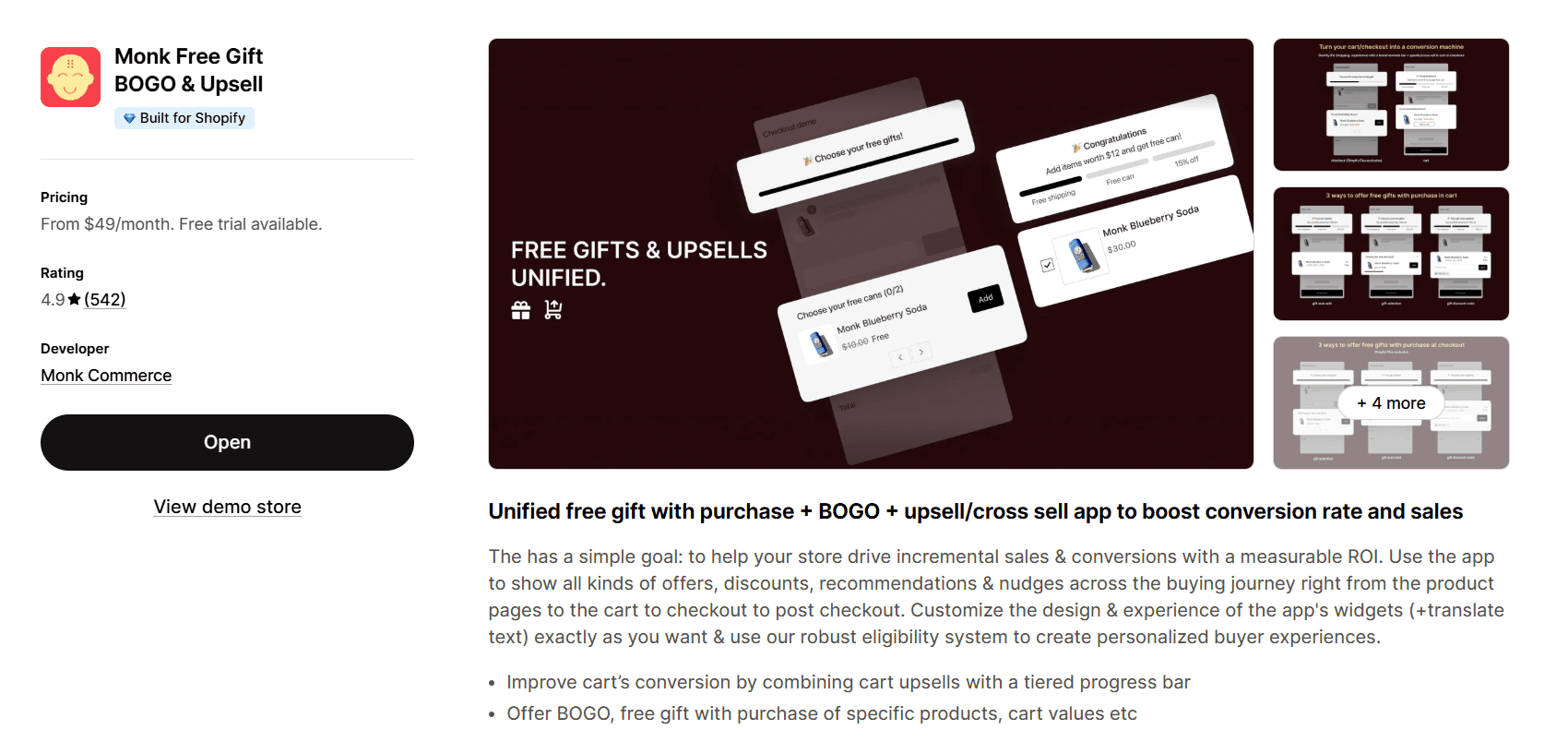
Log in to your Shopify admin dashboard and navigate to Apps. Search for Monk and install the app. Once installed, open the Monk dashboard from your app panel.
Step-2: Create a New Offer
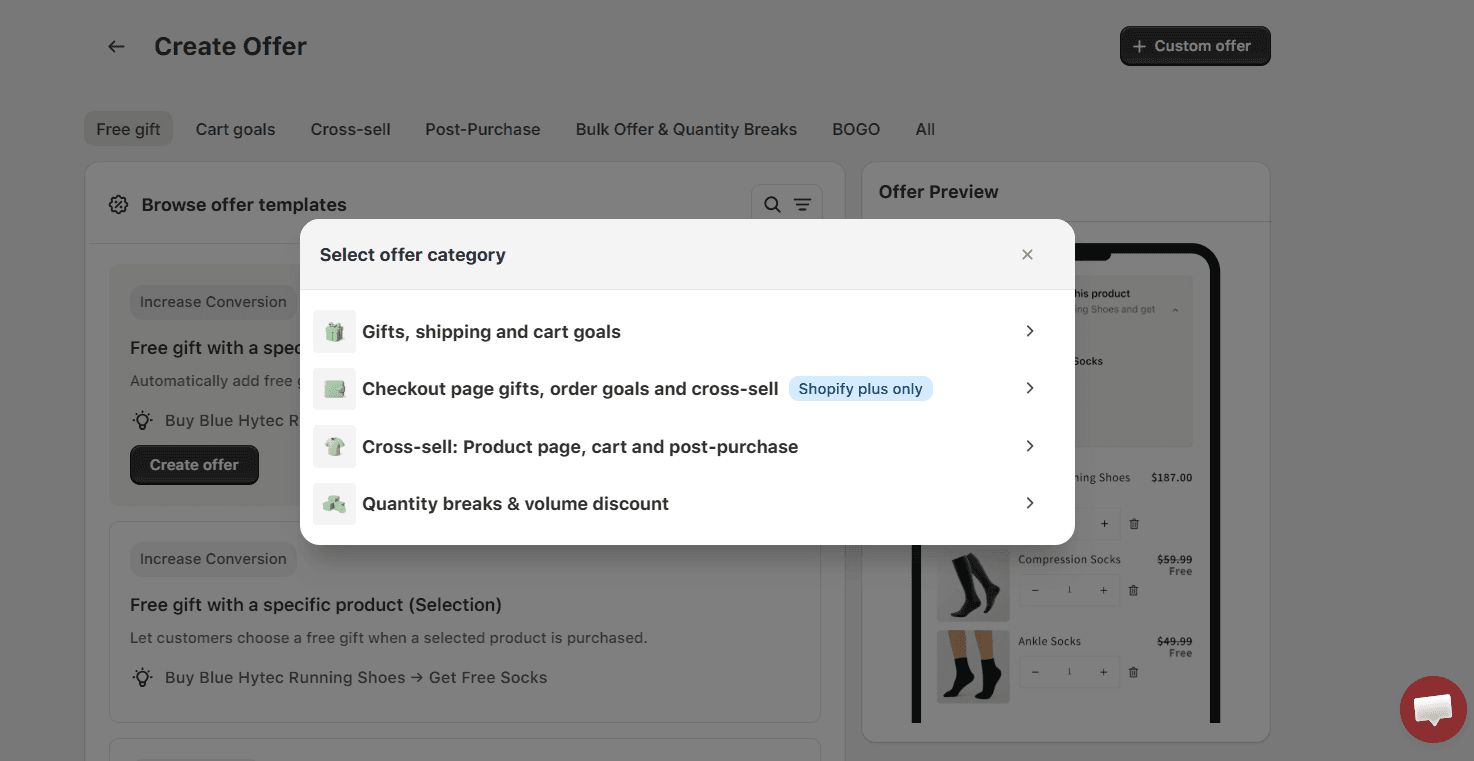
From the Monk dashboard, click Create New Offer -> Custom Offer.
Select the category: Gifts, Shipping, and Cart goals -> General Free gifts -> Auto-Add
Ensure you name your offer appropriately, as the name will appear as the discount at checkout. Avoid generic offer names like FG, FG10, B2G1, etc., that are prone to misuse.
Step-3:Configure the Offer Display
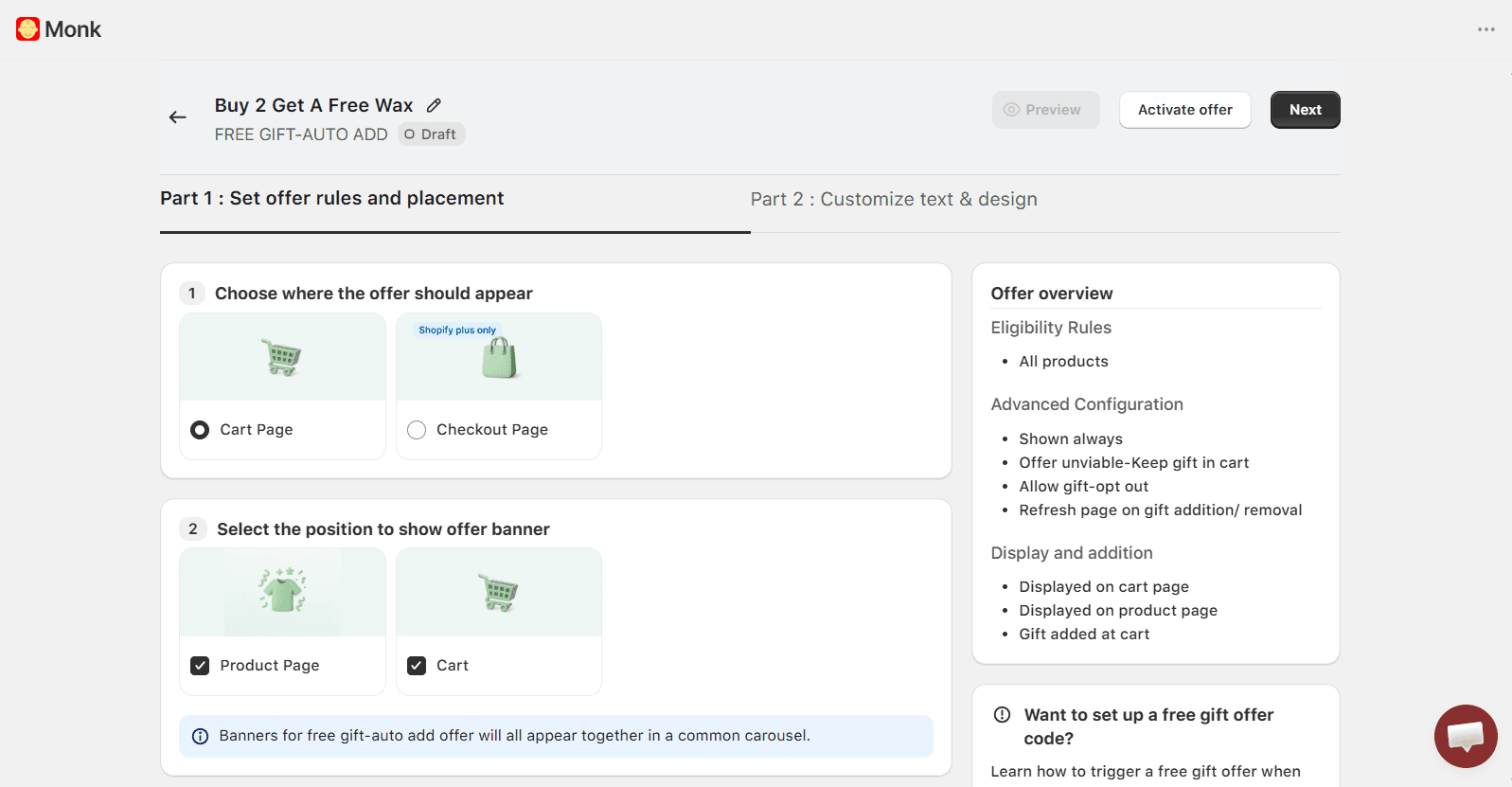
As the next step of the offer configuration, select where you want the offer to be displayed: the cart or the checkout (Shopify Plus only). Along with that, you can select where you want to show an offer banner: the product page or the cart, for higher visibility of the offer details. This ensures that your customers don’t miss out on the offer.
Step-4: Configure the rules and gift:
For a generic Buy 2 Get 1 Free offer, you can configure the rules as follows:
Show Offer if
-> Count of items in the cart -> Greater than or equal to -> 2
Meaning, the offer will be applied when there are 2 items in the cart, and the free gift product will be automatically added to the cart.
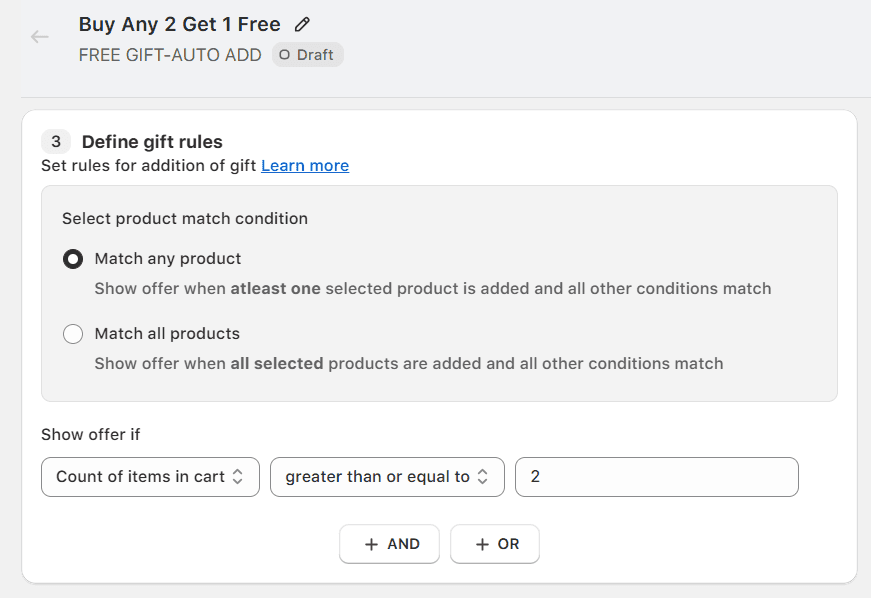
For a more targeted Buy 2 Get 1 Offer, you can add extra eligibility conditions like specific products, specific collections, etc.
For example:
Buy 2 Shampoos, Get 1 Conditioner free
Buy 2 T-shirts, Get 1 T-shirt free
For this Buy 2 Get 1 offer, you can configure the rules as follows:
Show Offer if
-> Specific Product -> Contains Any -> Choose your product
AND
-> Count of items in cart -> greater than or equal to -> 2
Meaning, the offer will be applied automatically when there are 2 specific products in the cart.
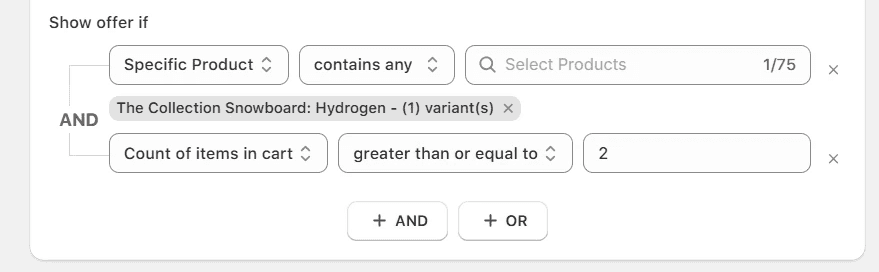
For example, here, when 2 Collection Snowboard: Hydrogen are present in the cart, a free gift product is added automatically to the cart.
Note: Buy 2 Get 1 offer on a collection instead of a single product Yes, using Monk, you can create a Buy 2 Get 1 offer based on a collection instead of a single product. Configure as follows: Show Offer if -> Specific Collection -> Contains any -> choose Collection AND -> Count of items in cart -> Greater than or equal to -> 2 Meaning, when any 2 products from a specific collection is added to the cart, a free gift is added automatically to the customer’s cart. |
As the next step, define what your gift product will be and the quantity. For a B2G1 offer, set the quantity as 1.
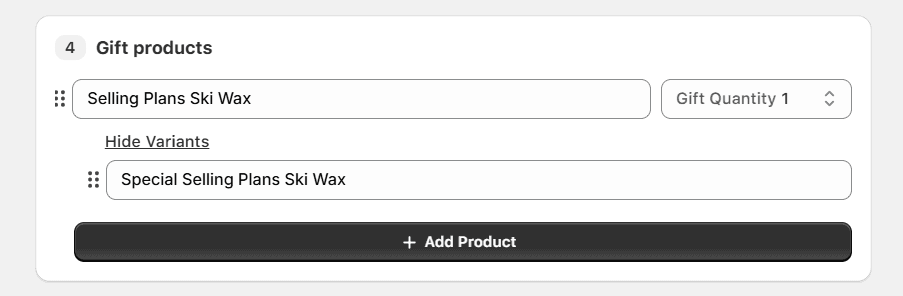
You can also opt for auto removal of the gift if the customer no longer qualifies for the offer and allow your customer to opt out if they do not want the gift product.
Step-5: Customize the text and design:
The best part about Monk is that you can customize the offer fully. The content, text color, size, font, and banner image before and after the offer is applied.
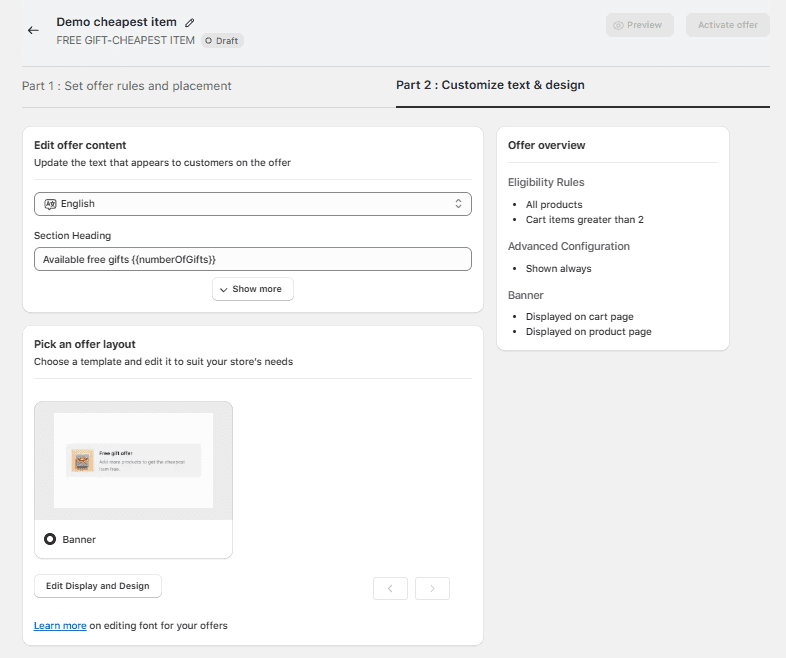
When done, save the changes and activate the offer. Do not forget to test and optimize the offer.
Once live, Monk automatically monitors qualifying cart conditions and adds the free item, with no additional steps required from the customer. The cart widget keeps them updated in real time.
B2G1 Best Practices to Maximize Conversions
The setup is only half the job. How you position and run your B2G1 offer has as much impact on results as the mechanics themselves. Here are the practices that consistently drive the highest conversion rates:
Be specific in your offer copy: ‘Buy 2 dresses, get 1 hat free’ will always outperform ‘Free item with qualifying purchase.’ When customers know exactly what they're getting and what they need to do to get it, they act.
Choose a gift that genuinely complements the qualifying products: The free item should feel like a natural pairing. If customers are buying skincare, a travel pouch or a sample-sized serum makes sense.
Create urgency with a time limit: Running the offer for 1–2 weeks to drive action without overexposing the promotion. For inventory clearance campaigns, longer durations are appropriate, but with a countdown timer or end-date messaging.
Set a usage limit of 1 per order: This prevents customers from stacking the offer to claim multiple free items in a single transaction, which can erode margins quickly. Set this limit in your discount settings or Monk's eligibility rules.
Exclude out-of-stock items from the gift pool: Nothing frustrates a customer more than earning a free gift and then discovering it's unavailable. Regularly audit your gift product list and remove or replace items that are out of stock.
A/B test your gift items: If you're unsure which product makes the best free gift, test two different options against each other. Track conversion rates and AOV for each variant over at least 7–10 days before drawing conclusions.
Announce the offer clearly on your site: Don't rely on customers to discover the promotion at checkout. Use homepage banners, product page callouts, and the Monk cart widget to surface the offer at every relevant touchpoint.
Mistakes to Avoid When Running B2G1 on Shopify
Even a well-intentioned B2G1 campaign can underperform or create operational headaches if common mistakes aren't caught before launch. Here's what to watch out for:
Running B2G1 without a visible storefront widget: If customers don't know the offer exists, they won't seek it out.
✅ Always pair the offer with a cart progress indicator or banner. Monk makes this easy to deploy in minutes.
Using discount codes instead of automatic discounts for B2G1: Code-based promotions introduce friction and are frequently abandoned at checkout.
✅ Unless you have a specific reason to gate the offer behind a code (e.g., a VIP-only promotion), automatic discounts almost always outperform.
Gifting a high-margin product without protecting your margins first: It's easy to get excited about a high-value gift, but make sure the math works.
✅ Calculate your margin on the qualifying products after the gift is factored in, and ensure your AOV uplift justifies the cost of the free item.
Letting conflicting discounts stack: If you're running other promotions simultaneously (e.g., a sitewide 15% off), make sure they don't stack with your B2G1 offer in unintended ways.
✅ Shopify allows some stacking configurations: review your discount combination settings carefully.
Not tracking AOV before and after: A B2G1 campaign should measurably move your AOV. If it doesn't, something is wrong, either with the offer structure, the gift choice, or the storefront messaging.
✅ Use Monk's AOV tracking dashboard to monitor performance in real time and course-correct quickly.
Ready to Run Your B2G1 Offer on Shopify?
Buy 2 Get 1 Free is effective but only if the customer experience remains seamless. A hidden offer, a missing free gift, or a confusing discount code can turn a high-converting promotion into a source of customer frustration.
Shopify's native B2G1 tools are a reasonable starting point for merchants testing the waters. But if you want the full experience: automatic gift addition, storefront widgets, tiered rules, and real-time AOV tracking, Monk is purpose-built for exactly this use case.
Whether you're running a limited-time campaign to move inventory, launching a new product with a gift incentive, or building B2G1 into your permanent promotional calendar, the setup process is straightforward, and the results speak for themselves.
Frequently Asked Questions:
Can you create a Buy 2 Get 1 free offer in Shopify?
Yes, you can create a Buy 2 Get 1 free offer in Shopify by either using Shopify’s native Buy X Get Y automatic discounts or using a free gifting app like Monk Free Gift from the Shopify App Store.
Does Shopify automatically add the free product in B2G1 offers?
No, Shopify’s native Buy X Get Y discounts can not automatically add the free gift product to the cart. However, you can automatically add the free gift product in the B2G1 offer using free gifting apps like Monk Free Gift
Can I create tiered offers like Buy 4 Get 2 in Shopify?
Yes, you can create tiered offers like Buy 4 Get 2 in Shopify by using a third-party app like Monk Free Gift, as one cannot configure this using native Shopify Buy X Get Y discounts.
Can I set up tiered Buy 2 Get 1 offers in Shopify (e.g., Buy 4 Get 2, Buy 6 Get 3)?
Yes, you can create a tiered Buy 2 Get 1 offer on Shopify using Monk Free Gift by enabling the setting ‘increase gifts with more purchases.' This will ensure that customers buy 2 and get 1 gift, buy 4 and get 2 gifts, and buy 6 and get 3 gift products in their cart.
Is it possible to set up B2G1 using a discount code?
Yes, you can set up a B2G1 offer using a discount code using Monk Free Gift.
Can I set up a B2G1 offer where the customers can select their gift?
Yes, you can set up a Buy 2 Get 1 offer, where customers can select a gift of their choice in the cart, by using an FG-selection widget in the cart using Monk Free Gift.
How to Set Up an Automatic Buy 2 Get 1 Free Discount on Shopify
Summary
Buy 2 Get 1 Free is a high-converting Shopify promotion that increases average order value by encouraging customers to purchase more items to unlock a free product. While Shopify supports basic Buy X Get Y discounts, it lacks features like auto-add gifts, tiered offers, and on-site messaging. Using apps, merchants can create seamless B2G1 experiences with automatic discounts, cart visibility, and advanced rules. With the right setup and strategy, B2G1 campaigns can drive higher conversions, improve customer experience, and maximize revenue.
If you run a Shopify store, you already know that promotions are one of the fastest levers you can pull to increase average order value (AOV). And among all the promotions available to you, Buy 2 Get 1 Free consistently ranks among the highest-converting.
Because it feels like a reward, customers feel like they're winning when they pick up a third item for free, and merchants benefit from the extra unit sold.
But setting up a B2G1 offer on Shopify isn't always straightforward. In this guide, you'll learn how to create a Buy 2, Get 1 Free offer on Shopify using Monk Free Gift. We'll cover the key decisions you'll need to make, walk you through step-by-step setup instructions, and share best practices to ensure your offer actually converts.
What is a Buy 2 Get 1 Free Offer on Shopify?
A Buy 2 Get 1 Free offer, also known as a Buy X Get Y promotion or BOGO on Shopify, is a discount structure where a customer must purchase a specified quantity of products to receive an additional item at no cost. In Shopify's discount system, this promotion falls under the ‘Buy X, Get Y’ discount type.
There are two common variants merchants run:
Same-product B2G1: The customer buys two of the same item and gets a third one free. This works well for consumables, bundles, or high-volume SKUs.
Mixed-product B2G1: The customer buys two items from a qualifying collection and receives a different item (or a gift) for free. This is ideal for cross-selling and introducing customers to complementary products.
Beyond the offer structure, you'll also need to choose between two delivery methods:
Discount Codes: The customer applies a code at checkout to trigger the discount. Easy to set up but creates friction: customers can forget to apply the code, or the discount may be shared beyond your intended audience.
Automatic Discounts: The discount is applied automatically when qualifying conditions are met. No code required, lower friction, and generally higher conversion. This is the recommended approach for most B2G1 campaigns.
Buy 2 Get 1 vs. Buy 1 Get 1: Which Should You Run?
Before you set up your offer, it's worth taking a moment to choose the right format. B1G1 and B2G1 are both effective, but they serve different goals and work better in different contexts. Here's a side-by-side comparison:
Feature | B1G1 (BOGO) | B2G1 | Mixed-Product B2G1 |
Best for | Consumables, loyalty campaigns | Margin-conscious AOV uplift | Cross-sell and new product intro |
Margin impact | Lower (gives away 1 for every 1 sold) | Moderate (1 free per 2 sold) | Lower if the gift is high-value |
AOV effect | Moderate | Higher. requires 2 units | Highest, drives multi-category spend |
Perceived value | High (customer gets a lot) | High (feels like a reward) | Very high (discovery factor) |
Inventory risk | Higher | Lower | Moderate |
Use case example | Buy 1 shampoo, get 1 free | Buy 2 jeans, get 1 tee free | Buy 2 skincare items, get a sample kit |
The short version: if margin protection matters and you want a meaningful average order value uplift, B2G1 is almost always the better choice over B1G1. The requirement to buy two items before earning the free gift means customers spend more per order, which is exactly the point.
Mixed-product B2G1 adds another layer of value by driving cross-category discovery, making it suitable during seasonal campaigns or new product launches.
How to Set Up a Buy 2 Get 1 Free Offer
Using Shopify's Native Discounts
Shopify's built-in discount system includes a Buy X Get Y discount type that can handle a basic B2G1 setup without any third-party app. Here's how to configure it:
From your Shopify admin, go to Discounts and click Create discount
Select Buy X, Get Y as the discount type
Under Customer buys, set the quantity to 2 and choose whether this applies to specific products or a collection
Under Customer gets, set the quantity to 1, select the free product, and set the discount value to 100% off
Under Uses, set a usage limit per order if needed (recommended: 1 use per order)
Choose between a discount code or an automatic discount (select Automatic for lower friction)
Set your active dates and click Save
Limitations of Shopify's Native B2G1 Feature
Shopify does include a native Buy X, Get Y discount type, and for simple use cases, it gets the job done. But if you want a polished, high-converting B2G1 experience, you'll quickly run into its ceiling.
Here's what Shopify's native B2G1 cannot do:
No auto-add to cart: When a customer qualifies for the free item, Shopify does not automatically add it to their cart. The customer has to manually add it, and most of them won't, especially if they don't know they're supposed to.
No storefront widget or cart messaging: There's no way to surface a progress bar, banner, or any other on-site message that shows customers how close they are to unlocking the free gift. Without a visual cue, customers don't know the offer exists until they reach checkout, if at all.
No tiered B2G1 support: If you want to run a tiered structure (e.g., Buy 2 Get 1 and Buy 4 Get 2), Shopify requires you to create two separate discounts. These discounts can conflict with each other, making management messy.
No cheapest-item logic: For stores with varied price points, automatically applying the discount to the cheapest qualifying item requires manual configuration or workarounds. Native Shopify doesn't handle this gracefully.
For merchants who want the free item added automatically, beautiful cart messaging, and the ability to run tiered or complex B2G1 rules, Monk is the purpose-built solution.
2. Set Up an Automatic Buy 2 Get 1 Free with Monk Free Gift
Monk is a Shopify app built specifically for merchants who want to run advanced free gift and BOGO promotions without the limitations of Shopify's native tools.
The free item is automatically added to the cart when the qualifying condition is met, a customizable cart widget shows customers their progress toward the gift, and tiered rules are fully supported within a single campaign.
Here's how to set it up from scratch:
Step-1: Install and Open Monk
Log in to your Shopify admin dashboard and navigate to Apps. Search for Monk and install the app. Once installed, open the Monk dashboard from your app panel.
Step-2: Create a New Offer
From the Monk dashboard, click Create New Offer -> Custom Offer.
Select the category: Gifts, Shipping, and Cart goals -> General Free gifts -> Auto-Add
Ensure you name your offer appropriately, as the name will appear as the discount at checkout. Avoid generic offer names like FG, FG10, B2G1, etc., that are prone to misuse.
Step-3:Configure the Offer Display
As the next step of the offer configuration, select where you want the offer to be displayed: the cart or the checkout (Shopify Plus only). Along with that, you can select where you want to show an offer banner: the product page or the cart, for higher visibility of the offer details. This ensures that your customers don’t miss out on the offer.
Step-4: Configure the rules and gift:
For a generic Buy 2 Get 1 Free offer, you can configure the rules as follows:
Show Offer if
-> Count of items in the cart -> Greater than or equal to -> 2
Meaning, the offer will be applied when there are 2 items in the cart, and the free gift product will be automatically added to the cart.
For a more targeted Buy 2 Get 1 Offer, you can add extra eligibility conditions like specific products, specific collections, etc.
For example:
Buy 2 Shampoos, Get 1 Conditioner free
Buy 2 T-shirts, Get 1 T-shirt free
For this Buy 2 Get 1 offer, you can configure the rules as follows:
Show Offer if
-> Specific Product -> Contains Any -> Choose your product
AND
-> Count of items in cart -> greater than or equal to -> 2
Meaning, the offer will be applied automatically when there are 2 specific products in the cart.
For example, here, when 2 Collection Snowboard: Hydrogen are present in the cart, a free gift product is added automatically to the cart.
Note: Buy 2 Get 1 offer on a collection instead of a single product Yes, using Monk, you can create a Buy 2 Get 1 offer based on a collection instead of a single product. Configure as follows: Show Offer if -> Specific Collection -> Contains any -> choose Collection AND -> Count of items in cart -> Greater than or equal to -> 2 Meaning, when any 2 products from a specific collection is added to the cart, a free gift is added automatically to the customer’s cart. |
As the next step, define what your gift product will be and the quantity. For a B2G1 offer, set the quantity as 1.
You can also opt for auto removal of the gift if the customer no longer qualifies for the offer and allow your customer to opt out if they do not want the gift product.
Step-5: Customize the text and design:
The best part about Monk is that you can customize the offer fully. The content, text color, size, font, and banner image before and after the offer is applied.
When done, save the changes and activate the offer. Do not forget to test and optimize the offer.
Once live, Monk automatically monitors qualifying cart conditions and adds the free item, with no additional steps required from the customer. The cart widget keeps them updated in real time.
B2G1 Best Practices to Maximize Conversions
The setup is only half the job. How you position and run your B2G1 offer has as much impact on results as the mechanics themselves. Here are the practices that consistently drive the highest conversion rates:
Be specific in your offer copy: ‘Buy 2 dresses, get 1 hat free’ will always outperform ‘Free item with qualifying purchase.’ When customers know exactly what they're getting and what they need to do to get it, they act.
Choose a gift that genuinely complements the qualifying products: The free item should feel like a natural pairing. If customers are buying skincare, a travel pouch or a sample-sized serum makes sense.
Create urgency with a time limit: Running the offer for 1–2 weeks to drive action without overexposing the promotion. For inventory clearance campaigns, longer durations are appropriate, but with a countdown timer or end-date messaging.
Set a usage limit of 1 per order: This prevents customers from stacking the offer to claim multiple free items in a single transaction, which can erode margins quickly. Set this limit in your discount settings or Monk's eligibility rules.
Exclude out-of-stock items from the gift pool: Nothing frustrates a customer more than earning a free gift and then discovering it's unavailable. Regularly audit your gift product list and remove or replace items that are out of stock.
A/B test your gift items: If you're unsure which product makes the best free gift, test two different options against each other. Track conversion rates and AOV for each variant over at least 7–10 days before drawing conclusions.
Announce the offer clearly on your site: Don't rely on customers to discover the promotion at checkout. Use homepage banners, product page callouts, and the Monk cart widget to surface the offer at every relevant touchpoint.
Mistakes to Avoid When Running B2G1 on Shopify
Even a well-intentioned B2G1 campaign can underperform or create operational headaches if common mistakes aren't caught before launch. Here's what to watch out for:
Running B2G1 without a visible storefront widget: If customers don't know the offer exists, they won't seek it out.
✅ Always pair the offer with a cart progress indicator or banner. Monk makes this easy to deploy in minutes.
Using discount codes instead of automatic discounts for B2G1: Code-based promotions introduce friction and are frequently abandoned at checkout.
✅ Unless you have a specific reason to gate the offer behind a code (e.g., a VIP-only promotion), automatic discounts almost always outperform.
Gifting a high-margin product without protecting your margins first: It's easy to get excited about a high-value gift, but make sure the math works.
✅ Calculate your margin on the qualifying products after the gift is factored in, and ensure your AOV uplift justifies the cost of the free item.
Letting conflicting discounts stack: If you're running other promotions simultaneously (e.g., a sitewide 15% off), make sure they don't stack with your B2G1 offer in unintended ways.
✅ Shopify allows some stacking configurations: review your discount combination settings carefully.
Not tracking AOV before and after: A B2G1 campaign should measurably move your AOV. If it doesn't, something is wrong, either with the offer structure, the gift choice, or the storefront messaging.
✅ Use Monk's AOV tracking dashboard to monitor performance in real time and course-correct quickly.
Ready to Run Your B2G1 Offer on Shopify?
Buy 2 Get 1 Free is effective but only if the customer experience remains seamless. A hidden offer, a missing free gift, or a confusing discount code can turn a high-converting promotion into a source of customer frustration.
Shopify's native B2G1 tools are a reasonable starting point for merchants testing the waters. But if you want the full experience: automatic gift addition, storefront widgets, tiered rules, and real-time AOV tracking, Monk is purpose-built for exactly this use case.
Whether you're running a limited-time campaign to move inventory, launching a new product with a gift incentive, or building B2G1 into your permanent promotional calendar, the setup process is straightforward, and the results speak for themselves.
Frequently Asked Questions:
Can you create a Buy 2 Get 1 free offer in Shopify?
Yes, you can create a Buy 2 Get 1 free offer in Shopify by either using Shopify’s native Buy X Get Y automatic discounts or using a free gifting app like Monk Free Gift from the Shopify App Store.
Does Shopify automatically add the free product in B2G1 offers?
No, Shopify’s native Buy X Get Y discounts can not automatically add the free gift product to the cart. However, you can automatically add the free gift product in the B2G1 offer using free gifting apps like Monk Free Gift
Can I create tiered offers like Buy 4 Get 2 in Shopify?
Yes, you can create tiered offers like Buy 4 Get 2 in Shopify by using a third-party app like Monk Free Gift, as one cannot configure this using native Shopify Buy X Get Y discounts.
Can I set up tiered Buy 2 Get 1 offers in Shopify (e.g., Buy 4 Get 2, Buy 6 Get 3)?
Yes, you can create a tiered Buy 2 Get 1 offer on Shopify using Monk Free Gift by enabling the setting ‘increase gifts with more purchases.' This will ensure that customers buy 2 and get 1 gift, buy 4 and get 2 gifts, and buy 6 and get 3 gift products in their cart.
Is it possible to set up B2G1 using a discount code?
Yes, you can set up a B2G1 offer using a discount code using Monk Free Gift.
Can I set up a B2G1 offer where the customers can select their gift?
Yes, you can set up a Buy 2 Get 1 offer, where customers can select a gift of their choice in the cart, by using an FG-selection widget in the cart using Monk Free Gift.
Ravish (RV)
Co-Founder, Monk Commerce
Ravish is an ecommerce and SaaS marketing expert with 6+ years of experience in Shopify and ecommerce and 10+ years of experience in marketing, and growth strategy. He has worked closely with Shopify merchants to solve real ecommerce challenges and shares practical, research-backed insights, industry best practices, and emerging trends.
Contents
Related Articles
How to Create a Buy X Get Y (BXGY) Offer on Shopify?
How to Enable Free Gift Selection on Shopify
Cart Progress Bars for Shopify Explained: Boost AOV with Smart Incentives
Get Monk Free Gift app for just $1/month this Black Friday
First month: $1 after your 7-day free trial. All features included. Offer live!
Claim offer now

Get Monk Free Gift app for just $1/month this Black Friday
First month: $1 after your 7-day free trial. All features included. Offer live!
Claim offer now
Get Monk Free Gift app for just $1/month this Black Friday
First month: $1 after your 7-day free trial. All features included. Offer live!
Claim offer now