Complete Guide to Gift Cards for Shopify Stores
Summary
Gift cards on Shopify are prepaid digital or physical store credits that let customers purchase products up to a set value and use the remaining balance later if unused. They are commonly used for gifting, refunds, promotions, and store credit. Shopify supports digital gift cards natively, while physical or advanced options may require setup or apps. Gift cards increase average order value, improve cash flow, reduce return friction, and encourage repeat purchases. They are easy to configure in Shopify admin, work across multiple purchases, and can be combined with discounts and promotions. Merchants can customize values, set optional expiry dates, track usage, and promote them across campaigns to attract new customers and drive retention.

Key Takeaways
Gift cards on Shopify are prepaid digital or physical store credits that let customers purchase products up to a set value and use the remaining balance later if unused. They are commonly used for gifting, refunds, promotions, and store credit. Shopify supports digital gift cards natively, while physical or advanced options may require setup or apps. Gift cards increase average order value, improve cash flow, reduce return friction, and encourage repeat purchases. They are easy to configure in Shopify admin, work across multiple purchases, and can be combined with discounts and promotions. Merchants can customize values, set optional expiry dates, track usage, and promote them across campaigns to attract new customers and drive retention.
Gift cards are a small yet important part of many online stores. On Shopify, they are easy to enable and simple for customers to understand and use, which is why many stores prefer them by default.
Gift cards on Shopify are convenient for consumers to get store credit, which they can then use to shop within your business. In other words, it can be considered a digital voucher or prepaid card.
If you're looking for a simple, adaptable tool for selling and retaining customers, gift cards are an excellent choice. This blog deep dives into gift cards: what they are, how they work, and how to manage them in Shopify.
What is a gift card?
A gift card is a prepaid card or digital code that lets customers spend a fixed amount of money in a store.
Gift cards are commonly used for gifting, as the name suggests, but also for store credit, refunds, and promotions.
Here’s why gift cards are really popular:
Customers can use the gift cards across multiple purchases
Customers can use the gift card themselves, or they can even gift it to a loved one.
There is no pressure to make an immediate purchase decision
Customers can choose what to buy, even on a later date
Merchants receive a payment upfront
Gift cards encourage repeat visits to the store
Gift cards reduce product return friction
Gift cards are easy to set up and manage
Gift cards can be customized based on the occasion or sale
Gift cards can be delivered or shared via email or any other digital medium.
Gift cards can also be used at checkout, instead of cash or card
Gift cards can also be used along with other promotional offers like Free gift with Purchase Shopify, BOGO, upsell etc.
Simply put, instead of choosing a product, the buyer chooses a value, and the recipient uses the balance amount of the gift card to purchase any item of their choice.
Types of gift cards on Shopify
Gift cards are a popular feature in Shopify stores, offering a convenient way for customers to avail gifts. Shopify has several options for implementing gift cards, allowing store owners to choose the best fit for their business.
Digital Gift Card :
This is a regular item available for purchase in your business. Customers can buy it just like any other product available in your store. This method is often employed during seasonal discounts or special promotions.
For example: "$500 Gift Card" or "$1,000 Gift Card."
Physical Gift Card :
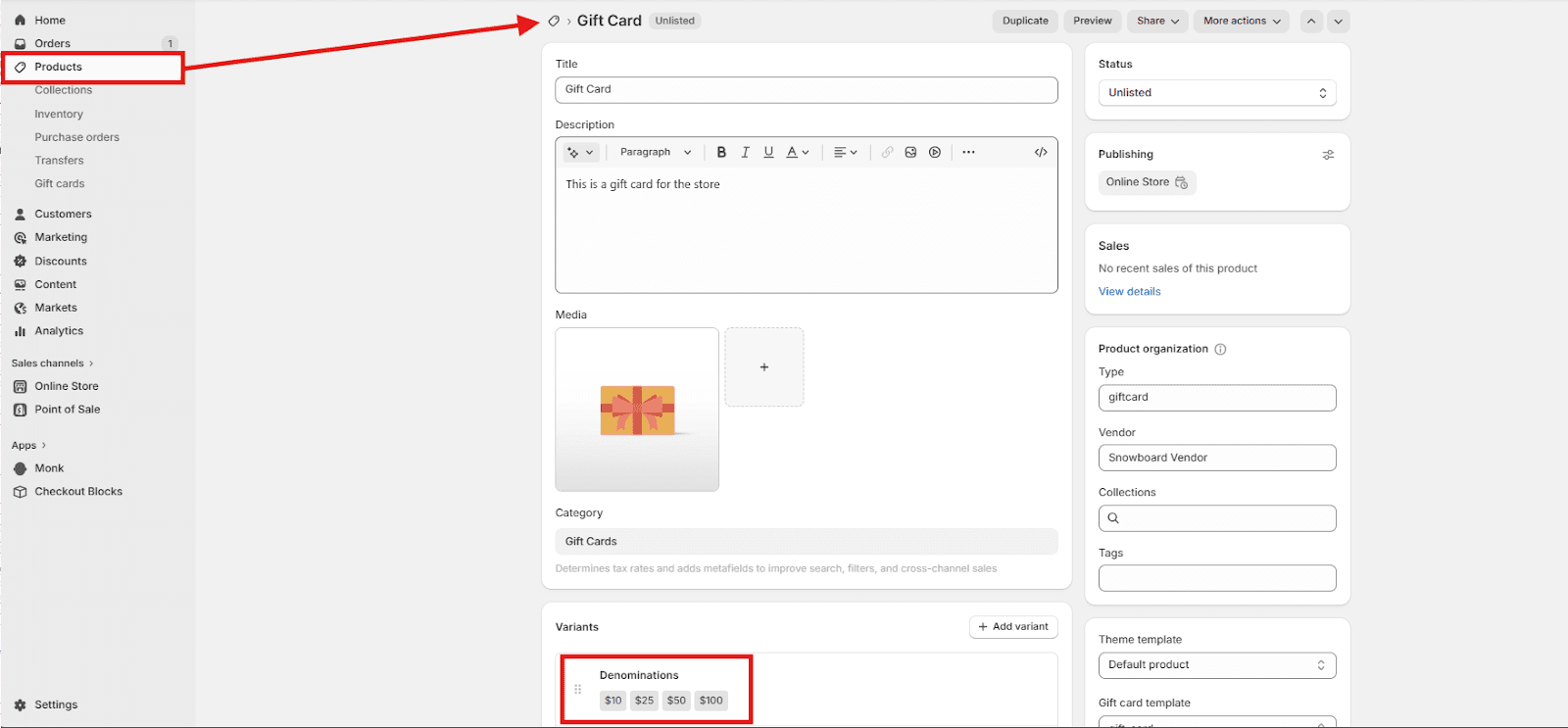
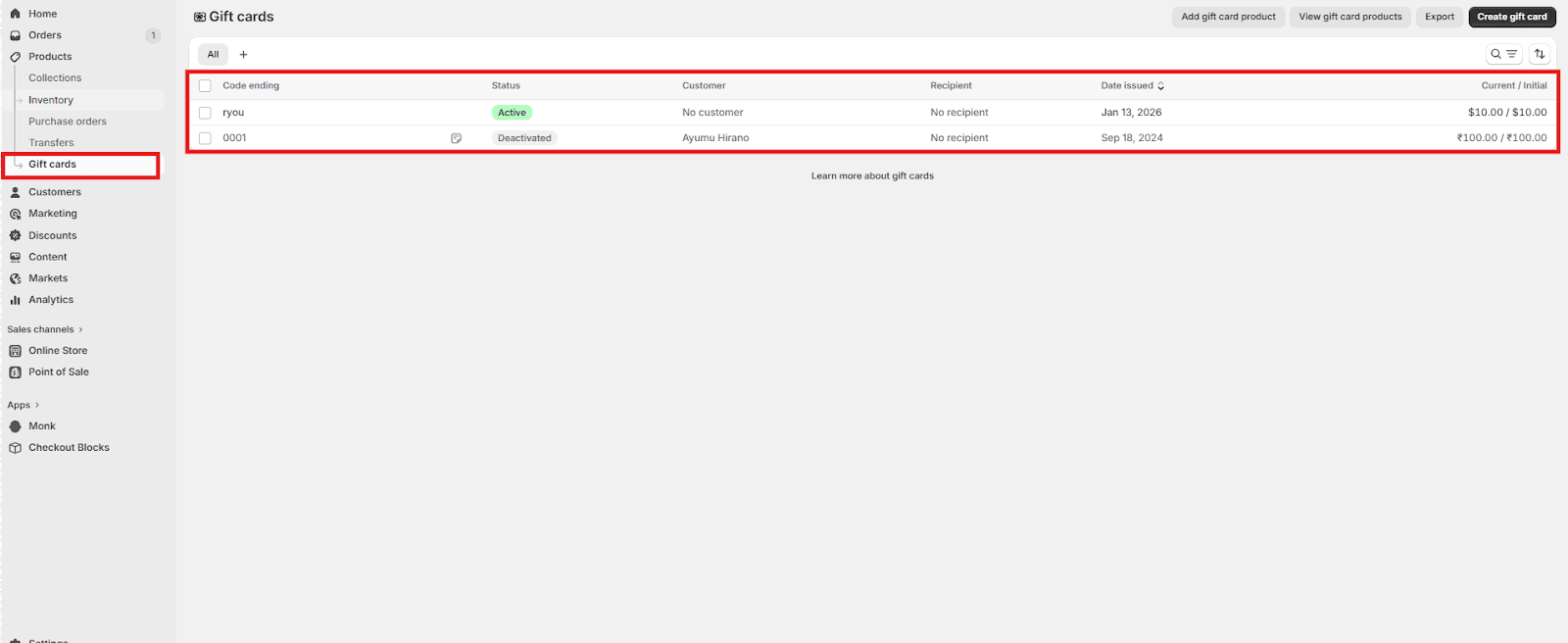
You build these straight inside the Shopify admin interface. Craft personalized gift cards for direct delivery to your customers. These are perfect for expressing regret, acknowledging customer loyalty, or addressing service-related matters. To create or manage gift card products, head to the Gift Cards section within your Shopify admin.
They're useful for:
Resolving customer service issues.
Store credit will be given for refunds.
Special prizes or gestures of goodwill.
Why should stores offer gift cards?
Boost average order value (AOV): This is a key benefit of Shopify gift cards. Since you get paid immediately, it can lead to more frequent purchases further increasing the AOV of Shopify store
Enhance Marketing Opportunities: Gift cards offer versatility across several marketing initiatives. Consider promotions and bundles, such as "Buy $50, get a $10 gift card!" Email campaigns are another avenue: "Send a gift card this Mother's Day!" Social media freebies also present an opportunity. These tactics can significantly boost both engagement and brand visibility.
Significant tool for attracting new customers: Many first-time buyers end up spending more than the card's face value, which naturally raises your AOV.
Improve Cash Flow: Gift cards offer a store immediate funds, arriving before the consumer even makes a purchase, unlike free gifts with purchase on Shopify
This advance payment provides several advantages:
It aids in managing cash flow more effectively.
It can be used to support inventory and marketing efforts.
It allows for better planning of any future holiday/seasonal sales.
Lower return rates: Awarding Gift cards avoids the common problems related to physical gifts, like sizing and personal taste. Customers get to pick exactly what they want, which generally results in happier turnover.
How do e-gift cards work?
On Shopify, gift cards work as a stored balance linked to a unique code. Shopify creates that code and gives it a predetermined value when a customer purchases a gift card.
At checkout, the code can be applied as a payment method, and the order total is reduced by the available balance.
Any unused amount remains on the gift card and can be used in future orders until the balance reaches zero or the card expires, if an expiry is set.
For example:
-> A consumer purchases a gift card from your store for $100.
-> Shopify then creates a one-of-a-kind gift card code. E.g: Gift For XYZ
-> The customer or the intended recipient receives the code via email.
-> During the checkout process, the recipient enters the code.
-> The customer makes an order worth $80; hence, the amount is deducted from the gift card balance, i.e., $100.
-> The customer can use the $20 (remaining balance) on a later purchase till the gift card balance reaches zero.
How to Enable Gift Cards in Shopify?
You can enable gift cards in Shopify by checking the plan requirements and simply activating them.
The gift card feature is available on all Shopify plans, but you need to activate “Enable gift cards” if they are not already enabled by navigating to Products -> Gift Cards.
Agree to Shopify's gift card terms of service.
Note: If you're using Shopify POS, you'll want to activate gift cards as a payment option within the POS settings as well.
How to create a gift card on your Shopify store?
There are two ways to create a gift card on Shopify:
Gift card as a product (Digital):
Go to Shopify admin > products
Add product details such as title, image(s), description. Also, pick an SEO friendly title and description to attract more customers and improve click-through rates via Google
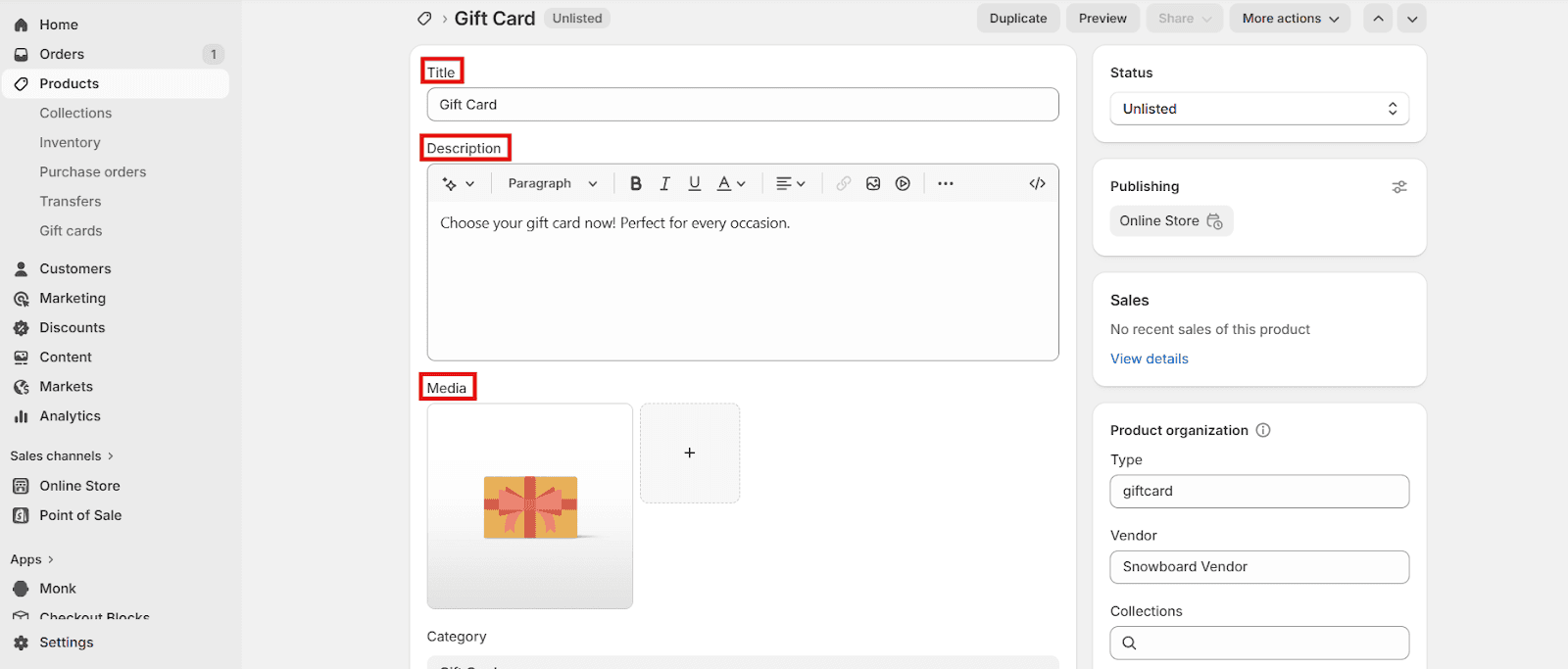
Set the value of your gift card (denominations):
Select from predefined amounts such as $25, $50, $100, or $200.
Consider providing the opportunity for customers to choose their preferred amount too.
Mark the gift card status as ‘Active’ and Click on ‘Save’ to activate the gift card
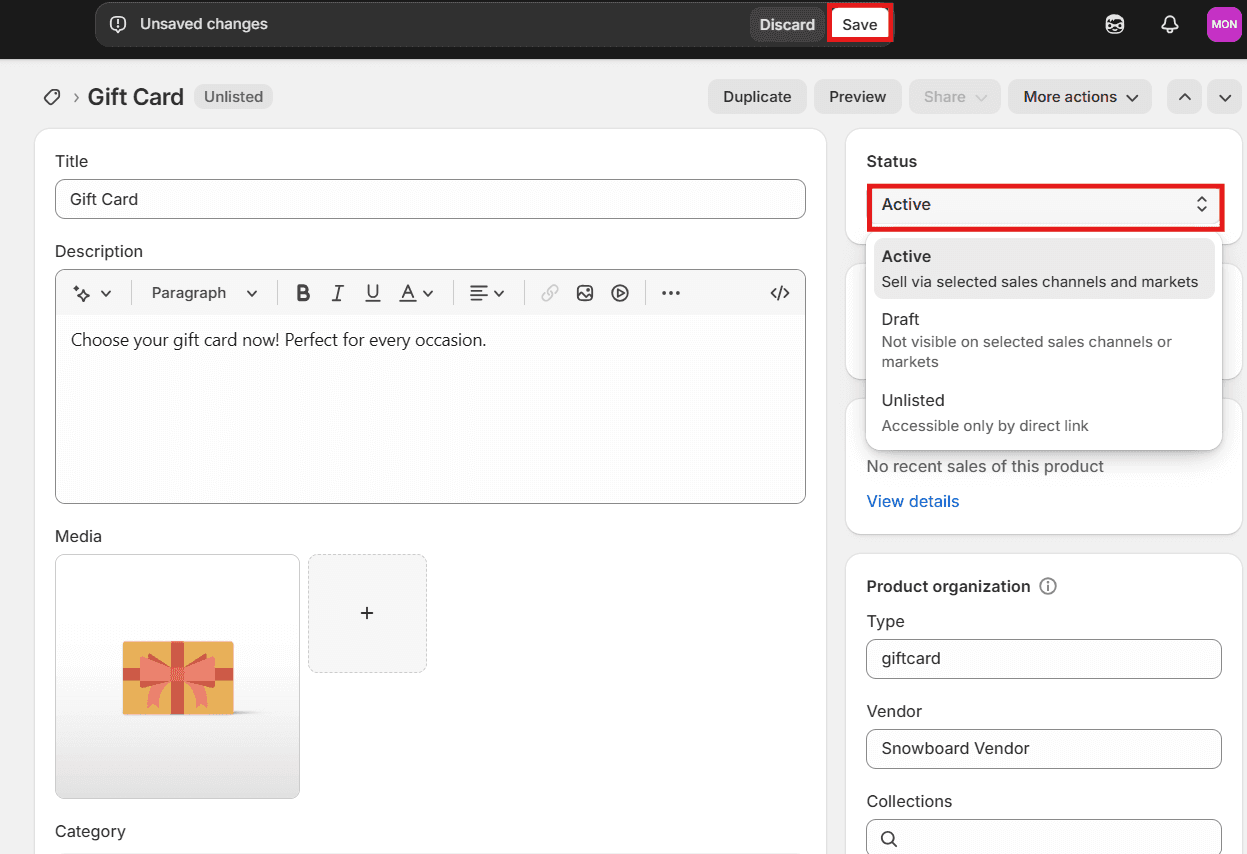
Preview the gift card display on live store to ensure all looks good
Run a test purchase to view and verify that the gift card gets added correctly as per the flow
Gift card for a specific section of customers (Physical)
Create a gift card under Shopify admin > products > gift cards > create gift card
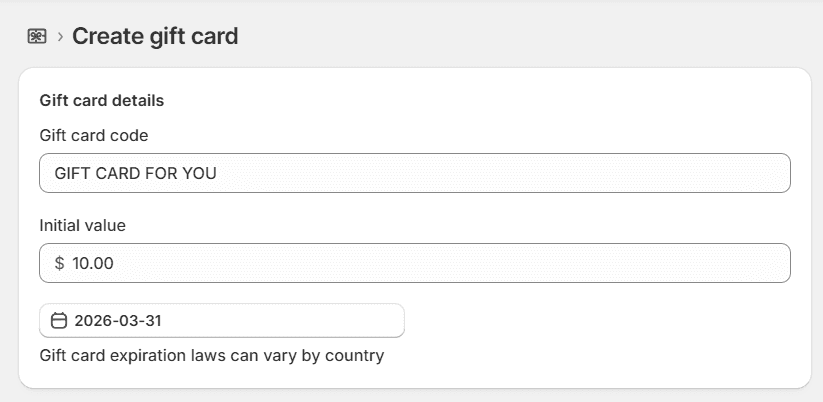
Enter the code name and initial value for the gift card
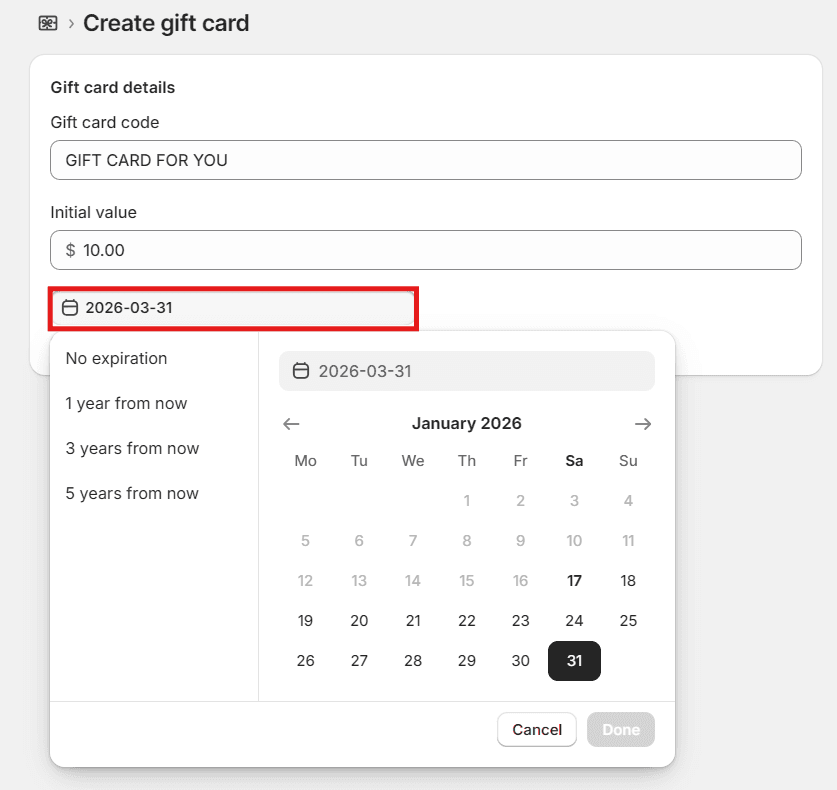
Set an expiration date:
Select a date or time range that fits your store's campaign strategy. A 30- to 90-day window works best, as it creates a sense of urgency for the customers.
Shorter expiration times, like 30 days, can encourage or push customers to use their gift cards quickly.
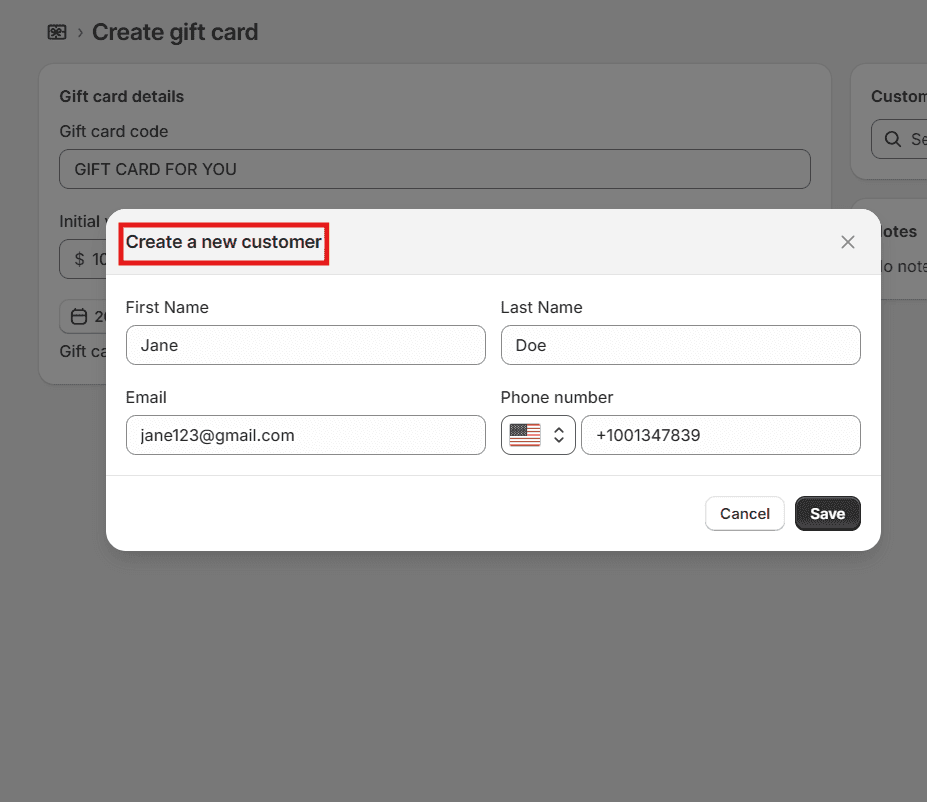
Add customers who can avail the gift card:
You can select an existing customer or create a gift card for a new customer by entering their details.
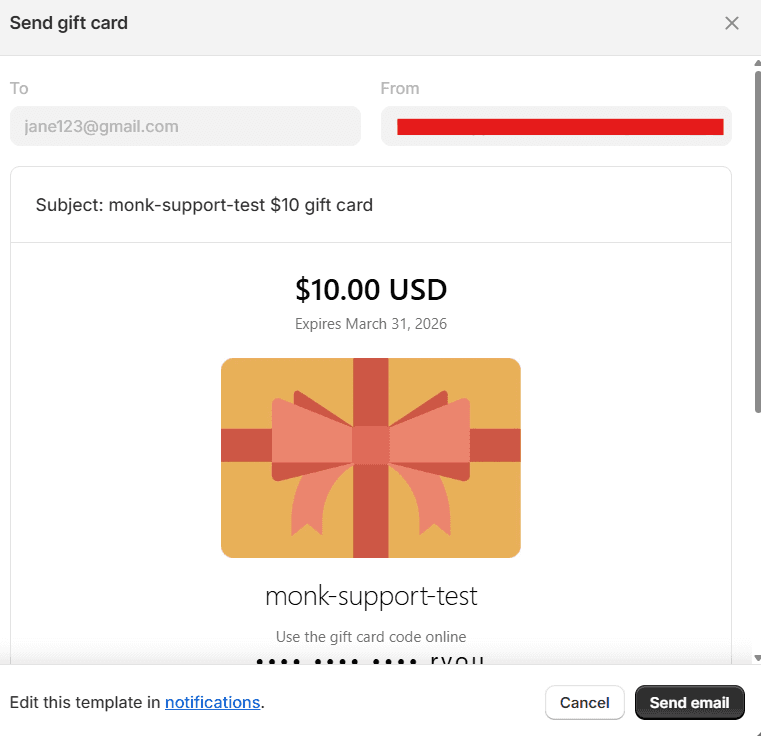
Be sure to test the gift cards before promoting them or sharing them with your customers. To share the gift card, verify all the customer details and send via email.
How to promote your gift cards?
Here are some excellent ways to increase gift card sales on your Shopify store. These approaches can significantly boost visibility, sales, and customer loyalty:
Increase visibility across the store:
Promote gift cards using homepage banners, announcement bars, or by featuring them prominently as a product.
Leverage seasonal campaigns:
Highlight gift cards during key sales periods like Black Friday, Cyber Monday, Christmas, and other holidays.
Use email marketing effectively:
Send timely reminders, especially for last-minute gifting, when physical delivery is no longer an option.
Add pop-ups and cart reminders:
Surface gift cards through pop-ups or cart prompts when a gifting occasion is approaching.
Promote on social media:
Run campaigns or giveaways to increase awareness and engagement around gift cards.
Integrate gift cards into checkout and post-purchase:
Offer gift cards during checkout or as a post-purchase upsell to capture additional revenue.
Tie gift cards to loyalty and referrals:
Use gift cards as rewards in loyalty or referral programs to encourage repeat purchases.
Pro tips to make gift cards a success
Gift cards are often combined with a free gift with purchase to create a gamified cart experience for the customers. To ensure that customers can utilize gift cards most effectively while bringing in revenue, the following tips can come in handy:
Make gift cards easy to find:
Feature them clearly across key pages of your store so customers don’t have to search for them.
Offer flexible pricing options:
Provide both fixed amounts and custom values to suit different budgets.
Support last-minute shoppers:
Ensure gift cards are delivered instantly by email for quick, stress-free gifting.
Keep the design on-brand and clear:
Use visually appealing designs with simple, searchable titles and descriptions.
Explain how gift cards work:
Clearly share how to redeem, check balances, and any expiration details.
Test everywhere before launch:
Make sure gift cards work smoothly across all sales channels.
Encourage redemption:
Use gentle reminders or campaigns to prompt recipients to use their gift cards.
How can you use gift cards to grow your Shopify store?
Here are some of the ways that gift cards can be utilized to boost your store’s sales and grow your business:
Attract new customers:
Gift card recipients often become first-time buyers and discover your brand through redemption.
Increase average order value:
Customers frequently spend more than the gift card balance during checkout, raising the AOV of your Shopify store
Improve cash flow:
Gift cards generate upfront revenue before products are shipped.
Reduce purchase hesitation:
They work well for last-minute buyers and seasonal shoppers.
Encourage repeat purchases:
Use gift cards in loyalty, referral, or post-purchase campaigns.
Support promotions and upsells:
Pair gift cards with offers to drive ongoing engagement and retention.
Conclusion
Gift cards on Shopify offer a straightforward, yet effective, way to boost your store's performance and enhance the customer experience. By simplifying the gifting process for shoppers and simultaneously providing merchants with a way to generate immediate revenue, gift cards attract new customers.
As Shopify handles gift card codes, balances, and their application automatically, store owners can easily implement them without needing any technical expertise. They're adaptable, easy to oversee, and compatible with all Shopify plans.
Whether utilized during holiday seasons, special promotions, or customer support scenarios, gift cards foster customer loyalty, drive repeat business, and keep customers engaged with your store.
Frequently Asked Questions:
How do customers redeem a Shopify gift card?
Customers can redeem a Shopify gift card on the checkout page, where they can enter their gift card code in the “Discount code or gift card” field and apply it.
The discount will be immediately applied deducting the gift card’s value from the total.
Note: If the gift card does not cover the entire purchase, the customer can pay the remaining balance with any alternate payment method as well. Unused gift card funds can be used at the same store later.
Can I customize gift card designs on Shopify?
Yes, you can customize designs for Shopify gift cards, though the extent of your alterations depends on whether you’re using Shopify’s built-in Basic Customization or a third-party app from the Shopify App Store.
Shopify allows you to modify the gift card product page through your theme, giving you control over layout, colors, and images. You can also customize gift card email notifications by editing notification templates in the Shopify admin, including adding branded visuals.
If you use Apple Wallet gift cards, Shopify lets you edit the text, colors, and images after enabling Apple Wallet Passes. For deeper personalization, such as multiple design options, customer-selected visuals, or advanced layouts, third-party apps offer more flexibility and creative control.
Do Shopify gift cards expire?
No. By default, Shopify gift cards do not expire. However, as a store owner, you can choose to set an expiration date when creating a gift card. This is optional and often depends on your store's business policy.
Always make sure your customers know about any expiration details to prevent any misunderstandings.
Note: Without an expiration date, the gift card is valid forever.
Can gift cards be used with discount codes?
Yes, you can use Shopify gift cards and discount codes together.
Shopify sees gift cards as a form of payment, not a discount, which is why they generally work seamlessly together during the checkout process.
Customers have the option to apply a gift card to cover part of their order and then apply a discount code to the balance, provided the discount doesn't have any limitations.
How do I check a gift card balance?
As a store owner, you can find the current balance and status of a gift card by going to Shopify Admin-> Products-> Gift cards and then searching for the specific card.
Customers can access the gift card from thsee how much is left on a gift card, customers just need to open the email and click "View gift card." They can also enter the gift card code when they're checking out to get the same information.
Are physical gift cards supported on Shopify?
No, Shopify doesn't directly provide physical gift cards, the kind made of plastic. Its primary offering is digital gift cards, which are sent via email.
If you want to sell physical gift cards, you'll need to look into third-party apps or integrations. These handle the printing, barcodes, and the process of redeeming them in a real store.
Can I offer personalized gift card messages?
When customers buy a gift card, Shopify gives them the option to add a custom message, the recipient's name, and a delivery date. This information is then included in the email that gets sent to the recipient.
If you're looking for more elaborate personalization, like custom designs, unique fonts, or longer messages, you might need to explore third-party gift card apps or make some adjustments to your theme.
How do I track gift card sales?
You can track the gift card sales by going to Shopify Admin > Analytics > Reports > Sales by gift card to track sold, redeemed, and remaining balances.
What happens if a gift card email is not received?
In case a customer does not receive a gift card email, you can resend the email from the Shopify admin
Can gift cards be refunded or reissued?
No, gift cards can not be refunded or reissued. But they can be disabled, and a new one can be issued if required.
Can a gift card be used multiple times?
Yes, a gift card can be used multiple times until either the entire balance is spent or the gift card expires.
What happens if a gift card is lost or deleted?
You can search for the gift card in the Shopify admin and re-send the gift card email.
Can gift cards be used for partial payments?
Yes, if the gift card balance is less than the order total, the customer can pay the remaining amount using another payment method.
Can gift cards be used to buy other gift cards?
No, Shopify does not allow gift cards to be used to purchase other gift cards.
Complete Guide to Gift Cards for Shopify Stores
Summary
Gift cards on Shopify are prepaid digital or physical store credits that let customers purchase products up to a set value and use the remaining balance later if unused. They are commonly used for gifting, refunds, promotions, and store credit. Shopify supports digital gift cards natively, while physical or advanced options may require setup or apps. Gift cards increase average order value, improve cash flow, reduce return friction, and encourage repeat purchases. They are easy to configure in Shopify admin, work across multiple purchases, and can be combined with discounts and promotions. Merchants can customize values, set optional expiry dates, track usage, and promote them across campaigns to attract new customers and drive retention.
Gift cards are a small yet important part of many online stores. On Shopify, they are easy to enable and simple for customers to understand and use, which is why many stores prefer them by default.
Gift cards on Shopify are convenient for consumers to get store credit, which they can then use to shop within your business. In other words, it can be considered a digital voucher or prepaid card.
If you're looking for a simple, adaptable tool for selling and retaining customers, gift cards are an excellent choice. This blog deep dives into gift cards: what they are, how they work, and how to manage them in Shopify.
What is a gift card?
A gift card is a prepaid card or digital code that lets customers spend a fixed amount of money in a store.
Gift cards are commonly used for gifting, as the name suggests, but also for store credit, refunds, and promotions.
Here’s why gift cards are really popular:
Customers can use the gift cards across multiple purchases
Customers can use the gift card themselves, or they can even gift it to a loved one.
There is no pressure to make an immediate purchase decision
Customers can choose what to buy, even on a later date
Merchants receive a payment upfront
Gift cards encourage repeat visits to the store
Gift cards reduce product return friction
Gift cards are easy to set up and manage
Gift cards can be customized based on the occasion or sale
Gift cards can be delivered or shared via email or any other digital medium.
Gift cards can also be used at checkout, instead of cash or card
Gift cards can also be used along with other promotional offers like Free gift with Purchase Shopify, BOGO, upsell etc.
Simply put, instead of choosing a product, the buyer chooses a value, and the recipient uses the balance amount of the gift card to purchase any item of their choice.
Types of gift cards on Shopify
Gift cards are a popular feature in Shopify stores, offering a convenient way for customers to avail gifts. Shopify has several options for implementing gift cards, allowing store owners to choose the best fit for their business.
Digital Gift Card :
This is a regular item available for purchase in your business. Customers can buy it just like any other product available in your store. This method is often employed during seasonal discounts or special promotions.
For example: "$500 Gift Card" or "$1,000 Gift Card."
Physical Gift Card :
You build these straight inside the Shopify admin interface. Craft personalized gift cards for direct delivery to your customers. These are perfect for expressing regret, acknowledging customer loyalty, or addressing service-related matters. To create or manage gift card products, head to the Gift Cards section within your Shopify admin.
They're useful for:
Resolving customer service issues.
Store credit will be given for refunds.
Special prizes or gestures of goodwill.
Why should stores offer gift cards?
Boost average order value (AOV): This is a key benefit of Shopify gift cards. Since you get paid immediately, it can lead to more frequent purchases further increasing the AOV of Shopify store
Enhance Marketing Opportunities: Gift cards offer versatility across several marketing initiatives. Consider promotions and bundles, such as "Buy $50, get a $10 gift card!" Email campaigns are another avenue: "Send a gift card this Mother's Day!" Social media freebies also present an opportunity. These tactics can significantly boost both engagement and brand visibility.
Significant tool for attracting new customers: Many first-time buyers end up spending more than the card's face value, which naturally raises your AOV.
Improve Cash Flow: Gift cards offer a store immediate funds, arriving before the consumer even makes a purchase, unlike free gifts with purchase on Shopify
This advance payment provides several advantages:
It aids in managing cash flow more effectively.
It can be used to support inventory and marketing efforts.
It allows for better planning of any future holiday/seasonal sales.
Lower return rates: Awarding Gift cards avoids the common problems related to physical gifts, like sizing and personal taste. Customers get to pick exactly what they want, which generally results in happier turnover.
How do e-gift cards work?
On Shopify, gift cards work as a stored balance linked to a unique code. Shopify creates that code and gives it a predetermined value when a customer purchases a gift card.
At checkout, the code can be applied as a payment method, and the order total is reduced by the available balance.
Any unused amount remains on the gift card and can be used in future orders until the balance reaches zero or the card expires, if an expiry is set.
For example:
-> A consumer purchases a gift card from your store for $100.
-> Shopify then creates a one-of-a-kind gift card code. E.g: Gift For XYZ
-> The customer or the intended recipient receives the code via email.
-> During the checkout process, the recipient enters the code.
-> The customer makes an order worth $80; hence, the amount is deducted from the gift card balance, i.e., $100.
-> The customer can use the $20 (remaining balance) on a later purchase till the gift card balance reaches zero.
How to Enable Gift Cards in Shopify?
You can enable gift cards in Shopify by checking the plan requirements and simply activating them.
The gift card feature is available on all Shopify plans, but you need to activate “Enable gift cards” if they are not already enabled by navigating to Products -> Gift Cards.
Agree to Shopify's gift card terms of service.
Note: If you're using Shopify POS, you'll want to activate gift cards as a payment option within the POS settings as well.
How to create a gift card on your Shopify store?
There are two ways to create a gift card on Shopify:
Gift card as a product (Digital):
Go to Shopify admin > products
Add product details such as title, image(s), description. Also, pick an SEO friendly title and description to attract more customers and improve click-through rates via Google
Set the value of your gift card (denominations):
Select from predefined amounts such as $25, $50, $100, or $200.
Consider providing the opportunity for customers to choose their preferred amount too.
Mark the gift card status as ‘Active’ and Click on ‘Save’ to activate the gift card
Preview the gift card display on live store to ensure all looks good
Run a test purchase to view and verify that the gift card gets added correctly as per the flow
Gift card for a specific section of customers (Physical)
Create a gift card under Shopify admin > products > gift cards > create gift card
Enter the code name and initial value for the gift card
Set an expiration date:
Select a date or time range that fits your store's campaign strategy. A 30- to 90-day window works best, as it creates a sense of urgency for the customers.
Shorter expiration times, like 30 days, can encourage or push customers to use their gift cards quickly.
Add customers who can avail the gift card:
You can select an existing customer or create a gift card for a new customer by entering their details.
Be sure to test the gift cards before promoting them or sharing them with your customers. To share the gift card, verify all the customer details and send via email.
How to promote your gift cards?
Here are some excellent ways to increase gift card sales on your Shopify store. These approaches can significantly boost visibility, sales, and customer loyalty:
Increase visibility across the store:
Promote gift cards using homepage banners, announcement bars, or by featuring them prominently as a product.
Leverage seasonal campaigns:
Highlight gift cards during key sales periods like Black Friday, Cyber Monday, Christmas, and other holidays.
Use email marketing effectively:
Send timely reminders, especially for last-minute gifting, when physical delivery is no longer an option.
Add pop-ups and cart reminders:
Surface gift cards through pop-ups or cart prompts when a gifting occasion is approaching.
Promote on social media:
Run campaigns or giveaways to increase awareness and engagement around gift cards.
Integrate gift cards into checkout and post-purchase:
Offer gift cards during checkout or as a post-purchase upsell to capture additional revenue.
Tie gift cards to loyalty and referrals:
Use gift cards as rewards in loyalty or referral programs to encourage repeat purchases.
Pro tips to make gift cards a success
Gift cards are often combined with a free gift with purchase to create a gamified cart experience for the customers. To ensure that customers can utilize gift cards most effectively while bringing in revenue, the following tips can come in handy:
Make gift cards easy to find:
Feature them clearly across key pages of your store so customers don’t have to search for them.
Offer flexible pricing options:
Provide both fixed amounts and custom values to suit different budgets.
Support last-minute shoppers:
Ensure gift cards are delivered instantly by email for quick, stress-free gifting.
Keep the design on-brand and clear:
Use visually appealing designs with simple, searchable titles and descriptions.
Explain how gift cards work:
Clearly share how to redeem, check balances, and any expiration details.
Test everywhere before launch:
Make sure gift cards work smoothly across all sales channels.
Encourage redemption:
Use gentle reminders or campaigns to prompt recipients to use their gift cards.
How can you use gift cards to grow your Shopify store?
Here are some of the ways that gift cards can be utilized to boost your store’s sales and grow your business:
Attract new customers:
Gift card recipients often become first-time buyers and discover your brand through redemption.
Increase average order value:
Customers frequently spend more than the gift card balance during checkout, raising the AOV of your Shopify store
Improve cash flow:
Gift cards generate upfront revenue before products are shipped.
Reduce purchase hesitation:
They work well for last-minute buyers and seasonal shoppers.
Encourage repeat purchases:
Use gift cards in loyalty, referral, or post-purchase campaigns.
Support promotions and upsells:
Pair gift cards with offers to drive ongoing engagement and retention.
Conclusion
Gift cards on Shopify offer a straightforward, yet effective, way to boost your store's performance and enhance the customer experience. By simplifying the gifting process for shoppers and simultaneously providing merchants with a way to generate immediate revenue, gift cards attract new customers.
As Shopify handles gift card codes, balances, and their application automatically, store owners can easily implement them without needing any technical expertise. They're adaptable, easy to oversee, and compatible with all Shopify plans.
Whether utilized during holiday seasons, special promotions, or customer support scenarios, gift cards foster customer loyalty, drive repeat business, and keep customers engaged with your store.
Frequently Asked Questions:
How do customers redeem a Shopify gift card?
Customers can redeem a Shopify gift card on the checkout page, where they can enter their gift card code in the “Discount code or gift card” field and apply it.
The discount will be immediately applied deducting the gift card’s value from the total.
Note: If the gift card does not cover the entire purchase, the customer can pay the remaining balance with any alternate payment method as well. Unused gift card funds can be used at the same store later.
Can I customize gift card designs on Shopify?
Yes, you can customize designs for Shopify gift cards, though the extent of your alterations depends on whether you’re using Shopify’s built-in Basic Customization or a third-party app from the Shopify App Store.
Shopify allows you to modify the gift card product page through your theme, giving you control over layout, colors, and images. You can also customize gift card email notifications by editing notification templates in the Shopify admin, including adding branded visuals.
If you use Apple Wallet gift cards, Shopify lets you edit the text, colors, and images after enabling Apple Wallet Passes. For deeper personalization, such as multiple design options, customer-selected visuals, or advanced layouts, third-party apps offer more flexibility and creative control.
Do Shopify gift cards expire?
No. By default, Shopify gift cards do not expire. However, as a store owner, you can choose to set an expiration date when creating a gift card. This is optional and often depends on your store's business policy.
Always make sure your customers know about any expiration details to prevent any misunderstandings.
Note: Without an expiration date, the gift card is valid forever.
Can gift cards be used with discount codes?
Yes, you can use Shopify gift cards and discount codes together.
Shopify sees gift cards as a form of payment, not a discount, which is why they generally work seamlessly together during the checkout process.
Customers have the option to apply a gift card to cover part of their order and then apply a discount code to the balance, provided the discount doesn't have any limitations.
How do I check a gift card balance?
As a store owner, you can find the current balance and status of a gift card by going to Shopify Admin-> Products-> Gift cards and then searching for the specific card.
Customers can access the gift card from thsee how much is left on a gift card, customers just need to open the email and click "View gift card." They can also enter the gift card code when they're checking out to get the same information.
Are physical gift cards supported on Shopify?
No, Shopify doesn't directly provide physical gift cards, the kind made of plastic. Its primary offering is digital gift cards, which are sent via email.
If you want to sell physical gift cards, you'll need to look into third-party apps or integrations. These handle the printing, barcodes, and the process of redeeming them in a real store.
Can I offer personalized gift card messages?
When customers buy a gift card, Shopify gives them the option to add a custom message, the recipient's name, and a delivery date. This information is then included in the email that gets sent to the recipient.
If you're looking for more elaborate personalization, like custom designs, unique fonts, or longer messages, you might need to explore third-party gift card apps or make some adjustments to your theme.
How do I track gift card sales?
You can track the gift card sales by going to Shopify Admin > Analytics > Reports > Sales by gift card to track sold, redeemed, and remaining balances.
What happens if a gift card email is not received?
In case a customer does not receive a gift card email, you can resend the email from the Shopify admin
Can gift cards be refunded or reissued?
No, gift cards can not be refunded or reissued. But they can be disabled, and a new one can be issued if required.
Can a gift card be used multiple times?
Yes, a gift card can be used multiple times until either the entire balance is spent or the gift card expires.
What happens if a gift card is lost or deleted?
You can search for the gift card in the Shopify admin and re-send the gift card email.
Can gift cards be used for partial payments?
Yes, if the gift card balance is less than the order total, the customer can pay the remaining amount using another payment method.
Can gift cards be used to buy other gift cards?
No, Shopify does not allow gift cards to be used to purchase other gift cards.
Contents
Related Articles

How Shopify Gift Cards Work?
Top 10 Shopify Apps to Raise Average Order Value
Check Shopify Gift Card Balance Easily
Get Monk Free Gift app for just $1/month this Black Friday
First month: $1 after your 7-day free trial. All features included. Offer live!
Claim offer now

Get Monk Free Gift app for just $1/month this Black Friday
First month: $1 after your 7-day free trial. All features included. Offer live!
Claim offer now
Get Monk Free Gift app for just $1/month this Black Friday
First month: $1 after your 7-day free trial. All features included. Offer live!
Claim offer now