
How Shopify Gift Cards Work?
Summary
Shopify gift cards are prepaid digital or physical vouchers that let customers store value and use it for future purchases online or in-store. Shopify generates a unique code for each card, which is applied at checkout, supports partial payments, and retains remaining balance for later use. Merchants can issue gift cards manually or sell them as products, manage balances, resend codes, and track usage from the admin. Benefits include instant cash flow, higher average order value, customer acquisition, reduced returns, and flexible marketing use. They are easy to set up, widely usable, and fully integrated into Shopify checkout and POS.

Key Takeaways
Shopify gift cards are prepaid digital or physical vouchers that let customers store value and use it for future purchases online or in-store. Shopify generates a unique code for each card, which is applied at checkout, supports partial payments, and retains remaining balance for later use. Merchants can issue gift cards manually or sell them as products, manage balances, resend codes, and track usage from the admin. Benefits include instant cash flow, higher average order value, customer acquisition, reduced returns, and flexible marketing use. They are easy to set up, widely usable, and fully integrated into Shopify checkout and POS.
Gift cards are one of the most efficient products you can sell on Shopify. You don't have to worry about shipping, managing inventory, or delays in fulfillment.
They are delivered right away, are easy to track, and are easy to use.
Gift cards are a great way, in addition to free gift with purchase and upsell for store owners to increase sales, bring in new customers, and get people to buy from them again. They're a versatile and simple way for customers to give gifts.
In this guide, we’ll look at how Shopify gift cards work and why they can be a streamlined addition to your store.
How to create a Shopify gift card?
On Shopify, a gift card is created as a product with a fixed or custom value. When purchased, Shopify generates a unique code linked to that value and sends it to the customer digitally.
The balance is stored in Shopify’s system. When the code is applied at checkout, the order total is reduced, and the remaining balance (if any) is automatically updated for future use.
Shopify supports two main types of gift cards:
Digital Gift Cards
Delivered electronically, usually by email
Contain a unique gift card code
Can be purchased and used instantly
Ideal for last-minute gifts and online-only stores
Physical Gift Cards
Printed cards that are shipped or handed out in person
Also contain a unique redeemable code
It can be redeemed both online and in-store (if POS is enabled)
Setting Up Gift Cards on Shopify
Shopify allows you to create gift cards in two main ways: manually (issued by the store owner) or as a product that customers can purchase.
Create a Gift Card Manually (Admin-Issued)
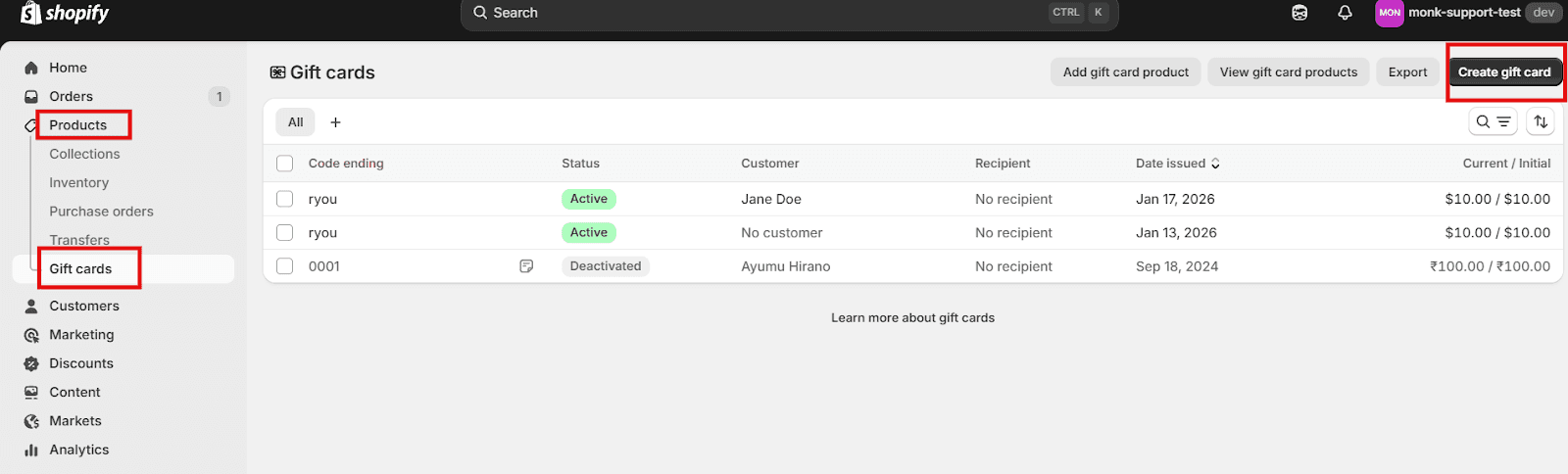
Go to Products > Gift cards. Click on Create Gift Card
Enter the value of the gift card, assign a customer to it (optional), and set an expiration date (optional).
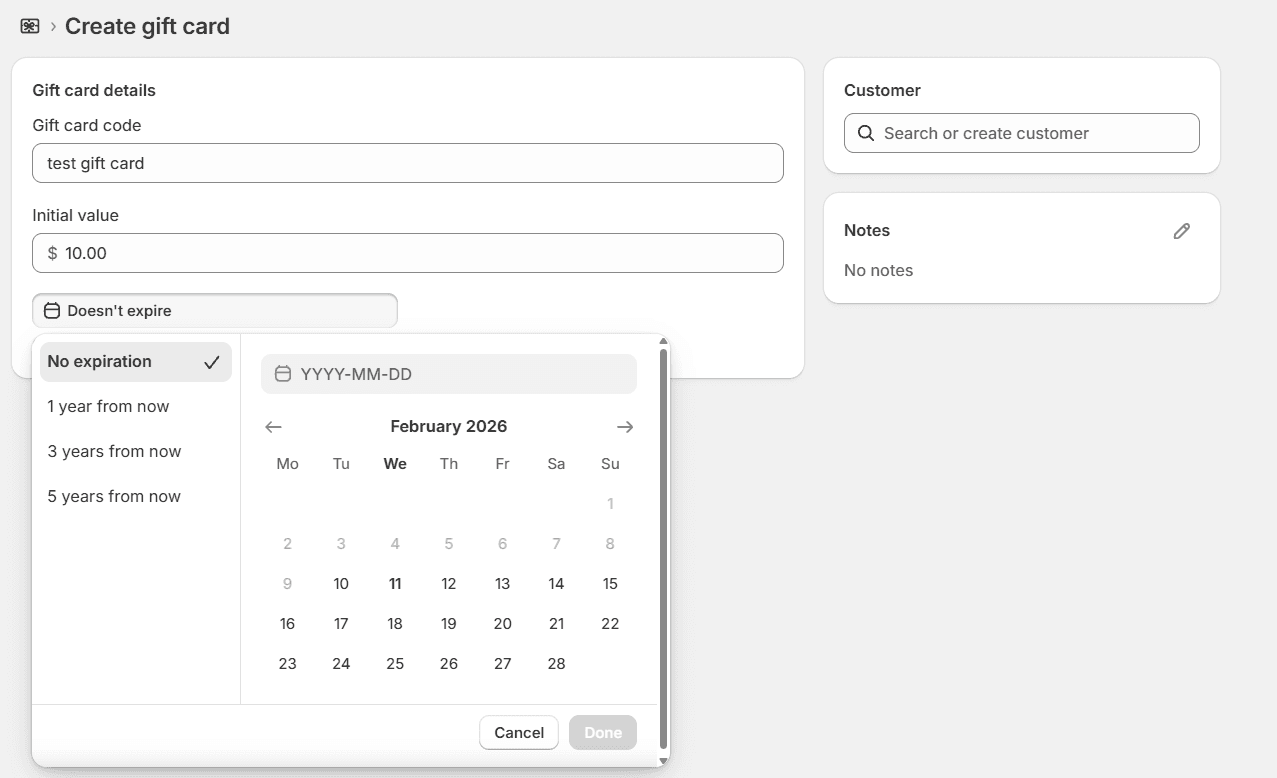
Ensure to save the gift card.
Create a gift card product (customer-purchased).
This lets customers buy gift cards directly from the store as a product.
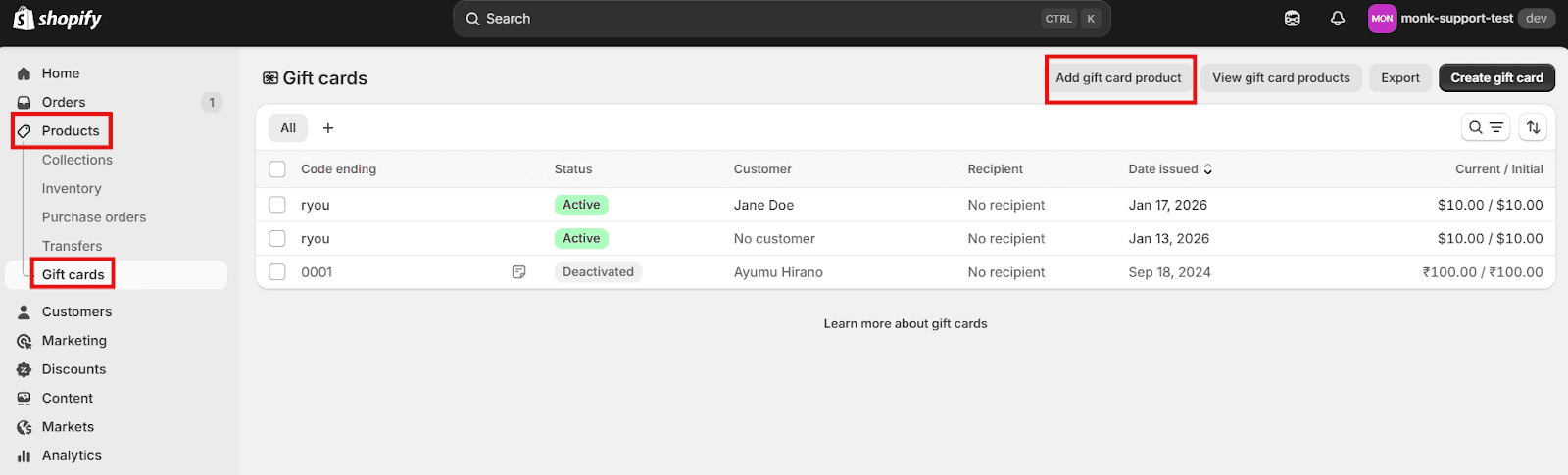
Go to Products > Gift cards. Click on Add a gift card product.
Set the gift card values (e.g., $25, $50, $100)
Add a title, description and images
Choose where the gift card product will be available (Online store, POS)
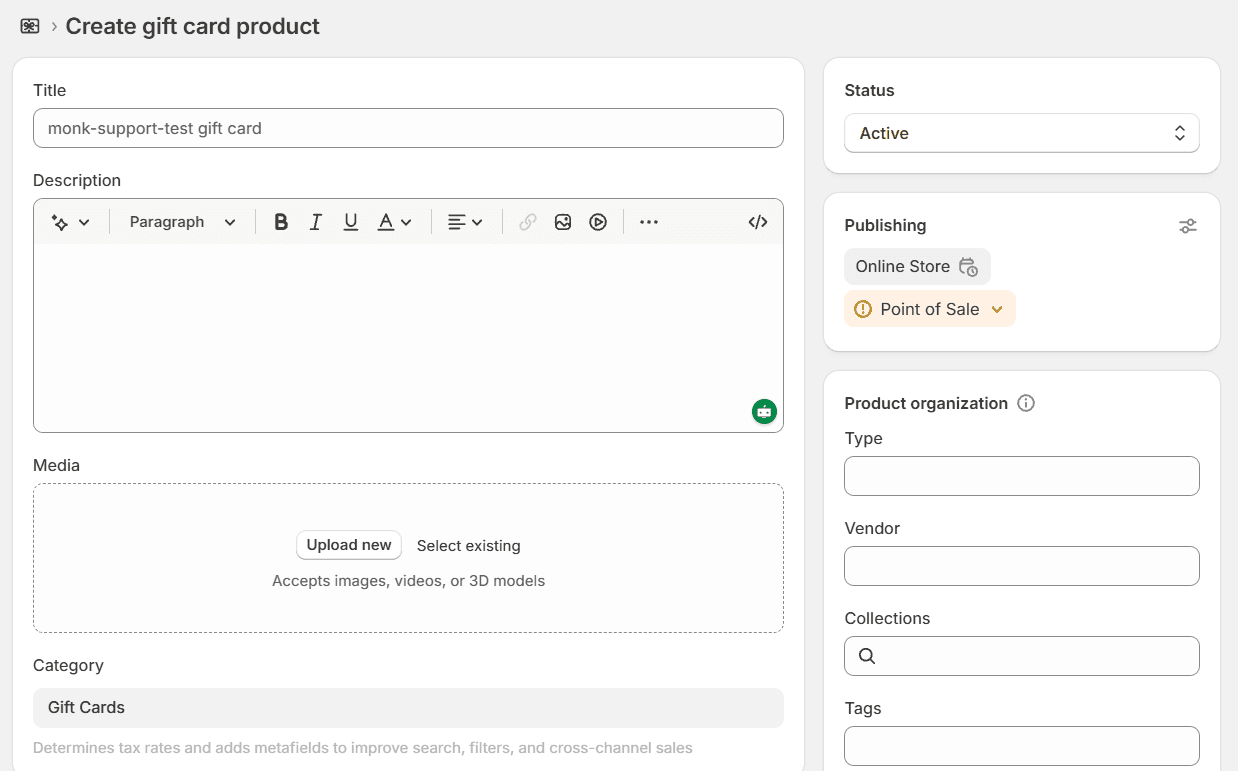
Save and publish the product
Once the gift card is created, Shopify generates a unique gift card code that you can send to the customer manually.
How Shopify Gift Cards Work
How customers receive gift cards
Customers can purchase a gift card just like a product. After payment, the gift card is sent via email to either the purchaser or the person who will receive it, along with a personalized note.
The merchant can also give customers gift cards as store credit, refund, thank you, or even to promote a sale. Each gift card contains a unique code that the customer uses at checkout.
How gift cards are redeemed
Gift cards can be redeemed at checkout. After adding products to the cart, customers can proceed to checkout and enter the gift code in the discount code widget.
Customers can use the gift cards to buy anything online or in a store (in Shopify's POS).
Partial Redemption and balances
Shopify gift cards also support partial use:
If the order total is less than the gift card value, the remaining balance stays on the gift card for future purchases.
If the order total is greater than the gift card value, the gift card balance is fully applied, and the customer pays the remaining amount using another payment method.
The same gift card code can be reused until the balance reaches zero (or until it expires, if an expiration date applies).
Managing Gift Cards in Shopify Admin
You can find the gift card details in Shopify admin > Products > Gift cards. You will then find a list of all issued gift cards.
Tracking gift card usage:
In order to see how a specific gift card has been used:
Go to Products > Gift cards
Click on the specific gift card code.
Review the Timeline section.
You will find details of when the gift card was created, the original value, orders where it was used, the remaining balance or any manual adjustments, and the expiration date (if set).
Gift card balance and history:
To see the transaction history and balance of a specific gift card, click on the desired gift card in the list of gift cards.
Shopify shows the current balance and a history of transactions on the details page for a gift card. This shows when the card was given, any partial redemptions, refunds that were put back on it, and the total amount still outstanding.
The activity log keeps track of everything that happens with a specific gift card, making it easier to answer consumer questions about their remaining cash or how they used the card in the past.
Resending or adjusting gift cards
You can update or send a gift card again from the gift card's details page. Please select "resend the email" to send the code for the gift card to the customer again.
You can update the gift card on its details page. In case a refund needs to be issued back to a gift card, you can choose the gift card as the type of refund when you process the return.
If you can't change the balance directly, you might have to turn off the existing card and give out a new one with the right amount.
Benefits of Using Shopify Gift Cards
Benefits for Your Business
1. Increase Cash Flow Instantly
You are paid right away when customers buy gift cards, even before they use them.
This can help with buying stock, setting marketing budgets, or dealing with busy times of year.
2. Increase sales and encourage future purchases
Gift cards often make people spend more than the value of the card, increasing the average order value of your store, especially if they buy other things when they use it.
3. Attract New Customers
People that get gift cards from you might not have bought anything from you otherwise. It's a way to turn gift recipients into loyal customers.
4. Lower Returns and Raise Conversions
Gift cards are less likely to be returned than actual products, and they help turn people who are only browsing into purchasers.
5. Flexible Marketing Opportunities
You can utilize them in promotions, give them away with purchases, or use them as prizes in loyalty programs.
6. Trackable & Insightful Analytics
Shopify gives you information on how many gift cards you sell and how many you redeem. This helps you discover how people buy things and how they act during different times of the year.
Benefits for Your Customers
1. Easy & Flexible Gifting
Customers can send a gift that is unique to them without having to bother about picking out specific items.
2. Quick and easy delivery
You can send digital gift cards right away by email or text message. This is great for last-minute gifts.
3. No Expiration (Optional)
Gift cards can have no expiration date, depending on your settings and the restrictions in your area. This gives the person who gets them some freedom.
4. Available on all platforms
Shopify gift cards work in online stores and, if enabled, in person at retail locations.
5. Customizable Experience
Customers can typically choose the amount and add personal messages, which makes it a thoughtful gift.
Troubleshooting Common Issues Related to Gift Cards:
Gift card not working
Some of the common causes could be:
Incorrect code entered (extra spaces, wrong characters)
The gift card is disabled
The gift card is fully used
Currency mismatch (multi-currency stores)
Expired gift card (if expiration date set)
How to fix:
Step 1: Verify the code.
Go to Shopify Admin > Products > Gift cards> confirm if the status is active and remaining balance is > $0
Step 2: Check usage rules
Gift cards cannot be used to buy another gift card
Some subscription apps block gift card payments
Step 3: Re-enable (if disabled)
Open the gift card > click enable
Customer balance conflicts
Some of the common scenarios could be:
Customer says the balance is wrong
Balance shows $0 but customer claims remaining funds
Multiple gift cards are applied
Partial payments confusion
How to fix:
Step 1: View Gift card history
Go to Gift cards > Open card and review the initial value, orders applied to, remaining balance, and adjustments made.
Step 2: View order timeline
Open the related order and confirm if refunds were processed correctly.
Step 3: Manual Adjustment if needed
Open Gift card > Click adjust balance
Email delivery issues
Some of the common causes could be:
Customer typo in email
Email marked as spam
Store email domain not authenticated
Email notification disabled
How to fix:
Step 1: Confirm if the email was sent; if not, then Click 'Resend.'
Step 2: Check if the notification were enabled.
Step 3: Ask the customer to check the spam/promotions folder.
Conclusion
Shopify gift cards are a simple and effective way for customers to pay for future purchases ahead of time. They also help businesses boost sales. They work like shop credit, letting you use them in parts, keep track of your balance, and apply them easily at checkout.
Shopify has built-in features for managing balances and refunds, so gift cards are a safe and easy way to pay provided they are set up and watched appropriately.
FAQs
Do Shopify gift cards expire?
Shopify gift cards do not expire by default, but merchants can choose to set an expiration date when creating the gift card.
Can customers use multiple gift cards?
Yes, Shopify allows customers to use multiple gift cards in a single order at checkout.
How do I resend a lost gift card?
If the customer cannot find their gift card email, the merchant can resend it from Shopify admin. Go to Products > Gift cards > Open the gift card > Click resend
Can gift cards be refunded?
Gift cards generally cannot be refunded for cash once purchased. However, if an order that is paid by a gift card gets refunded, the amount is refunded back to the same gift card.
Can gift cards be used with discounts?
Yes, Shopify gift cards can be used together with discount codes for the same order. The discount code is applied first, and then the gift card will be applied.
How do customers check their gift card balance?
Customers can check the gift card balance using the balance check link that is included in their original gift card email.
Are Shopify gift cards taxable?
Shopify doesn’t apply one universal “gift cards are/aren’t taxable” rule. It depends on the location and the tax laws.
It’s recommended to consult with a tax professional for your store and region.
Can I create custom gift card designs?
Yes, Shopify allows you to customize the look of your gift cards.
Do gift cards work in Shopify POS?
Yes, Shopify gift cards work both online and in Shopify POS. The balance will sync automatically between your online and POS so customers can use the same gift card.
Can I disable gift cards anytime?
Yes, you can disable the gift cards anytime from your Shopify admin.
How Shopify Gift Cards Work?
Summary
Shopify gift cards are prepaid digital or physical vouchers that let customers store value and use it for future purchases online or in-store. Shopify generates a unique code for each card, which is applied at checkout, supports partial payments, and retains remaining balance for later use. Merchants can issue gift cards manually or sell them as products, manage balances, resend codes, and track usage from the admin. Benefits include instant cash flow, higher average order value, customer acquisition, reduced returns, and flexible marketing use. They are easy to set up, widely usable, and fully integrated into Shopify checkout and POS.
Gift cards are one of the most efficient products you can sell on Shopify. You don't have to worry about shipping, managing inventory, or delays in fulfillment.
They are delivered right away, are easy to track, and are easy to use.
Gift cards are a great way, in addition to free gift with purchase and upsell for store owners to increase sales, bring in new customers, and get people to buy from them again. They're a versatile and simple way for customers to give gifts.
In this guide, we’ll look at how Shopify gift cards work and why they can be a streamlined addition to your store.
How to create a Shopify gift card?
On Shopify, a gift card is created as a product with a fixed or custom value. When purchased, Shopify generates a unique code linked to that value and sends it to the customer digitally.
The balance is stored in Shopify’s system. When the code is applied at checkout, the order total is reduced, and the remaining balance (if any) is automatically updated for future use.
Shopify supports two main types of gift cards:
Digital Gift Cards
Delivered electronically, usually by email
Contain a unique gift card code
Can be purchased and used instantly
Ideal for last-minute gifts and online-only stores
Physical Gift Cards
Printed cards that are shipped or handed out in person
Also contain a unique redeemable code
It can be redeemed both online and in-store (if POS is enabled)
Setting Up Gift Cards on Shopify
Shopify allows you to create gift cards in two main ways: manually (issued by the store owner) or as a product that customers can purchase.
Create a Gift Card Manually (Admin-Issued)
Go to Products > Gift cards. Click on Create Gift Card
Enter the value of the gift card, assign a customer to it (optional), and set an expiration date (optional).
Ensure to save the gift card.
Create a gift card product (customer-purchased).
This lets customers buy gift cards directly from the store as a product.
Go to Products > Gift cards. Click on Add a gift card product.
Set the gift card values (e.g., $25, $50, $100)
Add a title, description and images
Choose where the gift card product will be available (Online store, POS)
Save and publish the product
Once the gift card is created, Shopify generates a unique gift card code that you can send to the customer manually.
How Shopify Gift Cards Work
How customers receive gift cards
Customers can purchase a gift card just like a product. After payment, the gift card is sent via email to either the purchaser or the person who will receive it, along with a personalized note.
The merchant can also give customers gift cards as store credit, refund, thank you, or even to promote a sale. Each gift card contains a unique code that the customer uses at checkout.
How gift cards are redeemed
Gift cards can be redeemed at checkout. After adding products to the cart, customers can proceed to checkout and enter the gift code in the discount code widget.
Customers can use the gift cards to buy anything online or in a store (in Shopify's POS).
Partial Redemption and balances
Shopify gift cards also support partial use:
If the order total is less than the gift card value, the remaining balance stays on the gift card for future purchases.
If the order total is greater than the gift card value, the gift card balance is fully applied, and the customer pays the remaining amount using another payment method.
The same gift card code can be reused until the balance reaches zero (or until it expires, if an expiration date applies).
Managing Gift Cards in Shopify Admin
You can find the gift card details in Shopify admin > Products > Gift cards. You will then find a list of all issued gift cards.
Tracking gift card usage:
In order to see how a specific gift card has been used:
Go to Products > Gift cards
Click on the specific gift card code.
Review the Timeline section.
You will find details of when the gift card was created, the original value, orders where it was used, the remaining balance or any manual adjustments, and the expiration date (if set).
Gift card balance and history:
To see the transaction history and balance of a specific gift card, click on the desired gift card in the list of gift cards.
Shopify shows the current balance and a history of transactions on the details page for a gift card. This shows when the card was given, any partial redemptions, refunds that were put back on it, and the total amount still outstanding.
The activity log keeps track of everything that happens with a specific gift card, making it easier to answer consumer questions about their remaining cash or how they used the card in the past.
Resending or adjusting gift cards
You can update or send a gift card again from the gift card's details page. Please select "resend the email" to send the code for the gift card to the customer again.
You can update the gift card on its details page. In case a refund needs to be issued back to a gift card, you can choose the gift card as the type of refund when you process the return.
If you can't change the balance directly, you might have to turn off the existing card and give out a new one with the right amount.
Benefits of Using Shopify Gift Cards
Benefits for Your Business
1. Increase Cash Flow Instantly
You are paid right away when customers buy gift cards, even before they use them.
This can help with buying stock, setting marketing budgets, or dealing with busy times of year.
2. Increase sales and encourage future purchases
Gift cards often make people spend more than the value of the card, increasing the average order value of your store, especially if they buy other things when they use it.
3. Attract New Customers
People that get gift cards from you might not have bought anything from you otherwise. It's a way to turn gift recipients into loyal customers.
4. Lower Returns and Raise Conversions
Gift cards are less likely to be returned than actual products, and they help turn people who are only browsing into purchasers.
5. Flexible Marketing Opportunities
You can utilize them in promotions, give them away with purchases, or use them as prizes in loyalty programs.
6. Trackable & Insightful Analytics
Shopify gives you information on how many gift cards you sell and how many you redeem. This helps you discover how people buy things and how they act during different times of the year.
Benefits for Your Customers
1. Easy & Flexible Gifting
Customers can send a gift that is unique to them without having to bother about picking out specific items.
2. Quick and easy delivery
You can send digital gift cards right away by email or text message. This is great for last-minute gifts.
3. No Expiration (Optional)
Gift cards can have no expiration date, depending on your settings and the restrictions in your area. This gives the person who gets them some freedom.
4. Available on all platforms
Shopify gift cards work in online stores and, if enabled, in person at retail locations.
5. Customizable Experience
Customers can typically choose the amount and add personal messages, which makes it a thoughtful gift.
Troubleshooting Common Issues Related to Gift Cards:
Gift card not working
Some of the common causes could be:
Incorrect code entered (extra spaces, wrong characters)
The gift card is disabled
The gift card is fully used
Currency mismatch (multi-currency stores)
Expired gift card (if expiration date set)
How to fix:
Step 1: Verify the code.
Go to Shopify Admin > Products > Gift cards> confirm if the status is active and remaining balance is > $0
Step 2: Check usage rules
Gift cards cannot be used to buy another gift card
Some subscription apps block gift card payments
Step 3: Re-enable (if disabled)
Open the gift card > click enable
Customer balance conflicts
Some of the common scenarios could be:
Customer says the balance is wrong
Balance shows $0 but customer claims remaining funds
Multiple gift cards are applied
Partial payments confusion
How to fix:
Step 1: View Gift card history
Go to Gift cards > Open card and review the initial value, orders applied to, remaining balance, and adjustments made.
Step 2: View order timeline
Open the related order and confirm if refunds were processed correctly.
Step 3: Manual Adjustment if needed
Open Gift card > Click adjust balance
Email delivery issues
Some of the common causes could be:
Customer typo in email
Email marked as spam
Store email domain not authenticated
Email notification disabled
How to fix:
Step 1: Confirm if the email was sent; if not, then Click 'Resend.'
Step 2: Check if the notification were enabled.
Step 3: Ask the customer to check the spam/promotions folder.
Conclusion
Shopify gift cards are a simple and effective way for customers to pay for future purchases ahead of time. They also help businesses boost sales. They work like shop credit, letting you use them in parts, keep track of your balance, and apply them easily at checkout.
Shopify has built-in features for managing balances and refunds, so gift cards are a safe and easy way to pay provided they are set up and watched appropriately.
FAQs
Do Shopify gift cards expire?
Shopify gift cards do not expire by default, but merchants can choose to set an expiration date when creating the gift card.
Can customers use multiple gift cards?
Yes, Shopify allows customers to use multiple gift cards in a single order at checkout.
How do I resend a lost gift card?
If the customer cannot find their gift card email, the merchant can resend it from Shopify admin. Go to Products > Gift cards > Open the gift card > Click resend
Can gift cards be refunded?
Gift cards generally cannot be refunded for cash once purchased. However, if an order that is paid by a gift card gets refunded, the amount is refunded back to the same gift card.
Can gift cards be used with discounts?
Yes, Shopify gift cards can be used together with discount codes for the same order. The discount code is applied first, and then the gift card will be applied.
How do customers check their gift card balance?
Customers can check the gift card balance using the balance check link that is included in their original gift card email.
Are Shopify gift cards taxable?
Shopify doesn’t apply one universal “gift cards are/aren’t taxable” rule. It depends on the location and the tax laws.
It’s recommended to consult with a tax professional for your store and region.
Can I create custom gift card designs?
Yes, Shopify allows you to customize the look of your gift cards.
Do gift cards work in Shopify POS?
Yes, Shopify gift cards work both online and in Shopify POS. The balance will sync automatically between your online and POS so customers can use the same gift card.
Can I disable gift cards anytime?
Yes, you can disable the gift cards anytime from your Shopify admin.
Contents
Related Articles
Complete Guide to Gift Cards for Shopify Stores
Check Shopify Gift Card Balance Easily
How to Create a Discount Code in Shopify in 2026: A Step-by-Step Guide
Get Monk Free Gift app for just $1/month this Black Friday
First month: $1 after your 7-day free trial. All features included. Offer live!
Claim offer now

Get Monk Free Gift app for just $1/month this Black Friday
First month: $1 after your 7-day free trial. All features included. Offer live!
Claim offer now
Get Monk Free Gift app for just $1/month this Black Friday
First month: $1 after your 7-day free trial. All features included. Offer live!
Claim offer now